

agent-qa
: How to use it, features, and the business problems it solves
Add bookmark
What is agent-qa?
agent-qa is an AI QA agent developed by vostride (copyright held by the individual Pranshu Chittora) that runs end-to-end tests for web, Android and iOS apps from steps written in plain language. It drives a real browser (Playwright) or real devices and emulators (Appium) and records evidence for every step, including screenshots, logs and video. memidex stores what was proven on screen as files in your repository and reuses it in later runs. It can be used from the CLI, a local dashboard, or from Claude Code and Codex through MCP and skills. The software is free for permitted purposes under FSL-1.1-ALv2; the model (API or a Claude/Codex subscription) costs extra. The interface and docs are English only (as of November 2026).
Business problems it solves
About "agent-qa"
What is agent-qa
agent-qa is an AI QA agent from vostride that runs tests for web, Android and iOS apps from steps written in plain language. You describe a user journey in sentences, such as "add a mug to the bag and verify the total is $36.00", and agent-qa performs those steps in a real browser or on a real device, compares each step with what is on the screen, and decides whether it passed. There are no selectors (code that points at elements on the page) to write or maintain.
After every run, a mechanism called memidex stores what was proven on screen as files in your repository and hands the relevant parts to the next run as hints. You can use agent-qa from the terminal CLI, from a local dashboard, or from coding agents such as Claude Code and Codex through MCP and skills.
The software is licensed under FSL-1.1-ALv2 and is free for permitted purposes. You bring the AI model that makes the test decisions, and that model costs extra. The interface and documentation are English only (as of November 2026). The official README states that the project is at an early stage and that bugs should be expected.
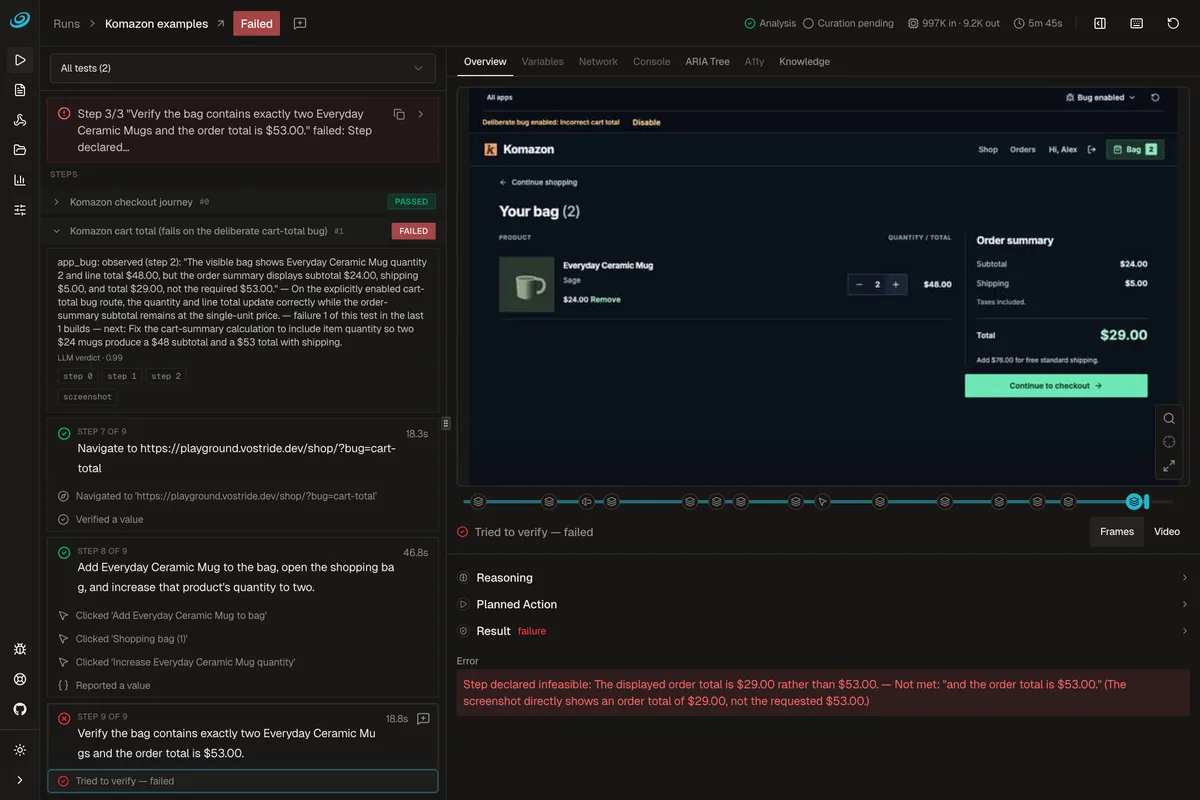
Source: agent-qa GitHub repository (also for the images below)
How to use it
- Add it to your project
Node.js 24 or later is required. In the folder that will hold your tests (usually the root of your app's repository), run
npm install -D agent-qa, then create the configuration file (agent-qa.config.yaml) withnpx agent-qa init. If you use a Claude or Codex subscription, also install the sign-in package@vostride/agent-qa-subscription-auth. - Connect a model Register an API key, or sign in to a Claude or Codex subscription in the browser. Keys are not written into YAML files; they are registered with a dedicated command.
- Write a test A test is a target app plus a list of steps, written in a YAML file. Steps that start with "Verify" or "Check" become checks, and the official guide asks you to name exact values — "the total is $36.00" rather than "the total looks right". Your coding agent can write tests for you.
- Run it and read the evidence
Run tests with
agent-qa run, from the dashboard, from a coding agent or in CI. You review the verdict and the evidence for each step: what it saw, what it did and why it passed or failed.
The official quickstart walks you through running the example tests in about ten minutes against a small shop built for testing, one page of which contains a deliberate bug.
Write the steps; it runs them on the real screen and keeps the evidence
On the web, agent-qa drives a real browser through Playwright. On mobile, it drives real devices, emulators and simulators through Appium (UiAutomator2 on Android, XCUITest on iOS). iOS tests require a Mac with Xcode and a simulator, or a connected device. Tests can also run on BrowserStack devices.
Plain-language steps
- Target app
- User journey
- Values to verify
On the real screen
Playwright for the web, Appium for Android and iOS
Evidence per step
Screenshots, console and network logs, the accessibility tree, and video (web and Android)
Stored in memidex
Facts, cautions and procedures proven on screen become hints for the next run
An action that completed a step through a model decision is saved, and the next time the same step meets the same screen it is replayed without calling the model. If the configuration, the test text or the screen changes, the step asks the model again, and a saved action that fails to replay is dropped. The official site says that on a rerun where the screen matches, this caching uses about 60% fewer tokens and runs roughly 5× faster (42 seconds down to 8).
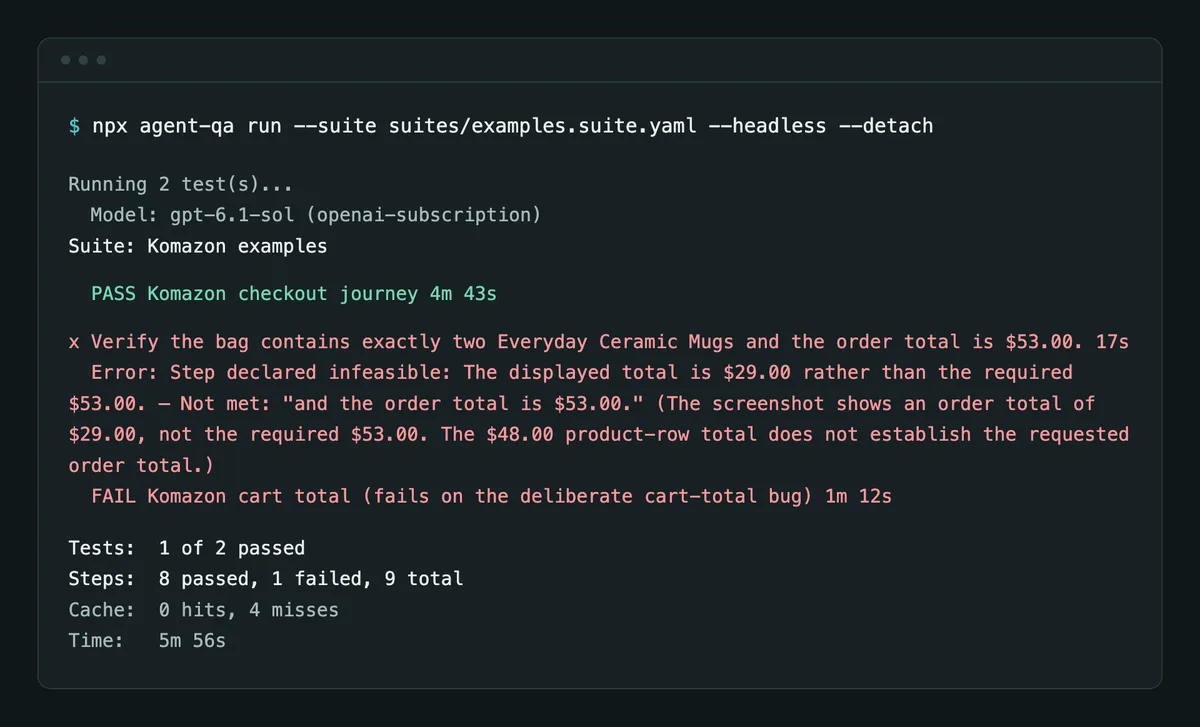
When you run from the terminal, each test in the suite is shown with its verdict, the step that failed and what did not match. In the official demo, the checkout journey passes and the test for a deliberately planted cart-total bug fails.
What it learns is checked before use and kept in files
agent-qa's "self-improvement" does not rewrite its own prompts or code. According to the official documentation, it improves three things — knowledge about your app, actions it can replay without the model, and which tests it can trust — through this loop:
- Run: every step records its evidence, and the verdict and exit code are final before any learning starts
- Diagnose: each failure gets a root cause, and flaky failures or broken environments are not treated as lessons about your app
- Learn: what the run proved becomes candidate records in memidex (facts, cautions and procedures). The model words them; code decides what is allowed
- Check: a candidate is promoted only with confirmed evidence from a verified step
- Correct: when a verdict is wrong, you mark the run (false fail, false pass or confirmed bug), and agent-qa fixes the knowledge or the test behind it in the same call
What it learns lives as files in agent-qa-knowledge/ in your repository, so you can review it with git diff or roll back a batch. Tests that keep failing for flaky reasons are quarantined. agent-qa never makes git commits, and CI runs only propose candidates without changing what your team's runs trust.
Learning also uses your configured model: analysis of failures the rules cannot classify, one call per candidate (at most 50 per run), and so on, within about a minute after the verdict.
Features
01Running tests
Tests written as sentences are run on the real screen.
- Targets — the web (browsers such as Chromium), Android and iOS
- Suites — run tests that belong together in one go
- Hooks — run scripts before and after tests to set up or check data, isolated in Docker containers (512 MB, one CPU, read-only, no network by default)
- Saved logins — save a signed-in state and reuse it (web only)
- CI — run in CI and output JUnit reports
02Working with coding agents
It is designed to let coding agents verify their own changes.
- MCP server — MCP clients such as Claude Code and Codex can write tests, run them and read the evidence
- Skills — install packaged skills that teach the agent how to use agent-qa
- Setup prompt — hand the whole setup, up to the first test run, to an agent with a single prompt
03Choosing a model
Models are switched in the configuration file, without rewriting tests.
- Subscriptions — sign in with a Claude (Claude Code) or Codex subscription
- API — connect to OpenAI-compatible, Anthropic-compatible or Gemini endpoints with an API key
- Local models — use models on your own machine through compatible endpoints such as Ollama and LM Studio
What the official documentation says about safety
Because tests drive a real app with a model in the loop, the official documentation separates what agent-qa protects from what it leaves to you.
Benchmark results
vostride self-publishes results, with per-task evidence, on two benchmarks that measure whether mobile tasks are completed.
| Benchmark | Published result |
|---|---|
| AndroidWorld | Success on all 116 tasks (100% pass@1). vostride describes this as tied #1 by pass@1 against the community leaderboard snapshot dated September 26, 2026 |
| AppControlBench | iOS: 60 of 60 points (100% completion); Android: 54.5 of 55 points (99.1% completion) |
Both are self-published, and the AppControlBench results are not entries on its official leaderboard. The runs used gpt-6-sol with memidex and self-improvement turned off. They measure mobile task completion, and the official site asks you to evaluate QA correctness (such as false passes) on your own app.
Pricing
| Item | Cost | Details |
|---|---|---|
| Software (agent-qa) | Free | Use, modify and redistribute for any "Permitted Purpose" under FSL-1.1-ALv2. There are no paid plans |
| AI model | Paid by you | API usage fees, or a Claude or Codex subscription. Local models also work |
| Runtime | Paid by you | Machines and devices that run the tests, CI, BrowserStack, etc. |
- FSL-1.1-ALv2 is not an open-source license. The source is published and may be used for any purpose other than a "Competing Use" (offering the software to others in a competing commercial product or service). Each version also becomes available under the Apache License 2.0 two years after it is released
- Learning (self-improvement) and test writing also call your configured model
(As of November 2026, based on the official license page and documentation)
How agent-qa differs from other AI testing and coding tools
| Product | How it tests | Highlights |
|---|---|---|
| agent-qa | Runs user journeys written in plain language on the real screen (web, Android, iOS) | Evidence for every step, memory through memidex, usable from Claude Code and Codex over MCP. The software is free |
| Tusk | Generates unit and integration test code from pull-request changes and runs it in CI | Integrates with GitHub to raise coverage and catch regressions |
| Claude Code | Writes test code on request and runs it with commands | A coding agent that takes work from implementation to release. Included in Claude Pro/Max/Ultra |
| Codex | Writes and runs test code on request | OpenAI's coding agent, available with ChatGPT plans |
| Devin | Plans, implements, tests and opens pull requests autonomously in its own environment | An autonomous AI engineer that supports multiple repositories and parallel sessions |
Details of the other products in the table are as of the check date shown on each product page.
To add tests at the code level, Tusk is a candidate; to delegate the implementation itself, including tests, consider Claude Code, Codex, Devin, or Cline, which runs inside your editor. agent-qa suits the role of checking the changes those agents make by operating the same screens a user would.
FAQ
Q. Is agent-qa free? The software is free, and there are no paid plans. However, the AI model that makes the test decisions (API usage fees, or a Claude or Codex subscription) and the environment that runs the tests cost extra.
Q. Is it open source? The source is published on GitHub, but the license is FSL-1.1-ALv2, which is not an open-source license. You may use it for anything except offering it to others as a competing commercial product or service. Each version also becomes available under the Apache License 2.0 two years after release.
Q. Can I use it in Japanese? The interface, documentation and example tests are all in English. Japanese display is not supported (as of November 2026).
Q. What do I need to test iOS apps? Besides Appium and the XCUITest driver, you need a Mac with Xcode and a simulator, or a connected device. Tests can also run on BrowserStack devices.
Q. How do I use it from Claude Code or Codex? Register the agent-qa MCP server and install its skills, and the agent can write tests, run them and read the evidence. In v0.2, MCP calls have no approval prompts, so the official docs say to hand it over the way you would hand over a shell.
Provider
agent-qa is developed by vostride. The copyright notice in the license is in the name of an individual (Pranshu Chittora), and no operating company is listed. The source is published on GitHub (vostride/agent-qa) and the package on npm (agent-qa). The contact address is hello@vostride.com.
The information on this page is based on what was published on the official website, documentation and GitHub as of November 2026. Features and license terms may change, so please check the official website for the latest information.