Typeless
: How to use it, features, and the business problems it solves
Add bookmark
What is Typeless?
An AI voice dictation app from Simply CA LLC (Palo Alto, California). It removes filler words such as "um", repeated words, and self-corrections from what you say, formats lists and steps, and inserts polished text right where your cursor is in Slack, Gmail, ChatGPT, and other apps. It supports 100+ languages, translates as you speak, and lets you rewrite selected text by voice. Available on Mac, Windows, Linux, iOS, and Android. The Free plan has a weekly word limit; Pro is US$12/month billed yearly or US$30 billed monthly.
Business problems it solves


About "Typeless"
What is Typeless?
Typeless is an AI voice dictation app from Simply CA LLC, based in Palo Alto, California. Instead of typing, you speak: Typeless removes filler words such as "um" and "uh", repeated words, and the parts you corrected mid-sentence, turns what remains into clean text, and inserts it right where your cursor is. It works in any app where you can type, including Slack, Gmail, Google Docs, Notion, and ChatGPT.
The official site says speaking (220 wpm) is about four times faster than typing on a keyboard (45 wpm) and promises to "save one day a week." According to the About page, the company was founded by Stanford University alumni, and its founder and CEO is Huang Song.
How to Use
- Install the app and sign in Download the desktop app from the official site, or get the mobile app from the App Store or Google Play. You can sign in with Google, Apple, or an email address. On macOS, allow the "Accessibility" permission (to insert text into input fields) and the "Microphone" permission (to capture your voice).
- Speak where you want to type On desktop, click an input field, press the shortcut once (Fn on macOS and Right Alt on Windows by default), and press it again when you finish. On mobile, tap the "Speak" button on the Typeless keyboard. The polished text appears where you started.
- Add the words you use often to the dictionary Register names, internal abbreviations, and industry terms so they are transcribed correctly. The desktop app can import words in bulk from a CSV file. When you correct a word after dictating, Typeless adds your preferred spelling to the dictionary automatically.
- Ask for rewrites and translations by voice Select text and say something like "make it more polite" or "make it shorter" to rewrite it. With the translation shortcut, you can speak in your own language and insert the message in English or another language.
Each dictation can run for up to 9 minutes. After 8 minutes, a 60-second countdown appears, and everything up to the limit is saved to History automatically (official help center).
Features
01Turn speech into writing (Dictate)
- Filler and repetition removal — removes "um", "uh", and unnecessary repeated words
- Self-correction handling — when you correct yourself mid-sentence, only your final intended message is kept
- Auto-formatting — organizes spoken lists, steps, and key points into structured text such as bullet lists
- Tone per app — adapts the style to the app you are using, from work emails to casual chats
- Personalization — adapts to your phrasing and writing style the more you use it; can be turned off in Settings
- Personal dictionary — add names and terms manually, or automatically from your corrections
02Edit and translate by voice
- Translate — speak in your own language and insert ready-to-send text in the language you choose. You can register several target languages and switch between them
- Speak to edit — on mobile, select text and edit it with a spoken instruction: fix typos, change wording, restructure, and more
- Help me write — in the iOS app, describe what you want to say and Typeless drafts the reply, email, or post (App Store release notes, September 2026)
03Ask on desktop (Ask anything)
- Rewrite selected text — select text, press the shortcut (Fn + Space on macOS by default), and say how to change the tone, format, or length
- Ask about selected text — select a paragraph on a website or document and ask for a summary, explanation, or translation; the answer is shown without changing the original
- Web answers and quick actions — ask a question and get an answer from the web in a pop-up card, or ask it to open the right web page for things like videos, products, or nearby places
What you say becomes text you can send
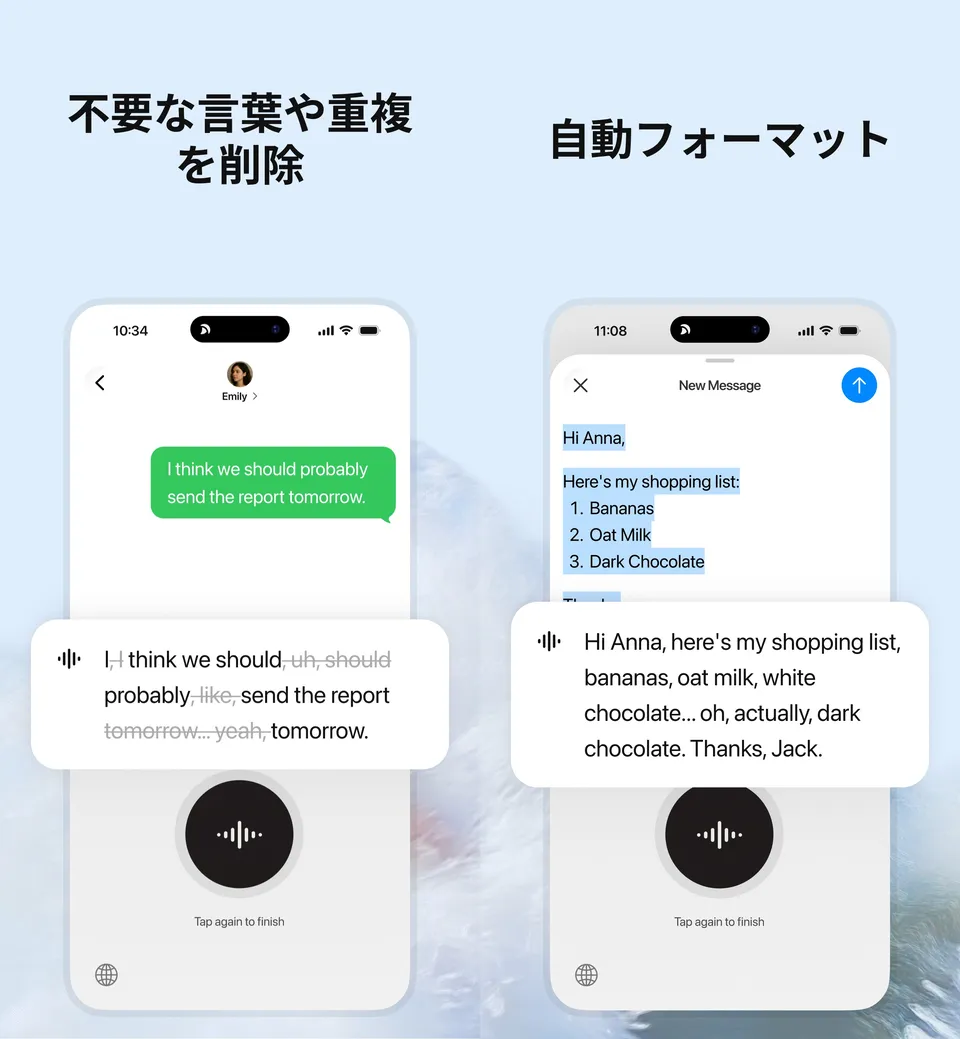
The most tedious part of voice input is fixing the transcript afterward. Typeless removes the "ums" and self-corrections that inevitably creep into speech before inserting the text. In an official App Store screenshot, "I, I think we should, uh, should probably, like, send the report tomorrow... yeah, tomorrow." becomes "I think we should probably send the report tomorrow."
When you list items or steps out loud, such as a shopping list or a procedure, Typeless formats them into a numbered list. The company says it produces text in real time that reads "as if you carefully typed it."
Fix and translate by voice instead of retyping
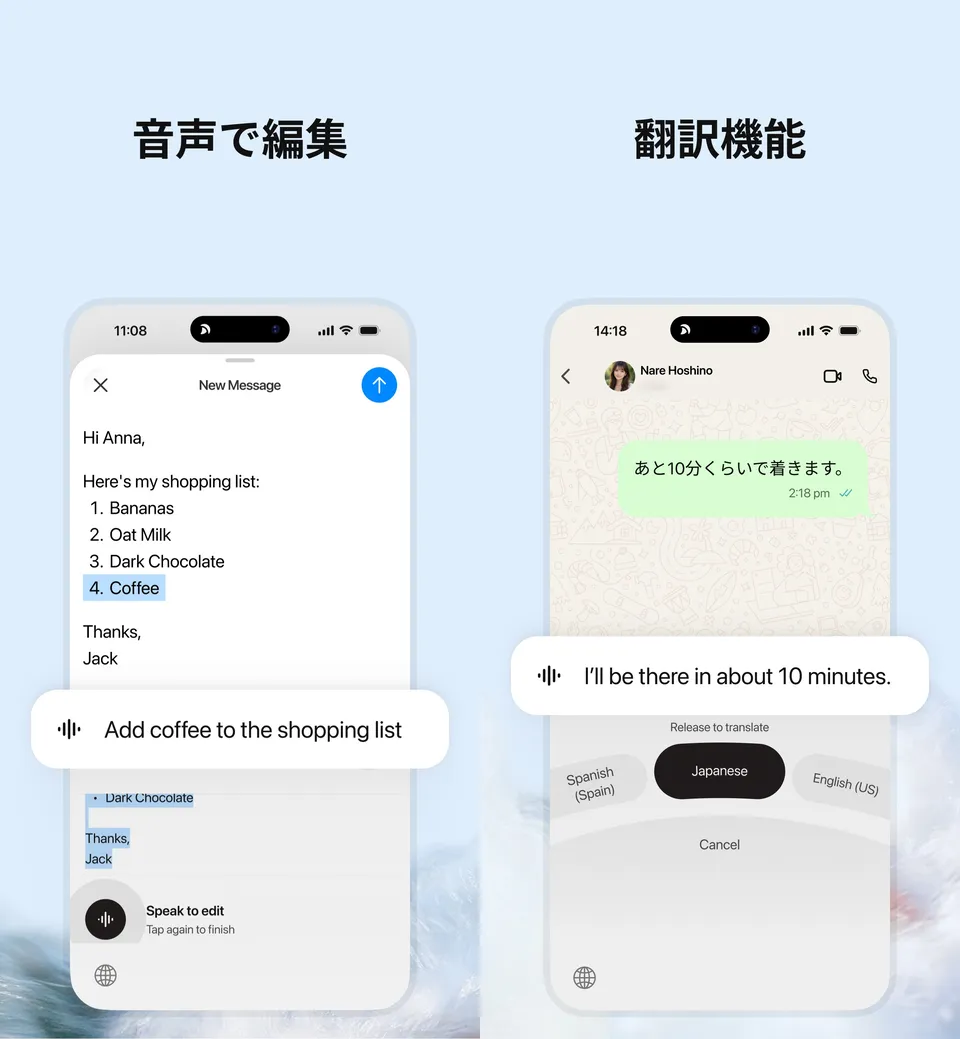
You can also make edits after dictating by voice. With Speak to edit on mobile, select the part you want to change and say something like "Add coffee to the shopping list," and the text is rewritten accordingly. On desktop, Ask anything does the same.
To translate, press the translation shortcut in an input field, choose the target language, and simply speak in your own language. Typeless says the result reads naturally to local readers rather than as a literal translation. It suits people who want to write English emails or chats by speaking in Japanese.
Source: Typeless: AI Voice Keyboard (App Store)
Pricing
The official pricing page is in US dollars, per member. The Free plan already includes features such as translation, Ask anything, the dictionary, and tone per app; the main differences are the word allowance, accuracy, and priority during peak demand.
| Plan | Price (per member) | What's included |
|---|---|---|
| Free | US$0 | Weekly word limit, standard accuracy, standard access during high demand. Translation, Ask anything, personalization, personal dictionary, 100+ languages, tone per app, whisper mode |
| Pro | US$12/month billed yearly / US$30 billed monthly | Everything in Free plus unlimited words, enhanced accuracy, priority access during high demand, cloud sync across devices, team member management, consolidated billing and invoices, team usage analytics |
| Enterprise | Custom quote | Everything in Pro plus SSO, SCIM and JIT provisioning, domain verification, audit logs with configurable retention, enforced HIPAA controls and BAA, volume discounts, flexible billing and payment terms, priority support |
Prices are based on the official pricing page, its FAQ, and the billing page of the help center, checked on October 23, 2026. The Free plan's word limit is described as "weekly," but the exact number of words is not stated on the pricing page or in the help center. The pricing page does not say whether taxes are included; the terms of service state that applicable taxes are the user's responsibility. Payment is by major credit cards such as Visa, Mastercard, American Express, and Discover, and Enterprise customers can also pay by invoice. For teams, adding a member adds a seat charged on a prorated basis, and seats removed mid-cycle are not refunded. On the Japanese App Store, three in-app purchase items named "Typeless Pro" are listed at ¥5,000, ¥10,000, and ¥22,000 (no period is shown, so check the purchase screen). The official site also offers students 50% off Pro (desktop checkout only).
Privacy and Data Handling
Because you hand your voice and text to an AI tool, data handling is part of the decision. The official "Data Controls" page explains the following:
- Voice audio is not stored: audio, together with limited context such as the app you are using and relevant text in it, is processed in real time on cloud servers and discarded as soon as the result is returned. Transcription is performed in the cloud
- Not used for training: dictation data is not used for model training by Typeless or any third party. Typeless has zero-retention agreements with its LLM providers (such as Microsoft and Google)
- History stays on your device: history is stored only on the device, and you can choose how long to keep it (from forever to not at all). Only if you turn on Pro's cloud sync is history text stored in the cloud
- Compliance: the pricing page lists GDPR compliance, ISO 27001 compliance, and HIPAA readiness for all plans
The terms of service state that you own the output. At the same time, they make no warranty about its accuracy and ask you to verify it before relying on it. Recording or transcribing other people's speech without their consent is listed as a prohibited activity.
Pros and Cons
Pros
- Turns natural speech into ready-to-send text without fillers and self-corrections
- Works in any app where you can type, with one account across five platforms
- The Free plan already includes translation, Ask anything, and the dictionary
- Officially states that audio is not stored or used for training
Cons
- Priced in US dollars, and Pro billed monthly (US$30) costs 2.5 times the yearly rate (US$12/month)
- The Free plan's weekly word limit is not given as a number
- Each dictation is limited to 9 minutes, so long dictations need to be split
- Transcription runs in the cloud, so audio and limited context (app name and nearby text) are sent to servers (the company says they are discarded right after processing)
Reputation
The official site highlights that both the desktop and mobile versions were "#1 Product of the Day" on Product Hunt. On the Japanese App Store, as of October 23, 2026, the app had a 4.5 rating (1,046 ratings) and ranked 70th in Productivity.
Reviews on the App Store praise how cleanly it transcribes even speech full of hesitations and self-corrections, and how Speak to edit lets you fix text with instructions like "write this in kanji." Others point out that frequently used words need to be added to the dictionary to avoid misrecognition, and one reviewer reported that a bug that cut off recordings was fixed in an update, so building up the dictionary is part of getting started.
How It Differs from Other AI Dictation and Transcription Tools
| Typeless | Wispr Flow | Notta | Otter AI | |
|---|---|---|---|---|
| Main use | Voice input into any text field (speak instead of type) | Voice input into any text field | Transcribing meetings and interviews, minutes | Meeting transcription and summaries |
| Platforms | Mac, Windows, Linux, iOS, Android | Mac, Windows, iPhone, Android | Web, Zoom/Teams/Meet/Webex integrations, etc. | Zoom, Teams, Meet integrations, etc. |
| Pricing | Free / Pro US$12/month yearly, US$30 monthly | Free available / Pro ¥960/month | Free ¥0 / Premium from ¥1,185 (yearly, monthly equivalent incl. tax) | Basic free / Pro from $8.33 |
Columns other than Typeless reflect the content of each product page as of when it was checked.
If you are comparing tools of the same "speak into any text field" type, Wispr Flow is the closest. Both remove fillers and support a dictionary and per-app styles; Typeless also has a Linux app, while Wispr Flow shows prices in Japanese yen. If you want to record whole meetings and turn them into minutes, transcription services such as Notta, Otter AI, and Rimo Voice are a better fit. For recording in-person conversations, Plaud, which pairs with a recording device, is another option.
FAQ
Q. Is Typeless free?
A. Yes. The Free plan is applied automatically when you create an account. It includes translation, Ask anything, and the dictionary, but there is a weekly word limit, and accuracy and access during high demand are standard. Upgrade to Pro to use it without a word limit.
Q. Can I use it in Japanese?
A. Yes. It supports more than 100 languages and detects the language you are speaking automatically. The official site and help center are available in Japanese, and the app interface can be set to any of 58 languages, including Japanese. Many reviews on the Japanese App Store come from people using it in Japanese.
Q. Which apps does it work in?
A. The official FAQ says Typeless works system-wide, in any text-based editor such as Google Docs, Notion, Gmail, Slack, and Chrome. The official use-cases page also shows it in ChatGPT, Claude, Cursor, LINE, Microsoft Word, and more.
Q. Is my voice recording stored?
A. According to the company, audio is not stored and is discarded right after cloud processing. Dictation data is not used for model training, and history is stored only on your device (unless you turn on Pro's cloud sync).
Q. Can teams use it?
A. Pro includes team member management, consolidated billing, and usage analytics. For organizations that need SSO, SCIM, audit logs, or HIPAA controls, there is Enterprise, priced through the sales team.
The information on this page is based on the official website (pricing page, help center, Data Controls, About page, and terms of service) and the Japanese App Store listing as of October 2026. Prices, features, and supported platforms may change, so please check the official website for the latest information.