

Augment Code
: How to use it, features, and the business problems it solves
Add bookmark
What is Augment Code?
Augment Code is an AI coding agent for large codebases from Augment Computing, Inc. (USA). Built around the Context Engine, which indexes code by meaning, it offers VS Code and JetBrains extensions, the Auggie CLI, Cosmos for running agents side by side in the cloud, and code review on GitHub, automating work from tickets to PRs, reviews, vulnerability fixes, and incident investigation with human approval in between. Pricing is a flat team price: Standard $20/month and Business $100/month (up to 50 seats, usage included), with Enterprise priced on request. In October 2026, Harness acquired assets including Cosmos, the Auggie CLI, and the Context Engine (as of November 2026).
Business problems it solves

About "Augment Code"
What is Augment Code?
Augment Code is an AI coding agent for large codebases from Augment Computing, Inc., a U.S. company. At its core is the "Context Engine," which indexes repositories, services, and change history at the level of meaning so that agents read only the parts relevant to the task at hand.
You can use it in four places: extensions for VS Code and JetBrains, the Auggie CLI in the terminal, "Cosmos," which runs agents side by side in the cloud, and code review on GitHub pull requests. The official site positions Cosmos as "the platform for building an always-on software delivery system" — a "software factory" — and the product has shifted its weight toward having agents run work from tickets to pull requests, reviews, vulnerability fixes, and incident investigation, with human approval in between.
About the acquisition by Harness: On October 8, 2026, Harness, a software delivery platform, announced that it had acquired select Augment Code assets (Cosmos, the Auggie CLI, the Code Context Engine, and related technology). Cosmos will join the Harness platform as the "Harness Cosmos Software Factory Agent," and the team is moving to Harness. As of November 2026, augmentcode.com still lists the Standard, Business, and Enterprise plans, and Cosmos is described as "available now." How the product is offered may change, so check the official announcements before adopting it.
How to use it
- Choose where to use it and install
To use it in your editor, install the Augment extension in VS Code or a JetBrains IDE. To use it in the terminal or CI, install the Auggie CLI with
npm install -g @augmentcode/auggie. To automate work as a team, start from Cosmos (in the browser). - Sign in and index your workspace
After you sign in, the Context Engine indexes the folder you're working in. You can exclude files from the index with
.augmentignore, and add other repositories or folders as context. - Ask the agent to do the work Ask the Agent in natural language to "implement a feature," "upgrade a dependency," or "write a pull request." Progress is saved automatically as checkpoints so you can go back to an earlier step. The default "Agent" asks for approval before running commands or using tools, while "Agent Auto" edits files, runs terminal commands, and uses tools such as MCP automatically.
- Turn recurring work into Cosmos loops Tell the Cosmos Advisor, in natural language, what flow you want to automate. The Advisor lays out the agents (Experts), environment, and automation it will use; once you approve the plan, agents start running when triggered by GitHub, GitLab, Slack, Linear, Jira, schedules, or webhooks.
In the editor, when the agent edits a file, the added and removed lines are shown as a diff. You can see right away which file changed and by how many lines, and if you don't like it, you can go back to an earlier step from a checkpoint.
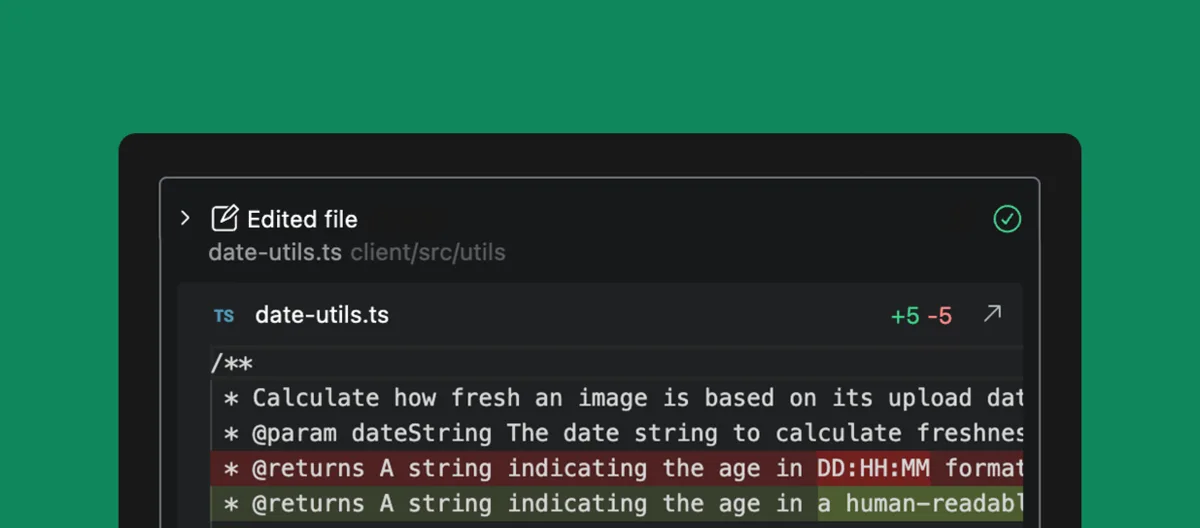
Source: Augment Code documentation, Augment Code official site (the same applies to the screenshots below)
From hundreds of thousands of files, pass along only what the task needs
Many coding agents build context by grepping files, opening broad spans, and replaying everything they found into the model. Augment's official site argues that this wastes tokens and causes rework.
The Context Engine is a search engine that semantically indexes your code and understands the relationships between hundreds of thousands of files. For example, if you ask it to "add logging to payment requests," it maps the entire path — the React app, the Node API, the payment service, the database, and the webhook handlers — and passes only that slice to the model. Beyond code, it also draws on why changes were made, how your team builds, docs and tickets, and design decisions.
In its official benchmark, Augment says that on the same frontier model, Auggie solved tasks at effectively the same rate as Claude Code while using materially fewer tokens (measured by Augment Code).
The Context Engine can be used outside Augment's own products, too. It can be plugged into agents such as Claude Code, Codex, Cursor, Kiro, Zed, GitHub Copilot, and Gemini CLI as an MCP server, and an SDK is also available.
Run tickets, pull requests, reviews, and incidents as "loops"
Cosmos is a platform for running agents at the scale of an organization. It ships with "Experts" — agents with defined roles — for each stage of development.
- PR Author — Takes a task description through branch creation, implementation, and follow-up
- PR Fixer — Repairs review findings, CI failures, and merge conflicts
- Deep Reviewer, Pair Reviewer, Risk Analyzer — Line-by-line correctness review, interactive review with a human, and routing complex changes to focused human review
- Verifier — Exercises a change in a running environment and reports evidence-backed findings
- Incident Investigator — Watches alert channels and posts root-cause analyses in-thread
You can use Experts as they are, adapt their instructions, tools, and environments to your organization, or build your own from scratch. For execution, besides Augment-hosted cloud sandboxes, you can choose "self-hosted daemons" running on your own machines for code that can't leave the building. Quality gates are built in: work pauses for review, resumes on reply, and consequential actions are approved by a person. A September 2026 update changed agents so that they no longer merge pull requests.
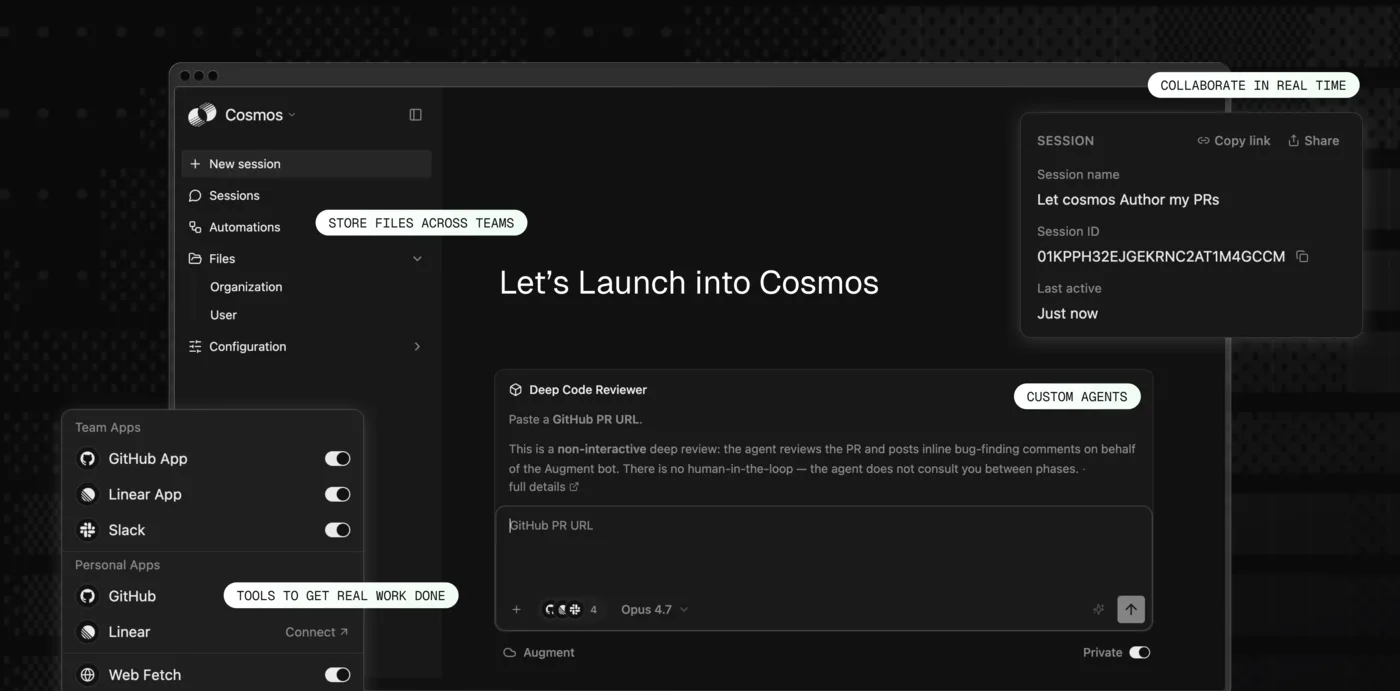
The official site cites the following results from Cosmos loops.
Code review loop
Ticket-to-PR loop
Vulnerability remediation loop
Incident response loop
Figures are as published on Augment Code's official site (as of November 2026).
Features
01Write in the editor and terminal
Agents that work alongside developers on their own machines.
- Agent, Chat — Implement and answer questions in VS Code and JetBrains with an understanding of your codebase
- Completions — Code completions based on the context of your codebase
- Tasklist, checkpoints — Break complex work into steps and revert edits
- Auggie CLI — Use it interactively, or run one-shot tasks from CI, serverless functions, and cron with
--print - Rules and guidelines, Skills, custom commands — Teach the agent your team's standards and workflows
02Delegate in the cloud
Cosmos agents that keep working after you step away.
- Experts — Role-based agents for implementation, repair, review, verification, incident investigation, ticket dispatching, and more
- Automations — Triggered by GitHub, GitLab, Slack, Linear, Jira, schedules, and webhooks
- Environments — Cloud sandboxes, self-hosted daemons, or pools of both
- Memory — Share what was learned across sessions, agents, and teams
03Review
Hand the first review of a pull request to an agent.
- Code Review — AI review of GitHub pull requests (available on all plans)
- Code Review Enterprise — An analytics dashboard of reviews, user allowlists, MCP connections to Jira, Linear, and Notion, and installation across multiple GitHub organizations
04Connect and manage
External tools and running it as an organization.
- MCP and native tools — Integrations with GitHub, Linear, Jira, Confluence, Notion, Sentry, and more
- Context Engine MCP and SDK — Build the Context Engine into other agents
- Usage dashboards and budgets — See your organization's usage and set limits
- Security — SOC 2 Type II. Enterprise adds SSO, OIDC, SCIM, CMEK, and ISO 42001
Pricing
Pricing is a flat team price with no per-seat charge. On Standard and Business, the whole team of up to 50 seats pays one price, and a set amount of "usage" is included every month.
| Plan | Monthly price | Included usage | Highlights |
|---|---|---|---|
| Standard | $20 (flat per team) | $20 per month | Up to 50 seats, Context Engine, Agent and Chat, CLI, MCP, Cosmos (standard-size compute, 50 concurrent sessions), SOC 2 Type II |
| Business | $100 (flat per team) | $100 per month | Same features as Standard with more included usage |
| Enterprise | Custom | Custom | Unlimited users and concurrent sessions, custom-size and multi-region compute, SSO/OIDC/SCIM, CMEK and ISO 42001, dedicated support, volume-based annual discounts |
- How usage is counted: Usage is measured in dollars and is the sum of LLM inference (billed at each provider's public API list price), a flat 40% service fee on LLM usage, and Cosmos compute time (no fee on compute)
- Usage is pooled across the whole team; heavy and occasional users draw from the same balance
- If you go past the included usage, you can top up as you go without changing plans. Top-ups are valid for 12 months from purchase
- Paid plans exclude any AI training on your data (under the Commercial Terms of Service)
- Support for Standard and Business is community-based plus tickets through the support portal (covered by the SLA); Enterprise includes dedicated support
- The pricing page shows U.S. dollars, and under the terms of service, fees exclude sales and other taxes
Pricing is based on the official pricing page as of November 2026.
How it differs from other AI coding agents
| Product | Provider | What stands out | Entry price |
|---|---|---|---|
| Augment Code | Augment Computing (key assets acquired by Harness) | Indexing of large codebases (Context Engine) and agent loops run in the cloud (Cosmos) | $20/month per team (flat up to 50 seats) |
| Cursor | Anysphere | AI code editor based on VS Code, with cloud agents and Bugbot reviews | Hobby free / Pro $20 (per user) |
| Claude Code | Anthropic | Terminal-first coding agent, also usable from IDEs, the web, Slack, and GitHub | Included in Claude Pro from $20 |
| GitHub Copilot | GitHub | From code completion to agents and automatic PR review, built into GitHub | Free / Pro $10, Business $19 (per user) |
| Kilo Code | Kilo Code (acquired by Anaconda) | Open source; switch among 500+ models at cost | Free for individuals / Teams $15 (per user) |
Other products' columns reflect what's on each product page as of when it was checked.
What sets Augment Code apart is its flat per-team price rather than per-user pricing and the fact that it puts codebase indexing at the center of the product. Rather than a tool for one developer to write faster locally, it's built for organizations with large codebases to hand whole review and repair flows to agents.
- For the in-editor experience, see Cursor; to delegate deeply from the terminal, see Claude Code
- To keep everything inside GitHub, see GitHub Copilot
- To build cross-repository code search as a foundation, see Sourcegraph; for an open-source option, see Kilo Code
Track record and reputation
The official site lists Adobe, MongoDB, Pure Storage, DXC, DDN, Tekion, Snyk, MoneyGram, Crypto.com, Webflow, and Pigment as customers. Its customer stories page introduces cases at the following scale (all from the official customer stories page).
01Large engineering organizations
- Pure Storage — A 2,000-engineer team is building a development methodology on top of the Context Engine, aiming to triple delivery velocity
- Tekion — Rolled out persona-based agents across development, QA, and product to more than 1,300 engineers
- DXC Technology — Used in select critical projects within its 50,000-developer organization
02Automating the whole SDLC
- WEX — Building toward a fully automated SDLC that connects requirements, code generation, review, security, and deployment through agents
- Pearl Technologies — Presented as achieving a 3x productivity boost with Cosmos
- Intercom — Adopted Augment Code for parallel agent workflows after trying Cursor and multiple LLM coding tools
"The CLI changed everything. Being able to call agents directly from my existing workflows — CI/CD, validation, architecture reviews — that's what made Augment's value real for me and the engineers in my team." (A user's comment on the official customer stories page)
FAQ
Q. Can I use Augment Code in Japanese? The interface, official site, and documentation are in English. Try it before adopting to see how well it handles instructions in Japanese.
Q. Is there a free plan? The pricing page lists three plans: Standard, Business, and Enterprise. The support section mentions use during "trials," but the pricing page doesn't give the conditions.
Q. Is it still $20 a month if I use it alone? Yes. Standard costs the same $20 a month whether you're one person or 50, and the included usage ($20 worth per month) is shared across the team. Usage beyond that is purchased as top-ups.
Q. What happens to current customers after the Harness acquisition? According to Harness's announcement, Cosmos will be offered as the Harness Cosmos Software Factory Agent, and customers can adopt it, continue using their preferred coding tools, or use both. For how your current plan is handled, check the official announcements from Augment Code and Harness.
Q. Is my code used to train AI? The pricing page states that paid plans exclude any AI training on your data (under the Commercial Terms of Service). Enterprise also supports CMEK (customer-managed encryption keys) and ISO 42001.
Q. Can I use it with code that can't leave our network? For Cosmos execution, besides Augment's cloud, you can choose "self-hosted daemons" running on your own virtual or physical machines. The official documentation also includes setup guides for self-hosted GitLab and GitHub Enterprise Server.
The information on this page is based on what was published on the official site, pricing page, and documentation, as well as Harness's announcement (October 8, 2026), as of November 2026. Features, pricing, and how the product is offered may change, so please check the official site for the latest information.