ChatSense
: How to use it, features, and the business problems it solves
Add bookmark
What is ChatSense?
A generative AI service for businesses from Knowledge Sense, Inc. (Minato-ku, Tokyo). It lets you use 10+ models including GPT, Claude and Gemini in an environment where input data is not used to train AI. Beyond chat, it offers an AI that answers from internal documents with citations (RAG), slide generation with PowerPoint export, Deep Research and transcription, plus admin features such as SSO, IP address restrictions, banned words and log monitoring. A free Starter plan (30 uses per month per team) is available; the Business plan starts at ¥980 per user per month with no setup fee and no minimum users or term. Adopted by more than 500 companies, including companies listed on the TSE Prime Market.
Business problems it solves



About "ChatSense"
What is ChatSense?
ChatSense is a generative AI service for companies and local governments provided by Knowledge Sense, Inc. (株式会社ナレッジセンス, Minato-ku, Tokyo). From the ChatSense screen, employees can switch between the latest models from OpenAI (ChatGPT), Anthropic (Claude) and Google (Gemini). ChatSense sits between users and each vendor's official API: it keeps input data from being used to train the AI, and adds the controls a company needs, such as account management, usage visibility and banned-word filters.
Besides chat, the same screen offers an AI that answers from your internal documents with citations (RAG), slide generation with PowerPoint export, Deep Research, transcription and image generation. The official site says it has been "adopted by more than 500 companies, including companies listed on the TSE Prime Market," and Knowledge Sense has obtained ISO/IEC 27001 (ISMS) certification for the ChatSense business (announced March 2024).
Per the official site
Per user per month
No minimum term either
Starter plan is free
How to use it
- Sign up for the free Starter plan Register from "Start free trial" on the official site. No credit card is needed, and you can stay on the Starter plan at ¥0 (up to 30 uses per month for the whole team).
- Invite members and start chatting Even the Starter plan has no limit on the number of users. You can organize conversations into folders and share frequently used prompts with your team as templates.
- Switch to the Business plan for more models and features For ¥980 per user per month, you get 10+ models including Claude and Gemini, plus extensions such as Deep Research, slide generation and Notebook. Usage beyond each model's included monthly allowance is billed by tokens and similar units.
- Load internal documents to build your own AI Add PDFs, Word or Excel files, and you can build an AI chatbot that answers from that content and links to its sources. Additional training is an extension added to the Business plan or higher for ¥98,000 per month, and also supports files in OneDrive, SharePoint Online and Box. Building in your own environment and onboarding support are discussed under the Enterprise plan.
Features
01Multiple AIs on one screen
On the Business plan, each model has its own monthly included allowance (see the Pricing table below).
- AI chat — switch between GPT, Claude and Gemini models
- Web browsing — looks up information on the web to answer
- Deep Research — spends time researching many sources and writes a report
- Code Interpreter — reads files and calculates, analyzes and draws charts
- Image generation — creates images with GPT Image 2, Nano Banana 2 and others
- Transcription and voice chat — transcribes audio and video by speaker and summarizes it; you can also talk by voice
02Using internal data
- Additional training (RAG) — load txt, csv, xls, xlsx, doc, docx, html, PDF and other files to build an AI that answers from them, showing its sources. An extension added to the Business plan or higher for ¥98,000 per month; supports OneDrive, SharePoint Online and Box, and retrains automatically when files are updated
- Notebook — add PDF, Word, Excel and PowerPoint files as sources, ask questions, and get cited answers or slides and infographics summarizing the material
- Cross-system search — search Box, SharePoint and Teams data while keeping access permissions (per the official FAQ; the provider advises checking support for your systems before adoption)
03Documents and task automation
- Slide generation AI — from instructions or attached materials, the AI handles research through design and exports to PowerPoint or PDF
- Cowork — an AI agent you can ask in plain language to operate web apps in the Chrome browser (explained below)
- AI agent (Outlook integration) — drafts Outlook emails and creates calendar events from the chat screen
04Security and administration
- No training on your data — input data is not reused to train AI (common to all plans, including Starter)
- Access control — single sign-on (SSO), IP address restrictions
- Input and usage monitoring — banned-word registration, chat history monitoring and export, usage dashboard
- Budget control — budget settings and per-department budget management
- Prompt sharing — turn effective prompts into templates the team can reuse
Employees can start safely from a familiar chat screen
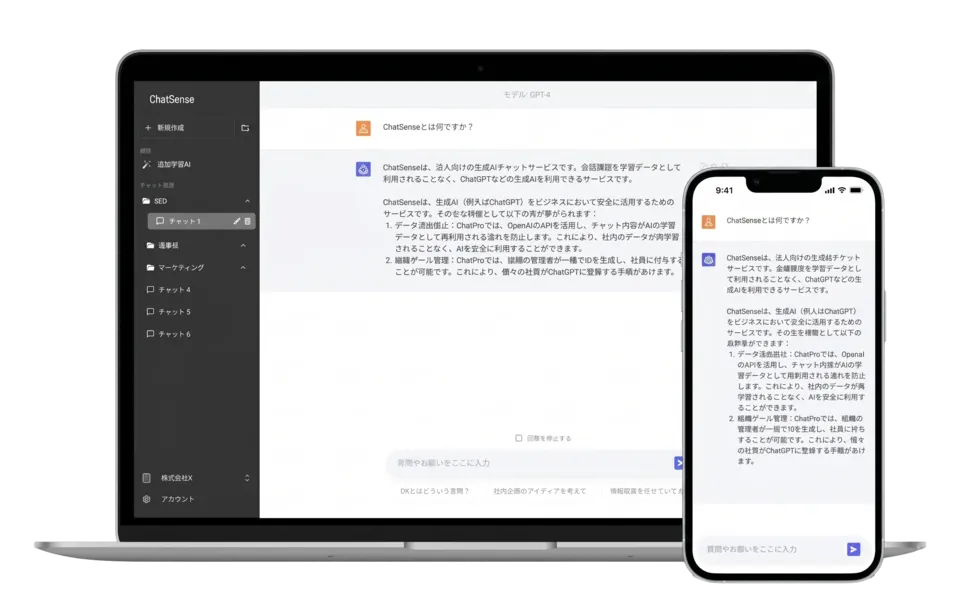
The ChatSense screen shows a list of conversations and folders on the left and the chat area on the right, so anyone who already uses a chat-style AI can start right away.
The difference is that the company can manage it. In Fujitsu General's case study, the problem was that with the free version of ChatGPT, input data could be used for training, so internal data could not be entered. ChatSense goes through each vendor's official API, so input data is not used for training, and the company can record who entered what and when, and block confidential information with banned words.
Source: ChatSense official site
Answers from internal documents, with citations
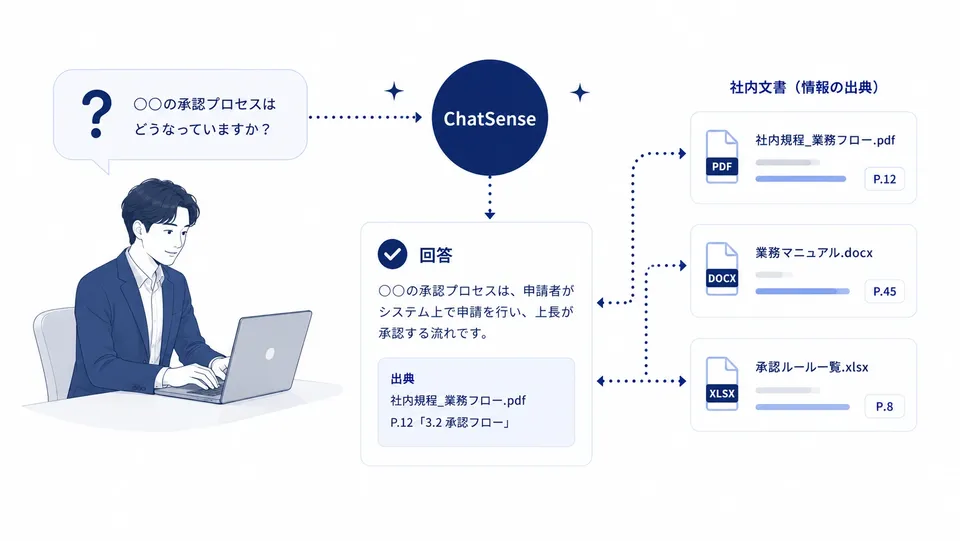
ChatSense's additional training (RAG) lets you load internal rules, manuals and past reports to build an AI that answers based on them. Each answer shows which document and which page it is based on, so instead of trusting the AI blindly, you can go back to the original and check. The official site says it can be set up without code.
Source: ChatSense official site (illustration of cited answers)
In published case studies, Mitsui & Co. built a bot loaded with its approval rules, and Gunma Prefecture uses it for handovers during personnel transfers and Q&A on specialist departments' materials.
Slide generation and Cowork
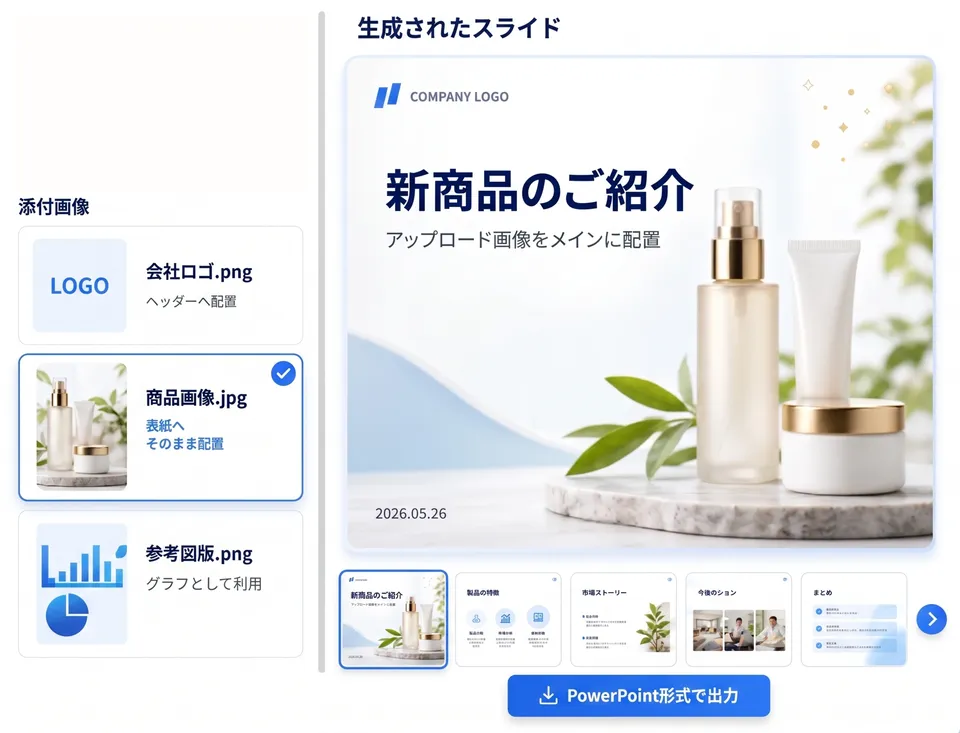
The slide generation AI takes brief instructions or attached internal materials and handles research, structure and design to produce slides. In the official demo screen, an attached company logo and product image are placed in the header and on the cover. Finished decks can be exported as PowerPoint or PDF. The provider says there is an option to prevent garbled Japanese text and broken layouts. On the Business plan, you can try 1 slide per month for every 5 users; beyond that, you need to add an option.
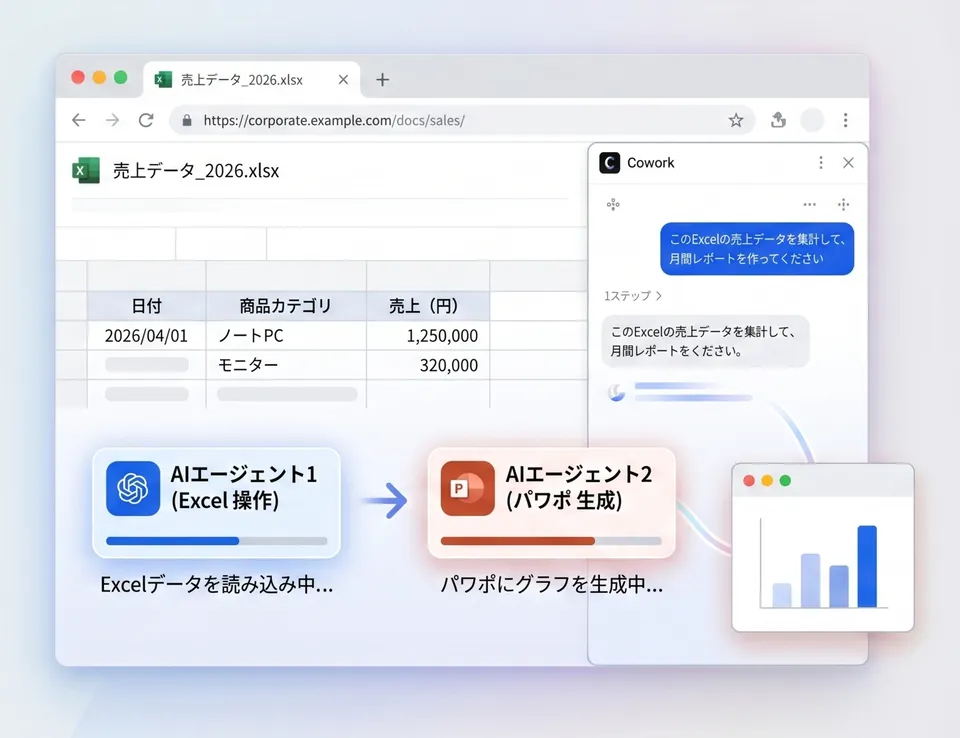
Cowork is an AI agent you can ask in plain language to operate web apps in the Chrome browser. It handles work people used to do while watching the screen, such as web searches, form filling, data collection and transcription between systems, planning the steps as it goes. Because it starts from the browser screen the user sees, the provider says it also works with internal systems that require login and admin screens without APIs.
High-risk operations such as entering passwords, confirming payments or deleting accounts are not executed automatically. Because the content of the pages it operates on may be sent to the AI (LLM), the provider advises checking the data involved and the target web apps when adopting it. Cowork is an extension (Business plan or higher) at ¥5,000 per user per month; it is enabled per member, and the monthly fee depends on the number of enabled members.
Pricing
There are three plans: the free Starter, Business from ¥980 per user per month, and Enterprise by quote. There is no setup fee, and the Business plan has no minimum term or minimum number of users.
| Plan | Price | Main contents |
|---|---|---|
| Starter | ¥0 | GPT-5.6 Luna, up to 30 uses per month for the whole team, no user limit, folders, prompt sharing and templates. No credit card required |
| Business | From ¥980 per user per month | 10+ AI models and extensions. Usage beyond each model's included allowance is pay-as-you-go. SSO, IP restrictions, banned words, history export, budget settings, invoice payment |
| Enterprise | Quote | Building in your own environment with Azure OpenAI (Japan East region), rollout under your own brand, additional training on proprietary data, onboarding consulting, employee training |
On the Business plan, the amount included in the monthly fee for each model (included allowance) and the price beyond it are as follows.
| Model | Included per month | Beyond the allowance |
|---|---|---|
| GPT-5.6 Luna | 1M tokens | ¥1 / 1K tokens |
| GPT-5.6 Sol | 100K tokens | ¥4 / 1K tokens |
| GPT-6 Astra | 100K tokens | ¥8 / 1K tokens |
| GPT-5.6 Thinking | 1M tokens | ¥4 / 1K tokens |
| GPT-5 Pro | None | ¥30 / 1K tokens |
| Gemini 3.1 Pro | 100K tokens | ¥4 / 1K tokens |
| Gemini 3.7 Flash | 100K tokens | ¥1 / 1K tokens |
| Claude Sonnet 5 | 100K tokens | ¥4 / 1K tokens |
| Claude Opus 5 | 100K tokens | ¥4 / 1K tokens |
| Claude Fable 5.1 | 100K tokens | ¥8 / 1K tokens |
| Extension (Business) | Included allowance and beyond |
|---|---|
| Deep Research | 1 trial per month for every 5 users. Beyond that, add an option (¥98,000 per month, up to 200 runs per month across the organization) |
| Slide generation AI | 1 slide per month for every 5 users as a trial. Beyond that, add an option (¥98,000 per month, up to 1,000 slides per month across the organization) |
| Notebook | Up to 100 turns per user per month included. Then ¥5 per turn |
| Image generation | Up to 5 images per month included. Then ¥15 per image for GPT Image 2 and Nano Banana 2, ¥30 for Nano Banana Pro |
| Transcription | An allowance of "30 minutes × number of members" per month shared across the organization. Then ¥12 per minute |
| Voice conversation mode | Up to 100K tokens included. Then ¥4 / 1K tokens |
| Code Interpreter | Sessions are free (model token charges apply according to the conversation volume) |
| Additional training | ¥98,000 per month. Up to the equivalent of 1 million manuscript pages (400 characters each). Supports OneDrive, SharePoint Online and Box |
| Cowork | ¥5,000 per user per month. Enabled per member; charged for the number of enabled members |
Prices, models and allowances are based on the official pricing table checked on October 23, 2026. The pricing table does not state whether prices include tax. Prices of the extensions (additional training, Deep Research, slide generation, Cowork) are based on the pricing section of the official feature pages checked on the same day. The extensions require the Business plan or higher. Usage beyond the limits is discussed by inquiry. Payment is by credit card, or by invoice if approved (Specified Commercial Transactions Act disclosure). Paid plans renew automatically and can be canceled by downgrading to the free plan. Cancellations and refunds after purchase are not accepted.
Security
- No training on input data — it uses each vendor's official API so that input data is not reused for AI training. The provider says it has enterprise contracts with the generative AI vendors and has set up Zero Data Retention with most AI vendors
- ISMS certification — Knowledge Sense obtained ISO/IEC 27001 certification for the ChatSense business (announced March 19, 2024)
- Admin features — SSO, IP address restrictions, banned-word registration, chat history monitoring and export, automatic detection of problematic usage (AI monitoring)
- Your own environment — on the Enterprise plan, you can discuss building in your company's or municipality's environment using Azure OpenAI Service (Japan East region)
Adoption and reputation
The official site says more than 500 companies, including companies listed on the TSE Prime Market, have adopted it (the same wording appears in an October 2026 press release). The comments and results introduced in the official case studies are as follows.
- Kao — rolled out a "research data assistant" across its R&D division to explore knowledge accumulated in research reports. Kao says it has heard comments such as reaching "unexpected knowledge from other research labs" and being able to grasp past knowledge in a new field quickly after a transfer (announced October 2026)
- Mitsui & Co. — its seafood business division uses it for a bot loaded with approval rules, collecting overseas news and a translation AI
- Gunma Prefecture — adopted across the prefectural government. 86% of users felt their work improved, with work time cut by about 30% on average
- Fujitsu General — company-wide adoption. Cut machine-learning programming effort by up to 60%. Deciding factors were "a pricing structure with no setup fee or minimum contract period" and the speed of feature additions
- Ajinomoto Frozen Foods — validated on a small scale with monthly plans before rolling out company-wide. In one example, a code fix that used to take an hour took 3 minutes
- Shimotsuma City — adopted across the city office. Used for council responses and counter services; in one example, document writing that took an hour took 10 minutes
The official site also lists cases such as JR西日本中国メンテック, Nippon Sharyo and ウォーターエージェンシー. All are case studies published by the provider, not third-party evaluations.
Pros and cons
Pros
- Use GPT, Claude and Gemini under one contract, with input data not used for training
- Start from ¥980 per user per month with no setup fee and no minimum users or term; try the free plan before deciding
- Build an AI loaded with internal documents without code; answers show their sources
- A full set of admin features for company use, such as SSO, IP restrictions, banned words and log monitoring
- Non-chat features such as slide generation, Cowork and transcription on the same screen
Cons
- ¥980 per user per month is the entry price; pay-as-you-go charges are added once you exceed each model's allowance, so the monthly cost varies with usage
- On the Business plan, Deep Research and slide generation come only with a trial allowance; serious use needs an option (¥98,000 per month each)
- The Starter plan offers only GPT-5.6 Luna and up to 30 uses per month for the whole team, not enough for a company-wide trial
- Additional training on internal documents (supporting Box, SharePoint Online and OneDrive) is a ¥98,000-per-month extension, and building in your own environment is discussed under the Enterprise plan
How it differs from other corporate generative AI services
| ChatSense | ChatGPT (Business / Enterprise) | Microsoft 365 Copilot | Claude (Team) | |
|---|---|---|---|---|
| Provider | Knowledge Sense (Japan) | OpenAI | Microsoft | Anthropic |
| AI | Switch between GPT, Claude and Gemini | OpenAI models | Built into Microsoft 365 apps | Anthropic models |
| Corporate pricing | From ¥980 per user per month (pay-as-you-go beyond allowances) | From 2 users; annual plans available | ¥4,497 per user per month (annual, excl. tax). Add-on to business plans | $25 per seat per month ($20 billed annually) |
| Best for | Using several AIs with internal documents under one admin console | Using ChatGPT's features as-is across an organization | Using AI with internal data inside Word, Excel and Teams | Teams centered on Claude |
Columns other than ChatSense reflect the content of each product page as of when it was checked.
To use ChatGPT as-is across your organization, compare ChatGPT; to use AI inside Word and Teams, Microsoft Copilot; and to work mainly with Claude, Claude. For researching by loading documents, NotebookLM; for slide generation alone, GAMMA; and for building internal AI apps yourselves, Dify are also candidates.
FAQ
Q. Can I use ChatSense for free?
A. Yes. The Starter plan is ¥0 and requires no credit card. The available model is GPT-5.6 Luna, up to 30 uses per month for the whole team. There is no limit on the number of users.
Q. Is my input data used to train AI?
A. The provider says no. It uses each vendor's official API, and not reusing input data for training is common to all plans, including the free Starter plan.
Q. What is the minimum number of users?
A. The Business plan can be contracted for a single user, with no minimum term. In the Fujitsu General and Ajinomoto Frozen Foods cases, they tried it small on monthly contracts before expanding company-wide.
Q. How much can I use for ¥980 per user per month?
A. The ¥980 includes a monthly allowance per model (e.g., 1M tokens for GPT-5.6 Luna, 100K tokens for Claude Sonnet 5). Usage beyond that is billed at each model's rate (¥1–8 per 1K tokens; ¥30 for GPT-5 Pro).
Q. Can it use our Box or SharePoint data?
A. The official FAQ says it integrates with Box, SharePoint and Teams and can search across them while keeping access permissions. Supported targets and required settings vary by environment, so checking before adoption is recommended. The additional training extension for loading internal documents (Business plan or higher, ¥98,000 per month) supports OneDrive, SharePoint Online and Box.
Q. Is onboarding support or training available?
A. The Enterprise plan offers onboarding consulting (over 100 companies supported, according to the provider) and employee training and prompt courses.
The information on this page is based on the official website (pricing table, feature pages, case studies, Specified Commercial Transactions Act disclosure) and Knowledge Sense's press releases as of October 2026. Prices, models and allowances may change, so check the official site for the latest information.