

Fireflies.ai
: How to use it, features, and the business problems it solves
Add bookmark
What is Fireflies.ai?
Fireflies.ai is an AI meeting assistant that automatically transcribes, summarizes, searches, and analyzes your meetings. Its AI notetaker "Fred" automatically joins Zoom, Google Meet, and Microsoft Teams calls and records conversations in 100+ languages. Moments after a meeting ends you get a summary with key points and action items, and it also supports questions to AskFred, search across all your meetings, conversation intelligence (sentiment, talk time, topics), and CRM integration (Fireflies for Sales). Used by more than 1 million companies worldwide and rated 4.8 on G2, its pricing is Free $0 / Pro $10 / Business $19 / Enterprise $39 (per seat, monthly, billed annually).
Business problems it solves

About "Fireflies.ai"
What is Fireflies.ai
Fireflies.ai is an AI meeting assistant that automatically transcribes, summarizes, searches, and analyzes your meetings. Its AI notetaker "Fred" automatically joins meetings on Zoom, Google Meet, Microsoft Teams, and more, recording conversations in 100+ languages. Moments after a meeting ends, you get a summary complete with key points and action items. Used by more than 1 million companies worldwide and rated 4.8/5 on G2, it is one of the leading services in this space.
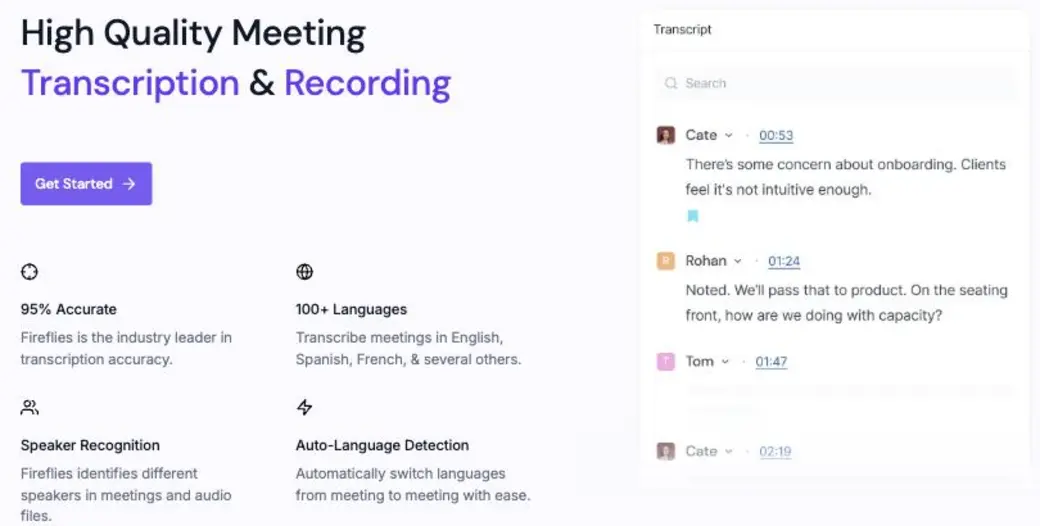
Source: Fireflies.ai official site (the same applies to the image below)
How to use
Once it's connected to your calendar, the rest is automatic. Just show up to the meeting and the notes are captured for you.
Connect your calendar
Link your Google/Outlook calendar. Fred automatically joins your scheduled meetings.
Record the meeting
Record and transcribe conversations on Zoom, Meet, and Teams (100+ languages).
Receive the summary
Right after the meeting, a summary with key points and action items is generated.
Search, act, and integrate
Ask AskFred questions or search past meetings. It syncs automatically to your CRM and other tools.
Even on the free plan, transcription and AI summaries are unlimited. You can get started with no credit card.
Key features
01Transcription and AI summaries
Transcribe your Zoom, Meet, and Teams meetings with speaker identification and timestamps. It supports 100+ languages, and right after each meeting a summary with key points and action items is generated instantly.
02AskFred and meeting search
Ask the AI assistant "AskFred" a question about your meeting content and get an answer back. Even for a conversation from months ago, you can search across everything down to a specific sentence or timestamp.
03Conversation intelligence and analytics
Conversation intelligence such as sentiment analysis, talk time per speaker, topic detection, and question detection. Team analytics for admins let you gain visibility into your sales and support conversations.
04Integrations and Fireflies for Sales
Integrates with your CRM and a wide range of other tools. The new "Fireflies for Sales" feature auto-fills your CRM from meeting content and delivers deal intelligence. API integration is also supported.
Pricing
Monthly price per seat (billed annually). Even the free plan offers unlimited transcription and AI summaries (as of August 2026, in US dollars).
| Plan | Price (per seat/month, billed annually) | What you get |
|---|---|---|
| Free | $0 | Unlimited transcription and AI summaries / 400 mins of storage / 20 AI credits / AskFred and API |
| Pro | $10 | 8,000 mins of storage / recording and downloads / voice agent / unlimited integrations |
| Business | $19 | Unlimited storage / multi-language mode / conversation intelligence / team analytics |
| Enterprise | $39 | SSO and SCIM / audit logs / HIPAA / private storage / dedicated account manager |
Pricing is based on the official figures as of August 2026 (in US dollars, per seat, monthly, billed annually). Monthly billing costs more, while annual billing saves you up to 44%. The free plan requires no credit card. Check the [official pricing page](https://fireflies.ai/pricing) for the latest amounts and limits.
How it differs from other AI meeting-notes tools
The strength of Fireflies.ai is that even for free it offers unlimited transcription and summaries, supports 100+ languages and the major meeting tools, and rounds it out with search and conversation intelligence. It doesn't just record and stop there—AskFred and analytics let you put the substance of your conversations to work.
| Aspect | Fireflies.ai | Typical AI meeting notes |
|---|---|---|
| Free tier | Unlimited transcription and AI summaries | Often capped by count or duration |
| Languages and integrations | 100+ languages and major meeting tools | Some are limited |
| Analytics | AskFred and conversation intelligence | Some focus mainly on transcription |
| Security | SOC 2, GDPR, HIPAA, E2E encryption | Varies by tool |
Nearby options include JamRoll, which is strong at recording sales conversations in Japanese, and Notion, which you can use as one with your documents. Fireflies.ai is a good fit for teams that want to automatically record multilingual meetings and put them to work through search and analytics.
FAQ
Q. Can I use Fireflies.ai for free?
Yes. The Free plan ($0, no credit card required) gives you unlimited transcription and AI summaries. Recording, downloads, and more advanced features are available on Pro ($10/seat) and above.
Q. Which meeting tools does it support?
It supports major web conferencing tools such as Zoom, Google Meet, and Microsoft Teams, and can transcribe in 100+ languages.
Q. Can I use it for meetings in Japanese?
Yes. It supports 100+ languages, so it can transcribe and summarize Japanese meetings as well.
Q. Is it secure?
It complies with SOC 2 Type II, GDPR, and HIPAA, and supports 256-bit AES end-to-end encryption as well as private storage (on higher-tier plans).
The information on this page is based on what was published on the official site as of August 2026. Pricing and features are subject to change, so please check the Fireflies.ai official site for the latest details.




![[2026 Latest] 16 AI Tools to Maximize Sales Performance | Dramatically Improving Meeting, Proposal, and Call Efficiency](/_next/image?url=%2Fimages%2Farticles%2Fai-sales-tools-recommendation.png&w=3840&q=75 "[2026 Latest] 16 AI Tools to Maximize Sales Performance | Dramatically Improving Meeting, Proposal, and Call Efficiency")