

Sumarii
: How to use it, features, and the business problems it solves
Add bookmark
What is Sumarii?
An AI transcription and meeting-minutes service designed for spoken Japanese. It handles microphone recording, audio and video files, media URLs, and meeting-bot invites to Zoom, Google Meet, and Microsoft Teams, taking you from a transcript with speaker labels and timestamps all the way to a templated AI summary on a single screen. Its distinguishing feature is that you can fix broken proper nouns on the spot — via a "words that need checking" list of low-confidence terms and natural-language edits through AI chat. Audio, transcripts, and minutes are stored in Japan and are never used to train AI (zero retention). Up to 3 hours a month is free with no credit card required, with every feature available.
Business problems it solves




About "Sumarii"
What is Sumarii
Sumarii is an AI transcription and meeting-minutes service designed for spoken Japanese. It records meetings with speaker separation, and keeps summarization, personal notes, speaking analytics, and AI chat inside a single screen.
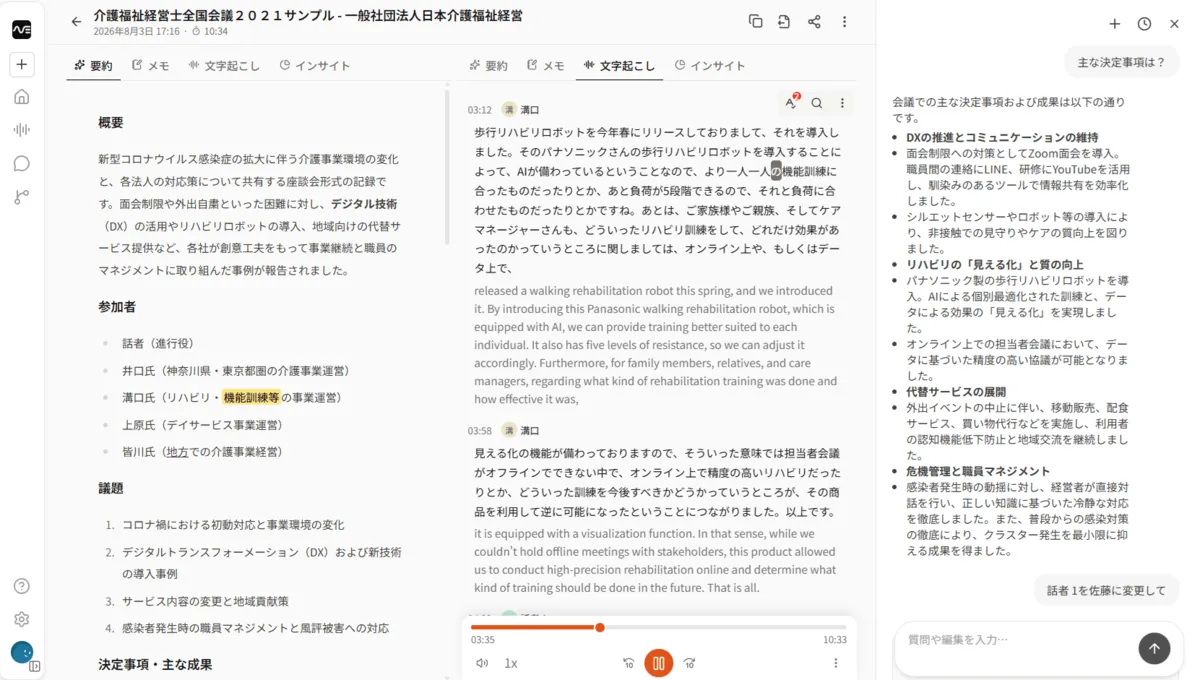
Source: Sumarii official site (all interface images below are from the same source)
No card required
Auto-detected
All plans
30 hrs/month
There is no shortage of tools in this category, but Sumarii's starting point is not "smarter summaries" — it is getting the words right. The developer cites having tried more than ten existing transcription services and hitting the same wall each time: proper nouns break, speakers get swapped, and the summary is too generic to submit as-is. Sumarii was rebuilt starting from transcription accuracy, with a path to fix errors on the spot and everything from summary to sharing kept on one screen.
This is a new service whose first features shipped in March 2026. Meeting-bot recording (April 2026), cross-session search (May), a desktop app (June), and team workspaces (July) have followed in quick succession, and development is still moving fast.
If a word breaks, the summary breaks
A single misheard word in a transcript becomes a "fact" once it reaches the summary. Minutes that read "agreed to discontinue" when the speaker said "moving toward discontinuing" leave later readers with no way to verify anything. This is why Sumarii puts accuracy first.
The official site lets you listen to the same audio processed by a generic AI transcriber and by Sumarii. The misrecognition examples it cites are below. Note that what breaks is, in every case, phrasing specific to business conversation.
Generic AI transcription
- reviewing 10期納聞 (meaningless)
- 出見中7件 (meaningless) are done
- finishing 講習中 (during training)
- we adopted the ホコーリハビリロボット (meaningless)
- and キムマネージャー (Manager Kim)
Sumarii
- reviewing 10機能分 (10 features)
- 10件中7件 (7 of 10) are done
- finishing 今週中 (within this week)
- we adopted the 歩行リハビリロボット (walking rehab robot)
- and the ケアマネージャー (care manager)
Minutes containing a meaningless string give the reader no way to notice the error. Get "10 features" right, and the summary and the search built on top of it hold up.
Clear low-confidence words from a list
No matter how far accuracy improves, mistranscribed proper nouns and internal jargon never reach zero. Sumarii is designed around a human fixing them.
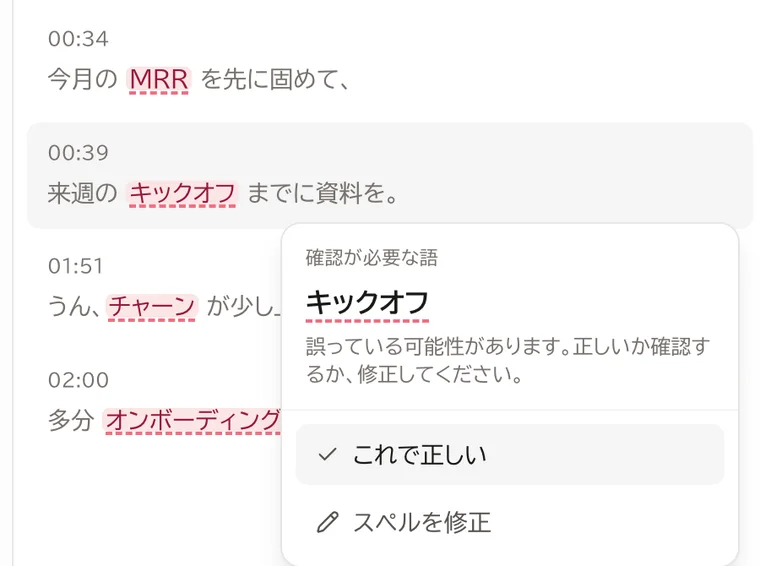
Every word the AI was not confident about is listed under "words that need checking." Instead of rereading the whole transcript hunting for errors, it shows you only the suspicious spots and lets you correct them — and that ordering is where it earns its keep in practice.
- A remaining count is shown, so you work through the list top to bottom
- For each word, confirm "this is correct" or fix the spelling right there
- Register recurring proper nouns and jargon in custom vocabulary to improve accuracy on future sessions
One recording, five screens
The same session is handled through tabs, depending on what you need. Because transcription and summarization are not split across separate tools, there is no copy-paste-and-tidy step.
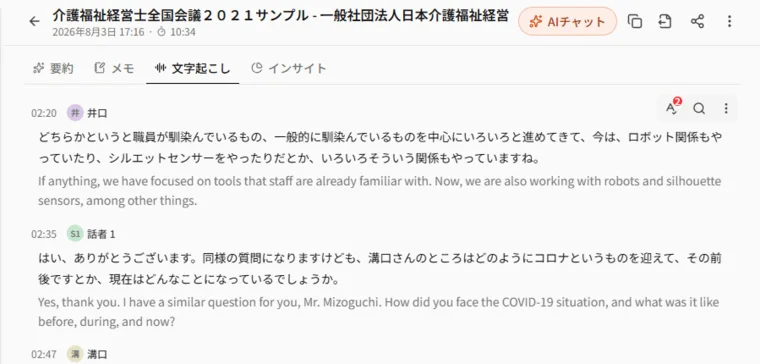
Transcript comes with speaker labels and timestamps, and words highlight in sync with playback. Clicking a line seeks the audio to that point, and a translation can be shown beneath the original.
Summary automatically generates Markdown structured as overview, participants, agenda, and decisions. Templates are available per use case (meetings, lectures, sales calls), and the result can be edited or regenerated.
Notes are personal and kept separate from the AI summary. You can write while recording, so what the AI wrote and what you wrote never blend together.
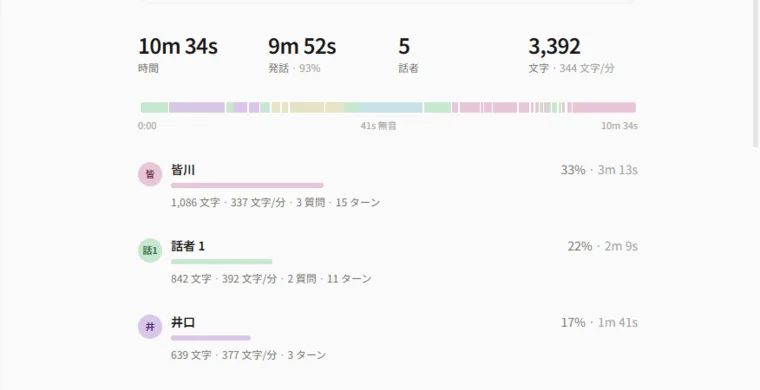
Insights aggregates speaking time, pace, question count, and turns per speaker. The AI adds observations such as "one person is dominating and the discussion is unbalanced," which makes it useful for reviewing the meeting itself rather than just the minutes.
AI chat answers questions about the session's content. Beyond a single session, you can ask across every session in the workspace — "what did we talk about in recent sessions?" You can also fix speaker names, transcript text, summaries, and translations from the chat in natural language.
How to use it
-
Start for free
Sign up at the official site. No credit card is required, and you get 3 hours of transcription plus AI features every month. Email, Google, or Microsoft sign-in all work.
-
Bring in audio
Four input paths are supported: microphone recording, audio/video files, media URLs, and inviting a meeting bot to Zoom, Google Meet, or Microsoft Teams.
-
Clean up the transcript
Use automatic speaker naming to replace "Speaker 1" with real names in bulk, then clear the "words that need checking" list. Register internal terms in custom vocabulary.
-
Summarize and ask
Pick a template to generate the AI summary, and instruct edits via chat if needed. Ask AI chat about anything unclear.
-
Share or export
Issue a view-only share link, or export as txt, Word, Excel, CSV, SRT, or audio.
Supported input, output, and platforms
| Category | Supported |
|---|---|
| Input | Microphone recording / audio and video files (mp3, m4a, wav, mp4, etc.) / media URLs / meeting-bot invites (Zoom, Google Meet, Microsoft Teams) |
| Per-session limit | Up to 5 hours (all plans) |
| Languages | 99 languages with auto-detection, including Japanese, English, Chinese, Korean, and Arabic |
| Output | txt / Word / Excel / CSV / SRT / audio file |
| Platforms | Web app / desktop app (Windows, macOS) |
There is no mobile app. From a smartphone, you use the web app.
Beyond this, there is cross-session search combining vector and keyword search, tag and folder organization, edit history with diffs and rollback for up to 50 entries, full-text translation, session context for reusing the premises that feed a summary, split view for two tabs side by side, customization of the meeting bot's display name and wallpaper, and a team workspace that shares sessions and dictionaries and pools usage.
How it differs from other tools
The official site frames the difference for minutes-taking as follows.
| Aspect | Sumarii | Chat AI (ChatGPT, Gemini, etc.) | Built-in meeting features | Free tools (voice memo, Whisper, etc.) |
|---|---|---|---|---|
| Input | Mic, file, URL, meeting bot | Pasted text only | Live meetings only | Mic or local file |
| Speaker separation | Automatic, renameable afterward | Not supported | Roughly, by participant name | Not supported |
| Custom vocabulary | Register proper nouns and jargon | Specify in the prompt each time | Not supported | Not supported |
| Summary templates | Built-in plus your own | Substitute with custom GPTs / Gems | Paid auto-summary at best | Not supported |
| Cross-session search and chat | Ask and search across all sessions | Chat history only | Own meeting data only | Per-file search only |
Pricing
Pricing is set along two axes: transcription hours and AI tokens. All prices below include Japanese consumption tax.
| Plan | Monthly | Yearly | Transcription | AI tokens |
|---|---|---|---|---|
| Free | ¥0 | — | 3 hours / month | 500K tokens / month |
| Pro | ¥1,980 | ¥19,800 | 30 hours / month | 5M tokens / month |
| Team | ¥3,980 / seat | ¥39,800 / seat | 50 hours / seat / month (pooled) | 8M tokens / seat / month (pooled) |
- Free has no feature restrictions. AI summary, chat, translation, and export are all available within the time and token allowance
- Yearly costs ten months' worth of the monthly price (two months free)
- Team starts at two seats and adds member invites, session sharing, and a shared workspace dictionary
- Transcription hours reset monthly, and monthly plans can be canceled at any time
- Payment is by credit card (processed by Stripe)
Minutes tools in this category are usually corporate contracts running from several thousand to several tens of thousands of yen per month, so an individual getting 30 hours for ¥1,980 a month is a relatively unusual price point.
Security and data handling
- Stored in Japan: meeting audio, transcripts, and minutes are held in Japan
- Not used for AI training (zero retention): content is not used to train any model, by the operator or its vendors. Google Gemini, used for summaries and chat, runs under zero-retention terms and keeps nothing after processing
- Encryption: HTTPS in transit, encrypted at rest. Audio is retrievable only via short-lived signed links
- Access control: workspace-level isolation (row-level security) and optional TOTP multi-factor authentication
- Deletion: three stages — trash (recoverable), permanent deletion (destroyed immediately, purged from backups within 7 days), and account deletion
- Subprocessors published: Supabase (database, Japan), Akamai Linode (audio, Japan), Google Gemini, Cloudflare, Resend, Stripe
On the other hand, no third-party certifications such as ISO/IEC 27001 or SOC 2 have been obtained. If your security review treats certification as a requirement, that will be the deciding factor.
The person building it
Sumarii is built in Japan by Onur Usluca (@onur_usluca). The stated approach is to run real Japanese-language meetings while building, and to decide what to add next from actual usage.
Under Japan's Specified Commercial Transactions Act disclosure, the business name is listed as "Sumarii," with the representative's name, address, and phone number disclosed on request. Support is at help@sumarii.com.

FAQ
Q. How much can I do on the free plan?
Within 3 hours of transcription and 500,000 AI tokens per month, you can use every feature, including AI summary, chat, translation, and export. No credit card is required.
Q. Does it work with Zoom and similar tools?
Yes. You can invite a bot to Zoom, Google Meet, and Microsoft Teams meetings to record them, and configure the bot's display name and wallpaper.
Q. Does it support languages other than Japanese?
It supports 99 languages with automatic detection. You can show a translation beneath the original text, or translate the full transcript into another language at once.
Q. Will what I said be used to train AI?
No. Audio, transcripts, and notes are not used to train any model by the operator or its vendors, and Google Gemini — used for summaries and chat — runs under zero-retention terms and keeps nothing after processing. Data is stored in Japan.
Q. Is there a smartphone app?
There is no dedicated app. It is offered as a web app and a desktop app (Windows, macOS).
Q. How long can a single recording be?
Up to 5 hours per session, on every plan.
Related tools
For meeting transcription and minutes, these are the practical comparisons.
- For the largest track record of adoption in Japan, Notta
- To automate work before and after meetings, including CRM sync, Otolio
- To combine your own notes with AI minutes, Granola
- If your meetings are mainly in English, Otter AI
From the author: While writing this article, I used Sumarii myself to transcribe meetings and draft the minutes. Japanese transcription accuracy was high and the tool was easy to work with, so it is one I can recommend to anyone struggling with meeting minutes.
The quickest way to decide is to drop your own meeting audio into the free tier and check the accuracy yourself.








![[2026 Latest] 16 AI Tools to Maximize Sales Performance | Dramatically Improving Meeting, Proposal, and Call Efficiency](/_next/image?url=%2Fimages%2Farticles%2Fai-sales-tools-recommendation.png&w=3840&q=75 "[2026 Latest] 16 AI Tools to Maximize Sales Performance | Dramatically Improving Meeting, Proposal, and Call Efficiency")