
FlipHTML5
: How to use it, features, and the business problems it solves
Add bookmark
What is FlipHTML5?
FlipHTML5, provided by Wonder Idea Technology of Hong Kong, turns PDFs, Word and PowerPoint files, and images into page-flipping digital books (digital catalogs and brochures) that you can publish and embed on the web. It includes an AI eBook Generator that builds an outline and layout from a topic or a PDF/Word file, an AI chatbot that answers readers from a published book's content, an AI assistant for polishing, translating, and generating images, and an MCP server for creating and managing books from AI assistants such as ChatGPT. Japanese is supported. Pricing: Free (¥0, 5 books a day, 500 AI points/month) / Pro ¥2,180/month (¥1,808/month billed annually) / Platinum ¥5,100/month / Enterprise ¥14,500/month, plus AI Plus for AI eBooks at ¥3,280/month (¥2,290/month billed annually).
Business problems it solves

About "FlipHTML5"
What is FlipHTML5?
FlipHTML5 is a service that turns PDFs, Word and PowerPoint files, and images into page-flipping digital books that you can publish and share on the web. It is used for digital catalogs, brochures, company newsletters, manuals, and magazines — any case where you want people to read a "paper" document on the web as it is. Published books can be shared by link or embedded in your own website.
On top of that sit several AI features: the AI eBook Generator, which builds an outline and then the page design from a topic or a PDF/Word file; an AI chatbot placed inside a published book that answers readers' questions from the document's content; an AI assistant for polishing, translating, and generating images; and an MCP server that lets AI assistants such as ChatGPT create and manage books.
FlipHTML5 is run by Wonder Idea Technology (WONDER IDEA TECHNOLOGY LIMITED) in Hong Kong. Its company page cites more than 10 million publications, 5 billion page views, and 5 million publishers. The site and the editor are available in Japanese, and prices are shown in Japanese yen on the Japanese site.
Enter a topic and get an eBook, from draft to design
The AI eBook Generator has two entry points: "Enter a topic" and "Upload a file". In the topic field you describe the title, theme, target readers, and style. With a file, you upload a PDF/Word document containing editable text (up to 50 MB and 50 pages), and the tool builds a book from the original content.
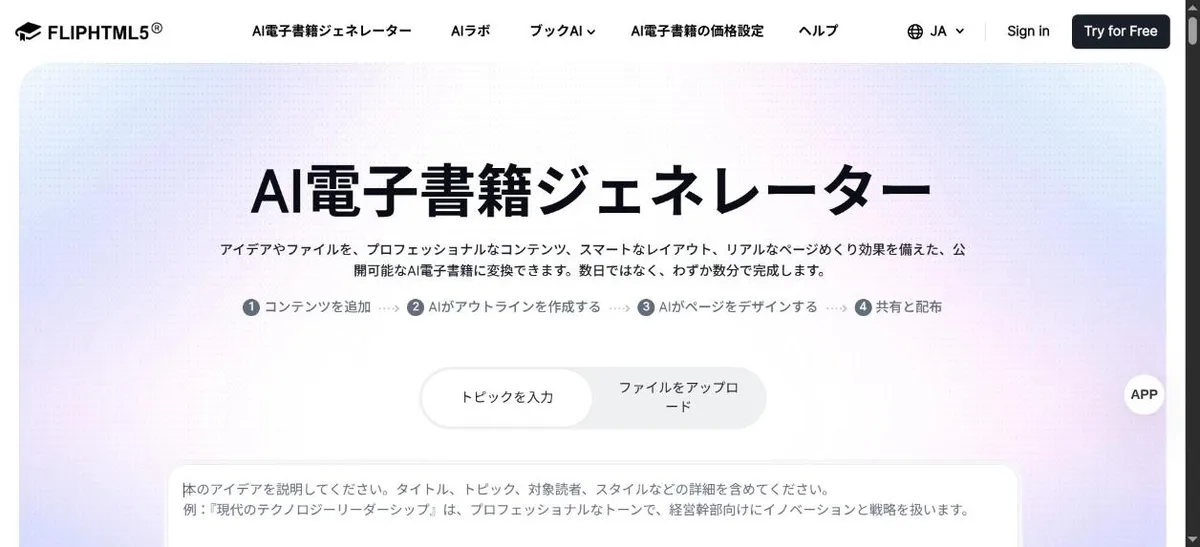
Source: FlipHTML5 AI eBook Generator (as of November 2026)
The process has four steps.
- Add your content — Write a topic or upload a PDF/Word file. You can choose from 28 publication types (eBook, picture book, magazine, catalog, brochure, manual, white paper, proposal, and more) and 30 languages including Japanese
- AI creates the outline — A structured outline appears in seconds. You can edit the titles and content before the layout is created
- AI designs the pages — Choose from ready-made layouts and 36 color schemes, and the AI places text, images, and elements. You can watch each page being designed, from the cover to the last page
- Share and distribute — The finished book is published as an online flipbook with page-turning effects
Points are charged based on the word count of the AI-generated outline: 200 points per 100 words (minimum 100 words, rounded up to the next 100). You can check the points before the layout is created.
Put a chatbot in a published book that answers from its content
The AI chatbot works like this: upload a document, create a book, and click "Enable chatbot" — the chatbot is trained on that document automatically. Readers ask questions inside the published book and get answers based on its content without leaving the page.
- Supported formats include PDF, DOCX, XLSX, PPTX, CSV, MD, and TXT
- One chatbot can combine several documents into a single knowledge base
- Answers are based on the documents you provide and show their sources (according to FlipHTML5)
- One chatbot can be reused across multiple flipbooks
This turns documents where information is hard to find — catalogs, manuals — into something readers can search by asking. The pricing page lists chatting with the AI bot in a book at 10 points per use.
Polishing, translation, and images inside the editor
The page editor includes an AI assistant that can improve, expand, shorten, fix spelling and grammar, change the tone, create titles, translate, and explain the text in a book. There are also text-to-image generation, image transformation, and background removal, and generated images can be placed directly on the page.
The main AI point costs listed on the pricing page are as follows.
| AI feature | Points |
|---|---|
| Create an eBook | 200 points per 100 words |
| Create a web page | 500 points per use |
| Text to image / image transformation | 120 points per use |
| Improve, expand, shorten, proofread, change tone, create titles, translate, explain | 10 points per use |
| Chat with the AI bot in a book | 10 points per use |
| Background removal | 5 points per use |
Source: FlipHTML5 pricing page (as of November 2026). The Japanese pricing page says "points/hour", but the AI eBook pricing page lists in-book chat as "10 points / answer", so we read these as points per use
Create and manage books from AI assistants such as ChatGPT (MCP)
The FlipHTML5 MCP server connects AI assistants to your FlipHTML5 workspace through the Model Context Protocol (MCP). Ask a connected assistant to "turn this document into a flipbook and protect it with a password", and it handles everything from creation to access settings.
01What it can do
- Create flipbooks — Turn online PDFs and documents into flipbooks you can share by link
- Update book details — Edit titles, descriptions, and keywords without opening each book's settings
- Choose who can read — Switch between public and private, and restrict access by password or email address
02How to connect
- Setup prompt — Send the prompt generated in FlipHTML5 to your AI assistant, and the assistant configures the connection
- Manual setup — Configure compatible assistants with the MCP server link and an API key
- Revoking access — Deleting the API key ends access through that connection
The core digital-book features
Even without AI, the heart of FlipHTML5 is letting people read your documents on the web.
- Conversion — PDF, Office files, and images into flipbooks. Merge several PDFs into one book, detect links in PDFs, import a PDF's table of contents, and batch-convert (Platinum and above)
- Catalogs from Excel/CSV — Automatically build a digital catalog from a table of product data
- Interactive elements — Add links, video, audio, animation, quizzes, forms, and more in the page editor (Platinum and above)
- Publishing and reach — Bookshelves, mini-sites, embeds, custom domains (1 on Platinum / 3 on Enterprise), SEO-friendly digital catalogs
- Sales and analytics — Digital sales of books, Google Analytics 4 integration, statistics on readers' locations, reading time, devices, and more
- Access control — Passwords, private books, access by email code, scheduled publishing/unpublishing
How to use it
- Sign up for free — The Free plan starts without a credit card
- Import a document or create one with AI — Upload a PDF, Word, or PowerPoint file to make a flipbook, or create one from a topic with the AI eBook Generator
- Refine the look and content — Choose templates and layouts, polish text with the AI assistant, and add images
- Publish and share — Share by link, embed in a website, or collect books on a bookshelf. Enable the AI chatbot if you need it
- See how it is read — Check views, readers' locations, time spent on pages, and more to see what gets read
Pricing
FlipHTML5 pricing is split into two lines: flipbook plans (Free / Pro / Platinum / Enterprise) and an AI eBook plan (AI Plus). You can subscribe to either one or combine both.
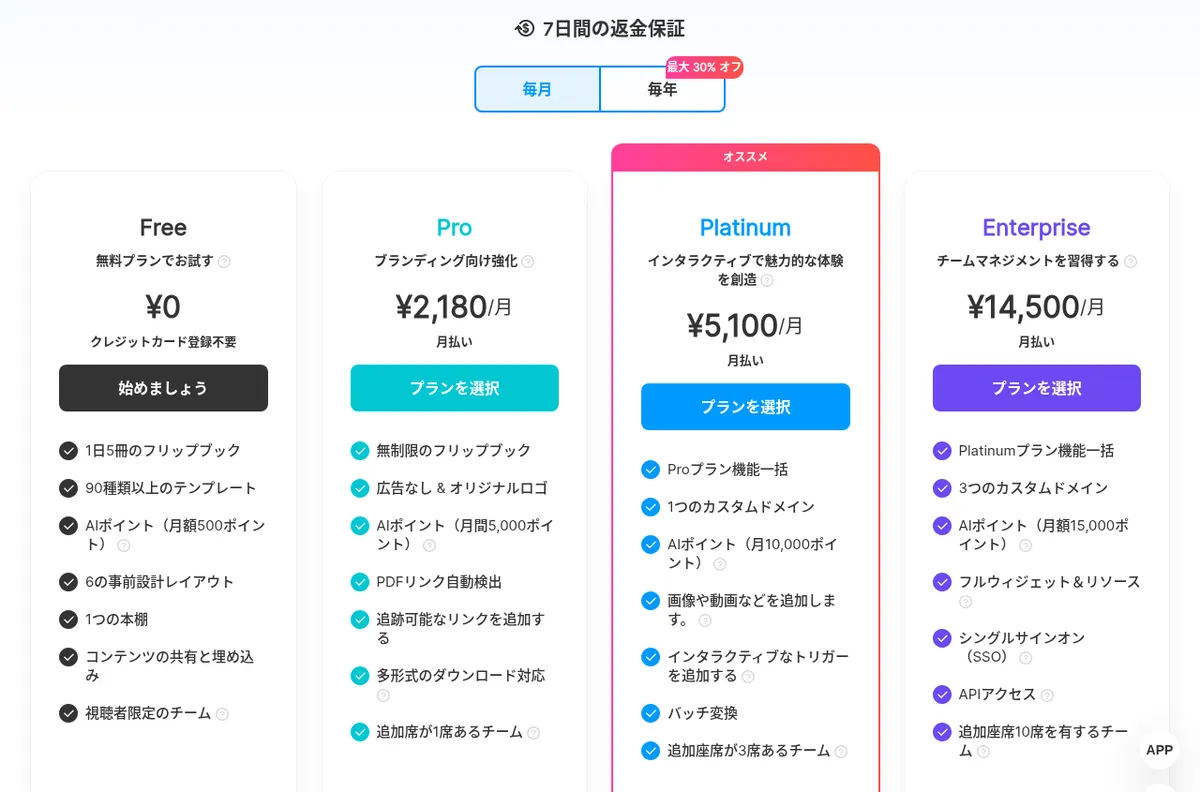
Source: FlipHTML5 pricing page (as of November 2026)
Flipbook plans
| Plan | Monthly | Annual | AI points (monthly) | Main features |
|---|---|---|---|---|
| Free | ¥0 | ¥0 | 500 | Up to 5 books a day, 90+ templates, 6 layouts, 1 bookshelf, sharing and embedding. Includes ads and the FlipHTML5 watermark; no downloads |
| Pro | ¥2,180 | ¥21,700 (¥1,808/month) | 5,000 | Unlimited books, no ads and your own logo, PDF link detection, trackable links, multi-format downloads (5 per month), 1 editable seat |
| Platinum | ¥5,100 | ¥43,000 (¥3,583/month) | 10,000 | Everything in Pro plus 1 custom domain, adding images and video, interactive triggers, batch conversion, 3 editable seats |
| Enterprise | ¥14,500 | ¥145,700 (¥12,142/month) | 15,000 | Everything in Platinum plus 3 custom domains, all widgets and resources, single sign-on (SSO), API access, 10 editable seats |
AI eBook plans
| Plan | Monthly | Annual | AI points (monthly) | Main features |
|---|---|---|---|---|
| Free | ¥0 | ¥0 | 500 (about one short eBook, ~250 words) | Create AI eBooks and share them by link, re-edit AI-generated text and images. No downloads, watermark removal, or point add-ons |
| AI Plus | ¥3,280 | ¥27,480 (¥2,290/month) | 80,000 (about 10 mid-sized eBooks of 3,000 words each) | Multi-format downloads, removal of watermark, logo, and ads, full editing in the page editor (links, images, video, widgets), point add-on packs, resources for commercial use |
Source: FlipHTML5 pricing page and AI eBook pricing page (as of November 2026; prices as displayed in Japanese yen on the pricing pages). The pricing pages do not say whether tax is included; the Terms of Service (3.7 Taxes) make users responsible for sales tax, VAT and similar taxes, and say FlipHTML5 will charge them separately to the payment method where it is obliged to collect them
- Annual billing is up to 30% cheaper than monthly. There is a 7-day money-back guarantee, and you can request a refund within 7 days of purchase (a full refund may not apply if you have used downloads or exports)
- When a paid plan expires, books created during the subscription remain accessible, but paid features and elements are disabled and ads are shown
- Payment by credit/debit card (Visa, Mastercard, JCB, American Express, etc.), PayPal, or wire transfer. PayPal purchases go through the USD pricing page
- Discounts for students/educators and nonprofits, and API access without signing up, are available on inquiry
How it differs from other design and document AI tools
| Product | Main use | What AI creates | How output is published | Starting price |
|---|---|---|---|---|
| FlipHTML5 | Turn documents into page-flipping digital books and publish them | eBooks, catalogs, brochures, an in-book chatbot | Flipbook links, embeds, bookshelves, sales | Free, Pro ¥2,180/mo, AI Plus ¥3,280/mo |
| Canva | Creating all kinds of designs | Designs, images, text | Image/PDF/video export, websites | Free, Canva Pro ¥11,800/yr |
| GAMMA | Generating presentations, documents, web pages | Slides, documents, web pages | PPT/PDF/Google Slides, web publishing | Free, Plus ¥1,440/mo (annual) |
| kdpbook.io | Producing books for Amazon KDP | Text, illustrations, typesetting, covers | PDF/EPUB for KDP | 2,000 free credits at sign-up, Starter $25/mo |
| ChatPDF | Reading your own documents through chat | Summaries, answers, translations | — (a tool for your own reading) | Free, Plus ¥1,299/mo |
| AI Shorts | Turning documents into narrated videos | Scripts, AI-voiced videos | Video | Free trial; pricing not published |
Other products' details are as of the check dates noted on their product pages
- If you want catalogs, brochures, or newsletters read on the web with their print look intact, FlipHTML5 fits. Reader statistics, access control, and an in-book chatbot are all in one place
- For single-page designs such as flyers and social images, start with Canva; for presentations, GAMMA
- If you just want to ask questions of a PDF for your own reading, ChatPDF suits you; to publish a book on Amazon, kdpbook.io
Pros and cons
Pros
- Turn existing PDF and Office documents into page-flipping digital books and publish them on the web as they are
- AI builds the outline and even the page design from a topic or a PDF/Word file
- Place an AI chatbot in a published book so readers can find content by asking
- Via MCP, create, update, and set access for books from AI assistants such as ChatGPT
- Prices are shown in Japanese yen, and you can start on a free plan
Cons
- The Free plan shows ads and a watermark and does not allow downloads; distributing documents for business effectively requires a paid plan
- Flipbook plans and the AI eBook plan are separate, so heavy AI use means combining two subscriptions
- Video, triggers, and similar features in the page editor require Platinum or above, so serious work starts at ¥5,100/month
- AI point costs vary by feature: creating an eBook costs 200 points per 100 words, so the Free plan's 500 points a month covers only one short book (about 250 words)
FAQ
Q. Can I use FlipHTML5 for free? A. Yes. The Free plan requires no credit card, lets you create up to 5 flipbooks a day, and includes 500 AI points a month. However, books show ads and the FlipHTML5 watermark, and downloads are not available.
Q. Can I use it in Japanese? A. Yes. The official site and pricing page are displayed in Japanese, with prices in Japanese yen. The AI eBook Generator can create books in 30 languages including Japanese.
Q. What is the difference between the flipbook plans and the AI eBook plan (AI Plus)? A. The flipbook plans (Pro / Platinum / Enterprise) cover converting, publishing, and managing documents (storage, templates, analytics, seats, etc.). AI Plus is for creating eBooks with AI and includes 80,000 points a month, full access to the page editor, and multi-format publishing. FlipHTML5 suggests subscribing to one or both depending on your needs.
Q. What happens to my books if I cancel a paid plan? A. Books created during the subscription remain accessible, but paid features and elements are disabled and ads are shown. Renewing restores the paid features.
Q. Which AI assistants can connect to the MCP server? A. FlipHTML5 says it works with AI assistants that support MCP connections. Setup differs by assistant; you configure it with the setup prompt generated by FlipHTML5 or with the MCP server link and an API key.
Provider
FlipHTML5 is developed and operated by Wonder Idea Technology Co., Ltd. (shown on the site as WONDER IDEA TECHNOLOGY LIMITED), headquartered in Hong Kong. According to its company page, the company has long developed digital publishing software, and FlipHTML5 is its HTML5-based service built for mobile. The product list in the site footer also includes ExhVerse, Mango AI, and Recastia alongside FlipHTML5.
The information on this page is based on what FlipHTML5 published on its official website (home, pricing, AI eBook pricing, AI eBook Generator, AI assistant, PDF chatbot, MCP server, and company pages) as of November 2026. Please check the official website for the latest features and pricing.