Google AI Studio
: How to use it, features, and the business problems it solves
Add bookmark
What is Google AI Studio?
Google AI Studio is Google's developer platform to try the Gemini models in the browser, build and deploy AI apps, and get a Gemini API key. It's organized around Build (app generation), Chat, Stream, and Generate Media (image/video/audio), and offers the Gemini 3 family, Nano Banana image, Veo video, and more. AI Studio itself is free; the API is usage-based with a free tier. Note: on the free tier input is used to improve products; on the paid tier it is not.
Business problems it solves





About "Google AI Studio"
What is Google AI Studio
Google AI Studio is a developer platform where you can try Google's "Gemini" AI models in the browser, build and deploy AI apps, and get a Gemini API key. Provided by Google, it bills itself as "the fastest way to start building with Gemini." From a prompt playground, it has grown into a "build-and-ship" platform organized around Build (app generation), Chat, Stream (real-time), and Generate Media (image/video/audio) tabs.
In the Build tab, describe what you want in words or images and the AI generates a working app. It provides a React frontend and a server-side runtime, and you can deploy to Cloud Run. You can also revise a generated app by pointing at part of the UI and saying "change this" in natural language.
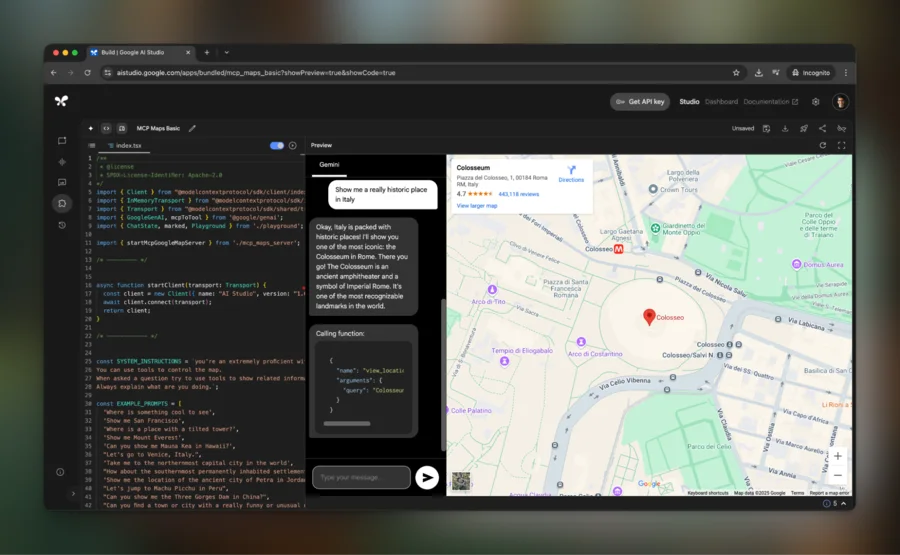
Source: Google AI Studio official site
Try the latest Gemini and get an API key
At Google AI Studio's core, you can try the latest Gemini models and get a Gemini API key to embed them in your own apps. It is multimodal (text/image/audio/video input), and you can configure Google Search grounding, URL context, and structured output.
The available models are updated regularly. As of August 2026, in place of the old Gemini 1.5 line, the lineup centers on the Gemini 3 family (3.7 Flash, 3.1 Pro, etc.) and the 2.5 family, plus the Nano Banana image models, Veo video, and Lyria music.
How to Use
-
Sign in
Go to aistudio.google.com with a Google account.
-
Choose what to build
Pick from Build (app generation), Chat (prompt testing), Stream (real-time), or Generate Media.
-
Pick a model and prompt
Choose a Gemini model, build a prompt with text/images, and run it.
-
Embed via API key
Get a Gemini API key as needed and integrate it into your app.
Features
01Try & test
- Multimodal input — text, image, audio, video, documents
- Model selection & parameters — adjust output format, token count, etc.
- Prompt gallery & long context — templates and a large context window
02Build
- Build (app generation / vibe coding) — generate working apps from a description; deploy to Cloud Run
- Generate Media — image (Nano Banana), video (Veo), audio, and music generation
- Stream — real-time dialog via audio, camera, and screen share (Live API)
03Connect
- Gemini API key — get one and integrate into your app
- Google Search grounding & URL context — ground answers in evidence
- Structured output & AI Chips — toggle features into a prompt
Pricing
Google AI Studio is free to use in the browser. The Gemini API you embed in apps has a free tier plus usage-based pricing (in USD, per 1M tokens).
| Item | Price |
|---|---|
| Google AI Studio (browser use) | Free |
| Free tier (Gemini API) | Flash / Flash-Lite have a free tier (with daily caps) |
| Gemini 3.1 Pro (paid, approx.) | $2.00 input / $12.00 output (≤200K tokens) |
| Gemini 2.5 Flash (paid, approx.) | $0.30 input / $2.50 output |
The previously mentioned "$3.50–7.00 input / $10.50–21.00 output" are old Gemini 1.5-era prices and differ from the current ones. On the free tier, input is used to improve products, while on the paid tier it is not (the privacy handling differs). Pricing and models change often, so check the [official pricing page](https://ai.google.dev/gemini-api/docs/pricing) for the latest (as of August 2026).
How it differs from other AI dev platforms
Google AI Studio's strength is that it takes you from trying Gemini to app generation and API integration all in one place. Its role differs from consumer chat apps.
| Aspect | Google AI Studio | Gemini (app) | ChatGPT |
|---|---|---|---|
| Focus | Development, testing, app generation | Consumer chat | Consumer chat |
| Models | Choose among Gemini models | Gemini | First-party |
| API | Get a Gemini API key | — | Separate API |
Unlike the consumer-facing Gemini and ChatGPT, it is geared to development and testing. If you want to build AI apps with Gemini or integrate the API, Google AI Studio is a strong choice.
The information on this page is based on what was publicly available on the official site as of August 2026. Please check the official site for the latest specifications and pricing.