

Hunyuan3D
: How to use it, features, and the business problems it solves
Add bookmark
What is Hunyuan3D?
An AI from Tencent that generates high-fidelity 3D models (geometry + PBR textures) from images or text, combining the shape-generation model Hunyuan3D-DiT and the texture-synthesis model Hunyuan3D-Paint. The current flagship is the commercial 3.1 (up to 8-view input), while the latest open-source version 2.1 also supports local execution and commercial use. The official web app has a free tier of 20 generations per day.
Business problems it solves



About "Hunyuan3D"
What is Hunyuan3D
Hunyuan3D is an AI developed by Tencent that generates high-fidelity 3D models from images or text. From a single image, a sentence, or a sketch, it automatically generates 3D assets with geometry (mesh) and PBR textures (materials). Aimed at production for games, e-commerce, video, 3D printing, and more, its major distinction is that a state-of-the-art commercial model and an open-source version coexist. The OSS version has surpassed 3 million cumulative downloads on Hugging Face and is highly rated on GitHub.

Source: Tencent Hunyuan3D (GitHub) (subsequent images are from the same source)
The current flagship is Hunyuan3D 3.1 (global version, closed, up to 8-view input), available on the official web app and the Tencent Cloud API. Meanwhile, the latest open-source version is Hunyuan3D 2.1 (model weights published, commercial use allowed), which supports local execution and your own fine-tuning. *In August 2026, the Hunyuan brand was renamed "Hy."
Building geometry and texture in two stages
Rather than generating 3D all at once, Hunyuan3D generates "geometry" and "texture" separately. First, the shape-generation model Hunyuan3D-DiT creates a mesh from the image; then the texture-synthesis model Hunyuan3D-Paint applies physically based (PBR) materials such as Albedo, Metallic, and Roughness. This division balances geometric accuracy with realistic appearance.
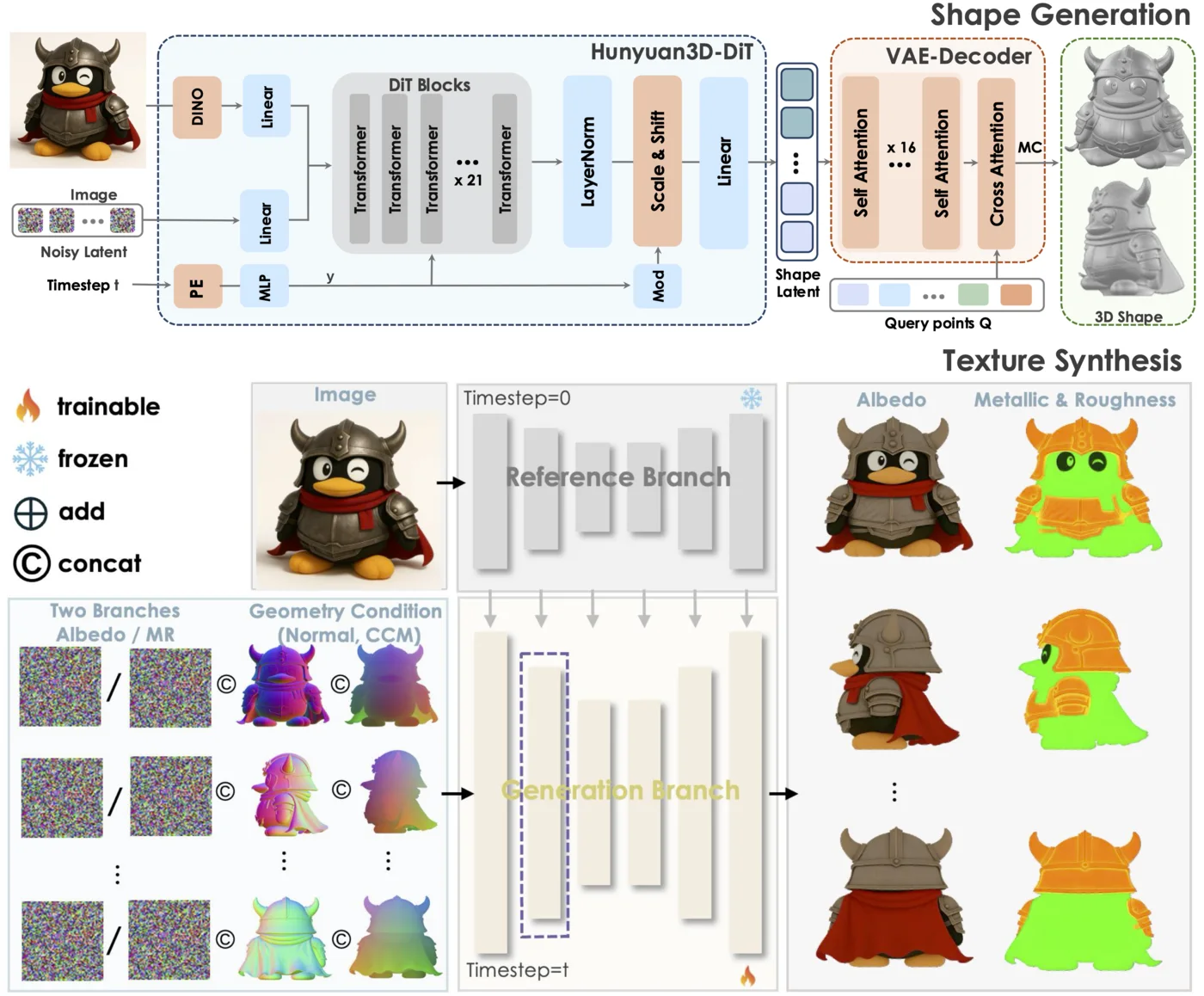
Features
01Generate
- Image / text / sketch → 3D — generate 3D from various inputs
- Multi-view input — generate from images at multiple angles (up to 8 views in 3.1)
- Hunyuan3D-DiT / Paint — shape generation and PBR texture synthesis
02Improve quality
- PBR textures — Albedo / Normal / Roughness / Metallic (up to 4K)
- Smart Topology — automatic topology optimization and UV unwrapping
- Output formats — export watertight meshes as OBJ / GLB
03Extend
- Hunyuan3D-Part — part-level decomposition (P3-SAM / X-Part)
- Auto-Rig — automatic rigging (Studio)
- DCC integration — use in Unity / Unreal / Blender
How to use
-
Choose the official web app or open source
Use the official web app to try it easily, or the open-source version (2.1) on GitHub / Hugging Face to run it locally.
-
Enter an image or text
Input the image you want to turn into 3D, or a description of what you want to make.
-
Generate the geometry
Hunyuan3D-DiT generates the mesh.
-
Apply the texture
Hunyuan3D-Paint synthesizes the PBR texture.
-
Export and use
Export as OBJ / GLB and import into Unity, Unreal, Blender, and more.
Pricing
The official web app offers 20 free generations per day for general users. For businesses, the Tencent Cloud API is available (200 free credits, with two tiers: high-fidelity Pro and fast Rapid). Specific paid pricing is not disclosed, so please check the official site for the latest (as of August 2026).
How it differs from other 3D generation AIs
3D generation AIs split largely into "open source vs. commercial SaaS." Hunyuan3D stands out by offering both a top-tier open-source version (2.1) and the latest commercial version (3.1), with a broad ecosystem that includes part decomposition and rigging.
| Aspect | Hunyuan3D | Meshy | Tripo |
|---|---|---|---|
| Availability | OSS (2.1) + commercial (3.1) | Commercial SaaS | Commercial SaaS |
| Self-hosting | Local execution and fine-tuning | Mainly cloud | Mainly cloud |
| Extensions | Part decomposition, rigging, DCC integration | 3D generation, animation | 3D generation |
For easy cloud-based 3D generation, Meshy and Tripo AI; for research on editable, part-decomposed 3D, Omnipart are comparison points. When you want to embed it into your own environment as open source, or leverage a large-vendor ecosystem, Hunyuan3D is a strong option.
The information on this page is based on content published on the official website, GitHub, and papers as of August 2026. Versions, specifications, and pricing may be updated, so please check the official website for the latest information.



![[2026 Edition] Must-Know for 3D Modelers: 4 AI Tools for Fast, Automated 3D Model Generation | Luma AI, Meshy, and More](/_next/image?url=%2Fimages%2Farticles%2Fai-3d-modeling-tools-comparison.png&w=3840&q=75 "[2026 Edition] Must-Know for 3D Modelers: 4 AI Tools for Fast, Automated 3D Model Generation | Luma AI, Meshy, and More")