
PixVerse
: How to use it, features, and the business problems it solves
Add bookmark
What is PixVerse?
An AI video generator operated by AIVORA PTE. LTD. of Singapore. It turns text or images into short videos using its own PixVerse V6 model (up to 15 seconds, 1080p, with audio), other companies' models such as Seedance and Kling, and templates such as dance and transformation effects. The website and app support Japanese. There is a free Basic plan (watermarked) and paid plans from $10/month.
Business problems it solves



About "PixVerse"
What is PixVerse?
PixVerse is an AI video generation service that creates short videos from text or images. Besides text-to-video, where you describe a scene in words, and image-to-video, which animates your own photos, it offers popular templates such as dance and transformation effects: just apply a photo and you get a video for social media. It is available as a web app (app.pixverse.ai) and as iPhone and Android apps, and both the official website and the web app are displayed in Japanese.
The operator, as stated in the Terms of Service, is AIVORA PTE. LTD. of Singapore. According to the official company information page, PixVerse was founded in 2023, and its co-founder and CEO is Changhu Wang. It has its own video models (currently PixVerse V6), and you can also choose other companies' video models such as Seedance, Kling, and MiniMax from the same screen.
In the 6th edition of "Top 100 Gen AI Consumer Apps" published by the US investment firm a16z, PixVerse is included in the mobile app list and is named in the text, alongside Kling AI and Hailuo, as a video generation service that has built real traction.
How to Use
- Open the web app or install the app On a computer, open app.pixverse.ai in your browser. On a smartphone, go to the App Store or Google Play from "Download the app" on the official website. Free credits are granted daily when you log in.
- Choose how to create Choose "Text to Video" to create from a description, or "Image to Video" to animate a photo. To make a social media video quickly, pick a template from the list and simply upload a photo.
- Choose the model and settings, then generate Choose the video model (PixVerse V6 or another company's model), duration, resolution, and aspect ratio (16:9, 9:16, etc.), and generate. Generation uses credits, and the amount depends on the model, resolution, duration, and whether audio is included.
- Refine and export Fix parts you don't like with editing features such as extending the video, transitions that connect the first and last frames, and replacing part of the video. On the free Basic plan a watermark is added; exporting without a watermark requires a paid plan.
Features
01Creating videos
These are presented as the core features on the official website and in the app description.
- Text to Video — Write the subject, location, camera movement, lighting, and sound, and turn it into a video
- Image to Video — Animate product photos, characters, or landscape photos
- Reference generation — Use multiple reference images to keep characters, objects, scenes, and styles consistent
- Templates — Apply a photo to formats such as dance, transformation, and product promotion to get a video instantly
- Lip sync — Match lines or audio to a character image so its mouth moves
02Fixing videos you made
Features for refining a video after it has been generated.
- Extend — Describe the next scene to continue the video
- Transition — Smoothly connect the first and last frames with an AI-generated transition
- Partial video editing — Replace a selected part of the video based on reference images and more
- Upscaling — Raise the resolution of images and videos (up to 4K for video, according to the app description)
03Fitting into professional workflows
Features for ads and high-volume video production.
- Agent — Remake shots while describing what you want to change in a conversation
- Canvas — Connect prompts, references, generation, and outputs as nodes, and adjust and rerun them as a workflow
- Marketing Hub — Create short ad videos from product images or URLs
- API and CLI — An API for developers and a command-line tool for generating from the terminal
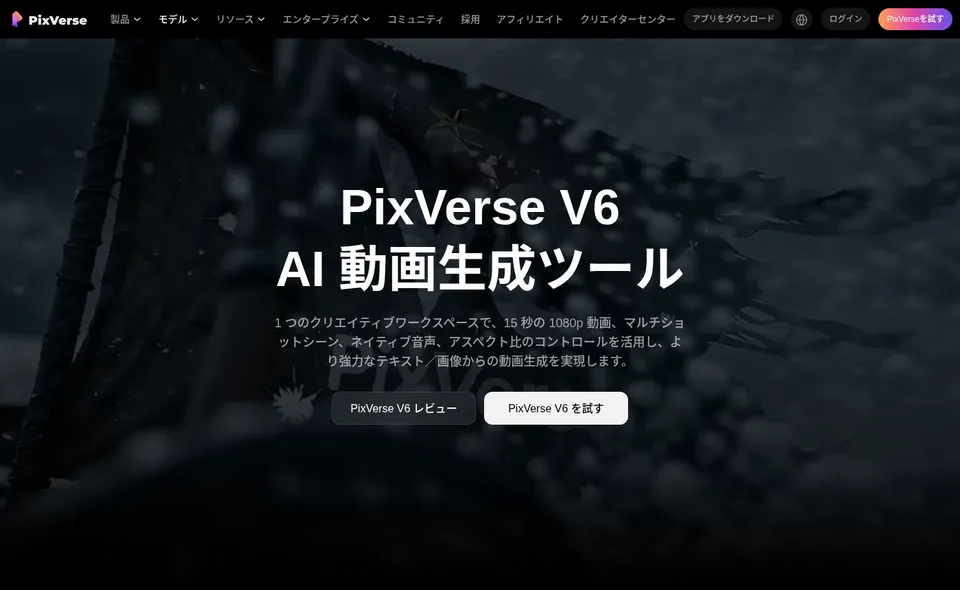
PixVerse V6 makes 15-second, 1080p videos with audio in one pass
The official model page introduces its own video model, PixVerse V6, with "15-second 1080p video, multi-shot scenes, native audio, and aspect ratio control" as its key features.
Multi-shot builds wide shots, close-ups, and cuts within a single generation, so you can make videos with scene changes, like a short commercial or trailer, without stitching fragments together. Audio generates dialogue, sound effects, and ambient sound together with the video. You can set the aspect ratio, such as 16:9 or 9:16, before generating, which is handy when making separate versions for YouTube and vertical short videos.
Source: PixVerse V6 (official)
Templates turn a single photo into a social media video
In the app, the home screen lets you choose image generation, image to video, or text to video, along with buttons for lip sync, image editing, transitions, and upscaling.
Templates are grouped into series such as dance, transformation, beauty, and miniature world, and you can make videos with trending movements and effects just by choosing a photo. Since you can start without writing a prompt, it is a good entry point for producing lots of short videos for social media.
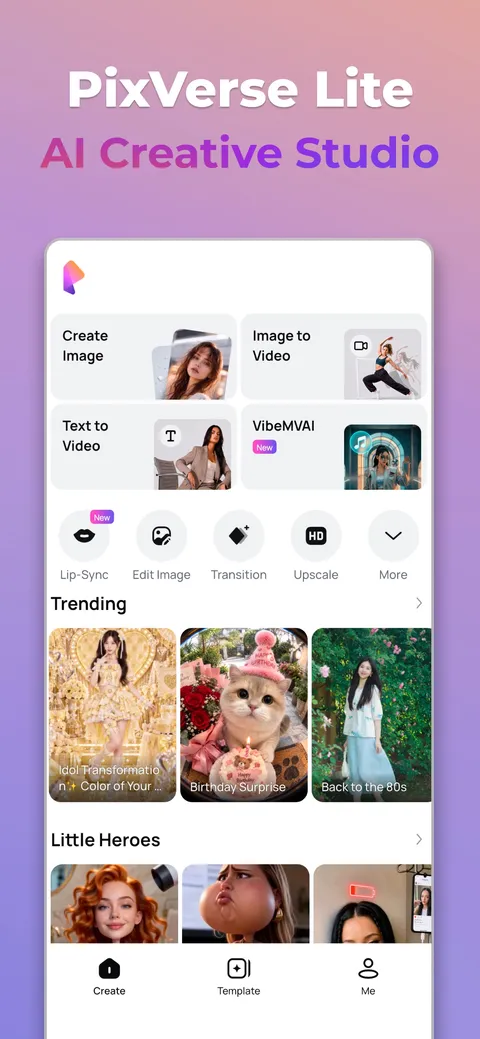
The template list shows sample videos by theme, and once you choose one you can make it with your own photo. Generated videos can be refined with extend and transition.
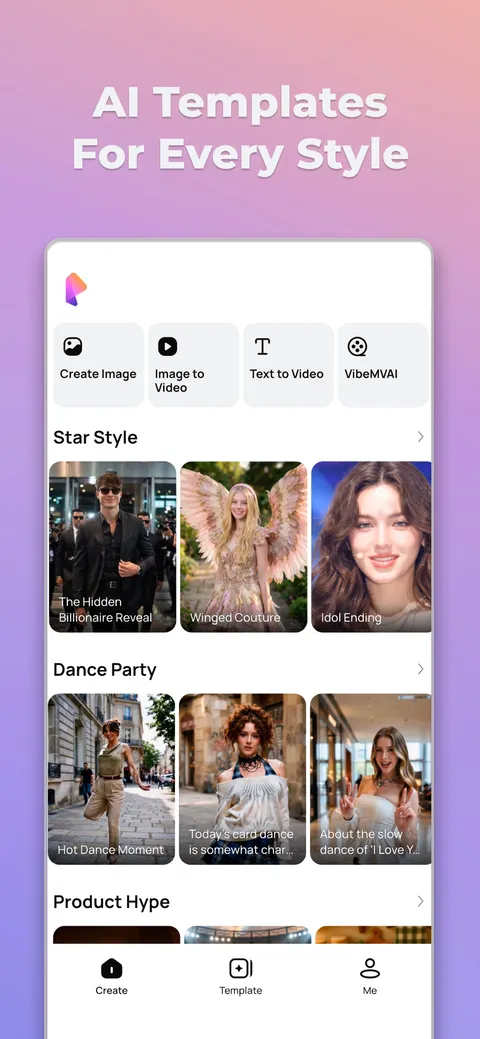
Source: App Store (Japan) PixVerse Lite (screenshots of the app provided by AIVORA PTE. LTD.)
Pricing
The PixVerse web app has a free Basic plan and five paid plans. Even on the Japanese pricing page, prices are shown in US dollars, and it does not state whether tax is included. Video generation uses credits, and paid plans grant membership credits every 30 days.
| Plan | Monthly billing | Annual billing (per month) | Annual total | Membership credits (every 30 days) | Daily credits | Video resolution | Concurrent generations |
|---|---|---|---|---|---|---|---|
| Basic (free) | $0 | — | — | None (60 initial) | 30 | Up to 540P | 2 |
| Standard | $10 | $8 | $96 | 1,200 | 60 | Up to 720P | 3 |
| Pro | $30 | $24 | $288 | 6,000 | 60 | Up to 4K | 5 |
| Premium | $60 | $48 | $576 | 15,000 | 60 | Up to 4K | 8 |
| Ultra | $199 (regularly $249) | $149 | $1,788 | 25,000 | 60 | Up to 4K | 8 |
| Team Ultra | $199 per seat | $149 per seat | $1,788 per seat | 25,000 (shared by the team) | — | Up to 4K | 12 |
- No watermark and no ads are paid-plan benefits; output on the free Basic plan is watermarked
- Daily credits refresh every day at 00:00 UTC, and unused credits expire at the end of the day. Membership credits also do not carry over to the next 30 days
- Paid plans offer unlimited image generation in "Relax mode" for eligible image models (which models are eligible varies by plan). This does not mean unlimited video generation
- Pro and above can also choose other companies' video models such as Seedance, MiniMax, Kling O3, and Grok Imagine, and Ultra and Team Ultra get 20–40% off those models
- Credit packs come in four sizes: 500 credits for $5, 2,000 for $20, 5,000 for $50, and 10,000 for $100. Standard gets 10%, Pro 30%, and Premium and Ultra 50% extra credits
- Only valid, unused subscriptions are eligible for a full refund, and partial refunds are not offered. Credit packs are non-refundable
(Based on the official pricing page as of October 23, 2026. Ultra's $199 is the price shown on the pricing page with a "20% off" label)
The developer API is priced separately from the web app and managed on the API platform. The official API pricing page explains that, based on 225 credits = US$1, usage is billed in credits according to the seconds of video generated, the resolution, and whether audio is included.
Commercial Use and Data Handling
The official company information page distinguishes between PixVerse not claiming ownership of outputs and whether commercial use is allowed, which depends on the Terms of Service, the plan or contract, and the rights to the source materials. When using outputs for ads or client work, you need to check the rights to the photos, music, and people you used yourself.
The published Terms of Service and Privacy Policy also explain that, unless you opt out, uploaded content is aggregated and anonymized and used to improve the service, including model training. For information security, PixVerse states that it has obtained ISO/IEC 27001 certification from DNV.
Pros and Cons
Pros
- Even the free Basic plan lets you try it with daily credits
- In addition to its own PixVerse V6 model, you can use other companies' video models such as Seedance, Kling, and MiniMax on the same screen
- With templates, you can make a social media video from a single photo without writing a prompt
- The official website, web app, and app are displayed in Japanese
- Many features for refining after generation, such as extend, transition, partial editing, and Canvas
Cons
- The free Basic plan is watermarked and limited to 540P
- Prices are shown in US dollars, so you need to check the amount in yen at checkout
- Daily credits and membership credits cannot be carried over; unused credits expire
- Refunds are limited to "valid and unused" subscriptions, and dissatisfaction with results is not accepted as a reason for a refund
- Unless you opt out, uploaded content is used to improve the service (including model training)
How It Differs from Other AI Video Generators
PixVerse stands out for letting you use its own and other companies' models on one screen, and for its large number of templates for social media. Compared with other AI video generators listed on this site:
| Product | Provider | Features | Pricing (as listed on each product page) |
|---|---|---|---|
| PixVerse | AIVORA PTE. LTD. (Singapore) | Its own V6 (15 seconds, 1080p, audio) plus other models. Templates, Agent, Canvas | Free (watermarked). Paid plans from $10/month |
| Kling | Kuaishou (China) | Kling 3.0 / 3.0 Omni. Native audio and native 4K output | Monthly renewal from $8.8/month. Free plan is watermarked and not for commercial use |
| Vidu | ShengShu (China) | "Reference to video" that keeps people and objects consistent using reference images | From $10/month (free allowance available) |
| Runway ML | Runway | A creative platform for using its own Gen-4.5 and other models | Free (125 credits), Standard from $15/month |
Other products' details and pricing reflect what is listed on each product page as of the time of checking. Please check each product page and official website for the latest pricing.
If you want to quickly make social media videos from a single photo with templates, PixVerse is a good fit. If you want to craft high-quality 4K videos with audio using one model, compare it with Kling; if keeping characters' appearance consistent is the top priority, Vidu; and if you want a professional production environment including editing, Runway ML.
FAQ
Q. Can I use PixVerse for free? A. Yes. The free Basic plan grants 60 credits at first and 30 credits every day. However, output is watermarked and the resolution is up to 540P. Exporting without a watermark requires Standard ($10/month) or higher.
Q. How much does PixVerse cost? A. The paid web plans are Standard at $10/month, Pro at $30/month, Premium at $60/month, and Ultra at $199/month (a discounted price shown as of October 23, 2026; regularly $249). With annual billing, the monthly equivalent is $8–$149.
Q. Does it support Japanese? A. Yes. The official website (pixverse.ai/ja), the web app, the pricing page, and the app description are displayed in Japanese.
Q. Can I use the videos I make commercially? A. The official explanation is that PixVerse does not claim ownership of outputs, and whether commercial use is allowed depends on the Terms of Service, the plan or contract, and the rights to the materials. Before using outputs in ads or similar, check the Terms of Service and the rights to the materials you used.
Q. What company operates PixVerse? A. AIVORA PTE. LTD. of Singapore. It is listed as the operator in the Terms of Service.
The information on this page is based on what was published on the official websites (pixverse.ai and app.pixverse.ai) and the App Store as of October 2026. Please check the official website for the latest specifications and pricing.