

KUKURI
: How to use it, features, and the business problems it solves
What is KUKURI?
KUKURI (KUKURI - Agent Rules Hub) is a service for choosing and combining "AI rules" — how you want an AI to talk, answer and work — and handing them to your AI. Use them as text pasted into the settings of ChatGPT, Claude or Gemini, or as CLAUDE.md, AGENTS.md or GEMINI.md files for Claude Code, Codex and Antigravity. You can search official AI rules and parts, add, reorder and edit parts in a workspace, see "Clashing" marks on instructions that are hard to follow together, and get a draft by answering a few questions. The interface is in eight languages including Japanese. Pricing: Free (3 saved rules, 20 downloads and 20 AI consultations in total), Starter $7/month ($5.75/month billed yearly), Premium $15/month ($12.42/month billed yearly). Run by Spider Networks Inc. (as of November 2026).
Business problems it solves

About "KUKURI"
What is KUKURI
KUKURI (KUKURI - Agent Rules Hub) is a service for choosing and combining "AI rules" — how you want an AI to talk, answer and work — and handing them to your AI. For chat AIs such as ChatGPT, Claude and Gemini, a rule becomes text you paste into the settings; for AI agents such as Claude Code, Codex and Antigravity, it becomes a CLAUDE.md, AGENTS.md or GEMINI.md file. It is run by Spider Networks Inc. in Japan.
Instead of typing requests like "answer with the conclusion first" or "make a plan before you start" every time, you pick an AI rule from the official library, or combine small instructions (parts) into your own. The interface is available in eight languages, including Japanese and English.
Source: KUKURI's official How to use page (the same applies to the images below)
How to use
Following the official "How to use" page, the flow is:
- Find an AI rule Press "Search" at the top and type what you want the AI to do. If you are unsure, use "Filter (usage, token-saving, AI tags)" and pick a usage such as writing, coding or research. You can search and read rules without logging in.
- Use it as it is, or copy it to your workspace An AI rule's page has "Copy to workspace" and "Download". Download to use it as it is; copy it to adjust it first. The original stays unchanged.
- Adjust it in the workspace An AI rule is a combination of parts. You can edit the text, remove parts, reorder them and add other parts. When two instructions are hard to follow at the same time, a part gets a "Clashing" or "Heads-up" mark.
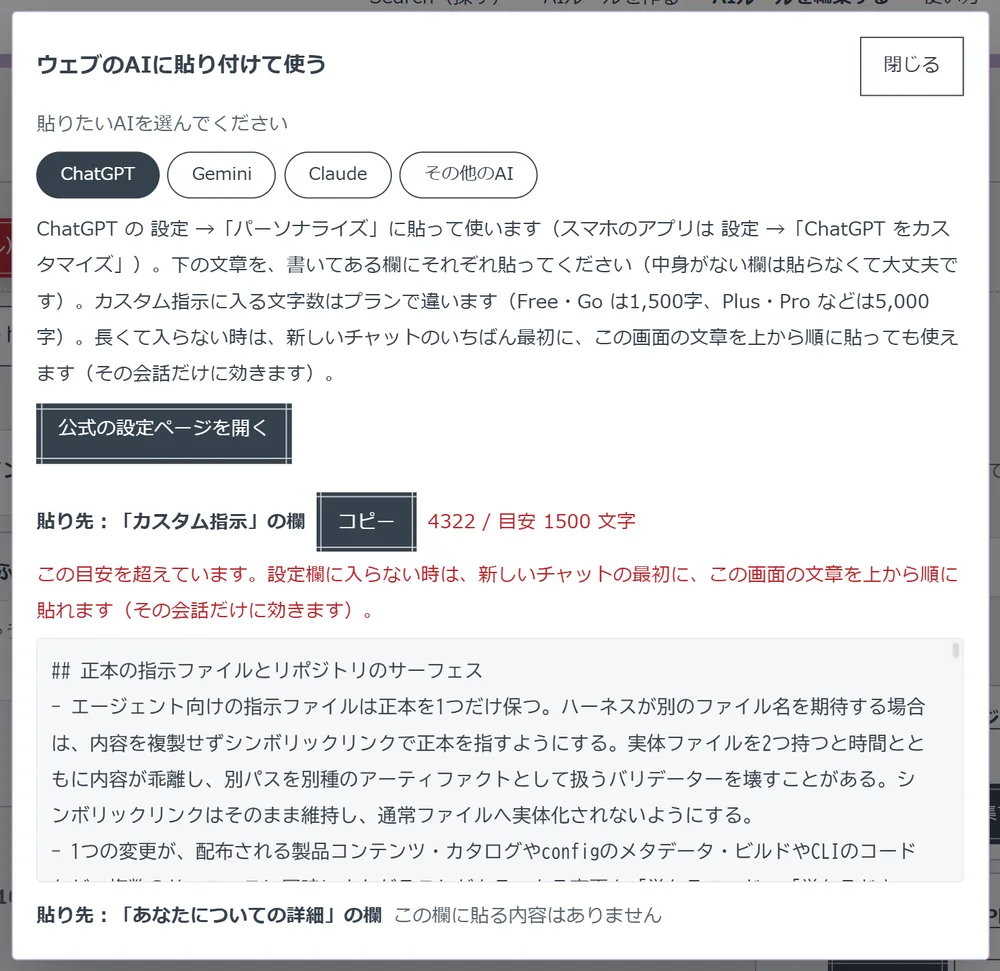
- Use it with your everyday AI For a chat AI, press "Use in web AI" and pick the AI; the text for each field and a copy button appear. For an AI agent, press "Download", choose the format, and put the file in the folder where you want the AI to work.
You can log in with an email address and password, a Google account or a GitHub account.
Your AI remembers the instructions, so you stop retyping them
KUKURI deals with the instructions an AI always follows. In chat AIs they go into settings such as ChatGPT's "Custom instructions" or Claude's "Instructions for Claude". In AI agents, the AI reads the CLAUDE.md, AGENTS.md or GEMINI.md placed in the working folder and follows it.
The official library is full of rules about how to get work done. The popular ranking on the top page includes, for example (as of November 2026):
- Respond to abusive or threatening customers without leaving staff alone
- Investigate using publicly available information (OSINT) without harming people
- Add features to an extensible Go service with tests that survive config overrides
- Write technical documents that mention commands and screen names, so they are easy to follow and translate
Beyond coding, there are rules for customer service, research and writing, so it is aimed at chat-AI users as well as engineers.
The screen tells you where to paste and what to name the file
Where to paste a rule and what to call the file differ from AI to AI. When you pick the AI you use, KUKURI shows where to paste and how.
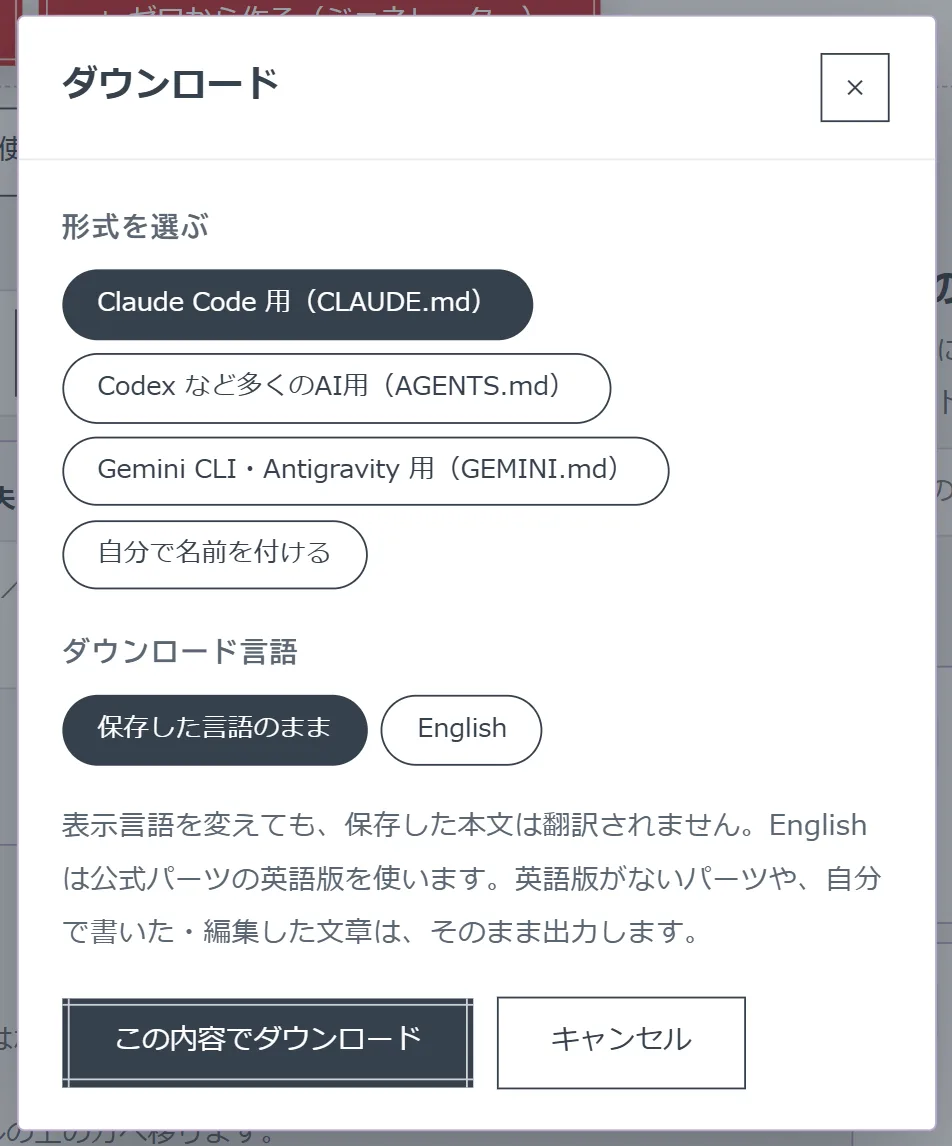
When downloading, you can choose "Native" (the saved language) or English. English uses the English versions of official parts; text you wrote or edited is not translated. The official guide also warns not to overwrite an existing file with the same name.
Features
01Find
Choose from official AI rules and parts.
- Search — keywords, plus filters for usage, token-saving and AI tags
- Rankings — popular AI rules and parts (all time and this month)
- AI rules and parts — an AI rule is a finished set you can use as it is; a part is a small instruction you add
02Create and adjust
Finish your own AI rule in the workspace.
- Create by answering questions — answer a few questions such as name, personality and way of speaking to get a draft (per the help page)
- Workspace — add, reorder and tune parts, and edit the text
- Conflict check — "Clashing" and "Heads-up" marks for instructions that are hard to follow together
- Import — upload your own Markdown file to see it split into parts, with an AI compatibility check (paid plans)
03Use
Hand it to chat AIs and AI agents alike.
- Use in web AI — text to paste into ChatGPT, Claude, Gemini and others, with where to paste it
- Download — CLAUDE.md, AGENTS.md, GEMINI.md, or a file name of your own
- Display languages — Japanese, English, Chinese, Spanish, German, Portuguese, French and Korean
Pricing
| Plan | Monthly | Yearly (per month) | Main contents |
|---|---|---|---|
| Free | $0 | $0 | 3 saved AI rules; 20 downloads and 20 AI consultations in total (no reset) |
| Starter | $7 | $5.75 ($69/year) | Unlimited AI rules you can create, 15 saved, 100 downloads/week, 100 AI consultations/week, upload your own AI rules with AI compatibility checks |
| Premium | $15 | $12.42 ($149/year) | Unlimited creation, 100 saved, practically unlimited downloads (high-volume protection limit of 100,000/week), 300 AI consultations/week, uploads and compatibility checks |
- Prices are in US dollars. Neither the pricing page nor the Specified Commercial Transactions Act notice says whether tax is included (it states there are no fees other than the listed price)
- On paid plans, downloads and AI consultations reset every week, counted from your registration date
- Payment is by credit card via Stripe. Plans renew automatically; after canceling you keep paid features until the end of the paid period. No prorated refunds
- If you cancel and return to Free, your saved AI rules are not deleted
(As of November 2026, per the official pricing page, help page and Terms of Service)
How your data is handled
According to the Terms of Service, AI rules and parts you create or edit are saved only in your own workspace and are not published to other users.
The AI features use an external AI provider (Anthropic as of November 2026). According to the Privacy Policy (updated November 5, 2026), what is sent to the provider includes the text you enter in "Ask the AI" (after masking strings that look like secrets) and the titles and text of parts the AI checks and categorizes. The help page also advises never to paste passwords or anything else that must stay private.
How it differs from other AI rule and agent tools
| Product | Type | Relationship to AI instructions |
|---|---|---|
| KUKURI | A library and editor for rules you give to AI | Choose and combine instructions, then hand them over as paste-ready text for chat AIs or as CLAUDE.md, AGENTS.md or GEMINI.md |
| Claude Code | Anthropic's AI coding agent | Reads CLAUDE.md in the folder and follows it |
| Codex | OpenAI's AI coding agent | Reads AGENTS.md |
| Antigravity | Google's agent-first development platform | Reads GEMINI.md |
| capsul | A CLI that narrows what Claude Code and Codex CLI receive | Passes the code excerpts a task needs, not instructions |
| Promptitude.io | A prompt management platform for teams | Develops and tests prompts and builds them into apps and workflows |
Details for the other products are as of the check dates stated on their product pages.
KUKURI is not an AI agent itself; it supplies the "how to behave" part to Claude Code, Codex, ChatGPT and Claude. It suits people who want to start from commonly used combinations of instructions rather than writing CLAUDE.md or AGENTS.md from scratch.
FAQ
Q. Can I use KUKURI for free? Yes. The Free plan lets you save up to 3 AI rules and use 20 downloads and 20 AI consultations in total. Free-plan counts do not reset; once they run out, you can only search and read official AI rules.
Q. Is it available in Japanese? Yes. The interface supports eight languages including Japanese and English. Switch from the language menu at the top before logging in, or from the settings page after logging in.
Q. Are the AI rules I create shown to other people? The Terms of Service say AI rules and parts you create or edit are saved only in your own workspace and are not published to other users.
Q. Which AIs can I use it with? For chat AIs, ChatGPT, Claude and Gemini, and others such as Muse by following the on-screen instructions. For AI agents, Claude Code (CLAUDE.md); Codex, Cursor, GitHub Copilot and others (AGENTS.md); and Antigravity and Gemini CLI (GEMINI.md).
Provider
KUKURI is provided by Spider Networks Inc. (株式会社スパイダーネットワークス). According to the Specified Commercial Transactions Act notice, the person responsible for operations is Takaya Tanoura, and the address and phone number are disclosed without delay upon request. The contact address is contact@kukuriagent.com.
The information on this page is based on what was published on the official website, pricing page, How to use page, help page, Terms of Service, Privacy Policy and Specified Commercial Transactions Act notice as of November 2026. Features and prices may change, so please check the official website for the latest information.