
Antigravity
: How to use it, features, and the business problems it solves
Add bookmark
What is Antigravity?
Google's agent-first development platform where AI agents autonomously plan, execute, and verify across editor, terminal, and browser. Now Generally Available as a family of Antigravity 2.0 (Agent Manager)/CLI/SDK/IDE. Choose Gemini 3.x, Claude 4.6, GPT-OSS, and more; free for individuals (macOS/Windows/Linux).
Business problems it solves









About "Antigravity"
What is Antigravity
Antigravity is Google's agent-first development platform, where AI agents autonomously plan, execute, and verify. Under the tagline "Experience liftoff with the next-gen agent platform," it differs from code-completion tools: agents drive development across the editor, terminal, and browser. It is now Generally Available (GA) and supports macOS, Windows, and Linux.
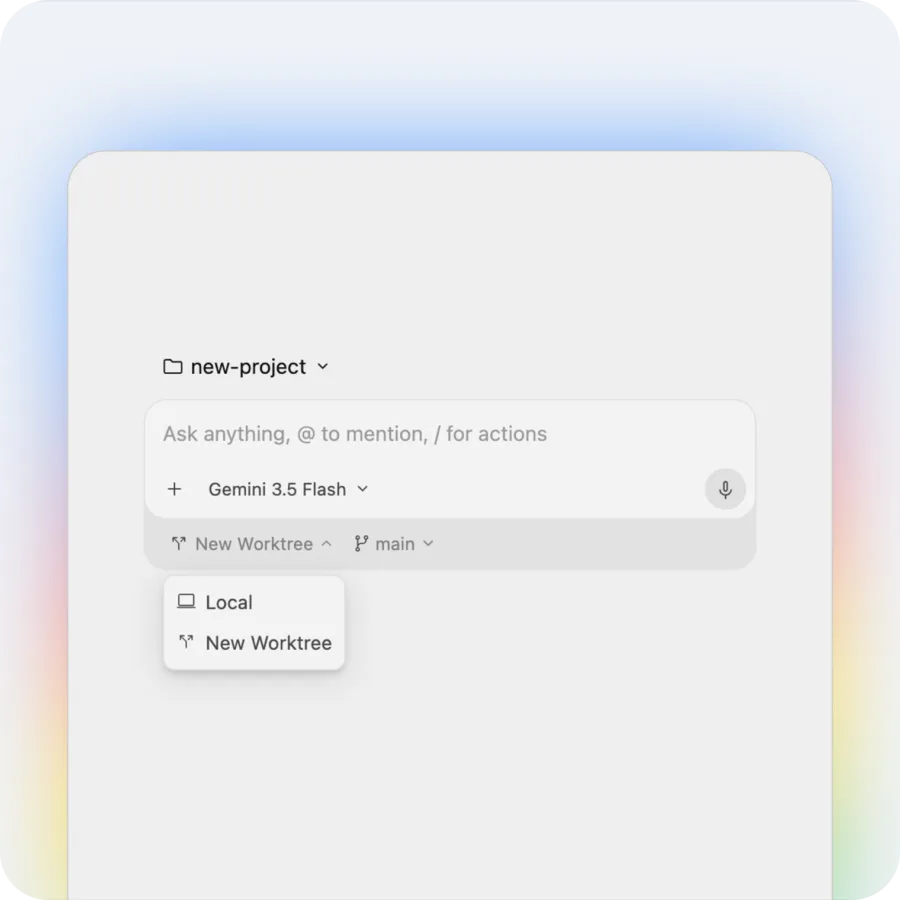
Antigravity's core is that you can manage multiple agents in parallel and delegate development. Assign work in the Agent Manager; agents run locally or in a new worktree, launch a browser to verify behavior, and let you check task lists, implementation plans, screenshots, and recordings as Artifacts.
Antigravity moved from public preview to Generally Available (GA), and has grown from a single IDE into a product family. It comprises "Antigravity 2.0" (the Agent Manager command center), a terminal-first CLI, a Python SDK for building agents, and a full IDE. You can select models — Gemini 3.1 Pro / 3.5–3.7 Flash, Claude Sonnet / Opus 4.6, GPT-OSS-120b — and it uses Nano Banana 2 for images (the old "Gemini 3" is updated).
How to use
Tell it what you want, and agents plan, execute, and verify.
Install
Download and launch the macOS / Windows / Linux build.
Instruct
Enter what you want, and pick a model and execution mode (Local/Worktree).
Agents execute
Agents autonomously plan, implement, and verify in the browser.
Verify via Artifacts
Check results via task lists, implementation plans, and recordings.
The individual plan is $0/month (no subscription), with unlimited tab completions/commands and weekly rate limits.
Key features
01Agent Manager (multiple agents)
A command center that manages multiple agents in parallel across workspaces. Projects define folder/repo boundaries, and you choose Local or New Worktree execution modes. It also supports Scheduled Tasks.
02Browser control & verification (Artifacts)
Agents launch localhost, verify behavior in Chrome, and leave Artifacts — task lists, implementation plans, walkthroughs, screenshots, and browser recordings. You can add Google-Docs-style comments to Artifacts.
03CLI, SDK & model choice
A terminal-first CLI and a Python SDK for prototyping custom agents. Choose the model (Gemini / Claude / GPT-OSS) from the prompt box (third-party models are available on Free/Pro/Ultra, not Enterprise).
Pricing
Individuals use it free (no subscription). Higher tiers relax rate limits, and the org plan is consumption-based via Google Cloud.
| Plan | Price | Highlights |
|---|---|---|
| Individual (Free) | $0 | Unlimited tab completions/commands / weekly rate limits |
| Google AI Pro | Bundled with AI Pro | Relaxed limits (refresh every 5 hours) |
| Google AI Ultra | Bundled with AI Ultra | Highest limits / third-party models |
| Organization | Consumption-based | Via Google Cloud, use 2.0/CLI org-wide |
Individuals stay at $0; higher tiers come bundled with Google AI Pro/Ultra subscriptions (Pro/Ultra limits refresh every 5 hours, with credits purchasable at Gemini Enterprise consumption rates). The org plan is consumption-based via Google Cloud. There's no BYO-key or legacy contract-based Enterprise tier yet. Prices change, so check the official pricing page for the latest (as of August 2026).
How it differs from other AI dev tools
Antigravity stands out by managing multiple agents in parallel and driving development autonomously — including browser verification and Artifact-based checks. That's a different experience from completion/chat-centric tools or single-agent tools.
| Aspect | Antigravity | Cursor | Windsurf |
|---|---|---|---|
| Focus | Multi-agent management + verification | AI editor (completion/agent) | Agentic IDE |
| Provider | Anysphere | (Windsurf) | |
| Models | Gemini/Claude/GPT-OSS selectable | Multiple models | Multiple models |
Alternatives to compare include the AI editor Cursor, agentic IDE Windsurf, and autonomous agent Devin. If you want to delegate development to multiple agents and run it through verification, Antigravity is a strong choice (individuals can start free).
Information on this page is based on the official website as of August 2026. Please check the official site for the latest specs and pricing.
Frequently compared services


Articles featuring Antigravity
Claude Fable 5 vs. GPT-5.5 vs. Gemini 3.1 Pro: Which Should You Choose? A Deep Dive into Performance, Pricing, and Use Cases [July 2026]
A thorough comparison of the latest flagship models from the industry's three leading AI labs, all released in the first half of 2026: Claude Fable 5, GPT-5.5, and Gemini 3.1 Pro. Covers benchmark performance, API pricing, context windows, multimodal support, and how to use them on consumer plans like ChatGPT Plus, Claude Pro, and Google AI Pro — with recommendations by use case, based primarily on official data.
![Claude Fable 5 vs. GPT-5.5 vs. Gemini 3.1 Pro: Which Should You Choose? A Deep Dive into Performance, Pricing, and Use Cases [July 2026]](/_next/image?url=%2Fimages%2Farticles%2Fai-model-compare-claude-fable-5-gpt-5-5-gemini-3-1.png&w=3840&q=75 "Claude Fable 5 vs. GPT-5.5 vs. Gemini 3.1 Pro: Which Should You Choose? A Deep Dive into Performance, Pricing, and Use Cases [July 2026]")
Top 4 AI Coding Tools Compared | Choosing Between Claude Code, Cursor, Codex, and Antigravity
A side-by-side comparison of the leading AI coding tools — Claude Code, Cursor, Codex, and Antigravity. Guides you to the right choice based on features, strengths, and ideal use cases.
[2026 Edition] 20 AI Tools Transforming Developer Workflows | Coding Assistance, Automated Code Review, No-Code Web Development, and Workflow Automation
A curated look at the best AI tools for developers in 2026. Covers 18 tools across coding assistance, automated code review, no-code development, and workflow automation — all aimed at improving productivity.
![[2026 Edition] 20 AI Tools Transforming Developer Workflows | Coding Assistance, Automated Code Review, No-Code Web Development, and Workflow Automation](/_next/image?url=%2Fimages%2Farticles%2Fdeveloper-ai-programming-tools.png&w=3840&q=75 "[2026 Edition] 20 AI Tools Transforming Developer Workflows | Coding Assistance, Automated Code Review, No-Code Web Development, and Workflow Automation")