LINE WORKS AiNote
: How to use it, features, and the business problems it solves
Add bookmark
What is LINE WORKS AiNote?
An AI meeting-minutes and transcription tool from LINE WORKS Corp. Record in-person meetings with the app, or let a bot join Zoom, Teams, Google Meet, Webex and LINE WORKS meetings, then get transcripts with speaker separation and AI summaries built from templates. It is the official successor to "CLOVA Note β". Free plan available; Solo from ¥1,440/month and Team from ¥19,800/month (annual contract, excl. tax).
Business problems it solves


About "LINE WORKS AiNote"
What is LINE WORKS AiNote?
LINE WORKS AiNote is an AI meeting-minutes and transcription tool from LINE WORKS Corp., the company behind the business chat app "LINE WORKS". In a single service, it transcribes meeting audio, tells speakers apart, summarizes the discussion with a template that matches the meeting's purpose, and shares the result with colleagues via a link.
It started as "CLOVA Note β", a free service for individuals. After its registered users passed one million, the official version was launched as LINE WORKS AiNote in November 2024. On February 4, 2025, CLOVA Note β restricted features such as creating notes and switched to a data-migration service into AiNote (the service ended at the end of July 2025).
The official site highlights three strengths: speed—about one minute to transcribe a one-hour meeting, speaker diarization technology that placed third in the world in an international competition, and a low price made possible by in-house development. The paid version was adopted by more than 2,900 companies within one year of launch (announced in May 2026).
Your recorded meeting comes back as text, split by speaker
At its core, AiNote turns a recorded meeting into a transcript separated by speaker. Each utterance carries the speaker's name and a timestamp, and the transcript view also shows each participant's share of the conversation and the main keywords.
According to the official site, the technology that separates speakers (speaker diarization) placed third in the world at the international competition "DIHARD3" (2021).
On the business plans, automatic speaker identification is also available: AI determines who is speaking during the recording. It covers members of your organization who have registered their voice. External participants cannot register voice information for privacy reasons, so they are not identified automatically.
Registering company names, product names and jargon as frequently used words makes them easier to recognize. Each member can register up to 1,000 words per language, and administrators can register up to 1,000 words per language for the whole tenant.
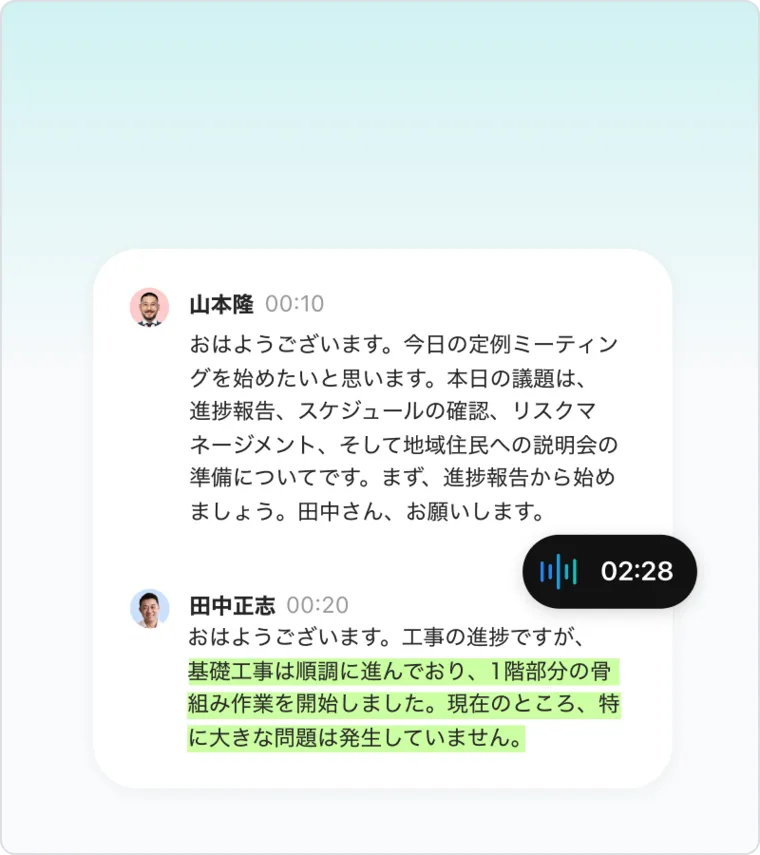
Source: LINE WORKS AiNote official website (the same applies to the screen images below)
Set a summary format for each type of meeting
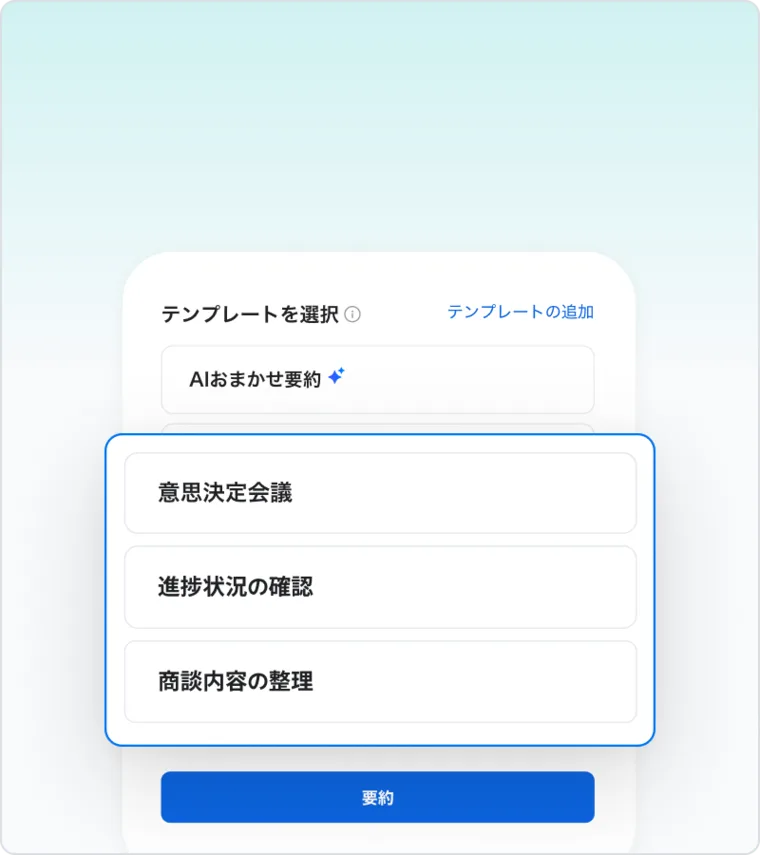
For AI summaries, you either pick a purpose-specific template or create a custom template with the headings you need. The official screenshot shows templates such as "Decision-making meeting", "Progress check" and "Sales meeting notes".
The official explanation is that by keeping the same template, the key points are recorded in the same structure even when the person taking minutes changes. This suits meetings where you check the same items every time—regular meetings, sales meetings, committees and so on.
AI summaries have a monthly limit: 12 on Solo, 120 on Team, 360 on Business and 1,200 on Enterprise. They are not available on the Free plan.
Find past meetings by what was said
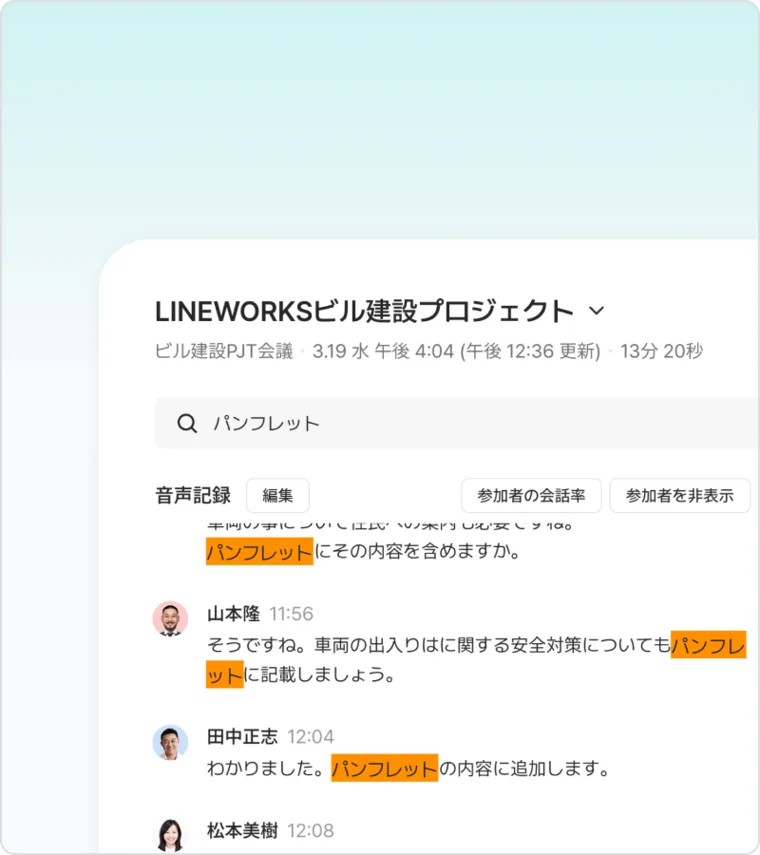
Notes can be shared with stakeholders via a link and work together with LINE WORKS. Because your accumulated notes are searchable by what was said, you can check "how did we decide that last time?" without reopening old minutes.
The screen on the right shows a search for "pamphlet"; matching utterances are listed with the word highlighted.
You can add bookmarks, memos and highlights to notes, and create notes by importing calendar events (according to the user guide in the Help Center).
Features
01Record
Works for both in-person and online meetings, and can transcribe a meeting even when in-person and online participants are mixed.
- Recording — Record with the smartphone app (iOS, Android) or a browser. Up to two mobile devices per account
- Web meeting recording — Enter the meeting URL and the AiNote bot joins Zoom, Microsoft Teams, Webex, Google Meet or LINE WORKS meetings to record (Solo and above; not available on the Free plan)
- Create notes from audio — Import recordings (.m4a, .mp3, .aac, .amr, .wav) to create a note
- Transcription length per session — Up to 60 minutes on Free, 180 minutes on Solo and 360 minutes on the business plans
02Transcribe and summarize
- Transcription and speaker diarization — Transcripts separated by speaker
- Automatic speaker identification — AI identifies organization members who registered their voice (business plans only)
- AI summary — Purpose-specific and custom templates; the summary language can also be set
- Frequently used words — Register jargon and proper nouns to aid recognition
- Target language — Choose from Japanese, English, Korean, Chinese (Simplified/Traditional). Meetings that mix several languages are not supported (as of October 2026)
03Share and connect
- Note sharing — Copy or share a link to distribute notes
- LINE WORKS integration — Used within the same LINE WORKS service environment
- API — Connect minutes data to your own systems (Team plan and above; development and setup are done by the customer)
04Manage and protect
- Administration — Member and organization management, searching and deleting notes, restricting recording/editing/sharing, usage statistics (by member and organization), audit logs
- Security — Single sign-on (SSO), two-step verification, network management, mobile app restrictions (screenshot control, upload/download limits, etc.)
- Certifications — ISO/IEC 27001, 27017, 27018, 27701, SOC2/SOC3
- Use of data for training — On paid plans, recordings are not used to train AI. On the Free plan they may be used
How to use
- Set up a LINE WORKS service environment Installing the app alone is not enough to start. Even for individual use, you need to open a LINE WORKS platform account and subscribe to AiNote in the admin console. The Free plan can be set up from a form on a PC, or from "Create service environment" in the smartphone app. For the business plans, apply via the free-trial or application form; after exchanging an application form, the environment is provided within five business days.
- Set frequently used words and the target language Register your company names, product names and industry terms as "frequently used words", and choose the meeting language under "target language". To use automatic speaker identification on a business plan, register members' voice information as well.
- Record the meeting Record in-person meetings with the smartphone app or a browser. For online meetings, enter the meeting URL in "Web meeting recording" and let the bot join. You can also import an existing recording.
- Review the transcript and summarize When transcription is done, check the speakers and content and edit as needed. Then choose a template that fits the meeting and create an AI summary.
- Share Share the note's link with stakeholders. On the Team plan and above, you can also send minutes data to internal systems via the API.
Web meeting recording works in conjunction with services such as Zoom, so "temporarily unavailable" may be displayed while AiNote adapts to changes on their side. During such periods, the Help Center suggests placing a smartphone near the speaker and recording with the app.
Pricing
Prices on the official site as of October 16, 2026. All prices exclude tax. There are monthly equivalents for annual contracts and prices for monthly contracts.
Business plans (unlimited users; transcription time and AI summaries are shared by all members of the service environment)
| Plan | Annual contract (per month) | Monthly contract | Transcription time / month | AI summaries / month | Data retention |
|---|---|---|---|---|---|
| Team | ¥19,800 | ¥22,000 | 6,000 min (100 h) | 120 | 5 years |
| Business | ¥54,000 | ¥60,000 | 18,000 min (300 h) | 360 | 5 years |
| Enterprise | ¥162,000 | ¥180,000 | 60,000 min (1,000 h) | 1,200 | 5 years |
All business plans include automatic speaker identification, web meeting recording and the API, and recordings are not used for training. On the Team plan and above, a dedicated customer success team supports you from initial rollout to advanced use. The Enterprise plan can only be contracted through a partner or with invoice payment.
Plans for individuals and small groups
| Plan | Annual contract (per month) | Monthly contract | Transcription time / month | AI summaries / month | Web meeting recording | Users | Data used for training | Retention |
|---|---|---|---|---|---|---|---|---|
| Free | ¥0 | ¥0 | 300 min | None | No | Up to 30 | Yes | 1 year |
| Solo | ¥1,440 | ¥1,600 | 600 min | 12 | Yes | 1 (or a small group) | No | 3 years |
Add-on (100 minutes of transcription + 2 AI summaries; available on Solo and business plans)
| Purchase type | Price (excl. tax) |
|---|---|
| Added monthly (annual contract; cancel yearly) | ¥360/month |
| Added monthly (monthly contract; cancel monthly) | ¥400/month |
| Single month (only when needed) | ¥440/month |
- Annual contracts are cheaper than monthly ones, but cancelling mid-term requires settling the fees for the remaining months until the end date.
- The free trial for business plans lasts 30 days. It is not available if you already use the Free plan or have had a trial before.
- Paid plans include email support for administrators (responses on weekdays 9:00–18:00 JST, accepted 24 hours).
Track record and reputation
The paid version was adopted by more than 2,900 companies within one year of launch (announced May 21, 2026). The same announcement reported that AiNote placed third in the Rookie of the Year category of "ITreview Best Software in Japan 2026", a category for products released in 2024 or later that received many highly positive user reviews.
On the Japanese App Store, the app "LINE WORKS AiNote - 文字起こし・議事録" is rated 4.5 out of 5 (4,833 ratings, as of October 16, 2026).
The official site presents three case studies from different industries.
01Healthcare: minutes in about one-third of the time
At Hakodate Goryokaku Hospital (社会福祉法人 函館厚生院 函館五稜郭病院) in Hakodate, Hokkaido, important meetings had to be recorded accurately, and minutes for a one-hour meeting sometimes took more than 15 hours to finish. The hospital reports that AiNote cut the time, which had been up to 15–16 hours, to about one-third.
02Building maintenance: chosen after comparing five tools
Harima Bistem (株式会社ハリマビステム) compared and tested five AI minutes tools for usability, processing speed, cost and security, and chose AiNote for its transcription speed and its operating environment with single sign-on (SSO).
03Car dealership: toward "meetings focused on discussion"
The case of Mie Toyopet (三重トヨペット株式会社) is presented as an effort that greatly reduced the burden of taking minutes, turning "internal meetings spent chasing the record" into "meetings focused on discussion".
Pros and cons
Pros
- Choose how to record according to the meeting: the app for in-person meetings, the bot for online meetings
- Besides speaker diarization, business plans can automatically identify who is speaking
- Create summary templates for each type of meeting to keep minutes consistent
- Business plans have unlimited users, with transcription time shared across the organization
- Items that IT departments want to verify—SSO, audit logs, ISO/IEC 27001, SOC2, etc.—are publicly listed
- Recordings are not used for AI training on paid plans
- Test the accuracy on the free Free plan
Cons
- Even individuals must set up a LINE WORKS service environment; you cannot start right after installing the app
- The Free plan lacks AI summaries and web meeting recording, and recordings may be used for training
- Meetings mixing several languages are not supported (as of October 2026)
- Only four languages (five variants) are supported: Japanese, English, Korean and Chinese
- The cheapest business plan starts at ¥19,800/month (annual contract, excl. tax), which can be expensive for a few users
- Web meeting recording may be temporarily unavailable due to changes in the connected meeting services
LINE WORKS AiNote vs. other AI meeting-minutes tools
| Product | Key features | Best for |
|---|---|---|
| LINE WORKS AiNote | LINE WORKS's minutes tool: automatic speaker identification, summary templates, business plans with unlimited users | Standardizing minutes across a department or company; teams already using LINE WORKS |
| Notta | Transcription and minutes service strong in Japanese, with web meeting integration and file import | Individuals or teams who want to start transcribing meetings and interviews easily |
| Rimo Voice | Japanese-focused AI minutes service from Japan, from bot recording to summaries | Teams editing and sharing Japanese meetings and interviews together |
| Sumarii | Specialized in spoken Japanese; lists low-confidence words for review | Efficiently correcting transcription errors |
| PLAUD | Dedicated AI voice recorders plus an app for transcription and summaries | Recording in-person conversations or calls on a device separate from your phone |
If you want an organization-wide rollout that meets admin and security requirements, AiNote is a candidate; for a quick start as an individual or small team, consider Notta or Rimo Voice; to reduce correction work, consider Sumarii.
FAQ
Q. Is LINE WORKS AiNote free? Yes. The Free plan costs ¥0, includes up to 300 minutes of transcription per month and can be used by up to 30 people. However, AI summaries and web meeting recording are not available, each transcription is limited to 60 minutes, and recordings may be used for AI training.
Q. Can I use it without a LINE WORKS subscription? Yes. However, even for individual use you must open a LINE WORKS platform account and subscribe to AiNote in its admin console. If you already use a LINE WORKS family product, you can start a trial or apply from the admin console.
Q. How is it different from CLOVA Note? LINE WORKS AiNote is the official version of "CLOVA Note β". CLOVA Note β restricted features such as creating notes on February 4, 2025 and ended at the end of July 2025. A data-migration service into AiNote was provided.
Q. Can it record Zoom or Teams meetings? Yes. With "Web meeting recording", the AiNote bot joins Zoom, Microsoft Teams, Webex, Google Meet and LINE WORKS meetings to record them. This feature is available on the Solo plan and above, not on the Free plan.
Q. Does it work for English or Chinese meetings? It supports Japanese, English, Korean and Chinese (Simplified and Traditional). You choose the "target language" for each meeting. As of October 2026, meetings that mix multiple languages are not supported.
The information on this page is based on what was published on the LINE WORKS AiNote official website, Help Center and press releases as of October 2026. Features and prices may change; please check the official website for the latest information.