
Marubatsu AI
: How to use it, features, and the business problems it solves
What is Marubatsu AI?
Marubatsu AI is a web test platform for schools, cram schools and training, run by Lanespire Inc. (株式会社レーンスパイア) in Ginza, Tokyo. You create tests, share them by URL and have web answers graded and tallied automatically. It also offers AI question generation (specify the unit, difficulty and number of questions and the AI drafts questions, answers and explanations), OCR/OMR grading of paper answer sheets printed with QR codes, and an MCP connection. Pricing: Free plan ¥0 (6 AI generations a month), Plus ¥9,800 a year (¥980 monthly), Pro ¥29,760 a year per member (¥2,980 monthly), Enterprise on request (tax included, as of November 2026).
Business problems it solves


About "Marubatsu AI"
What is Marubatsu AI?
Marubatsu AI is a web test platform that handles everything from creating a test to distributing, grading and tallying it in one place. It is run by Lanespire Inc. (株式会社レーンスパイア) in Ginza, Tokyo, a company whose business is AI adoption support, business automation and web/SaaS development.
According to the official site, the core of Marubatsu AI is handling "fast question creation, the immediacy of web tests and the reality of paper-based testing in the same workflow." It combines four things:
- Test creation and URL distribution — share a test by URL and have students answer straight from a phone or PC
- Automatic grading and analysis — web answers are graded automatically, and per-class accuracy, submission status and items awaiting grading are gathered on one screen
- AI question generation — specify the unit, difficulty and number of questions and the AI drafts questions together with correct answers and explanations (up to 20 questions per run)
- OCR / OMR grading of paper answer sheets — print answer sheets with QR codes, upload the scanned images and move from reading to grading
The interface, help center and tutorial videos are in Japanese (the videos have Japanese audio and subtitles). You can start on the free plan; paid plans start with Plus at ¥9,800 a year (¥980 a month if paid monthly), tax included.

Source: Marubatsu AI official site (same for the images below)
How to use it
The basic flow, based on the official help videos and FAQ:
- Sign up for free Click "無料で始める" (Start for free) on the top page and register with an email address and password, or with a Google or GitHub account. Registration is free and no credit card is required.
- Create a test From "新しいテストを作成" (Create a new test) on the dashboard, choose a test type (simple test, exam, survey, etc.), enter a title and description, and add questions. To draft with AI, use "質問を生成" (Generate questions) in the AI features: choose the topic, question type, difficulty, number of questions and language, and describe the learners' level or content to avoid in the additional instructions.
- Review the AI drafts and add them Read the generated question text, choices, answers and explanations, and add only those that fit your learning goals. The official help says AI-generated questions should not be published as-is but checked by the person setting the test first.
- Distribute by URL (or on paper) Share quizzes and homework by URL so students can answer from a phone or PC. For paper tests, print and hand out the answer-sheet PDF with QR codes.
- Grade and review results Web answers are graded automatically on submission. For paper answer sheets, upload images from "答案取込" (Import answer sheets); after answer-field detection and OCR processing, compare the original image with the reading result before confirming the score. Results are shown in the test's "分析" (Analysis) tab.
Grade and tally paper sheets and web answers on the same screen
Schools and cram schools can't move every test online — term exams and mock exams are often still on paper. Marubatsu AI's distinguishing point is that it grades and tallies web answers and paper answer sheets on the same screen.
01Reading paper answer sheets (Plus and above)
- Answer sheets with QR codes — the QR markers on the printed sheet locate the answer fields; fields that are not detected can be adjusted by hand
- OCR / OMR — reads written answers and marks from scanned images
- Confirmed by a person — the original image and the reading result are shown side by side, and you check that blank fields were not read as answers before confirming the score
02Analyzing results
- Per class — accuracy, submission status and items awaiting grading on one screen
- Weak questions and score trends — available on Plus and above
- Export — test data and results can be exported as CSV or Excel (Plus and above)
According to the official FAQ, scores for written answers are not shown to test takers until the teacher confirms the AI's provisional grading (Plus and above). Questions without grading criteria are not graded by AI; you enter and confirm the score by hand. Entering and confirming scores by hand is possible on every plan.
Features
01Creating tests
- Question types — the free plan offers true/false (○×), single choice and multiple choice. Plus adds written answers, and Pro adds numeric input, fill-in-the-blank, matching, ordering and diagram questions
- AI question generation — drafts questions, answers and explanations, and you add only the ones you choose. There is also "AI品質改善" (AI quality improvement), which analyzes existing questions and suggests improvements
- Question bank, formulas and images — add from a question bank, mix formulas and images in questions, and embed images and video (Plus and above)
02Distribution and delivery
- URL distribution — anyone who opens an active test URL can take the test without registering. By default, it asks for neither name nor email
- Test settings — change the time limit, passing score, test-taker information to collect and publishing conditions in the "設定" (Settings) tab. Password protection requires Plus or above
- Publishing results — to show scores and pass/fail on students' screens, close submissions, mark grading as complete and click "結果を公開" (Publish results)
03Teams and integrations
- Team use — up to 20 members on Pro and unlimited on Enterprise, with separate admin, editor and viewer roles
- Custom subdomain — your own subdomain such as "○○.marubatsu.com" (Pro)
- MCP connection — available on every plan since September 5, 2026. With an API key issued in the settings, MCP clients such as Claude Code and Codex CLI can create and update tests, questions, answers and hints, and work with responses and analysis at the team level
04Free test maker and printing tool, no sign-up
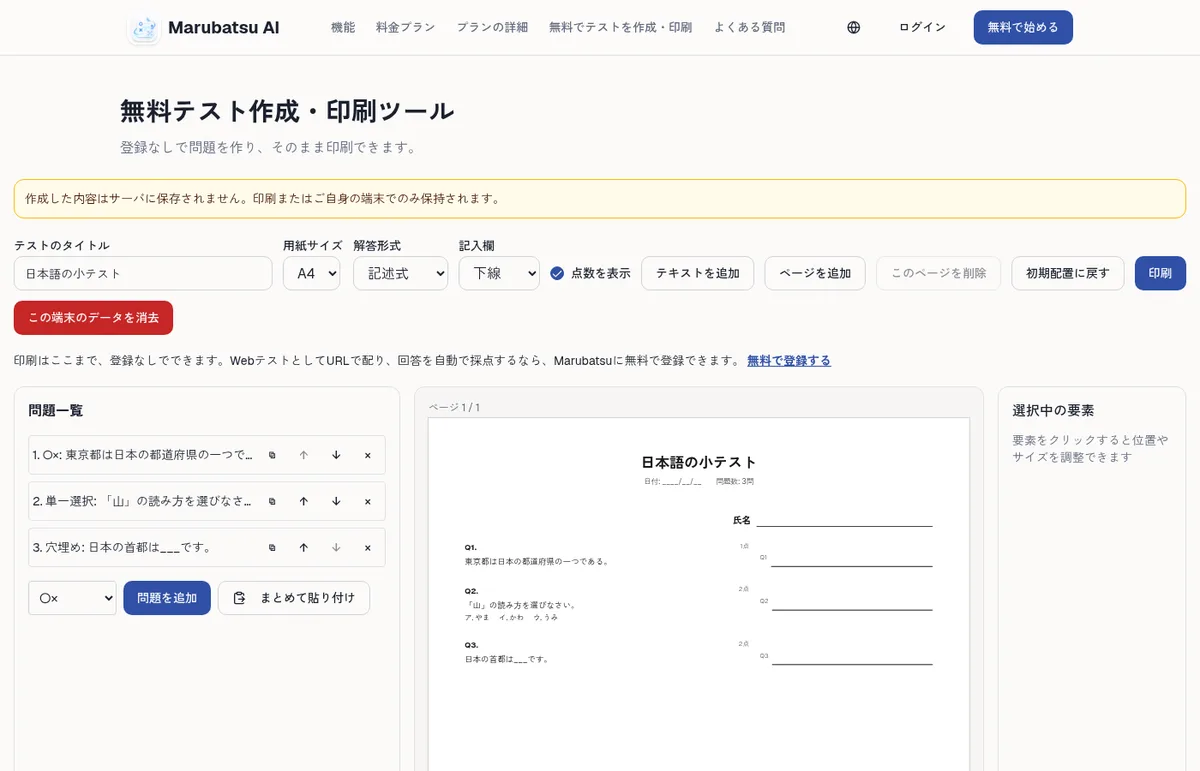
The Marubatsu AI site also has a free "無料テスト作成・印刷ツール" (test maker and printing tool) that works without registering. You can create up to 20 true/false, single-choice, multiple-choice, written and fill-in-the-blank questions at a time, arrange them on the sheet and print in A4, A3, B4 or B5. Nothing is saved on the server; the content exists only on paper or on your own device.
Pricing
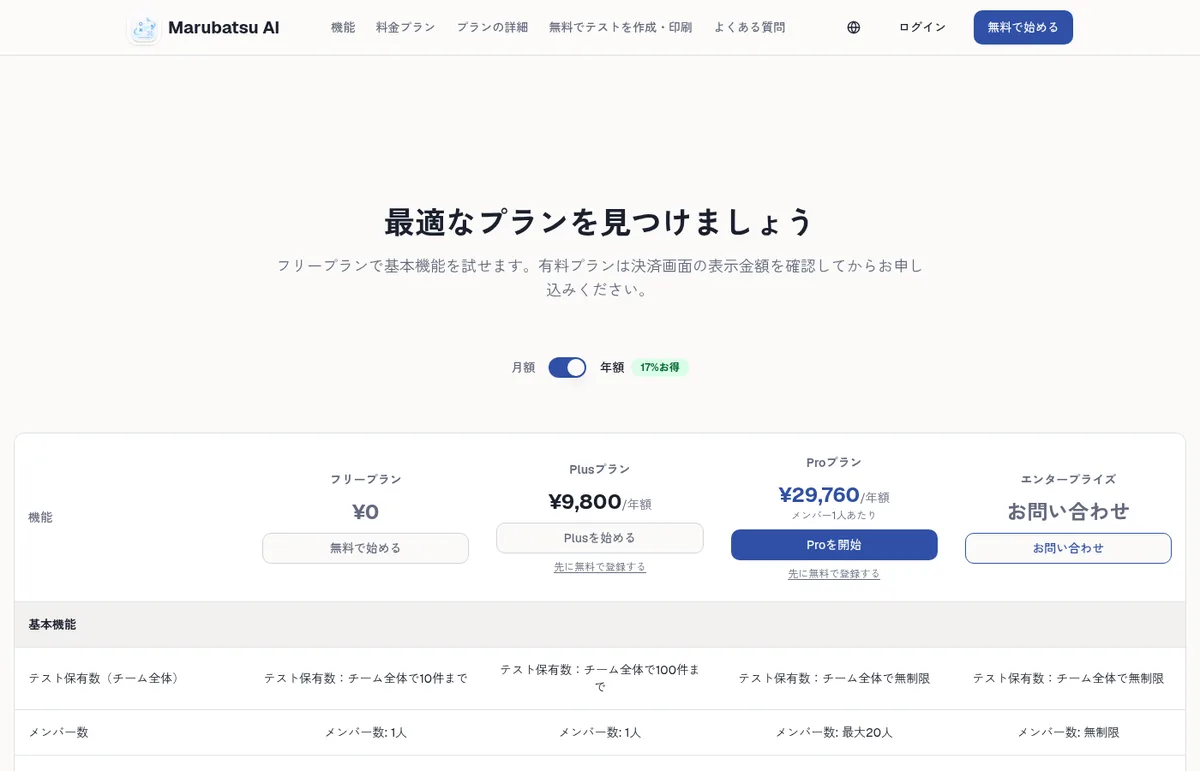
There are four plans: Free, Plus, Pro and Enterprise. All prices include consumption tax, and Plus and Pro can be paid yearly or monthly (yearly is labeled "17% off"). As of November 2026, based on the official pricing page and the notation under the Specified Commercial Transactions Act.
| Plan | Yearly (tax incl.) | Monthly (tax incl.) | Tests stored | Members | AI generation | OCR grading |
|---|---|---|---|---|---|---|
| Free | ¥0 | ¥0 | Up to 10 | 1 | 6/month | Not available |
| Plus | ¥9,800 | ¥980 | Up to 100 | 1 | 20/month | 50 sheets/month |
| Pro | ¥29,760 per member | ¥2,980 per member | Unlimited | Up to 20 | 200/month | 500 sheets/month |
| Enterprise | Contact | Contact | Unlimited | Unlimited | Unlimited | Unlimited |
- Payment — credit card (VISA, Mastercard, American Express, JCB; processed by Stripe). Bank transfer is not available for online sign-ups; contact them for individual contracts
- Renewal — monthly plans are charged every month and yearly plans every year on the renewal date
- Free trial — there is no free trial of paid plans. You can try the basic features on the free plan with no time limit
- Cancellation — from the dashboard, "設定" (Settings) → "プラン管理" (Plan management) → "プランをキャンセル" (Cancel plan). You can keep using it until the end of the paid period
- Refunds — due to the nature of digital services, refunds are not accepted after payment
How it differs from other test, learning and OCR tools
Marubatsu AI is a tool for teachers to run tests end to end — create, distribute, grade and tally. Its role differs from AI learning materials that adapt to each student or OCR tools that only read text.
| Tool | Main role | Price guide | Difference |
|---|---|---|---|
| Marubatsu AI | Test creation, URL distribution, auto grading and tallying, AI question generation, OCR/OMR grading of paper sheets | Free ¥0; Plus from ¥9,800/year (tax incl.) | Teachers create and distribute tests, and grade web and paper answers on the same screen |
| atama+ | AI learning material for cram schools | Not disclosed (included in cram school fees) | AI diagnoses where each student stumbles and builds what to study |
| RemoveHandwriting | Removes only handwriting from images and PDFs | 3 free credits on sign-up; paid from $3.9/month | Restores marked-up worksheets to blank. Does not grade |
| SmartRead | Enterprise AI-OCR (print and handwriting) | Cloud from ¥360,000/year (excl. tax) | Reads and digitizes documents in general. No test creation or grading |
| Deckbase | AI flashcards (spaced repetition) | Free plan; paid from $5.99/month | A review tool learners use themselves, not a test teachers distribute |
Other products' details are as of the dates noted on their product pages.
Who it suits and who it doesn't
Company
| Item | Details |
|---|---|
| Seller | 株式会社レーンスパイア (shown as 株式会社Lanespire / Lanespire Inc. on the company site) |
| Representative | 高橋 元希 (head of operations) |
| Address | N&E BLD. 6F, 1-12-4 Ginza, Chuo-ku, Tokyo |
| Business | AI adoption support and business automation, web production and SaaS development, etc. (per the company site) |
| Contact | support@marubatsu.com (weekdays 10:00–19:00 JST) |
Source: Notation under the Specified Commercial Transactions Act, Lanespire Inc.
FAQ
Q. Can I use Marubatsu AI for free? Yes. The free plan costs ¥0 and allows up to 10 tests, 20 questions per test and 100 responses a month. AI question generation can be used up to 6 times a month, but OCR grading of paper answer sheets is not available on the free plan.
Q. Can I hand out AI-generated questions as they are? The official help says AI-generated questions should not be published as-is but checked by the person setting the test first. Read the generated questions, choices, answers and explanations, and add only the ones that fit your learning goals.
Q. Can it grade paper tests? Yes (Plus and above). Print answer sheets with QR codes, run the test, and upload the scanned images to have them read by OCR/OMR. You confirm the score after checking the original image against the reading result.
Q. Do students need an account to take a test? No. Anyone who opens an active test URL can take it. By default, it asks for neither name nor email.
Q. Is there a free trial of the paid plans? No. You can try the basic features on the free plan with no time limit. Refunds are not accepted after payment, so the site recommends checking on the free plan before signing up.
Q. Can I operate tests from AI tools such as Claude Code? An MCP connection is available on every plan. Issue an API key in the settings and register it in an MCP client such as Claude Code or Codex CLI to create and update tests and questions and work with responses and analysis at the team level.
The information on this page is based on what was published on the official site as of November 2026. Please check the official site for the latest specifications and pricing.