

CopySlides
: How to use it, features, and the business problems it solves
Add bookmark
What is CopySlides?
CopySlides is a web service from AxisLab, a company established in Hong Kong SAR, that converts slides trapped in images, PDFs, and videos into editable PowerPoint (PPTX) files. There are three routes in: a Chrome extension that runs inside NotebookLM, an upload route for exported PDFs, and a route that extracts slides from a recorded video. Microsoft Azure AI Vision handles the text recognition, and an AI model rebuilds the layout as text boxes, tables, and shapes. It can also turn an image into a layered PSD. Pricing is Starter at $9/month (200 slides), Plus at $19/month (600 slides), and a one-time Lifetime plan at $149, with 3 free credits on registration. The interface is English only.
Business problems it solves


About "CopySlides"
What CopySlides is
CopySlides is a web service operated by AxisLab, a company established in Hong Kong SAR, that converts slides trapped in images, PDFs, and videos into editable PowerPoint (PPTX) files. The official terms describe the scope as "slide screenshots, PDF documents, NotebookLM presentations, and videos." Recognised text is rebuilt as text boxes, tables as tables, and arrows, rectangles, and other shapes as shapes, producing a .pptx that opens directly in PowerPoint or Google Slides.
There are three ways to bring a document in: a Chrome extension that runs inside NotebookLM (now Gemini Notebook), an upload route for exported PDFs, and a route that pulls slides out of a recorded video. On top of that, it can turn an image into a layered PSD. Usage runs on credits, and registering an account grants 3 free credits (as displayed in the workspace as of September 2026).
Chrome extension, PDF, video
Shown in the workspace, September 2026
Starter, 200 slides per month
Stated in the privacy policy
A file you were handed can't be edited one line at a time
Decks made with generative AI, and decks inherited from a predecessor, often survive only as a PDF, an image, or a recording. When all you want is to keep the content and swap the company name and the date, that format leaves you no way in. CopySlides addresses exactly this last step.
While it is still a PDF, image, or video
- Changing one line means rebuilding it in PowerPoint or regenerating it in the original tool
- Text exported as an image cannot be selected, replaced, or translated
- Applying your own logo and brand colours afterwards is awkward
After converting to PPTX with CopySlides
- Text arrives as text boxes you can click and rewrite
- Tables come back as native table objects, and arrows, rectangles, and callouts as editable shapes
- You can continue in PowerPoint, Google Slides, or Keynote
The company is equally explicit that conversion is automated. The terms state that a converted file is not promised to match the original exactly and that every result should be reviewed before you rely on it, and the FAQ notes that complex layouts can occasionally be misread.
Which of the three routes to use depends on what you already have
The official NotebookLM page sets out the choice plainly: use the extension while you are still inside NotebookLM, and use the PDF or video routes only when the exported asset is already what you have.
01Chrome extension (finish inside NotebookLM)
The route the company presents as primary. You never leave notebooklm.google.com.
- Pick slides in a side panel — the extension detects NotebookLM resources, stages them in a side panel, and lets you keep only the slides you want
- PPTX on the spot — the selected slides are uploaded, rebuilt as editable PowerPoint objects, and returned as a .pptx
- Chrome Web Store status — version 1.0.1, last updated 14 March 2026, 508 users, 623 KiB, listed language English (United States) only (checked 23 September 2026)
02PDF upload (start from the exported file)
Not limited to NotebookLM; any document that exists as a PDF qualifies.
- No page limit — one page becomes one slide. The official guide suggests splitting very long documents to speed up processing
- Scanned PDFs too — handled via OCR; the company recommends scans of at least 300 DPI
- No password-protected PDFs — encrypted files cannot be processed, so the protection has to be removed first
03Video (extract slides from a recording)
For webinar recordings and decks that were exported as video.
- Transition detection — rather than sampling frames at fixed intervals, it detects where the slide changes and extracts only the distinct slides
- Avoids mid-animation frames — it captures the final state after a transition finishes, so partial states do not slip in
- Length limits — in the official FAQ's wording, "Basic plans support videos up to 30 minutes. Pro and LTD plans support videos up to 2 hours." MP4, WebM, and MOV are among the supported formats
Erase the text, repaint the background, rebuild the layout
CopySlides has two pipelines: a Basic pipeline and a Pro pipeline. The terms describe Pro as using cloud optical character recognition and AI models to rebuild slide layouts, and Basic as reconstructing slides without an AI model.
Turn pages into images
Rendering PDF pages into images happens locally in the browser; the result is then sent to object storage for conversion
Read the text
Microsoft Azure AI Vision handles character recognition. Further document-recognition services are also used to improve accuracy on complex layouts
Classify and rebuild
Headings versus body text, multi-column layouts, tables and images are distinguished. Requests to the model that rebuilds the layout are routed through OpenRouter
Remove text, restore background
The Basic pipeline erases existing text from the slide, inpaints (restores) the background, and places the original text back as editable PowerPoint text boxes
Write out the PPTX
The rebuilt layout is converted to .pptx with pptxgenjs, producing editable PowerPoint elements rather than a slide with an image pasted on it
Combines the five stages described in the official guide (OCR, layout analysis, element classification, slide generation, PPTX export) with the providers named in the privacy policy
The company draws a clear line around what runs on your own machine. The privacy policy states that conversion on the website is not a purely local process in either mode, and that only the Basic mode of the desktop application runs its pipeline entirely on your own machine. On the web, rendering PDF pages and, in Basic mode, assembling the final PowerPoint file happen in the browser, but images are uploaded so that text can be detected and removed and the layout rebuilt.
The desktop app is distributed as v1.0.0 for macOS (Apple Silicon and Intel) and Windows (x64), requiring macOS 12 (Monterey) or later or Windows 10 (64-bit) or later. Per the official FAQ, the desktop app is currently available only to Lifetime Plan users. Its local Basic pipeline is unlimited and consumes no credits. The Pro pipeline is not yet available offline and can be used only through the online workspace.
Conversion is automated. The company states that fonts without an exact match are replaced with the closest alternative, that complex layouts are occasionally misread, and that numbers in tables with merged cells should be double-checked. The design assumes a review pass after export.
How to use it
-
Decide which route fits
If NotebookLM is still open, use the Chrome extension; if you already have a PDF or image, use the web workspace; if only a recording survives, use the video route. The Chrome extension is installed from the Chrome Web Store.
-
Try it with the 3 free credits
The workspace opens without signing in, but converting requires an account. Signing in grants 3 free credits. Credits are only deducted for successful conversions; failed ones cost nothing.
-
Upload the file
Drag or select an image (JPG, PNG, WebP and others), a PDF, or a video (MP4, WebM, MOV and others). Images can also be pasted from the clipboard. PDFs have no page limit, and one page becomes one slide.
-
Convert and collect the PPTX
When processing finishes you can download the .pptx. Besides PowerPoint, uploading it to Google Drive opens it in Google Slides. Results stay in My History until you delete them or close your account.
-
Finish in PowerPoint
Check substituted fonts, misread column structures, and the numbers in tables. This is also the point to apply your own logo and brand colours.
Features
01Convert
Pull editable elements out of a static document.
- Image to PPTX — rebuilds screenshots and photos into text boxes, shapes, and layered graphics
- PDF to PPTX — no page limit. Digital PDFs, and scanned PDFs via OCR
- Video to PPTX — detects slide transitions and extracts only the distinct slides; each is linked to its timestamp in the source video
- Conversion inside NotebookLM — the Chrome extension opens a side panel and converts only the slides you pick
- Two pipelines — Pro aims for higher fidelity using cloud vision-language models; Basic reconstructs without a model
02Stay close to the original look
How the recognised content is put back in line with the original design.
- Font matching — matches against a library of over 1,000 fonts including Google Fonts, and notes the substitution in the output when no exact match exists
- Table reconstruction — identifies rows, columns, and merged cells and rebuilds them as native PowerPoint table objects
- Shape recovery — rectangles, circles, lines, and arrows are rebuilt as native shapes, preserving fill, border, and position
- Image handling — images embedded in a PDF are extracted at their original resolution and placed without recompression
03Process in bulk and hand off
Features for multiple files and for what happens after export.
- Batch processing — queue several files for conversion and download the results together
- Merge — combine slides from several conversions into a single presentation
- Google Slides — both uploading the PPTX to Google Drive and exporting directly are documented
- Share link — each conversion gets a shareable link so a result can be previewed in the browser before downloading
04Turn an image into a layered PSD
For continuing in Photoshop rather than PowerPoint (the pipeline is named LayerD).
- Text layers — only horizontal lines that pass the confidence, orientation, and layout checks become native text layers, with approximate position, size, and sampled colour
- Pixel layers — visual elements are delivered as transparent pixel layers you can handle individually
- Kept rather than erased — text that could not be reconstructed stays in the artwork and is flagged in the layer manifest and in the workspace
- Input conditions — PNG or JPEG up to 20 MB and 16 million decoded pixels. One successful conversion uses one credit
Supported input and output
The web workspace accepts images, PDFs, and videos through a single upload area. The accepted formats are listed underneath it, along with the note that registering grants 3 free credits.
Per the official FAQ, the supported image formats are JPG, JPEG, PNG, WebP, GIF (first frame), and BMP. Video covers MP4, WebM, MOV, and most common formats. Output is PPTX, with image-to-PSD conversion as the one separate track.
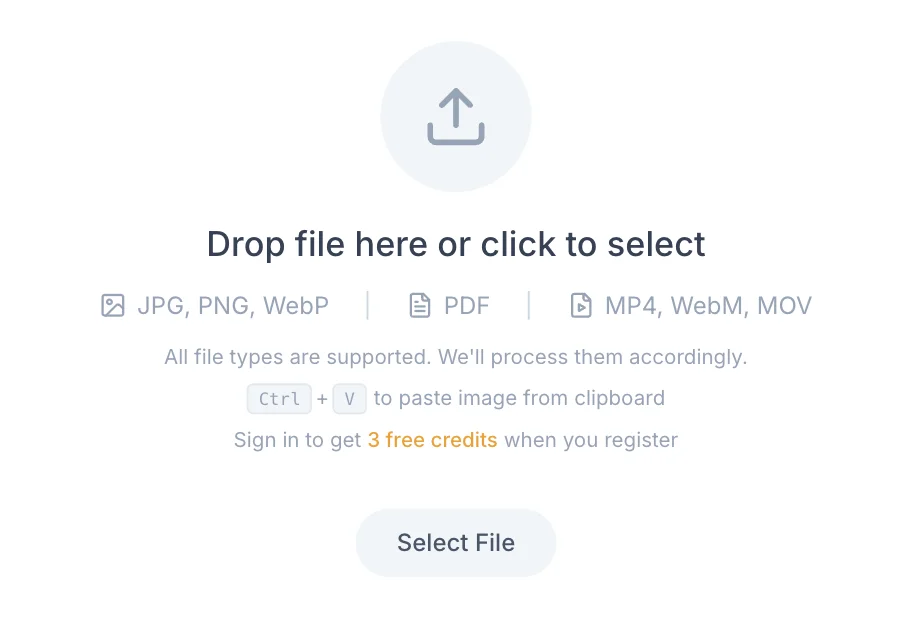
Source: CopySlides official site (screen as of September 2026)
Pricing
The pricing cards count allowances in slides, while the balance shown in the product is counted in credits (image-to-PSD conversion is documented as using one credit per successful run). All prices are in US dollars, and the site says nothing about tax. Payment goes through Stripe. Pages that fail to convert do not consume credits.
| Plan | Price (USD) | Allowance | What it covers |
|---|---|---|---|
| Free | $0 | 3 credits on registration | No credit card required. Shown in the workspace as "Free to Try" |
| Starter | $9/month | 200 slides/month | Editable PPTX export. Cancel anytime |
| Plus | $19/month | 600 slides/month | Everything in Starter plus email support |
| Lifetime | $149 one-time | Unlimited via the desktop app; 10,000 slides via web and extension | Licensed for up to 3 devices, every future update free |
- Lifetime is shown as $149 with a regular price of $199 struck through and a countdown timer (as displayed on 23 September 2026). How long the price applies is not stated
- The site uses two sets of names for the same three tiers: the pricing cards say Starter, Plus, and Lifetime, while some pages such as the video FAQ say Basic, Pro, and LTD. Which name you see depends on the page
- Subscriptions renew automatically and can be cancelled at any time from your account. Cancelling stops future charges but does not shorten a period you have already paid for
- On refunds, the terms say purchases are generally final, but that you can contact support and the request will be reviewed. They also state that nothing there limits any refund or cancellation right you have under applicable law
- The size of the free allowance does not appear in the pricing section; it is only shown in the workspace as 3 credits on registration
(Based on the pricing section, the workspace, and the terms of service as of September 2026)
How your data is handled
Once a proposal or an internal deck is handed to an outside service, retention and subprocessors are the first things worth checking. The CopySlides privacy policy (last updated 30 August 2026) publishes its providers and their roles, retention periods, and the scope of local processing in one place.
AxisLab is a company established in Hong Kong SAR; the terms are governed by Hong Kong law, with the courts of Hong Kong SAR holding exclusive jurisdiction. Nothing is published about a local entity or support desk in other regions.
How it differs from other converters
Getting an image-based or PDF-based deck back into an editable state can be approached in several ways: a conversion service such as CopySlides, the native features of whatever created the deck, or regenerating it with a slide-generation AI. What you already have, and which language you want to work in, decide which fits.
| Aspect | CopySlides | Swift-Slide | NotebookLM native features | Regenerating with a slide-generation AI |
|---|---|---|---|---|
| Input | Chrome extension (inside NotebookLM), PDF, image, video | PDF, PNG, JPEG, WebP | Slide decks generated in NotebookLM | Slides you are about to make |
| Output | PPTX (PSD from images) | PPTX, PDF, PNG, JPEG | PDF and PPTX download | Whatever the service exports |
| Fixing one part | Rewrite it as a text box after conversion | Rewrite it in the browser editor after conversion | Asking for a revision regenerates the whole deck | Freely editable after generation, but the content has to be entered again |
| Interface language | English only (as of September 2026) | Japanese and English | Japanese available | Varies by service |
| Price | 3 free credits / Starter from $9 per month / Lifetime $149 | Free / Light from 980 yen per month (tax incl.) | Within NotebookLM's own usage | Varies by service |
Being able to work from a recording, and getting an offline desktop app with a one-time Lifetime purchase, are distinctive in this category. On the other hand the interface is English only, so if you want to work in Japanese, a converter with a Japanese interface such as Swift-Slide becomes the alternative. For decks you have yet to create, slide-generation services such as GAMMA and イルシル apply; for assembling from templates, Canva; and for turning prose into diagrams, Napkin.
Frequently asked questions
The information on this page is based on what was published on the official site as of September 2026. Please check the official site for the latest specifications and pricing.






![How to Edit NotebookLM Slides [September 2026]: Why You Can't Fix the Text Even in PPTX, and Five Methods by What You Need to Change](/_next/image?url=%2Fimages%2Farticles%2Fnotebooklm-slide-edit.png&w=3840&q=75 "How to Edit NotebookLM Slides [September 2026]: Why You Can't Fix the Text Even in PPTX, and Five Methods by What You Need to Change")