

OpenCode
: How to use it, features, and the business problems it solves
What is OpenCode?
OpenCode is an MIT-licensed, open source AI coding agent built by Anomaly Innovations, Inc. (US). Use the same agent from a desktop app (macOS, Windows, Linux), a terminal UI, a mobile app or an SDK, and pick models from 200+ providers via Models.dev, including local models. Start with free models without an account, or sign in with ChatGPT Plus/Pro or GitHub Copilot. The OpenCode Go subscription costs $10/month (Go Plus $40/month, Go Teams $20 per member/month), and pay-as-you-go models are also available. Used by 22M+ developers every month (official, November 2026).
Business problems it solves
About "OpenCode"
What is OpenCode?
OpenCode is an open source AI coding agent that works with any model. It is built and operated by Anomaly Innovations, Inc. (Anomaly), a US company that also makes the infrastructure framework SST, and it is MIT licensed. The same agent is available as a desktop app, a terminal UI, a mobile app and an SDK, and it can investigate code, edit multiple files and run commands for you.
According to the official site, OpenCode has over 220,000 GitHub stars, more than 1,000 contributors and over 22 million developers using it every month (as of November 2026). The first version was released in April 2025, OpenCode 1.0 in October 2025, the desktop app in December 2025 and OpenCode 2.0 in September 2026.
Not tied to any single model
OpenCode's biggest strength is that you choose the model. Through Models.dev, an open database of AI model specs and pricing, it supports 200+ providers, so you can switch between models from Anthropic, OpenAI, Google, xAI, DeepSeek, Amazon Bedrock, Azure OpenAI and more, or run local models on your own machine.
You can also choose how to get started:
- Free models — limited-time free models are available right after installation, with no account required
- Your existing subscription — sign in with ChatGPT Plus or Pro, or GitHub Copilot
- Your own API keys — connect each provider's API key
- OpenCode's own model access — the OpenCode Go subscription or pay-as-you-go models in OpenCode Console
Use it from desktop, terminal or phone
| Surface | What it does |
|---|---|
| Desktop | Sessions, tabs, diffs, a built-in browser and extensions. Run several agents at once, each in its own tab (macOS, Windows, Linux) |
| Terminal | A terminal UI that works in any shell, editor or remote server. Review edits as diffs and choose which commands run on their own |
| Mobile | Start, steer and approve sessions of OpenCode running on your own computer from your phone (iPhone via TestFlight, Android via Google Play) |
| SDK | A TypeScript client to drive OpenCode from scripts and CI jobs |
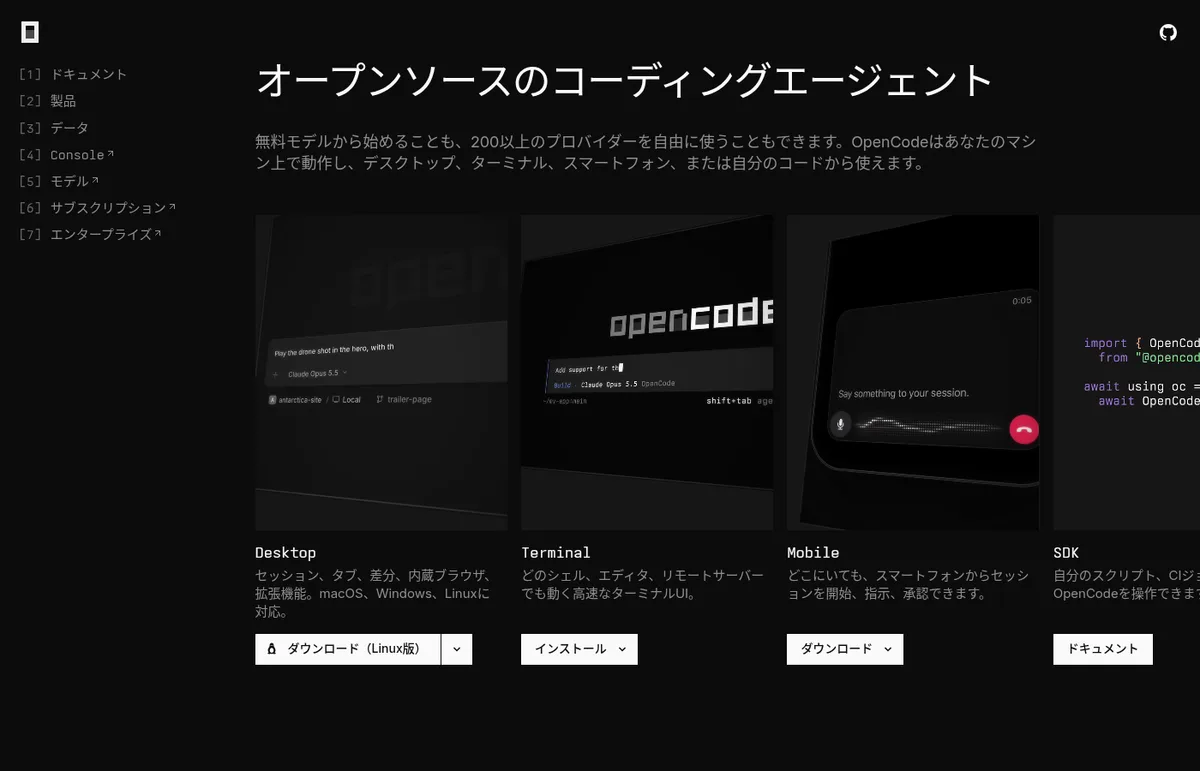 Source: OpenCode official website (opencode.ai/ja)
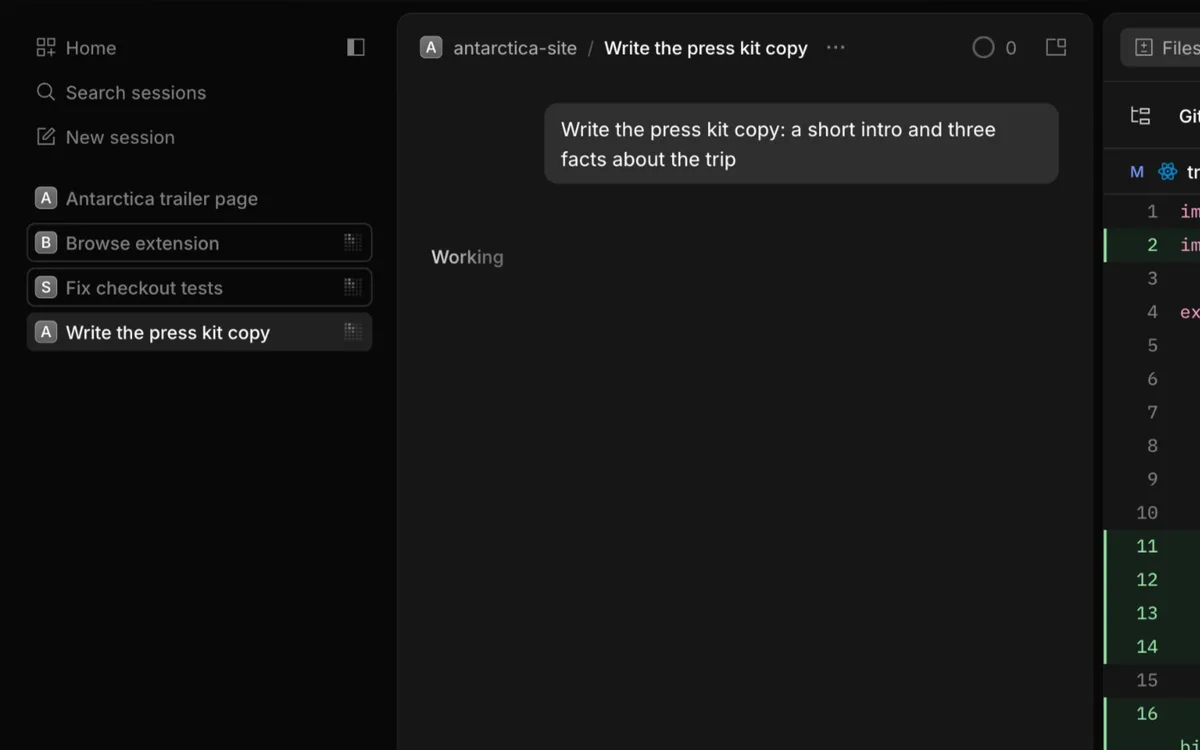 Source: OpenCode official press kit (captured from the real product)
How to use
-
Install it
Download the desktop app from the official site, or run
curl -fsSL https://opencode.ai/v2/install | bashin your terminal. You can also install withnpm install -g @opencode/clior Homebrew (brew install anomalyco/tap/opencode-v2). -
Try the free models
Pick one of the bundled free models and start right away, without creating an account.
-
Connect the models you want
Run
/connectin the TUI, choose a provider and paste an API key, or sign in with your ChatGPT or GitHub Copilot account. Use/modelsto pick a model. -
Give the agent a task
The default "Build" agent edits code and runs commands. When you want to settle on an approach first, use the "Plan" agent, which explores and plans without editing normal project files.
-
Make it your own
Add Markdown files under
.opencode/agents/to create your own agents, and add MCP servers, plugins, skills (SKILL.md) and custom commands. Permission settings let you decide which actions run automatically and which need your approval.
Features
01Agents
Separate exploring, planning and writing.
- Build / Plan — two primary agents: Build edits and runs, Plan explores and plans without changing files
- Subagents — General for research and multi-step work, Explore for read-only searches of code and the web
- Multi-session — run multiple agents in parallel on the same project
02Safe delegation
You decide how much runs automatically.
- Permissions — choose which actions run automatically and which need approval
- Undo — roll back recent file changes and conversation with `/undo`
- Diff review — check edits as diffs before accepting them
03Extensions
Connect the tools you already use.
- MCP servers — connect local and remote MCP servers for GitHub, Linear, Figma, Sentry, Notion, Slack and more
- Plugins and skills — plugins that hook into events, skills that teach workflows via SKILL.md
- Custom agents and commands — agents with their own prompts, models and tools, and slash commands for repetitive tasks
04For teams (OpenCode Console)
Manage model access and spend in one place.
- Workspaces — invite members, choose enabled models and set monthly budgets
- Enterprise — SSO with Okta, Microsoft Entra ID, Google Workspace and more, SCIM 2.0 directory sync, and policies for providers, MCP servers and plugins
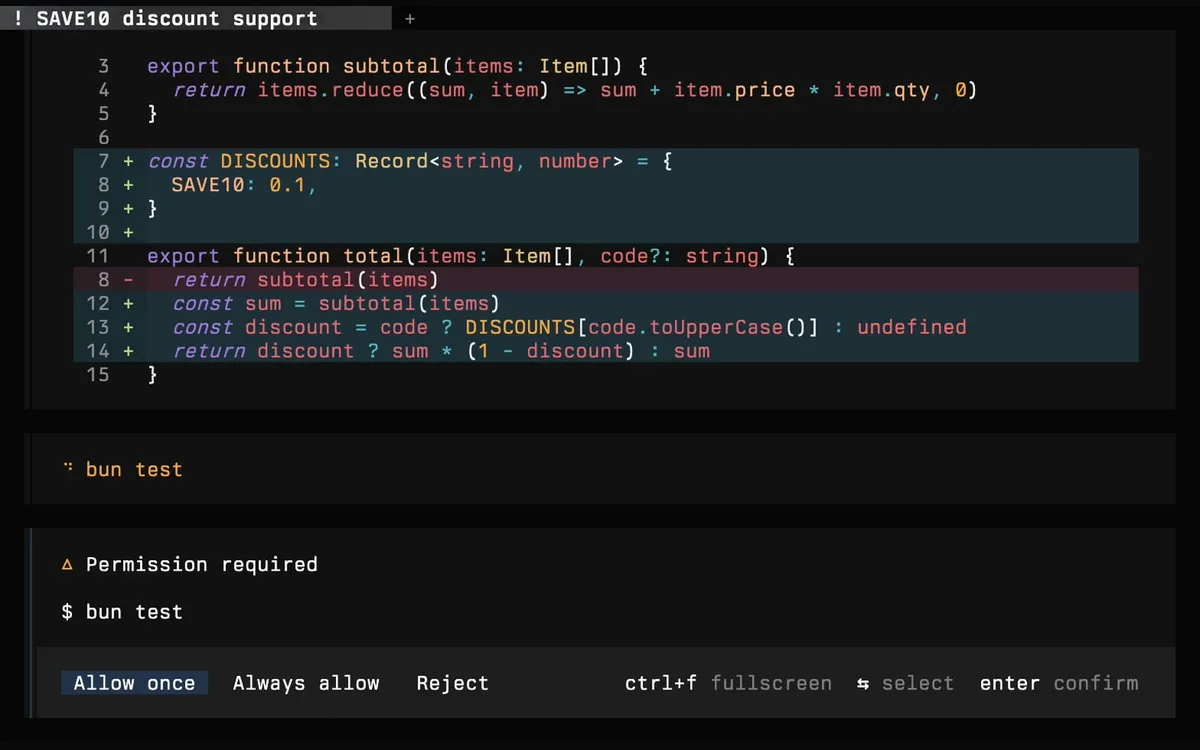 Source: OpenCode official press kit (captured from the real product)
Pricing
OpenCode itself (desktop app and terminal UI) is open source and free. You pay only for model usage: use your existing subscription or API keys, or choose OpenCode's own model access (the Go subscription or pay-as-you-go) (as of November 2026, in US dollars as listed on the official pricing pages).
| Plan | Price | What you get |
|---|---|---|
| OpenCode + free models | Free | No account needed. Free models are limited-time and have a daily request limit |
| Go | $10/month | 32 models curated for agentic coding, mainly open-weight models such as Kimi, Qwen, GLM, DeepSeek and MiniMax, plus some Grok, Gemini, GPT and Claude Haiku models |
| Go Plus | $40/month | Everything in Go, with higher limits |
| Go Teams | $20 per member/month | Per-member limits and one bill for the workspace. Minimum two members |
| Pay-as-you-go (OpenCode Console) | Per-model rates | Charged per request from prepaid credits. Examples per 1M tokens: Claude Opus 5.5 $4 input / $20 output, DeepSeek V4.1 Flash $0.30 input / $1.20 output |
| Enterprise | Contact sales | SSO, directory sync, policies, volume pricing and contract terms |
- Go usage is set by a monthly limit per model, with rolling 5-hour and weekly allowances (20% and 50% of the monthly limit). When you hit the limits, add credit and turn on "Extra Usage" to keep going on pay-as-you-go
- You can cancel Go at any time and keep it until the end of the paid period. You may qualify for a refund if you ask within 14 days of the charge and have used almost none of that period's allowance
- Each credit purchase for pay-as-you-go carries a processing fee of 4.6% + $0.31 (official docs)
- The "opencode.ai/zen" URL now leads to this pay-as-you-go model list in OpenCode Console
- Besides OpenCode, Go has been validated with Claude Code, Codex, Hermes and Pi
Data handling
Models served by OpenCode are hosted in the US and EU, and providers generally follow a zero-retention policy and do not train on your data. However, some free models state that data is used to improve or train the model during the free period. Requests to the OpenAI, Anthropic and xAI APIs are retained for 30 days, and to Google's APIs for up to 55 days. If you work with business code, check the per-model privacy notes in the official docs before choosing a model. By default, Go blocks paid endpoints that train on your requests.
Pros and cons
Pros
- Open source (MIT) and free to use
- Choose from 200+ providers without being locked into one company; local models work too
- Use your existing ChatGPT or GitHub Copilot subscription
- Many surfaces: desktop, terminal, phone and SDK
- The Go subscription starts at an accessible $10/month
Cons
- The latest (V2) docs are in English; the Japanese docs are for the previous version (V1)
- Prices are in US dollars
- Free models are limited-time, and some use your input data for training
- Getting the most out of it requires configuring models, permissions and MCP
Reputation
OpenCode has over 227,000 GitHub stars (as of November 18, 2026) and 1,093 contributors. The official site says more than 22 million developers use it every month. Downloads passed 1 million in October 2025 and 10 million in January 2026 (official press kit). The learning platform Boot.dev created a course on AI coding with OpenCode in consultation with the OpenCode team.
Japanese support
The official site's top page and product pages are available in Japanese, and the desktop app's menus have a Japanese translation (translation files in the public repository). The latest (V2) documentation is in English; the Japanese documentation covers the previous version (V1). The language of your conversations with the agent depends on the model you use.
How OpenCode differs from other AI coding agents
OpenCode stands out as open source, free to choose any model, and usable as the same agent from desktop, terminal and phone.
| OpenCode | Claude Code | Cline | Kilo Code | |
|---|---|---|---|---|
| Provider | Anomaly Innovations | Anthropic | Cline Bot Inc. | Kilo Code (owned by Anaconda) |
| Surfaces | Desktop, terminal, mobile, SDK | Terminal, IDE, web, Slack, mobile and more | VS Code, JetBrains, CLI, SDK | VS Code, JetBrains, CLI, cloud |
| Models | 200+ providers, local models | Claude | Various providers, local models | 500+ models, local models |
| License | MIT | Proprietary | Apache 2.0 | MIT |
| Pricing (guide) | Free; Go from $10/month | Included in Claude Pro ($20+/month) and other plans | Free for individuals (inference pay-as-you-go) | Free for individuals; Teams $15/user/month |
Other products' columns reflect the contents of each product page as of their check dates.
For heavy terminal use of Anthropic models, compare Claude Code; for OpenAI models with ChatGPT integration, Codex; for editor extensions, Cline and Kilo Code; and for an AI-first editor, Cursor. To run local models, you can combine OpenCode with Ollama or LM Studio.
FAQ
Q. Is OpenCode free?
A. OpenCode itself is open source (MIT) and free. The limited-time free models work without an account but have a daily request limit. If you use your own subscription or API keys, their charges apply.
Q. What is the difference between OpenCode Go and OpenCode Zen?
A. Go is a fixed monthly subscription from $10/month that gives you 32 curated models, mainly open-weight, within usage limits. The "opencode.ai/zen" URL now leads to the pay-as-you-go model list in OpenCode Console, where you use models including Claude, GPT and Gemini at per-token rates from prepaid credits.
Q. Can I use OpenCode Go with Claude Code or Codex?
A. Yes. OpenCode has validated Go with Claude Code, Codex, Hermes and Pi. Apps that don't send a session ID can't use Go models and use pay-as-you-go models instead.
Q. Can I use it in Japanese?
A. The official site and the desktop app's menus can be shown in Japanese. The latest documentation is in English. Whether the agent can respond to Japanese instructions depends on the model you choose.
Q. Is my code used for training?
A. Models served by OpenCode generally follow zero retention, but some free models state that data is used for improvement or training during the free period. Check the per-model notes in the official docs.
The information on this page is based on what was publicly available on the official website as of November 2026. Please check the official website for the latest specifications and pricing.