

Warp
: How to use it, features, and the business problems it solves
What is Warp?
Warp is a terminal with built-in AI agents (an agentic development environment) from Denver Technologies, Inc. (d/b/a Warp.dev) in the US. Ask in natural language and the built-in Warp Agent reads your codebase, then writes, fixes and debugs code and runs commands; other CLI agents such as Claude Code and Codex also run inside it. Available on macOS, Windows and Linux, with an open-source client (AGPL v3). It also offers the Warp Agent CLI for any terminal and Warp Factories for running agents in the cloud. Plans: Free ($0), Build ($20/month, or $18/month billed annually), Max ($200/month), Business ($50 per user/month) and Enterprise (contact sales); paid plans include monthly agent usage (as of November 2026). The interface is English-only.
Business problems it solves

About "Warp"
What is Warp?
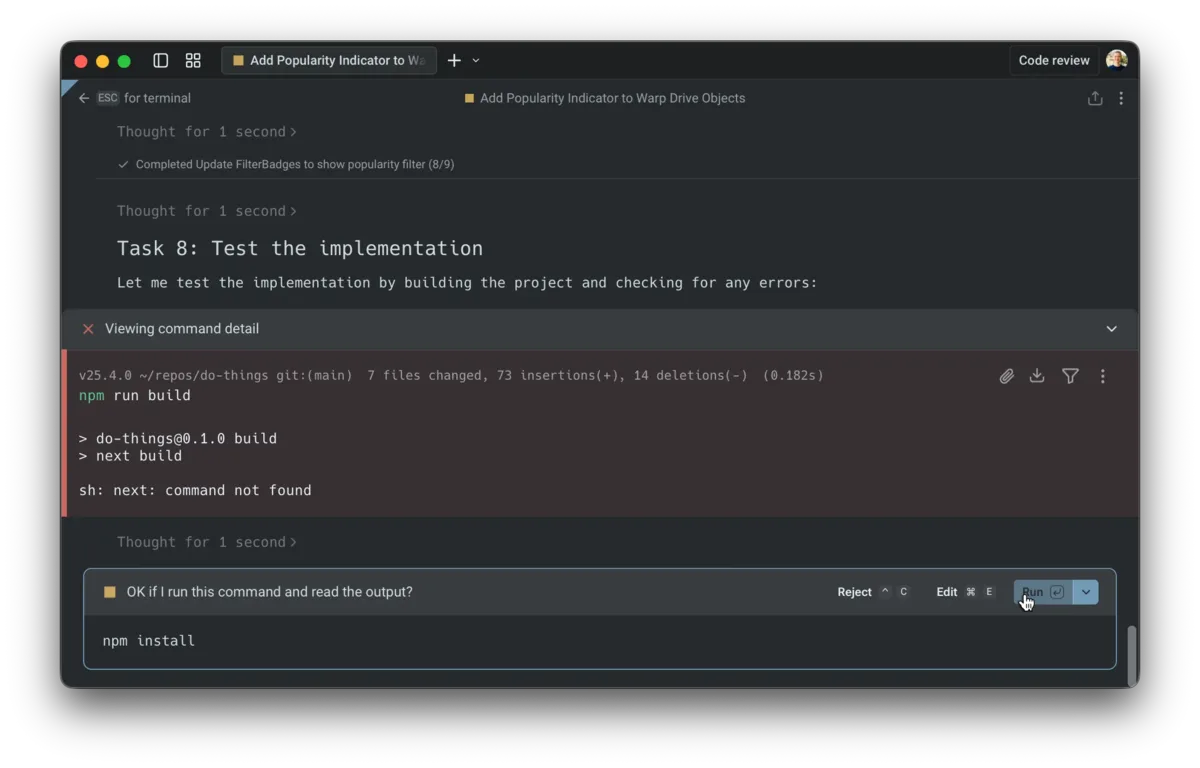
Warp is a terminal with built-in AI agents. It looks and works like a regular terminal, so your usual commands run as they are, but when you type a request in natural language, the built-in Warp Agent reads your codebase and goes on to write, fix and debug code and run commands. Warp calls itself an "Agentic Development Environment" and explains that a product born as a terminal has grown into a workbench for dispatching agents.
Besides its own agent, Warp can run other CLI agents such as Claude Code, Codex and Gemini CLI as they are. It supports macOS, Windows and Linux, and the client source code is public on GitHub (the UI framework under MIT, the rest under AGPL v3).
Warp is provided by Denver Technologies, Inc. (d/b/a Warp.dev) in the US (per its Terms of Service). The official site says it is "trusted by 800k+ devs" and publishes customer stories from Docker and Rectangle Health (as of November 2026).
 Source: Warp official documentation (docs.warp.dev)
What you can do
| Use | What Warp does |
|---|---|
| Use it as your everyday terminal | Run bash, zsh, fish or PowerShell as usual, and copy, search and navigate each command-and-output unit (Block) |
| Ask in natural language | Ask "Explain the architecture of this project" and the Warp Agent reads the code to answer, then writes or fixes code and runs commands |
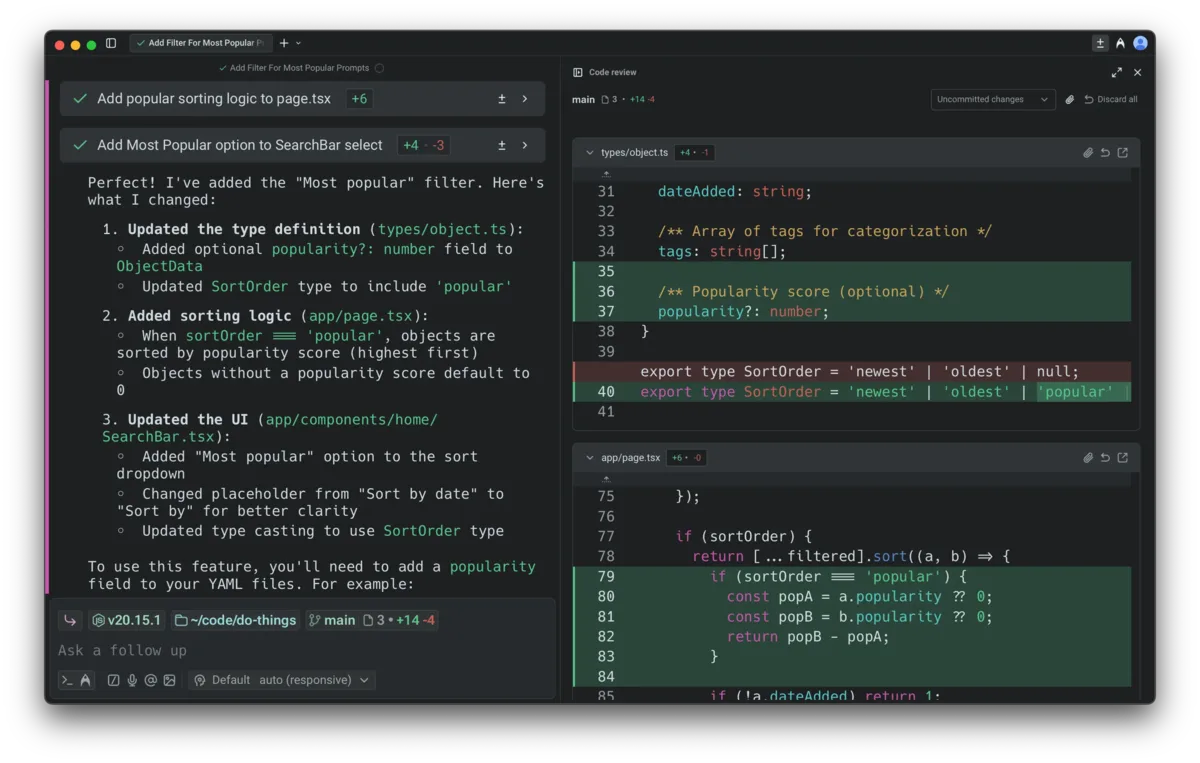
| Check changes before taking them | Review what the agent changed in the code review view, leave comments and send them back for refinement |
| Use the agents you already have | Run Claude Code, Codex and others in tabs of the same window and watch them in Warp |
| Share with your team | Share frequently used commands (Workflows), runbooks (Notebooks) and prompts in Warp Drive, and share live terminal sessions |
How to use
This follows the official quickstart (about 10 minutes).
-
Install Warp
Install it from the official download page. On macOS you can also use
brew install --cask warp, and on Windowswinget install Warp.Warp. For Linux there are .deb, .rpm and Arch Linux packages plus an AppImage. -
Create an account (optional)
When you launch Warp, a session is ready for input right away. You can sign up from "Sign up" at the top right, or skip it and start using Warp immediately.
-
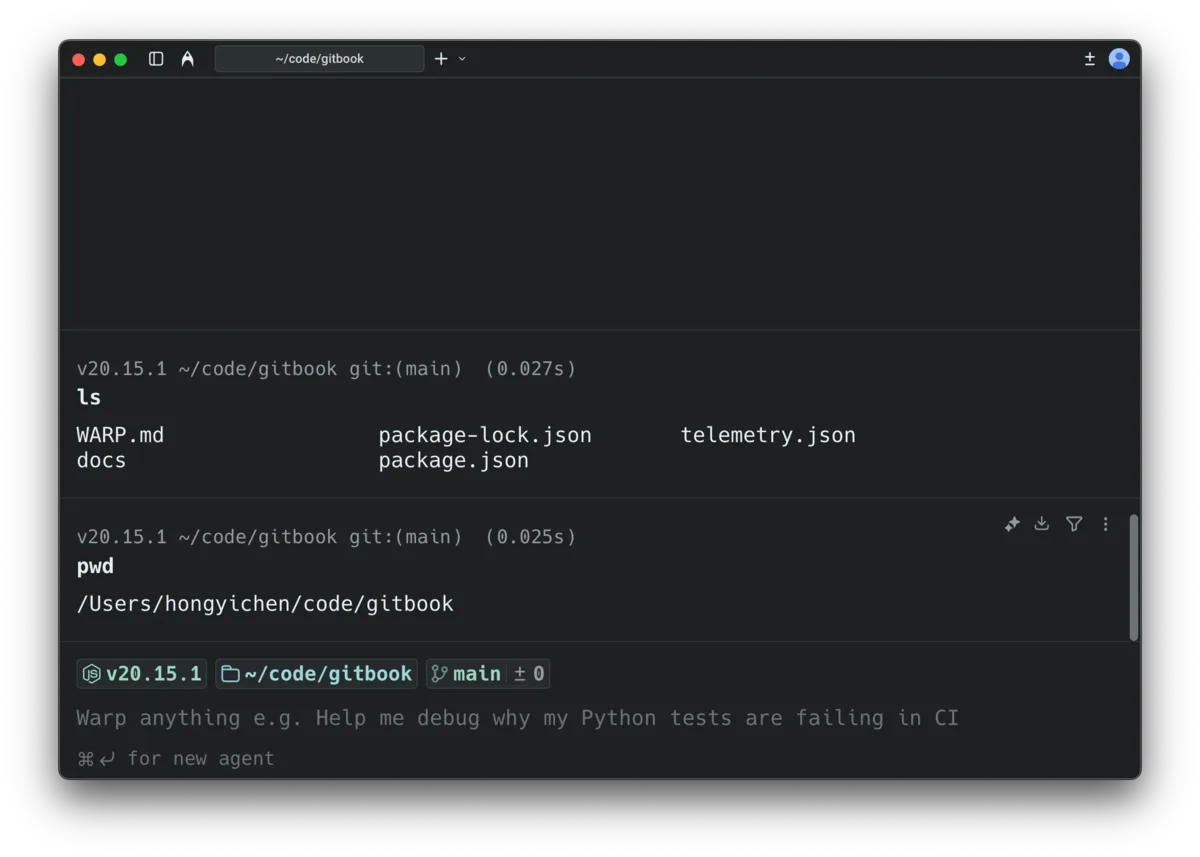
Run a command and see Blocks
Run a usual command such as
ls -laand the command and its output are grouped into one Block. You can select a Block to copy the output or search within it. -
Use the input editor and suggestions
The input works like a text editor, and
Shift+Enteradds a new line. Press→to accept a suggestion based on your history, andTabto see completions for commands, flags and file paths. If you mistype, Warp suggests a correction. -
Ask the agent
Press
⌘↩on macOS orCtrl+Shift+Enteron Windows and Linux to open an agent conversation (Agent Mode) and type your request. If you type natural language in terminal mode, Warp detects it and offers to send it to the agent.
 Source: Warp official documentation (docs.warp.dev)
Features
01A modern terminal
Everyday terminal work gets easier, even without agents.
- Blocks — Treat each command and its output as one unit you can copy, search, filter and share
- Editor-like input — Click to place the cursor, select and replace text, and run several lines at once. Vim keybindings are supported
- Completions and corrections — History-based suggestions, completions for commands, flags and paths, and fixes for typos
- Vertical tabs — Line up sessions as vertical tabs showing details such as the git branch, worktree and pull request
- Supported shells — bash, zsh, fish and PowerShell. An internet connection is needed only on first launch; after that Warp also runs offline
02Warp Agent (the built-in agent)
Hand off reading, writing and running code, right inside the terminal.
- Codebase Context — Index your Git repositories so the agent answers with the structure of the whole codebase in mind, including large multi-repo systems
- Choice of models — Paid plans include the latest models from OpenAI, Anthropic, Google and xAI, plus open models such as GLM, Kimi and DeepSeek. Auto routing can pick the right model per task
- Set the level of autonomy — From approving every step to full autonomy, configurable for individuals and organizations
- MCP and AGENTS.md — Connect external tools and data over MCP, and the agent picks up project rules such as AGENTS.md automatically
- Hide secrets — Redact secrets with custom regexes before they reach the agent, and read secrets directly from 1Password or LastPass
 Source: Warp official documentation (docs.warp.dev)
03Reviewing and editing code
Take the agent's work from 80% to 100% yourself.
- Code Review — Check the agent's changes as diffs, leave comments and send them back to the agent to fix
- Code editor — Make edits on the spot in an editor with a file tree, find and replace, and Language Server Protocol support
- Git worktrees — Each worktree gets its own Code Review and Codebase Context, so several local agents can work in parallel on the same repository without file conflicts
04Going beyond the terminal
Same account, plan and usage—choose where the work happens.
- Warp Agent CLI — A command (`warp`) for using the Warp Agent from other terminals, including over SSH without installing a remote binary. Included in every plan
- Cloud agents — Run agents in the cloud triggered by schedules, CI, webhooks or integration events. Local sessions can also be pushed to the cloud to continue
- Warp Drive — Share Workflows, Notebooks, prompts and environment variables with your team
- Warp Factories — An enterprise platform (early access) where a fleet of agents defined in code takes work coming from Slack, Linear, Jira, GitHub and more through to pull requests. Priced separately from the terminal
Pricing
Warp (the terminal, the Warp Agent CLI and cloud agents) has five plans: Free, Build, Max, Business and Enterprise. Amounts are as shown on the official pricing page (warp.dev/pricing), all in US dollars (checked on November 20, 2026).
| Plan | Monthly | Annual (per month) | Main contents |
|---|---|---|---|
| Free | $0 | $0 | Core terminal features and the Warp Agent CLI. For AI, buy usage or bring your own API key, etc. 3 indexed codebases (3,000 files each), 30 cloud-stored conversations |
| Build | $20 | $18 | $20 of agent usage each month, all models, 40 indexed codebases (100,000 files each), unlimited conversation storage, email support |
| Max | $200 | $180 | Everything in Build plus $200 of agent usage each month (10× Build) |
| Business | $50 per user | $45 per user | $20 of usage per seat each month, up to 25 members, SAML SSO, team usage metrics, admin-configurable data controls |
| Enterprise | Contact sales | Contact sales | Unlimited seats, inference through models in your own cloud (AWS Bedrock, Google Vertex AI), self-hosted cloud agents, and more |
- Agent usage is measured in dollars, and the cost depends on the model, the size of the task and whether it runs locally or in the cloud. Included monthly usage resets every 30 days from your subscription or renewal date
- Additional usage can be purchased on any plan. Purchased usage is shared across the team, rolls over month to month and stays valid for 12 months
- Using your own API keys (OpenAI, Anthropic, Google), a SuperGrok subscription or an OpenAI-compatible endpoint is available to individual users and organizations with 10 or fewer employees. Larger organizations need Business or Enterprise (pricing page and Terms of Service)
- The maximum team size is 10 members on Free, Build and Max, and 25 on Business
- Payment is by credit card only, through Stripe. Warp says it does not currently offer discounts for students, non-profits or open-source teams
- Warp Factories is priced separately with three plans: Start ($0/month plus usage, $3.50 per agent hour), Scale ($250 per team per month plus usage) and Enterprise (per the same pricing page)
How Warp differs from other AI coding tools
| Tool | Form | Relation to Warp |
|---|---|---|
| Warp | A terminal with built-in agents | Replaces the terminal itself and runs its own agent and other CLI agents in the same view |
| Claude Code | Anthropic's coding agent | Used mainly from the terminal, plus IDEs, the web and Slack. It can also run inside Warp |
| Codex | OpenAI's coding agent | Used from ChatGPT, IDE extensions and the Codex CLI. In Warp, signing in with ChatGPT lets you use the Codex usage included in your ChatGPT subscription |
| Cursor | AI code editor | Centered on a VS Code-based editor, while Warp is centered on the terminal |
| Cline | Open-source coding agent | Used from a VS Code extension, JetBrains and a CLI |
| OpenCode | Open-source coding agent | Used from a terminal UI and a desktop app, choosing from many models |
Details of other products are as of the check dates on their respective product pages.
If you spend much of your time in the terminal and want to run commands and ask agents in one place, Warp fits; if you prefer to write inside an editor, Cursor, GitHub Copilot or Kilo Code are options. If you want to get comfortable with the terminal itself first, you can start practicing in the browser with WebTerm.
Pros
- Start just by switching terminals: Your usual shell and commands work as they are, and Blocks and completions make the terminal itself easier to use
- Choose your agent: Besides the built-in Warp Agent, you can run Claude Code, Codex and others in the same window, and pick a model per prompt
- Free to start: The Free plan includes the terminal features, and individuals or organizations with 10 or fewer employees can run the Warp Agent with their own API key
- Clear data handling: For Warp-provided inference, Warp says it has Zero Data Retention agreements under which contracted model providers (Anthropic, OpenAI, Google, xAI, Fireworks AI) do not retain or train on your data for supported models. However, Claude Fable 5, Fable 5.1 and Fable 5.2 are not covered, because Anthropic requires data retention for them (official docs). It also holds a SOC 2 Type II attestation
- Open source: The client is public on GitHub, and you can build it yourself
Cons and caveats
- The interface is English-only: The official documentation says the UI is English-only with no language setting. Japanese characters can be displayed in command output and editor text
- Agent costs vary with use: Usage is measured in dollars and consumption varies by model and task size. Usage beyond the included amount must be purchased
- The Free plan relies on your own AI access: Free has no monthly agent usage, so for AI you buy usage or use your own API key, etc. Your own API keys are limited to individuals and organizations with 10 or fewer employees
- Credit card only: ACH, checks and other methods are not accepted
- A growing product line: Beyond the terminal there are the Warp Agent CLI, cloud agents and Warp Factories, with separate price lists. Deciding which one you need first avoids confusion
Reputation and track record
The official site says Warp is "trusted by 800k+ devs" and highlights livestreams with Anthropic and OpenAI, being a Google launch partner, and partnering on a Stanford course. Its customer stories describe how Docker adopted Warp for a more user-friendly terminal experience, using Warp Drive to streamline repetitive workflows and boost team productivity, and how Rectangle Health turned a senior engineer's side project into Rex, a self-improving AI teammate built on Oz (Warp's cloud agent platform) that now writes 54% of its own code. On Product Hunt it is rated 4.8 out of 5 (81 reviews, as of November 20, 2026).
FAQ
Q. Can I use Warp for free?
A. Yes, there is a Free plan with the terminal features and the Warp Agent CLI. However, Free has no monthly agent usage, so to use AI you either buy usage or connect your own API key (OpenAI, Anthropic, Google) or similar. Your own API keys are available to individuals and organizations with 10 or fewer employees.
Q. Is it available in Japanese?
A. The interface (UI) is English-only; according to the official documentation there is no language setting. Japanese characters can be displayed in command output and in the editor.
Q. Can I use it with Claude Code or Codex?
A. Yes. Warp can run CLI agents such as Claude Code, Codex and Gemini CLI, and cloud agents can be powered by the Warp Agent, Claude Code or Codex.
Q. Is my code or prompt used for AI training?
A. According to the official pricing page, Warp-provided inference is covered, for supported models, by Zero Data Retention agreements with Anthropic, OpenAI, Google, xAI and Fireworks AI, under which providers do not train on your data and delete prompts and outputs within a fixed period after the response. However, the official docs state that Claude Fable 5, Fable 5.1 and Fable 5.2 are not covered by these agreements, because Anthropic requires data retention for safety, abuse monitoring and compliance (on Enterprise, these three models are disabled by default).
The pricing page says you can enable Zero Data Retention for your account by turning off "Help Improve Warp" in Settings > Privacy. The docs, on the other hand, explain that "Help improve Warp" controls Warp's own analytics and content collection for service improvement, that turning it off does not remove the retention requirement for the three models above, and that to stay within Zero Data Retention you should choose a model other than those three. If you use your own API key or similar, your provider's account and terms apply instead of Warp's agreements.
Q. Which operating systems are supported?
A. macOS (Intel and Apple silicon, 10.14 or later), Windows (Windows 10 version 1903 or later and Windows 11, x64 and ARM64) and Linux (x64 and ARM64, glibc 2.31 or later).
The information on this page is based on what was published on Warp's official site, documentation, pricing page and Terms of Service as of November 2026. Please check the official site for the latest specifications and pricing.