
Paperpal
: How to use it, features, and the business problems it solves
Add bookmark
What is Paperpal?
An AI English-editing and academic writing tool for research papers from Cactus Communications, the company behind the English editing service Editage. Trained on professional editors' corrections of academic manuscripts, its AI polishes the grammar and wording of English text into an academic tone, and it brings together plagiarism checks, AI-generated text detection, citation checks, a pre-submission readiness check, literature search across more than 300 million papers with citations (10,000+ citation styles), and translation between 50+ languages including Japanese. It works on the web, as a Microsoft Word add-in, and in Google Docs and Overleaf, with a Japanese interface, payment in Japanese yen and a pay-later option for institutional funds. There is a free plan; Prime costs ¥2,090/month billed annually (¥4,290 month-to-month) and Pro ¥5,060/month billed annually.
Business problems it solves

About "Paperpal"
What is Paperpal?
Paperpal is an AI English-editing and writing assistant for academic papers from Cactus Communications, the company that runs the English editing service Editage. Its AI, trained on data from professional editors correcting academic manuscripts, polishes the grammar and wording of English text into an academic tone. On top of that, it handles plagiarism checks, AI-generated text detection, citation checks, literature search across more than 300 million academic papers, and Japanese–English translation, all in one place.
The official Japanese site promotes it as a way to "check grammar, plagiarism, AI-generated text and submission guidelines all at once," and its main users are researchers and graduate students who write papers in English for international journals. According to the official site, it has more than 5 million users worldwide (as displayed in October 2026). It launched in Japan in March 2023, and its Japanese user base passed 30,000 in October 2024 (announcement by Cactus Communications).
How to use it
- Create a free account: Sign up from "Start for free" on the official site. The free plan needs no credit card and lets you try every tool within usage limits
- Choose where to write: Paste your manuscript into the web editor, or install the add-in in the Word you already use. If you write in Google Docs or Overleaf (an online LaTeX editor), use the Chrome or Edge extension
- Fix your English: Suggestions for grammar and wording appear sentence by sentence, and you accept or reject each one. You can also translate a draft written in Japanese into English, or rewrite phrasing into an academic tone
- Find and cite literature: Ask questions while you write and get answers grounded in prior research, with citation details. You can also add your own PDFs to a library and chat with them
- Run checks before submission: Use the plagiarism check, AI detection, citation check and pre-submission check to catch problems before sending to a journal or your institution
- Upgrade if you hit the limits: If you need more than the free plan allows (200 grammar checks a month, 5 rewrites and similar uses a day), choose Prime or Pro
Turning your English into the phrasing of an academic paper
At Paperpal's core is the language check. According to the official site, its AI is trained on "academic English editing data from professional editors accumulated over 20 years by Editage," which it describes as having users in 192 countries and the most users in Japan. Because it recognizes the components of a paper, such as the title, references, equations, technical terms and abbreviations, before suggesting edits, it says it can fix grammar and wording without rewriting equations or terminology.
You can choose how deep the edits go with two modes: Essential for light editing and Extensive for thorough editing. Suggestions are grouped by type, such as "Rephrase, Verb Form, Spelling," and you can accept them all at once or reject them one by one.
Besides the language check, there are paraphrasing into an academic tone, word reduction to cut length, and translation. Translation works between more than 50 languages, including Japanese, Korean and Chinese, and rewriting returns text in the same language as the input (official help center).
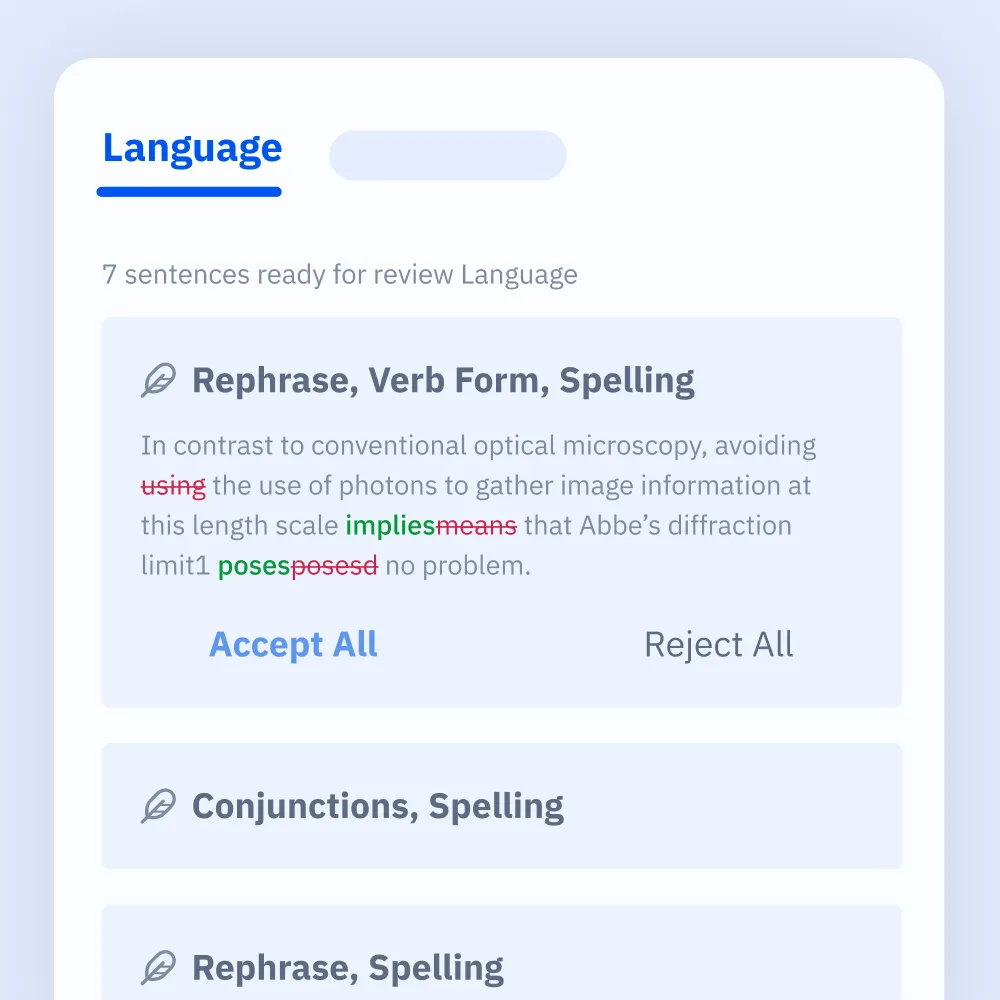
Source: Paperpal official website (the following screen images are from the same source)
Catching what you might miss before submission, in one pass
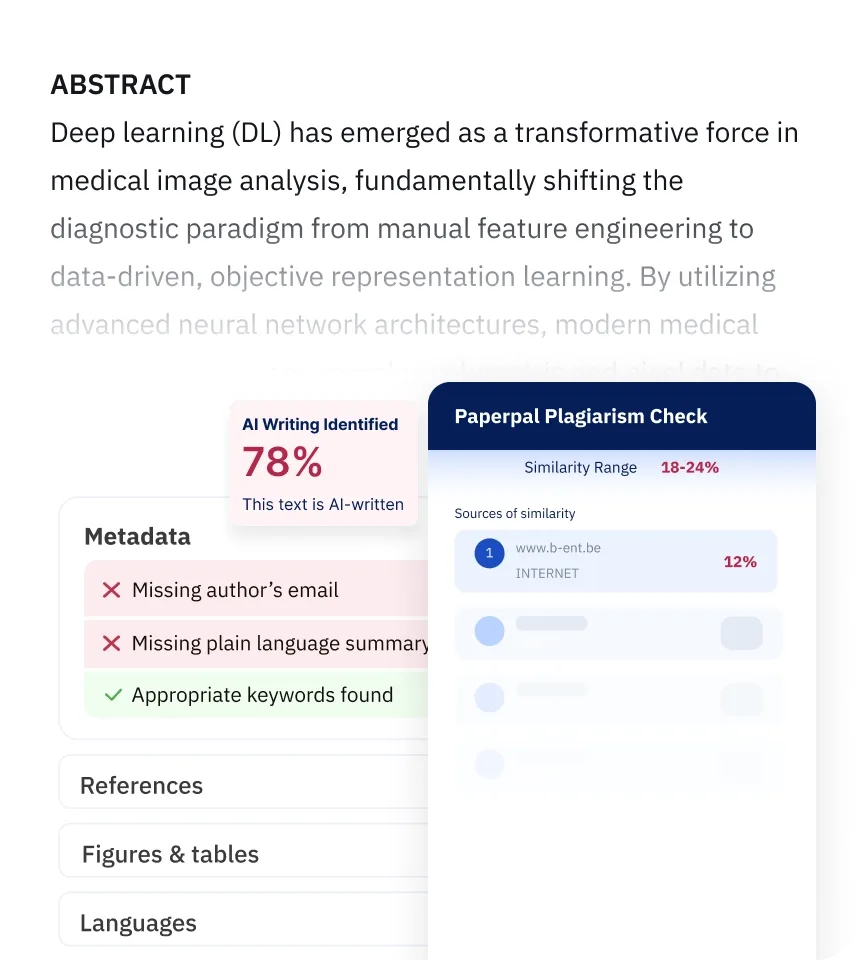
Submitting to an international journal means dealing not only with English errors but also with unintentional plagiarism, citation problems and how AI-written text is handled. Paperpal gathers these pre-submission checks in one place.
- Plagiarism check: Finds text that matches published literature and shows a similarity score and the similar sources
- AI detection: Finds text that may have been generated by AI and shows where to rewrite it in your own style
- Citation check: Finds citation errors, broken links and fake references made up by AI
- Pre-submission check: Reviews items tied to submission guidelines, such as a missing author email or keywords, all at once
Finding literature and citing it as you write
With Research & Library, you can search more than 300 million academic papers and pull relevant findings into your document along with citation details. You can ask questions without leaving your manuscript and insert answers based on prior research, with citations to the source papers, in one click. It supports more than 10,000 citation styles, including APA and MLA, and can generate reference lists automatically.
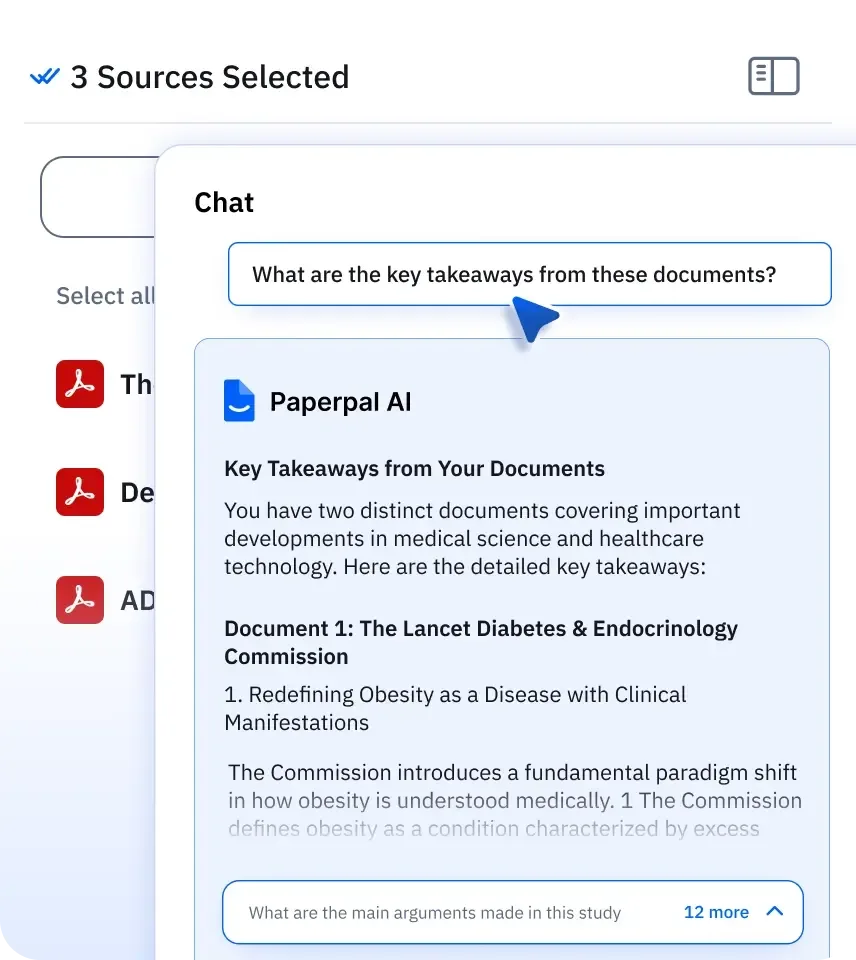
You can also upload your own PDFs and references to build a library and use Chat with papers to ask questions across several documents at once. It supports PDF, DOCX and PPT, and a web importer (Chrome and Edge) lets you bring in papers you open in the browser.
You can add an outline, a style guide and reviewer comments, then draft while citing from the materials you have gathered. The pricing page also lists a research and writing agent as a new feature.
Features
01Fixing and writing English
Features that polish the English of the paper itself.
- Language check — Corrects grammar, spelling and wording into an academic tone, with Essential and Extensive modes
- Consistency check — Available on Prime and Pro
- Paraphrasing and word reduction — Rewrites into an academic tone and cuts word count
- Translation — Translates between more than 50 languages, including Japanese
- AI proofreading and generative AI (Copilot) — Manuscript review and writing assistance listed in the official feature list
02Checking before submission
Final checks before you send to a journal or institution.
- Plagiarism check — Detects matches with published literature and shows a similarity score
- AI detection — Identifies text that may have been generated by AI
- Citation check — Detects citation errors, broken links and fake references
- Pre-submission check — Reviews items tied to submission guidelines at once (detailed report on Pro)
03Researching and citing
From literature search to managing citations.
- Research Q&A and citation search — Answers from more than 300 million academic papers, with citation details
- Chat with papers — Ask questions about uploaded PDF, DOCX and PPT files
- Library — Cloud storage for your materials (300 MB free / 2 GB Prime / 10 GB Pro)
- Citation styles — More than 10,000 styles including APA and MLA, plus automatic reference lists
- Agent — A research and writing agent (marked NEW on the pricing page)
04Figures and co-writing
Figures for your paper and work with co-authors.
- AI figure creation — Creates figures for papers with AI (partially available on Free; high-resolution SVG export on Prime and Pro)
- Expert illustration — Pro only, one per month
- Document sharing — Co-editing with up to 5 people, version history, and export to DOCX and PDF
Pricing
These are the prices shown on the official Japanese pricing page on October 30, 2026. Prices are in Japanese yen, and annual billing is about 51% cheaper than monthly billing.
| Plan | Monthly billing | Annual billing | Main limits |
|---|---|---|---|
| Free | ¥0 | ¥0 | 200 grammar checks/month; 5 paraphrasing, word reduction, translation, AI review and similar uses/day; 5 Research Q&A and citation searches/day; Chat with papers 5 files/month; 300 MB library. Plagiarism check and pre-submission check give basic reports; AI detection is a preview |
| Prime | ¥4,290/month | ¥25,080/year (¥2,090/month) | 20,000 grammar and consistency checks/month; plagiarism check 10,000 words/month; AI detection 25,000 words/month; citation check 10,000 words/month; 500 paraphrasing and similar uses/month; 500 Research Q&A and citation searches/month; Chat with papers 150 files/month; 2 GB library |
| Pro | ¥10,340/month | ¥60,720/year (¥5,060/month) | Unlimited grammar and consistency checks, AI detection, paraphrasing and similar uses, and Research Q&A; plagiarism check 30,000 words/month; citation check 30,000 words; unlimited pre-submission checks with detailed reports; Chat with papers 500 files/month; 10 GB library; one expert illustration per month |
- The agent is shown as limited on Free, 10 times the Free usage on Prime, and "unlimited (promotional period)" on Pro
- Pro also has one-time multi-year plans (2 years ¥97,020, 3 years ¥122,210; no auto-renewal)
- Below the plans, the pricing page shows "100% money-back guarantee," "pay later / university payment available" and "cancel anytime." For return and cancellation terms, the Specified Commercial Transactions Act notice points to the terms of use (researcher.life)
- The pricing page does not say whether prices include tax. The Specified Commercial Transactions Act notice states, under costs other than the product price, that consumption tax is added to the service fee
- At the time of checking, a banner at the top of the site announced a "25% off annual plans" sale. The table shows the prices on the pricing page and does not include the sale discount
- Pricing for teams and institutions is by inquiry, and you can also ask about a free trial
Sources: Paperpal pricing plans, Specified Commercial Transactions Act notice
Data handling and security
Because you entrust research data to it, how data is handled is part of the decision. The official data security page explains the following.
- Input data is stored only on Paperpal's servers and is not used to train AI. Free and paid plans are treated the same
- Its AI models include models it developed itself and models tuned to support academic writing
- Newly created documents and manuscripts uploaded for the plagiarism check or pre-submission check can be deleted from your account at any time
- It complies with regulations such as the GDPR (EU General Data Protection Regulation) and holds ISO/IEC 27001 certification, the international standard for information security
Adoption and reputation
The news section of the official Japanese site lists adoptions at universities and hospitals.
01Adoption at universities and hospitals
- Faculty of Textile Science and Technology, Shinshu University — Introduced to help faculty publish more English papers of higher quality (posted October 2024)
- Kyoto University Hospital — Introduced for researchers at the hospital (posted November 2024)
- Nagasaki University and Sophia University — Each introduced it (posted March 2024)
The official site also carries user testimonials under their real names.
"I had tried English editing with Grammarly a few times, but when I later compared it with the editing done by Paperpal, I felt Paperpal's was closer to English suited to papers."
— Keiko Goto, Associate Professor, Juntendo University Faculty of Medicine
"The biggest appeal is how much faster Paperpal's editing, rewriting and word-reduction features make writing papers and preparing conference presentations."
— Daiki Furukawa, Lecturer, Medical IT Center, Nagoya University Hospital
When Cactus Communications announced in October 2024 that its Japanese user base had passed 30,000, it quoted Hiroto Takenaka, a lecturer at Tokiwa University, as saying that Paperpal offered immediate suggestions for improvement, as if he had a proofreader by his side.
How it differs from other English-editing and research-writing AI
Paperpal stands out because it is trained on Editage's academic editing data and focuses on writing papers, combining English editing, pre-submission checks and literature search in one tool. It also offers a Japanese interface, payment in Japanese yen and pay-later for institutional funds.
| Product | Strengths | Where it works | Pricing (as listed on each product page) |
|---|---|---|---|
| Paperpal | English editing for academic papers; plagiarism, AI-text and citation checks; paper search and citations | Web, Word, Google Docs, Overleaf | Free plan. Prime ¥2,090/month billed annually, ¥4,290 month-to-month |
| Grammarly | Always-on checks of English grammar, spelling and tone; plagiarism and AI-text detection | Browser extension, desktop, mobile, Office, Google Docs | Free plan. Pro $12/month |
| Quillbot | Paraphrasing, grammar check, summarizing, citation generation | Web, browser extension, Word, mobile | Free plan. Premium $19.95/month or $99.95/year |
| Wordtune | Paraphrasing English, rewriting in a different tone, summarizing | Browser extension, editor | Free plan. Unlimited $6.99/month billed annually |
| SciSpace | Paper search, literature review, data extraction, drafts with citations | Web | Basic free; Premium $20/month ($12/month billed annually) |
| DeepL | Context-aware translation; DeepL Write for editing | Web, desktop, API | Free version. Individual ¥1,380/month |
Other products' prices are as listed on their product pages at the time of checking. Please see each product page and official site for current pricing.
If you want constant checks on any English you write, wherever you write it, compare Grammarly; if you want fine control over paraphrasing modes, compare Quillbot. If your focus is research and literature review, SciSpace is a candidate, and if translation quality matters most, so is DeepL. For researchers and graduate students who write papers in English and want to handle everything through the pre-submission check in one tool, Paperpal is a good fit.
Frequently asked questions (FAQ)
Q. Can I use Paperpal for free? A. Yes. The free plan needs no credit card and includes 200 grammar checks a month and up to 5 uses a day of paraphrasing, translation and similar tools. The plagiarism check and pre-submission check give basic reports, and AI detection is a preview.
Q. Can I use it in Japanese? A. There is an official Japanese website and a Japanese interface, and you can pay in Japanese yen. Editing is for English text, and translation supports more than 50 languages, including between Japanese and English.
Q. Can I pay with university research funds? A. Yes. If you choose "pay later" when purchasing, a quotation, invoice and delivery note are issued, and your institution handles the payment.
Q. Is the paper I enter used to train AI? A. The official site states that input data is never used to train AI. The free plan is treated the same way.
Q. Who runs it? A. Cactus Communications, the operator of Editage. The seller in Japan is カクタス・コミュニケーションズ株式会社 in Chiyoda-ku, Tokyo.
This page is based on information published on Paperpal's official website, pricing page, Specified Commercial Transactions Act notice and help center, and in announcements by Cactus Communications, as of October 2026. Please check the official website for the latest specifications and pricing.