
SciSpace
: How to use it, features, and the business problems it solves
Add bookmark
What is SciSpace?
An AI research assistant for researchers and students from PubGenius Inc. in the US (formerly Typeset). Covering more than 280 million papers across multiple databases, its AI agent handles paper search, literature reviews, data extraction and cited drafts, alongside standalone tools such as Chat with PDF and a citation generator. The interface is in English. Basic is free; Premium is $20/month ($12/month billed annually).
Business problems it solves

About "SciSpace"
What is SciSpace?
SciSpace is an AI research assistant for researchers and students provided by PubGenius Inc. in the United States. It lets you carry out the whole research workflow — finding papers, reading them, extracting information across multiple papers, and writing with citations — in a single workspace. It was formerly called Typeset, and typeset.io now redirects to scispace.com.
At its core is the SciSpace Agent: you describe a task in the chat box, and it plans the steps and carries them out. According to SciSpace's official comparison pages, paper search spans multiple databases — Google Scholar, PubMed, arXiv, OpenAlex and Semantic Scholar — covering more than 280 million papers. Alongside the agent, SciSpace offers standalone tools such as Chat with PDF, Literature Review, AI Writer, a citation generator, a paraphraser and an AI detector.
About the numbers: Even within SciSpace's own website, the paper count is given as "270M+", "280M+" or "287 million", and the user count as "1 million+", "9.6 million+" or "10M+", depending on the page. This page uses "280M+" papers from the comparison pages and "9.6 million+" users from the homepage (checked in October 2026).
Describe a task, and the AI agent researches and writes
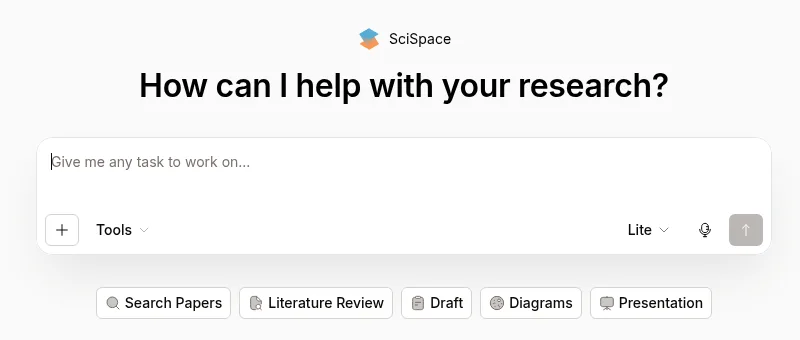
Source: home screen of the SciSpace website (October 19, 2026)
The SciSpace home screen is the SciSpace Agent's input box. Below it sit entry points for Search Papers, Literature Review, Draft, Diagrams and Presentation, so you can ask for everything from research to written output from the same screen.
On paid plans, you can choose how deeply to research (from the pricing page and the credits guide linked from it):
01What the agent can do
- Deep Research — reads into hundreds of papers
- Systematic Research (SLR) — research for systematic reviews that screens up to thousands of papers
- Reports — Premium can generate a Standard Report; Advanced and above can generate a Verified Report
- Biomedical Agent — an agent specialized in biomedicine (Premium and above)
- Parallel chats — agent chats running at once: 4 on Premium, 8 on Advanced, 16 on Max
You pick the agent's model tier — Lite, Pro or Expert — next to the input box. According to the pricing page, Pro is available on Premium and above, and Expert on Advanced and Max. SciSpace's help pages published on Notion state that Lite is available on all plans.
The Agent Gallery lists ready-made agents for specific research situations, such as summarizing manuscript revisions, documenting systematic-review search strategies, drafting parts of grant applications, interpreting statistical software output and making charts (2,734 agents as of October 19, 2026).
Standalone tools: from asking a PDF to generating citations
Apart from the agent, there are standalone tools for individual research tasks. According to the credits guide linked from the pricing page, the following standalone tools do not consume credits, so you can keep using them even after the agent's credits run out.
01Read
- Chat with PDF — upload a PDF (up to 100 MB per file) and ask questions; answers cite the relevant parts of the PDF. Also offers section-wise summaries, simple explanations of selected text, explanations of math, tables and figures, related-paper suggestions and note-taking
- Literature Review — find papers, compare key points across papers in a table with columns you define, and save them to your library
- Extract Data — extract data from paper PDFs
- Find Topics — explore research topics
02Write and polish
- AI Writer — write cited text with built-in reference management
- Citation Generator — create references in styles such as APA
- Paraphraser — rephrase text
- AI Detector — check whether text was written by AI
According to SciSpace, documents uploaded to Chat with PDF are protected with 256-bit encryption and are not used for AI training.
Chrome extension and iOS app
With the free Chrome extension, you can ask questions while reading on publisher sites such as Nature, Springer, Elsevier and Wiley, repositories such as Google Scholar and arXiv, and news sites. Highlight a difficult term or paragraph to get a plain explanation, or clip math and tables in PDFs to ask what they mean. SciSpace says you can choose from 75 languages to interact.
The iOS app (seller on the App Store: PubGenius Inc.) is free to download and focuses on paper search and citation-backed answers. According to the App Store listing, the app is available in English.
How to use
- Create an account Sign up via "Sign up for free" on the official website. The free Basic plan includes 100 agent credits per month and the Lite model.
- Describe your task Type what you want to research or create into the input box on the home screen and send it. You can also start from the buttons below the box, such as "Search Papers" for finding papers or "Literature Review" for a literature review.
- Choose a model Switch between Lite, Pro and Expert in the model selector next to the input box (Pro on Premium and above, Expert on Advanced and above).
- Verify the evidence Open the original papers from the citations in the answer and check that the claims match. Use Chat with PDF to read a PDF in detail.
- Write and export Draft cited text with AI Writer and format your references with the Citation Generator.
Pricing
Prices from the official pricing page as of October 19, 2026. Prices are in US dollars, and annual billing is cheaper.
Individual
| Plan | Monthly billing | Annual billing (per month) | Key features |
|---|---|---|---|
| Basic | Free | Free | 100 agent credits/month, Lite model |
| Premium | $20 | $12 ($144/year) | 1,200 credits/month, Pro model, more papers from Google Scholar, PubMed and arXiv, Deep Research, Systematic Research (SLR), Standard Report, eligible full-text papers through your institution, Biomedical Agent, 4 parallel chats. Unlimited literature reviews, Chat with PDF, AI detections and more |
| Advanced | $90 | $70 ($840/year) | Everything in Premium plus unlimited monthly usage (with fair-use limits), Expert model, Verified Report, 8 parallel chats |
| Max | $200 | $160 ($1,920/year) | Everything in Advanced plus maximum memory and context for complex research, publication-ready scientific figures, poster generation, 16 parallel chats, priority support |
Teams and organizations
| Plan | Monthly billing (per user) | Annual billing (per user per month) | Key features |
|---|---|---|---|
| Teams (Premium) | $25 | $15 | Premium features (1,200 credits/month per user), role management for admins, discounted pricing with more users |
| Teams (Advanced) | $100 | $75 | Advanced features |
| Teams (Max) | $220 | $175 | Max features |
| Enterprise | Custom quote | Custom quote | All Advanced features plus admin-managed access, shared credit pools, SSO/SCIM, consolidated billing, dedicated support, customizable integrations and limits |
- Monthly credits do not roll over. Add-on credits stay in your account indefinitely.
- Team credits are pooled across the team. Premium, Advanced and Max cannot be mixed in one team plan (each tier needs a separate team plan).
- Every plan has a 100% money-back guarantee within 24 hours of purchase, and you can cancel anytime. Credits are generally non-refundable.
- Payment is by major credit and debit cards; bank transfer is also accepted for Enterprise orders that meet certain criteria.
Reviews and reputation
The official website features comments from researchers and students:
- "SciSpace is an incredible (AI-powered) tool to help you understand research papers better. It can explain and elaborate most academic texts in simple words." (a researcher at a Danish university)
- "It's not only the saved time. Reading scientific literature, specially if you are not an expert in the field is a very attention-intensive process… Having them not just smartly summarised but being able to get meaningful answers is a game-changer." (a science journalist)
- "Upload your pdf and highlight the sections you want to understand. It simplifies those complicated sections of the article in a jiffy." (a product manager in healthcare)
SciSpace's comparison pages cite a Trustpilot rating of 4.3 out of 5 (346 reviews). On the US App Store, however, the iOS app is rated 2.6 (11 ratings), with reviews pointing to fewer features than the web version, such as no access to the web library and notes and no way to copy output (checked in October 2026).
Pros and cons
Pros
- Search, PDF reading, data extraction and cited writing all in one workspace
- Searches more than 280 million papers across multiple databases
- Research depth options such as Deep Research and Systematic Research (SLR)
- Standalone tools such as Chat with PDF and the citation generator do not consume agent credits
- Free Basic plan to start, and a 24-hour money-back guarantee on every paid plan
- The Chrome extension lets you ask questions while reading on publisher sites
Cons
- The interface is in English, and prices are in US dollars
- The free plan's agent is limited to 100 credits per month and the Lite model
- Credit usage per agent task is not fixed; similar requests can use very different amounts
- The iOS app has fewer features than the web version
- Paper and user counts vary between pages of the official website
SciSpace vs. other AI research tools
| Product | What it searches | Best for |
|---|---|---|
| SciSpace | 280M+ papers across multiple databases | Doing everything from finding papers to reading PDFs, extracting data and writing with citations in one service |
| Elicit | Academic papers and clinical trials, with systematic-review workflows | Screening papers against inclusion criteria and extracting data into tables |
| Consensus | 220M+ peer-reviewed papers, with the Consensus Meter showing where research agrees | Quickly learning what research concludes on a question |
| ChatPDF | Uploaded PDFs and other documents | Reading a single paper through conversation |
| NotebookLM | Materials you upload | Summarizing and asking questions based only on your own materials |
| Perplexity | The whole web (with sources) | Researching the latest news and web information with sources |
If you want to go from researching papers to writing in one service, consider SciSpace; to screen papers and extract data following a structured process, Elicit; and to quickly see what research concludes, Consensus.
FAQ
Q. Is SciSpace free? Yes. The Basic plan is free and includes 100 agent credits per month. Standalone tools such as Chat with PDF do not consume credits. To use the Pro model or Deep Research, you need Premium or higher, at $20/month ($12/month billed annually).
Q. Can I use it in Japanese? The interface is in English. SciSpace says Chat with PDF can interact in 75+ languages and the Chrome extension in 75 languages, but it does not publish the list of supported languages. The iOS app is available in English.
Q. Are Typeset and SciSpace the same service? They are from the same company; Typeset is the former name, and typeset.io redirects to scispace.com. According to the FAQ on the official pricing page, SciSpace Premium and Advanced are separate from the "Typeset Researcher" and "Team" plans, which only cover formatting and editor tools.
Q. Can I get a refund? Every plan has a 100% money-back guarantee within 24 hours of purchase. Refunds are requested through the support bot. After 24 hours you are no longer eligible, and credits are generally non-refundable.
Q. Are uploaded PDFs used for AI training? The official Chat with PDF page states that files are protected with 256-bit encryption and that data is not used for training.
The information on this page is based on SciSpace's official website (pricing page, the credits guide linked from it and tool pages), SciSpace's help pages on Notion (for the model tiers) and the App Store as of October 19, 2026. Features and pricing may change, so please check the official website and the pricing page for the latest information.