
remove.bg
: How to use it, features, and the business problems it solves
Add bookmark
What is remove.bg?
[Standalone site scheduled to close on December 1, 2026, moving to Canva] A background removal service that uses AI to detect the subject of an uploaded image, such as a person, product or animal, and cut out the background automatically (operated by Canva Austria GmbH, part of the Canva group). It is available on the web, with bulk editing, an API, desktop apps and a Photoshop plugin, but it will close at 9:00 CET on December 1, 2026, with background removal moving to Canva and the API to Leonardo.Ai. This page covers the shutdown schedule, refunds and credits, and where to migrate.
Business problems it solves



About "remove.bg"
The standalone remove.bg website will close at 9:00 CET on December 1, 2026 (17:00 the same day in Japan). Background removal is moving to Canva, part of the same group, and the API is moving to Leonardo.Ai. Until the closing date, the current website, apps and API keep working as usual. Below are the shutdown schedule, how subscriptions, credits and data are handled, where to migrate, and the service as of October 2026.
Shutdown schedule and what it affects
remove.bg has been part of Canva since 2021, and is ending its standalone service so that background removal can be integrated into the Canva platform. According to the official announcement (FAQ about the remove.bg transition):
| Item | From 9:00 CET on December 1, 2026 |
|---|---|
| Website (remove.bg) | No longer available; accounts can no longer be accessed |
| Background removal | Offered in Canva (the design tool at canva.com) |
| Self-service API | Stops accepting requests. The background removal API is offered through Leonardo.Ai |
| Enterprise API contracts | Not affected; they continue as usual |
| Photoshop plugin | No longer available |
| Other integrations and plugins | Discontinued |
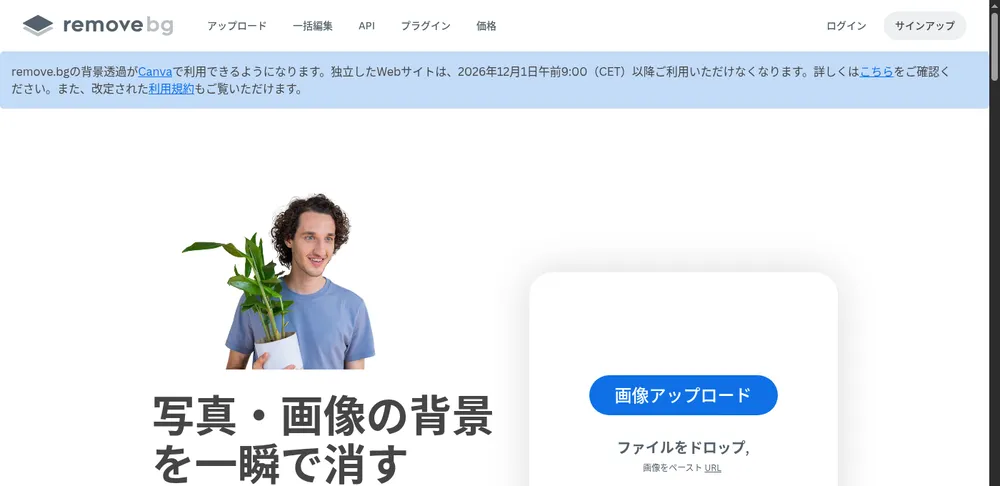
Source: remove.bg official website
Subscriptions, credits and data
- Yearly plans: Work as usual until the closing time, then end automatically with no further charges. Any unused period remaining after the closing date is refunded pro rata to the original payment method, with no action required on your part
- Monthly plans: Work as usual until the closing time, then end automatically. The final renewal occurring on or after November 1 is free. To cancel earlier, go to remove.bg/dashboard
- Pay-as-you-go (PAYG) credits: Unused credits expire on December 1, 2026. remove.bg recommends using them before the transition date
- Account data: Accessible until the closing time. After that, nothing can be downloaded, so export your credit usage reports and invoices from your account page before then
- Support: remove.bg/support or support@remove.bg
Where to migrate and alternatives
| What you want to do | Official migration path |
|---|---|
| Remove image backgrounds (single or bulk) | Background removal in Canva. The web and desktop apps can process multiple images at once. It can be used for free, but unlimited use requires Canva Pro |
| Build background removal into an app or website (API) | The Leonardo.Ai API, which offers the same background removal technology as remove.bg plus upscaling and scene generation APIs. You need to create a new account and API key (Leonardo.Ai) |
| Remove backgrounds in a Photoshop-style editor | Affinity, also part of Canva. The editor itself is free and has remove.bg's background removal technology built in, but this feature requires Canva Pro |
Leonardo.Ai's API is prepaid in US dollars, and unlike remove.bg's "one credit = one image," the cost depends on the capability you call. Its standard rate limit is 100 images per minute, compared with remove.bg's 500 (higher limits are available on request).
If your goal is e-commerce product photos, Photoroom, Claid.ai and Pic Copilot are also worth considering, as they add AI backgrounds and shadows on top of background removal.
The following describes the service as of October 2026. It will no longer be available from 9:00 CET on December 1, 2026.
What is remove.bg? (before the shutdown)
remove.bg is a background removal service: upload an image and its AI identifies the subject, such as a person, product, animal, car or graphic, and cuts out the background automatically in about five seconds. It is operated by Canva Austria GmbH in Vienna, Austria, and lets you make backgrounds transparent or replace them with white or any other color without photo-editing skills. Besides individuals, it has use-case pages for photographers, marketing, developers, e-commerce, media and car dealerships, and is used to cut out product images, profile photos and vehicle photos.
How to use it (before the shutdown)
- Upload an image On the remove.bg home page, click "Upload Image," or drop or paste an image, or enter an image URL. Both PNG and JPG work.
- The background disappears automatically Within seconds, the image is shown with a transparent background. You can download the preview image for free.
- Refine it Use Magic Brush to restore areas that were removed by mistake or erase leftover background. You can also add a background color, swap in a photo background, blur the background or add shadows.
- Save in high quality Exporting at full resolution uses one credit per image.
Features (before the shutdown)
01Remove and restore backgrounds
The core of remove.bg.
- Background removal — Automatically cuts out the background of people, products, animals, cars and graphics and makes it transparent
- Magic Brush — Erase or restore any part of the background with a brush
- Logo and signature background removal — Removes the background from logos or handwritten signatures so they can be used in documents and on the web
02Add a new background
Place the cut-out subject on a different background.
- Background colors and photos — Replace the background with white, black, a solid color, a gradient, scenery and more
- Magic Background (AI background generation) — Choose a reference background and the AI generates one
- AI Shadow and background blur — Add realistic shadows to the subject or blur the background
03Process in bulk and integrate
Features for high-volume work and integration with other tools.
- Bulk editing — Remove the backgrounds of multiple images at once
- API — Automate background removal in your own app or website
- Desktop apps and plugins — Windows / Mac / Linux app, Android app, Photoshop extension, Figma plugin and more
Pricing (as of October 2026)
Background removal for previews (low resolution) is free; exporting at full resolution uses credits (one credit per image). There are two pricing models, pay-as-you-go and subscription, and the pricing page showed the following amounts at the time of checking (Japanese yen on the Japanese page).
| Plan | Price (as shown on the pricing page) | Details |
|---|---|---|
| Free | ¥0 | Background removal for preview images on the website. One trial credit for AI editing when you create an account |
| Pay-as-you-go | From ¥330 for 3 credits | One-off small purchases; quantity is selectable. Credits expire at 9:00 CET on December 1, 2026 |
| Subscription | From ¥990/month for 40 credits | A fixed number of credits each month, AI photo editor, highest-quality export, API and integrations, bulk editing |
| Enterprise | Contact sales | For 100,000+ images per year, with flexible API, credits and rate limits |
We do not recommend signing up or buying credits now. Pay-as-you-go credits expire on December 1, 2026, and subscriptions end on the same day. If you are just starting to remove backgrounds, Canva, the official migration destination, is the safer choice.
Reputation and reviews
The remove.bg website features user testimonials such as "I was impressed by how carefully even fine details like hair were cut out, and that the images didn't look unnaturally jagged" (Taylor Hatmaker, Senior Technology Editor) and "The API is excellent and the accuracy of the processed images is astonishing" (Marc Cohen, CEO).
On the other hand, the standalone site is set to close in December 2026, and the Photoshop plugin, desktop apps and integrations will stop working on the same day. If remove.bg is part of your workflow, you need to choose a migration path before the closing date.
Frequently asked questions (FAQ)
Q. When will remove.bg close? A. The standalone website will be unavailable from 9:00 CET on December 1, 2026 (17:00 the same day in Japan). Background removal moves to Canva and the API to Leonardo.Ai.
Q. Will paid plans be refunded? A. For yearly plans, any unused period remaining after the closing date is refunded pro rata to the original payment method automatically. Monthly plans end automatically at the closing time, and the final renewal on or after November 1 is free. Pay-as-you-go credits are not refunded; they expire on December 1, 2026.
Q. What should I use instead of remove.bg after it closes? A. remove.bg points to Canva for removing image backgrounds, Leonardo.Ai for the API, and Affinity for Photoshop-style editing.
Q. Does it support Japanese? A. Yes, the website is available in Japanese (as of October 2026).
Q. Can I use it for free? A. Until the closing date, background removal for previews (low resolution) on the website is free. Full-resolution export requires credits.
The information on this page is based on what was published on the official remove.bg, Leonardo.Ai and Canva websites as of October 2026. Please check the official websites for the latest information.