

SonicCaption
: How to use it, features, and the business problems it solves
What is SonicCaption?
SonicCaption is a Chrome/Edge extension that listens to the audio playing in a browser tab and overlays bilingual subtitles (original plus translation) on the page in about 0.5 seconds. It works with YouTube, Netflix, Twitch, Zoom/Google Meet in the browser and online courses without uploading any files. It supports 60+ languages, and caption history can be saved as TXT or SRT. The free tier is 20 minutes; paid plans start at 10 USD/month for 8 hours, with 30% off on yearly billing (as of November 2026; taxes may be added). Built by Ethan Hu, the same developer as DubTab.
Business problems it solves


About "SonicCaption"
What is SonicCaption?
SonicCaption is a Chrome/Edge extension that listens to the audio playing in a browser tab and overlays bilingual subtitles (original plus translation) on the page in about 0.5 seconds. As long as a tab is playing sound—YouTube, Netflix, Twitch, Zoom or Google Meet joined in the browser, online courses and so on—it can show captions. There is no need to upload a video file or paste it into another site.
It is built by software engineer Ethan Hu and is run by the same team as the real-time translation tool DubTab. The official website has a Japanese version, and Japanese subtitles are supported.
Live bilingual subtitles for whatever a tab is playing
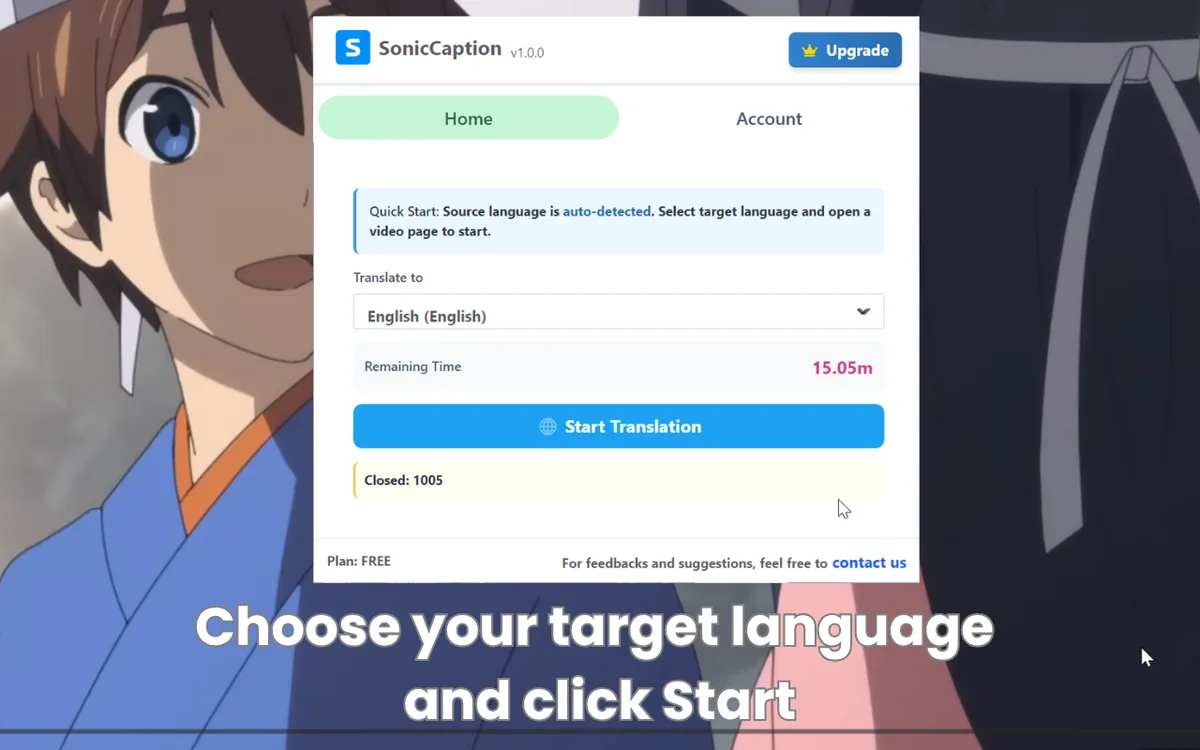
Open the extension, choose a target language and press Start: SonicCaption listens to that tab's audio and shows captions with the original and the translation side by side at the top of the page. It lets you follow live streams that have no official subtitles, or overseas courses whose subtitles don't cover your language, while they play.
The official site lists four use cases:
- Watching streams in other languages (late-night streams, anime, variety shows)
- Catching what is said in Zoom / Meet meetings with real-time captions
- Taking notes in online classes with the original and translation side by side (formulas, technical terms, example sentences)
- Language learning without pausing every few seconds to look up words
The official FAQ says it is for people who genuinely want to understand foreign-language content, and not for those who only want to enjoy the novelty of AI.
Source: Chrome Web Store (official screenshot)
Features
01Subtitles
- Real-time bilingual subtitles — shows the original language and the translation as dual subtitles overlaid on the page
- Works on any tab — generates captions on any site as long as video or audio is playing (the official site says "most sites")
- Low latency — appears in about 0.5 seconds, so it also works for live streams and meetings
- 60+ languages — English, Chinese, Japanese, Korean, Spanish, French, German and more. The source language is auto-detected
02Later use
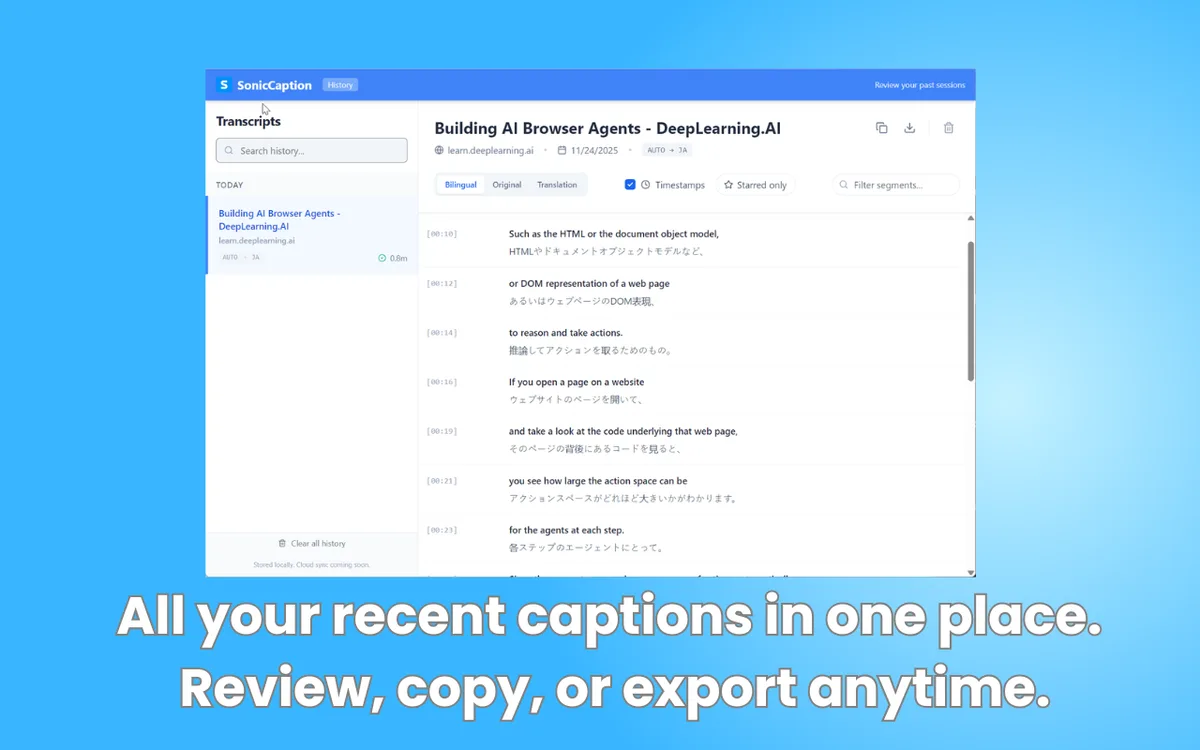
- Caption history — recent caption sessions are saved to your account so you can resume them or copy the text
- TXT / SRT export — download transcripts from the history as TXT or SRT files (per the Chrome Web Store description)
Source: Chrome Web Store (official screenshot)
03Teams
- Shared caption time — the whole team draws caption time from one balance, with no per-user billing to manage
- Member management — invite by email, separate owner / admin / member roles, and see per-member usage for the current billing period
How to use
- Install the extension Click "Add to browser" on the official site to open the Chrome Web Store and add SonicCaption. Pinning it to the toolbar makes it quick to open.
- Open a tab that plays audio YouTube, Netflix, Zoom, Twitch, course sites—anything works as long as audio is playing.
- Choose a language and press Start Click the SonicCaption icon, choose the target language and press Start; captions and translations appear at the top of the page. Paid plans are chosen inside the extension after installing it.
For teams, the owner signs in with Google on the official Teams page, sets up shared time and invites members by email. Members who join with the invited email address can start using the extension without extra setup.
Pricing
Official pricing as of November 2026 (USD). The terms of service say prices may exclude taxes and applicable taxes may be added as required by law. Yearly billing saves 30%.
| Plan | Monthly | Yearly | Caption time | Main features |
|---|---|---|---|---|
| Free | 0 USD | — | 20 minutes | Real-time captions on any site, bilingual subtitles, standard caption quality |
| Starter | 10 USD | 84 USD/year (7 USD/month) | 8 hours/month (96 hours/year on yearly) | Everything in Free + priority caption quality and latency, email support |
| Pro | 20 USD | 168 USD/year (14 USD/month) | 20 hours/month (240 hours/year) | Everything in Starter + priority support. Marked "most popular" |
| Power | 39 USD | 327 USD/year (27.25 USD/month) | 50 hours/month (600 hours/year) | Everything in Pro + priority support |
| Ultra | 79 USD | 663 USD/year (55.25 USD/month) | 120 hours/month (1,440 hours/year) | Everything in Power + priority support |
| Team / Enterprise | Contact | — | Time shared by the team | From 2 seats. Central management, dedicated account support, custom onboarding and SLA |
- The free 20 minutes is described as "20 minutes/month" on the pricing table but as "a limited one-time quota of 20 minutes" in the terms of service. Check what the extension shows before relying on it resetting every month
- Usage is measured by the length of audio you caption (captioning a 30-minute video the whole time uses about 30 minutes; a 1-hour meeting uses about 60 minutes)
- When you use up your included time, captions may pause until your quota resets for the next billing period or you upgrade
- Payments go through Stripe or another payment provider and renew automatically until cancelled. After cancelling, the plan stays active until the end of the current billing period; partially used periods are generally not refunded (except where required by law, among other cases)
How audio is handled
The official FAQ and privacy policy explain:
- Raw audio recordings are not uploaded. The extension listens in the browser, turns short chunks of audio into text, and sends only those text segments to the server to generate captions and translations
- Transcript and translation segments are sent to the company's servers and to third-party providers of speech-to-text and translation APIs
- Meeting or video recordings are not stored by default. Any feature that stores things long-term would be opt-in
- Audio and transcripts are not used to train unrelated general-purpose models unless the company clearly asks and receives explicit consent
How it differs from other real-time caption and translation tools
| Product | Key features | Best for |
|---|---|---|
| SonicCaption | Overlays bilingual subtitles on browser tab audio. Extension only, from 10 USD/month | Understanding videos, streams and courses you watch in the browser |
| DubTab | Same developer. Adds AI dubbing on top of subtitles, with desktop and Android apps | Hearing a translated voice too, or translating apps outside the browser |
| Transync AI | Turns Zoom, Teams and Google Meet audio into bilingual subtitles and translated speech, and can send translated audio to the other side | Meetings and sales calls where you also speak |
| Tactiq | Chrome extension that transcribes meetings without a bot and creates AI summaries | Keeping meeting records and minutes |
| kikiha | Adds a bot to the meeting to show real-time transcripts and translated captions | Giving all participants captions in Zoom, Meet or Teams meetings |
| ListenLeap | Turns podcasts, YouTube and your own audio into English listening material | Training listening skills themselves |
SonicCaption is a caption tool for the person watching or listening in the browser. If you need dubbing or translation of desktop apps, consider DubTab; for interpretation in meetings where you also speak, Transync AI; and for meeting records, Tactiq.
FAQ
Q. Can I use SonicCaption for free? Yes, there is a free tier with 20 minutes of caption time. The pricing table calls it "20 minutes/month" while the terms of service call it "a one-time 20 minutes", so for continued use consider a paid plan (from 10 USD/month).
Q. Does it support Japanese subtitles? Yes. It supports 60+ languages, so you can add Japanese translations to English, Chinese, Korean and other audio. The official site also has a Japanese version.
Q. Does it work with Zoom or Google Meet? Yes. The official FAQ says it works as long as audio is playing in the tab. Since it is an extension, it covers meetings you join in the browser.
Q. Is there a mobile or desktop app? SonicCaption is offered only as a Chrome/Edge extension. If you want a desktop or Android version, DubTab from the same developer offers them.
Q. Will it slow down my computer? The official FAQ says resource usage is low and it is optimized for typical laptops.
Q. Is my audio recorded or stored? The company says it does not upload raw audio recordings and does not store meeting recordings by default. What it sends to the server are text segments used to generate captions and translations.
Provider
SonicCaption is built by software engineer Ethan Hu (per the official site). The terms of service describe the operator as "a company registered in the United States" without naming it. In the listing application to this site, the operating company was given as XTCodeTech Ltd, and the developer contact on the Chrome Web Store is also an xtcodetech email address. DubTab, from the same developer, lists XTCodeTech Ltd (a Colorado, USA company) as its Google Play developer. On the Chrome Web Store it carries the "Featured" badge and has 8,000 users (as of November 2026). Inquiries are accepted by email at support@soniccaption.com. Users must be at least 16 years old (or the minimum age in their country).
The information on this page is based on what was published on the official website and the Chrome Web Store as of November 2026. Features and pricing may change, so please check the official website for the latest information.