Transync AI
: How to use it, features, and the business problems it solves
Add bookmark
What is Transync AI?
Transync AI is a real-time AI speech translation tool from Transync AI Inc. (US). It supports 60 languages, detects each speaker's language automatically, and handles bilingual subtitles, spoken translation playback and AI meeting notes. It translates Zoom, Microsoft Teams and Google Meet audio without a meeting bot or browser extension, and a virtual microphone can deliver translated speech to the other side. Available on Windows, macOS, iOS, Android and the web. New sign-ups get 40 free minutes; Personal Premium is $8.99/month (10 hours/month) and Enterprise is $24.99 per seat/month (40 hours/month).
Business problems it solves


About "Transync AI"
What is Transync AI?
Transync AI is a real-time AI speech translation tool from Transync AI Inc. of the United States. It listens to online meetings and in-person conversations, automatically detects each speaker's language, and shows bilingual subtitles with the original and the translation side by side. It can also read translations aloud and produce bilingual meeting notes and summaries afterward.
It supports 60 languages, including Japanese, English, Chinese and Korean. A key feature is that it translates Zoom, Microsoft Teams and Google Meet audio without adding a meeting bot or browser extension, and it runs on Windows, macOS, iOS, Android and the web.
Translates both sides without a meeting bot
Some meeting translation tools work by adding a translation bot to the meeting. Transync AI instead listens directly to your computer's microphone audio and system audio (the other side's voices coming from the meeting app) and translates them. Nobody on the other side has to install anything, and you keep using your usual meeting tool.
Capture audio
- Microphone audio (what you say)
- Computer audio (other participants in Zoom, Teams, Meet)
Detect language and translate
Identifies speakers and translates among 60 languages; registered keywords and context refine terminology
Deliver as text and voice
- Bilingual subtitles (can float on top)
- Spoken translation, virtual microphone
Keep a record
- Bilingual transcript
- AI summary, decisions, action items
Organized from the steps in the official desktop quick start guide.
It's also useful when you are the speaker. Select the virtual microphone (Transync AI Translation Mic) as the mic input in your meeting app, and participants hear the translated speech instead of your original voice. Voice cloning can make the translated speech sound closer to your own voice.
How to use
The flow below follows the official desktop quick start guide.
- Install the app and create an account Install from the download page and sign up. The desktop app is recommended if you need system audio, voice playback, the virtual microphone and picture-in-picture; the web version suits browser-based meetings and videos.
- Choose a translation mode Pick "one-way" for listening, "two-way" for conversation, or "multilingual" to translate into several languages at once.
- Choose languages and add keywords and context Select source and target languages and register technical terms, names, product names and meeting background in the AI assistant. You can specify translations in the form "A=B".
- Set up audio input Select microphone audio and computer audio. If needed, set up voice playback, voice cloning, picture-in-picture subtitles and the virtual microphone.
- Join the meeting and "Start translation" Join in Zoom, Teams, Google Meet or elsewhere and start translating. Pause and stop are one button each.
- Review records afterward Open translation records for the bilingual transcript, minutes, summary and action items. Records can be organized with folders and favorites.
Before starting, choose the translation mode for the situation: one-way (listen), two-way (conversation) or multilingual (several languages at once).
Multilingual mode counts usage time differently, so check the note in the pricing section.
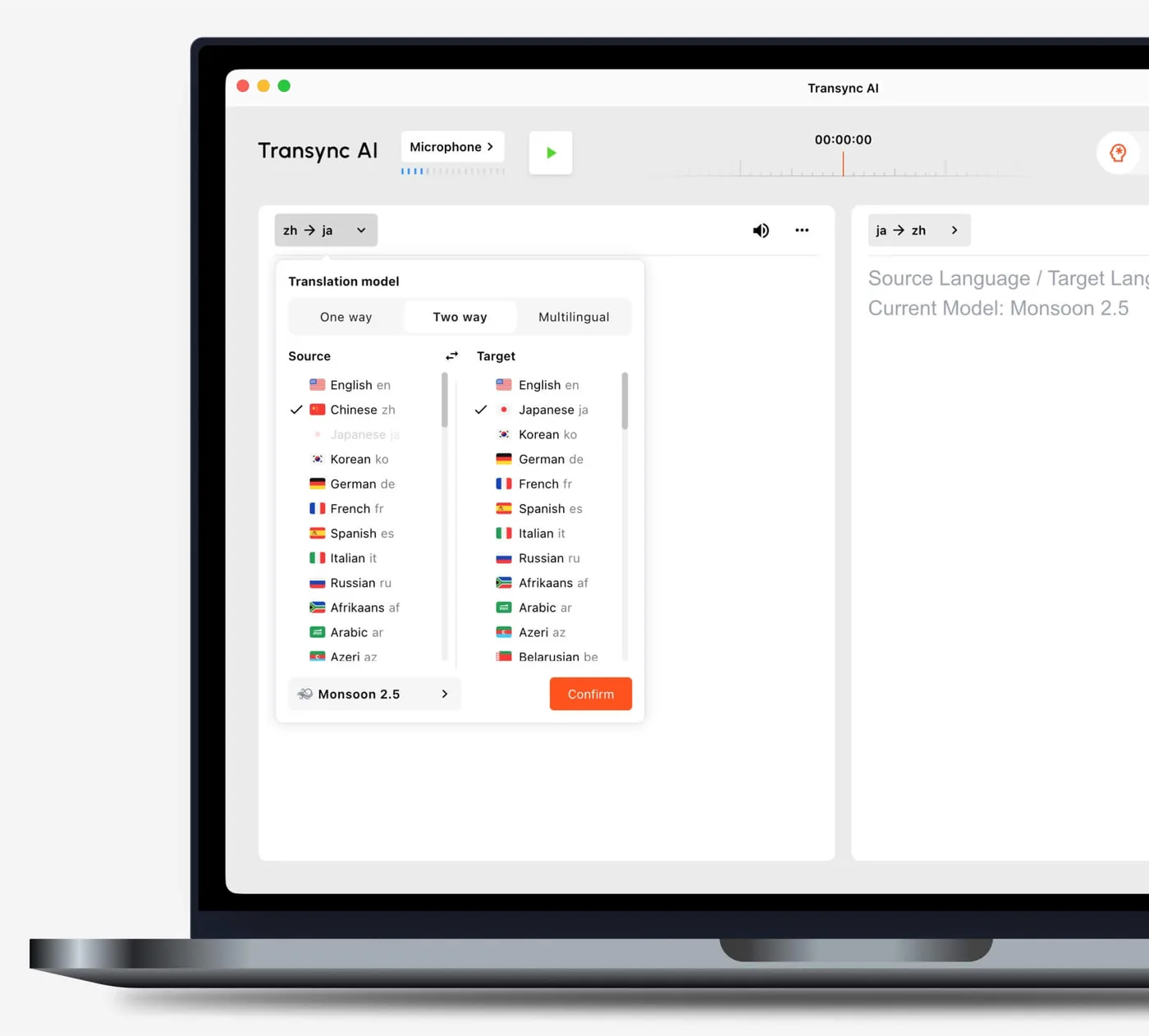
Source: Transync AI official site (Desktop Quick Start Guide) (same for the screen images below)
Features
01Translate
Translates meeting and conversation audio on the spot.
- Real-time speech recognition and translation — 60 languages; detects the speaker's language without switching buttons
- Three translation modes — one-way, two-way, multilingual (up to 10 languages)
- AI assistant (keywords and context) — register terms, proper nouns and meeting background in advance to refine translations
- Speaker separation — records who said what
02Deliver
Shows and plays the translation as subtitles and speech.
- Bilingual subtitles — original and translation in a split view
- Picture-in-picture subtitles — float subtitles above other windows and adjust position, size and opacity
- AI voice playback — reads translations in natural male or female voices (interruptible)
- Voice cloning — makes translated speech closer to your own voice
- Virtual microphone — delivers translated speech to meeting participants as mic input
- Presentation mode — streams talk subtitles and audio to the audience via QR code or share link
03Record
Keeps the meeting in a form you can revisit.
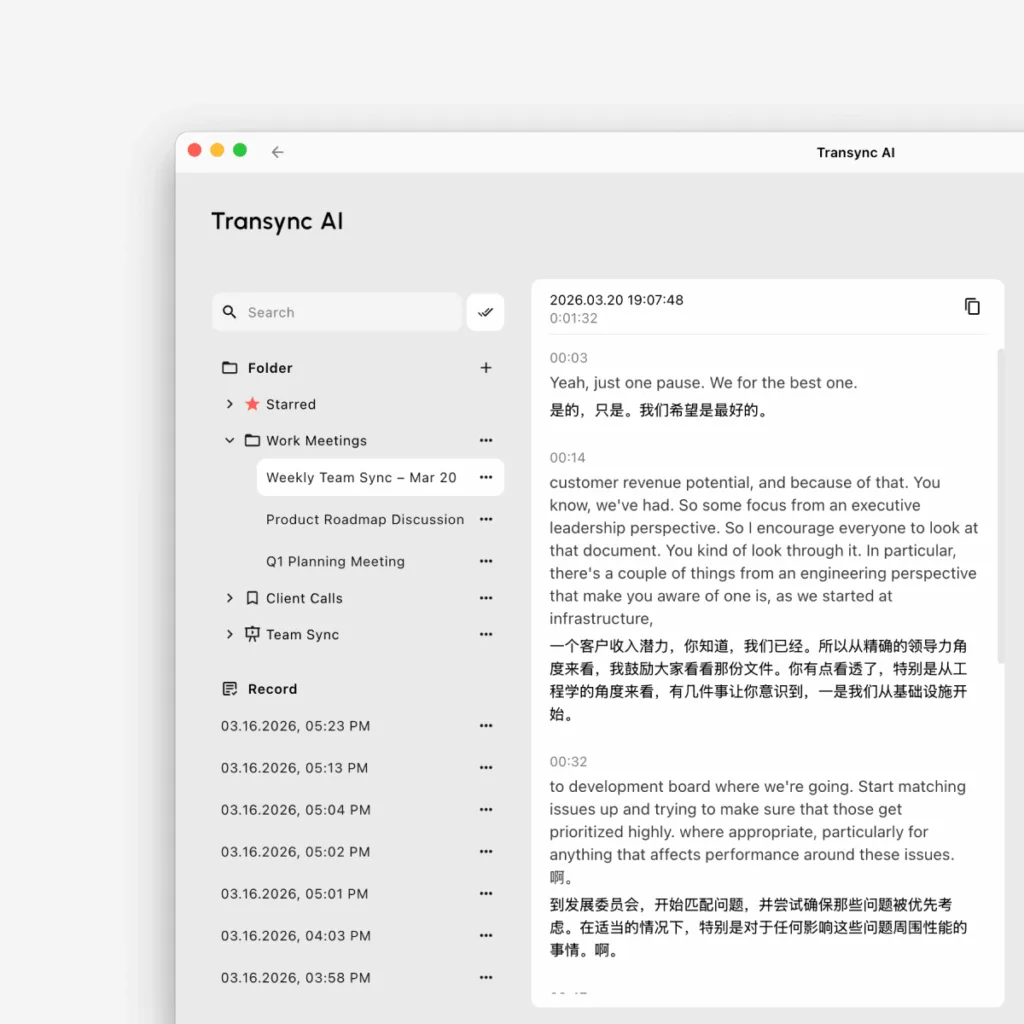
- Bilingual transcript — original and translation saved side by side
- AI meeting notes — summary, decisions and action items generated automatically
- Translation record management — search, folders and favorites
After the meeting, you can reread the bilingual transcript on the translation records page, and organize records with search, folders and favorites.
Pricing
Prices are in US dollars and divided by available translation time (official pricing page, as of October 2026).
| Plan | Price | Translation time | Main contents |
|---|---|---|---|
| Free | $0 | 40 minutes on sign-up | 60 languages, auto language detection, AI voice playback, keywords and context, AI meeting notes; all devices |
| Personal Premium | $8.99/month | 10 hours/month (resets monthly) | Same features as Free, up to 10 hours a month |
| Enterprise (team) | $24.99 per seat/month | 40 hours per seat/month | All Personal Premium features, unified account management, organization knowledge base, GDPR/HIPAA/ISO 27001 compliance |
| Enterprise plan | Quote | — | Via the official quotation form |
Adding time
- Personal Premium users can buy extra "time cards": 10 hours $7.99, 30 hours $22.99, 100 hours $69.99. They don't expire but can be used only during an active membership
- On the Enterprise plan, usage beyond 40 hours a month is deducted from the organization's prepaid balance at $0.70 per hour (per the quotation description on the pricing page)
- Enterprise has annual-spend discounts: 2% at $1,000, 5% at $3,000, 8% at $5,000, 10% at $10,000, and 10% at $15,000 (with 10% kept the following year)
How time is counted
- One-way and two-way translation are counted at the standard rate. Multilingual translation counts double from 3 languages, adding 1× for each extra language (up to 9× at 10 languages)
- The pricing page has a calculator that estimates needed hours from monthly meeting time and usage mode
- Payment is in US dollars (Chinese yuan for mainland China), and the terms say consumption tax may be added where applicable. The terms also mention a "30-day free trial" for new users, but the pricing page and home page say "40 minutes free after sign-up"; this page follows the pricing page
Security and data handling
The official site describes data handling as follows:
- Audio and text are protected with end-to-end AES-128 encryption and TLS 1.3
- Audio is deleted immediately after processing and not stored; only text is kept for translation and summaries, and it can be deleted anytime
- Data is not used to train AI models unless the user explicitly opts in (not used by default)
- Compliant with GDPR, ISO 27001 and HIPAA; SOC 2 Type II is under audit (as of October 2026)
Customers and reputation
The official site displays logos of organizations using it, including Toyota, Yakult, Benesse, SOMPO, Ipsos, UKG and Cafe24. On the Japanese App Store, the app "同言翻訳-Transync AIリアルタイム翻訳ソフト" is rated 4.5 (107 ratings, as of October 28, 2026).
Pros and cons
Pros
- No meeting bot or extension needed; works without asking anything of the other side
- Not only subtitles—spoken translation and the virtual microphone help when you're the speaker
- Minutes, summaries and action items in one tool
- Easy entry price, from $8.99/month for individuals
Cons
- Only 40 minutes free at sign-up; no ongoing free plan
- Priced in US dollars, and multilingual translation is counted at 2× or more
- The desktop app is needed for all features, such as system audio and the virtual microphone
- SOC 2 Type II is still under audit, so companies with strict security reviews should confirm details
How it differs from other AI interpretation tools
| Product | How it joins meetings | Key features | Price (as listed on each product page at the time checked) |
|---|---|---|---|
| Transync AI | Translates PC audio directly (no bot) | 60 languages, spoken translation, virtual mic, voice cloning, AI notes | 40 min free on sign-up; individual $8.99/month; enterprise $24.99/seat/month |
| VoicePing | Both direct PC audio and meeting bot | Also handles in-person meetings and trade-show events; cross-search of meeting logs | Free plan 90 min/month; paid from ¥3,163/month |
| DeepL Voice | Supports Teams, Zoom, Meet | Subtitles in a different language per participant; data deleted after calls | From ¥2,200 per user/month (tax incl.); 14-day free trial |
| Sentio | Runs in the browser (no bot) | Speech in 44 languages to subtitles/voice in 77; share via QR code | Free trial 30 min/month; ¥3,300/month (tax incl.) |
| kikiha | Adds a bot to the meeting | Transcription in 60 languages, 15 target languages, AI minutes | From ¥2,480/month (tax incl.) |
- If yen billing and dealing with a Japanese company matter, VoicePing and Sentio are easy to compare
- If each participant should see subtitles in their own language, DeepL Voice fits that design
- If you want a bot in the meeting that also takes care of records, kikiha is a good fit
- If you want to deliver your own words to others as translated speech, or use the same app at trade shows and in-person conversations, Transync AI's virtual microphone and voice playback help
FAQ
Q. Is Transync AI free? A. New sign-ups get 40 minutes of real-time translation free. After that, paid plans such as Personal Premium ($8.99/month, 10 hours/month) apply.
Q. Does it support Japanese? A. It translates Japanese, and the official site and apps can be displayed in Japanese.
Q. What do I need to use it with Zoom? A. Just select microphone and computer audio in Transync AI and start translating—no bot or extension in Zoom. To deliver translated speech to others, choose the virtual microphone as Zoom's mic.
Q. Is meeting audio stored? A. According to the official description, audio is deleted right after processing and only text is kept for translation and summaries. Text can be deleted anytime and isn't used for AI training unless you explicitly opt in.
Q. Can multiple people in a company use it? A. The Enterprise plan ($24.99 per seat/month, 40 hours/month) provides unified account management and an organization knowledge base. You can create a quote from the official quotation form.
The information on this page is based on what was published on the official site (pricing page, terms of service, quick start guide) and the App Store as of October 2026. Please check the official site for the latest specifications and pricing.