
Tactiq
: How to use it, features, and the business problems it solves
What is Tactiq?
Tactiq is an AI meeting-notes tool that transcribes Google Meet, Zoom and Microsoft Teams meetings in real time through a Chrome extension, without a bot joining the call, and uses AI to create summaries, action items and follow-up emails. It supports 60+ languages including Japanese and does not record or store audio. It also offers workflows to Linear, HubSpot and Slack, a Claude connector and Tactiq MCP. The free plan includes 10 transcripts per month; paid plans start at JPY 1,249 per user per month billed annually (as of November 2026). Operated by Tactiq HQ Pty Ltd in Sydney, Australia.
Business problems it solves


About "Tactiq"
What is Tactiq?
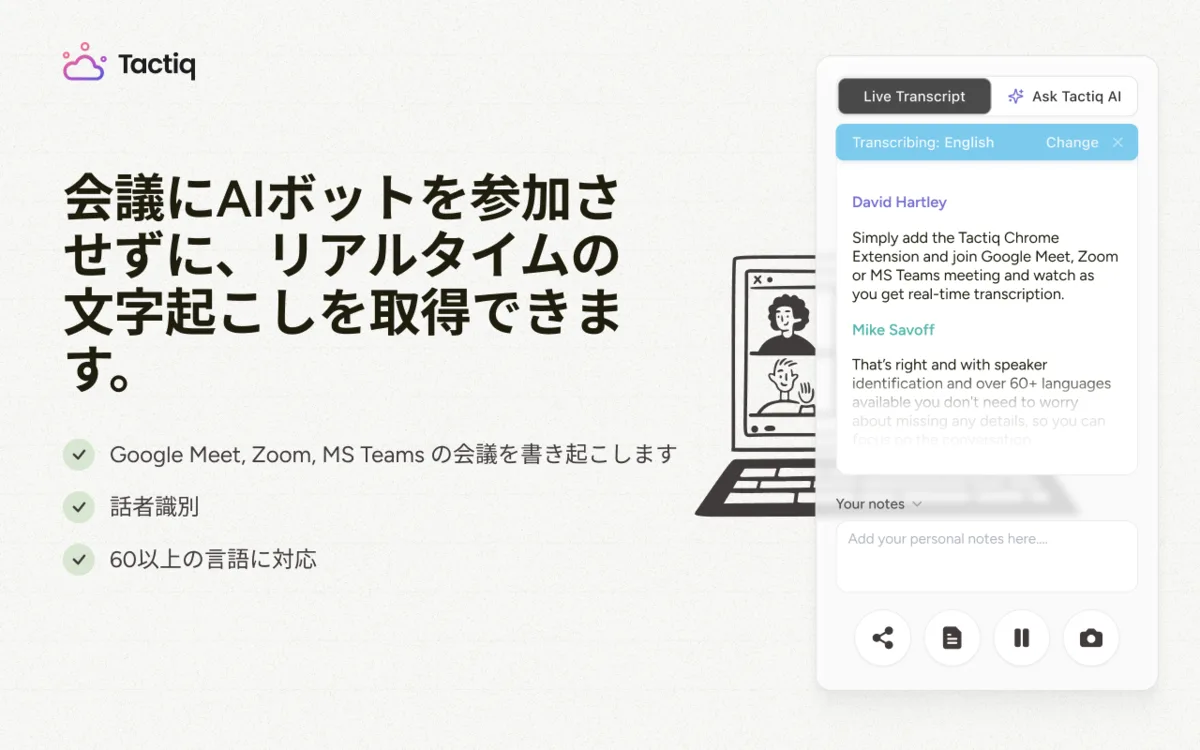
Tactiq is an AI meeting-notes tool that transcribes Google Meet, Zoom and Microsoft Teams meetings in real time without a bot joining the call, and uses AI to produce summaries and action items. It runs as a Chrome extension, and the transcript appears line by line with speaker names in a panel beside the meeting. Because no "AI participant" enters the meeting, you don't have to worry about the other side refusing a recording bot.
It is operated by Tactiq HQ Pty Ltd in Sydney, Australia. On the Chrome Web Store it carries the "Featured" badge, with 1,000,000 users and a 4.9 rating (4,683 ratings) as of November 27, 2026. The official enterprise page says it is used by "more than 1.5 million users and more than 20,000 organizations." The official site has a Japanese version, and prices are shown in yen.
Transcribing on your own screen, without a bot
Many AI note-takers collect audio by sending a recording bot into the meeting. Tactiq runs inside your own screen as a browser extension, so no bot joins the call. The transcript is shown only to you, and you can also notify everyone in the meeting that you are transcribing (official FAQ).
During the meeting you can click a transcript line to highlight it, or tag it on the spot as an action item, decision or question. You can save a screenshot to the transcript when a slide appears, and keep in-meeting chat messages and links. You can also ask Tactiq AI mid-meeting, "What are the key points so far?"
Source: Chrome Web Store
After the meeting: summaries, tasks and follow-up emails
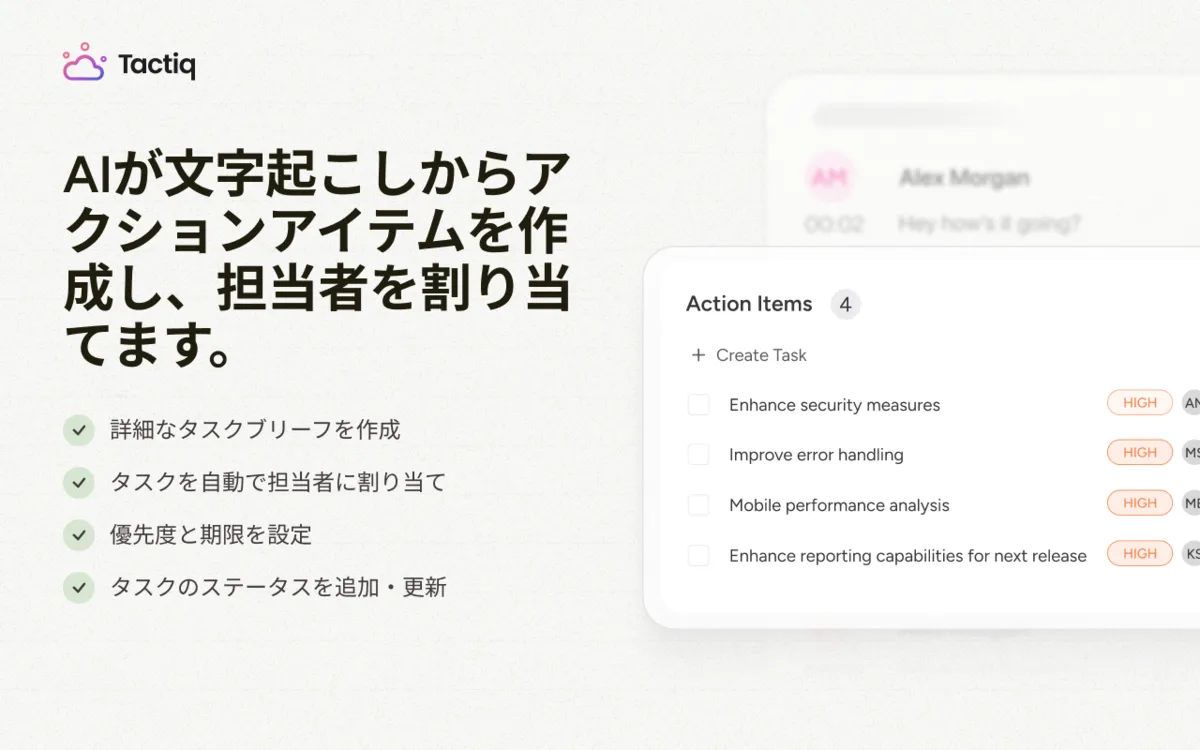
From the transcript, AI creates the following in one click:
- Meeting summaries and action items (who does what)
- Follow-up emails and project updates
- Answers to free-form questions (including about past meetings). Frequently used questions can be saved as prompts and reused in future meetings
AI features are counted in "AI credits": one AI action — generating a meeting summary, drafting action items, or asking Tactiq AI a question — uses one credit. Transcripts can be exported to Google Docs, Notion, Word and PDF, and summaries can be sent to Slack or Microsoft Teams (Chrome Web Store description).
Source: Chrome Web Store
Workflows, and using it from Claude or ChatGPT
You can build "workflows" that push meeting content to other tools. The official site shows examples such as creating Linear issues from meeting insights, generating and syncing HubSpot updates, and turning key moments into Slack messages.
Meeting records are also available from AI chats. Tactiq is a verified connector in Claude's directory and a verified plugin in ChatGPT's directory, and connects to other AI tools through Tactiq MCP. From Claude, it can search your recorded meetings and answer with verbatim quotes that include the speaker and timestamp. According to the enterprise page, access through MCP and the Claude Connector is read-only, limited to summaries by default, and authorized per user via OAuth, with admins deciding who can connect. According to the official Claude page, searching and listing meetings from Claude works on every Tactiq plan, including Free, while reading meeting details, summaries and full transcripts requires the Team plan or higher. The pricing table separately lists Tactiq MCP and the Claude Connector (both in beta) as features of the Business plan.
Features
01During the meeting
- Real-time transcription — Google Meet, Zoom and Microsoft Teams, with speaker names and timestamps; no bot joins
- In-meeting AI — Ask Tactiq AI for key points or follow-up questions during the call
- Highlights, tags and screenshots — Tag lines as action items, decisions or questions, and save the screen to the transcript
02After the meeting
- AI summaries and action items — Created in one click, along with follow-up emails and project updates
- Search — Within a transcript and across all meetings (including AI-generated insights)
- Export and sharing — Google Docs, Notion, Word, PDF, and sending to Slack or Microsoft Teams
03Teams and admin
- Workflows — Automatically push meeting content to Linear, HubSpot, Slack and more
- Auto-share with teams — Automatically share transcripts with your team (Team plan and above)
- Administration — SAML SSO and advanced data retention (Business and above), a curated data processing agreement (Enterprise)
How to use it
- Add the extension to Chrome Click "Add to Chrome" on the official site or the Chrome Web Store, then create an account. The Free plan needs no credit card.
- Join your meeting as usual When you open a Google Meet, Zoom or Microsoft Teams meeting in the browser, the Tactiq panel appears beside it and the transcript starts flowing.
- Finish with AI Tag lines or ask questions during the meeting, then create summaries, action items and follow-up emails in one click afterwards, and share or export them.
Pricing
These are the prices on the official pricing page (tactiq.io/ja/buy) as of November 2026. They are per user per month and shown in yen (the page does not say whether tax is included).
| Plan | Annual (per month) | Monthly | For | Main features |
|---|---|---|---|---|
| Free | JPY 0 | JPY 0 | 1 user | 10 transcripts/month, 5 AI credits/month |
| Pro | JPY 1,249 | JPY 1,899 | 1 user | Unlimited transcripts, 10 AI credits/month, disable transcript notification, pause automatic transcription |
| Team | JPY 2,541 | JPY 3,199 | 1–20 users | Unlimited AI credits, priority support, auto-share transcripts with teams |
| Business | JPY 4,800 | JPY 6,400 | 20–200 users | Advanced data retention, SAML SSO, customer success manager, Tactiq MCP and Claude Connector (beta) |
| Enterprise | Contact sales | — | 200+ users | Curated data processing agreement, customizable SAML SSO and in-meeting notification, dedicated account manager |
- Annual billing is described as "save up to 33%"
- When you hit the transcript or AI credit limit, AI features pause until the limit resets at the start of the next month (or until you upgrade). Existing transcripts always stay accessible
- You can change or cancel your plan at any time; upgrades apply immediately, while downgrades and cancellations take effect at the end of the billing period
- Special pricing for teachers and students (the education plan) is available by application
- Enterprise is an annual contract with volume pricing based on the number of licenses, and Business and Enterprise can also be purchased through Google Cloud Marketplace (enterprise page)
Data handling and security
The official site states ISO 27001 certification and SOC 2 Type II, along with GDPR and HIPAA compliance. The FAQ explains that Tactiq uses OpenAI's enterprise API offering rather than ChatGPT, and that data submitted via the API is not used to train OpenAI models. The enterprise page says both the Business and Enterprise plans include "your data is never used to train models," and that Enterprise guarantees this through a curated data processing agreement (DPA).
How it differs from other AI meeting-notes tools
| Product | Key features | Best for |
|---|---|---|
| Tactiq | Bot-free real-time transcription via a Chrome extension. Workflows to Linear and HubSpot, Claude connector and MCP | Easily recording external meetings where a bot isn't welcome |
| Voxtiva | Transcribes and translates meetings in real time without a bot joining | Following a foreign-language meeting with translation |
| Granola | Captures your computer's audio and combines your own notes with AI to finish the meeting notes | Building notes around what you wrote yourself |
| tl;dv | Automatically records and transcribes meetings, with CRM integration | Reviewing sales meetings with a recording |
| Fathom | Records, transcribes and summarizes meetings, delivering summaries and action items right after the call | Sharing recorded meeting notes immediately |
| Fireflies.ai | An AI note-taker joins meetings to transcribe, summarize, search and analyze | Analyzing meeting records as a team |
| Read AI | Joins meetings to transcribe and summarize, and searches across email and chat too | Handling information beyond meetings as well |
Details for the other products reflect each product page at the time it was checked. Because Tactiq does not record audio, recording-based tools such as tl;dv or Fathom are options if you want to keep video or audio.
FAQ
Q. Can I use Tactiq for free? Yes. The Free plan has no time limit and needs no credit card, and includes 10 transcripts and 5 AI credits per month. Unlimited transcripts require Pro (JPY 1,249 per month billed annually) or above.
Q. Can it transcribe meetings in Japanese? Yes. It supports 60+ languages including Japanese, and there is a dedicated page for Japanese meetings. It transcribes in the language spoken in the meeting and can switch languages during the call.
Q. Will the other participants know I'm transcribing? No bot joins, so no Tactiq participant appears on the other side. The transcript is shown only to you, but you can also notify everyone that you are transcribing. Pro and above also have a setting to disable this notification.
Q. Does it record meeting audio? The official FAQ says Tactiq does not record or store audio; it transcribes in real time and saves the text.
Q. Can my company roll it out centrally? Yes. The extension can be deployed from the Google Workspace or Microsoft 365 admin console, and SSO and domain joining bring employees into a single workspace (enterprise page). Business covers 20–200 users and Enterprise covers 200 or more.
Provider
Tactiq is operated by Tactiq HQ Pty Ltd in Sydney, Australia (per the Chrome Web Store developer listing; address: Level 8, 11 York St, Sydney, NSW 2000). Inquiries are accepted by email at team@tactiq.io and through the help center, which is also available in Japanese.
The information on this page is based on what was published on the official website and the Chrome Web Store as of November 2026. Features and pricing may change, so please check the official website for the latest information.