
WebTerm
: How to use it, features, and the business problems it solves
Add bookmark
What is WebTerm?
WebTerm is a free, browser-based Linux terminal built for practice. It implements 100+ commands — pwd, ls, cd through grep, find, chmod, pipes and redirection, Vim and Git — and grades each step by the actual state of the filesystem, so copying an answer doesn't get you past it. 15 mission-style tutorials plus a free-play sandbox. No install, no sign-up, 8 languages including Japanese (desktop browsers only).
Business problems it solves


About "WebTerm"
What is WebTerm
WebTerm is a Linux terminal for learning that runs entirely in the browser. There is nothing to install and no account to create — you can type a command the moment the page loads. Over 100 commands are implemented on a simulator: navigation such as pwd, ls and cd; file and text work such as grep, find and chmod; pipes and redirection; Vim; and Git. It is built by init.co.jp, and the version as of August 2026 is v1.5.0.
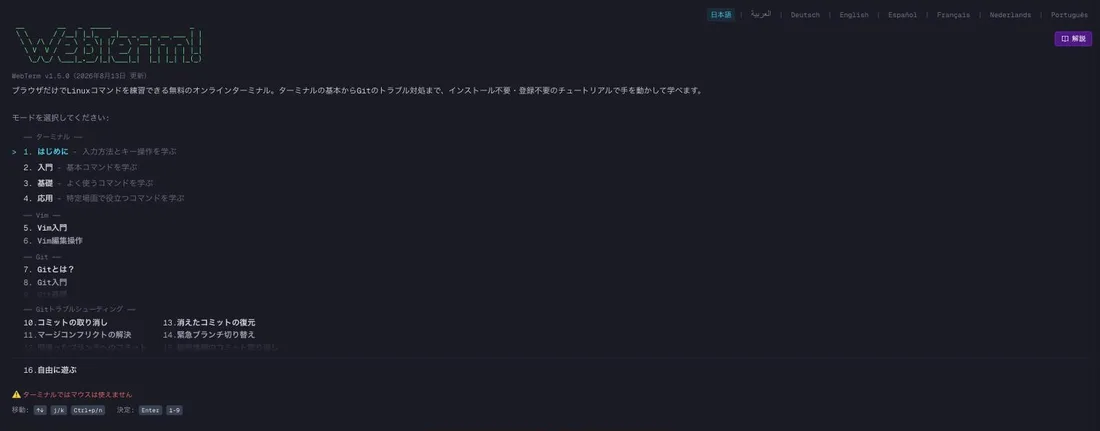
At the center of the experience are 15 tutorials, ordered by difficulty: 4 on the terminal, 2 on Vim, 3 on Git and 6 on Git troubleshooting, with a final entry, "16. Free play," for open practice.
Each step is graded on the state of the filesystem after your command runs, not on the string you typed, so copying an answer will not move you forward. The design assumes you type until your hands remember.
The more you hand to AI, the more the terminal matters
Claude Code, Codex and Cursor CLI all take the terminal as their ground. Reviewing a diff an agent proposes, reading a command that failed, and recovering a session that stopped halfway all happen in a shell.
Delegating without reading the terminal
- You cannot judge what a proposed diff means
- Work stops the moment an error appears
- You cannot tell how much has been changed
With the basic commands in hand
- `git diff` and `git status` let you check for yourself
- An error message tells you what to do next
- `git reflog` and friends let you recover
That is why WebTerm devotes six of its tutorials to Git troubleshooting alongside terminal basics: getting back from a broken state is treated as a skill to practice.
How to use it
-
Open it in a browser
Go to webterm.app. No sign-up, no install. Because typing is essential, it is meant for desktop browsers.
-
Pick a tutorial
They run in order from 01, "Terminal basics." If you already type commands daily, you can start from Vim (05–06) or Git troubleshooting (10–15).
-
Solve it in mission mode
Run the commands the instructions call for. Because grading looks at the filesystem, a different route to the same result still counts as correct.
-
Experiment in free play
A sandbox outside the tutorials. You can run
rmand break things without touching your own machine.
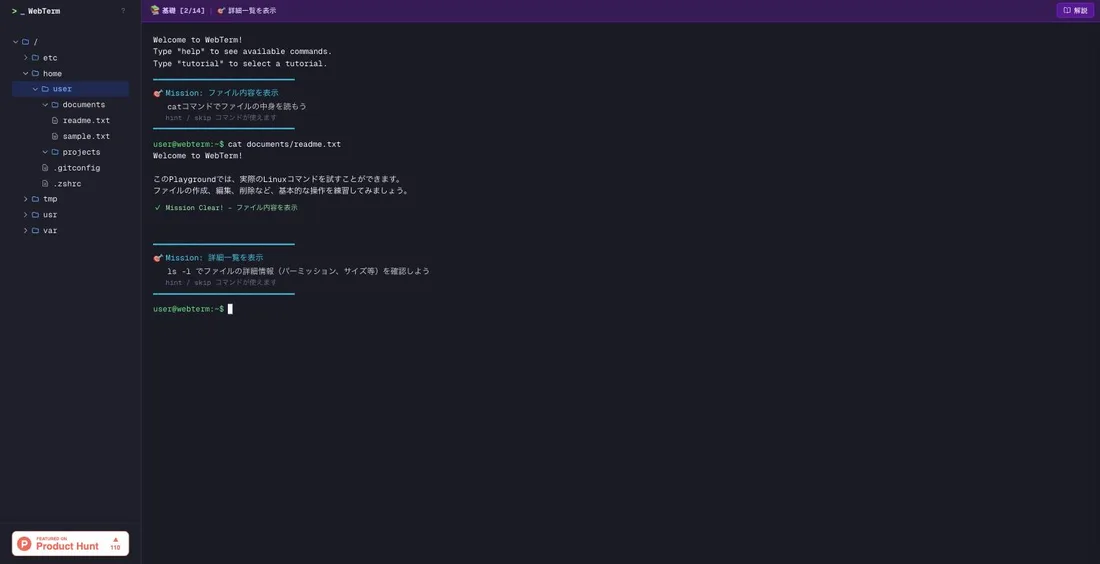
Mission mode. The current mission appears at the top; run a command and the output arrives with "Mission Clear!" before the next mission opens. The file tree on the left updates immediately, so you can see what your command actually did.
Features
01Implemented commands
Everything runs in the browser, with 100+ commands available.
- Files and search — pwd / ls / cd / mkdir / touch / cp / mv / rm / cat / grep / find / head / tail / wc / sort / chmod
- Shell features — pipes (|) and redirection (> / >>)
- Vim and Git — modal editing in Vim; commits and branches in Git
02How the learning works
Not reading — typing.
- 15 tutorials — 4 on the terminal, 2 on Vim, 3 on Git, 6 on Git troubleshooting
- Mission mode — graded on the state of the filesystem
- Progress tracking — keeps your place
- Live file tree — reflects each command instantly
03Environment
Nothing to prepare.
- No installation — a browser is enough; no VM, no WSL
- No account — you reach your first command without signing up
- 8 languages — Japanese, English, Chinese and more
Pricing
How it differs from other CLI learning services
WebTerm's position is "type first, read later." The structured curriculum lives in WebTerm Learn; WebTerm itself provides the environment and the exercises.
| WebTerm | WebTerm Learn | Progate's Command Line | Boot.dev | |
|---|---|---|---|---|
| Format | Terminal exercises only | Slides + exercises | Slides + exercises | Coding challenges |
| Scope | Commands, Vim, Git | Terminal basics to advanced, Git, Vim | Command-line fundamentals | Linux, Docker, CI/CD |
| Price | Free | Free | Paid (from ¥990/month) | Paid (from ¥4,200/month in Japan) |
| Sign-up | Not required | Free account | Required | Required |
If you want to start from language syntax instead, Progate and dotinstall are the alternatives; for server operations, KodeKloud.
This page reflects information published on the official site as of August 2026. Check the official site for the latest specifications and pricing.
Frequently compared services





Articles featuring WebTerm
CLI and Programming Study in the Age of AI Coding Agents [August 2026]: 11 Services, Starting from the Terminal and Git
With Claude Code, Codex and Cursor in everyday use by 2026, what you need is no longer the ability to write from scratch but the ability to read the diffs an agent produces, interpret its errors and recover a broken state — and all of that happens in the terminal. This article compares 11 learning services — WebTerm, WebTerm Learn, Progate, dotinstall, paiza Learning, ZEN Study, Techpit, Recursion, Boot.dev, KodeKloud and DeepLearning.AI — by entry point (language or environment), format, language support, free tier and price. It also covers the courses rebuilt around agents, including Progate's Claude Code Introduction (beta), KodeKloud's Claude Code For Beginners (8h32m) and DeepLearning.AI's course co-produced with Anthropic, and lays out an order to learn in: environment, syntax, agent, evaluation.
![CLI and Programming Study in the Age of AI Coding Agents [August 2026]: 11 Services, Starting from the Terminal and Git](/_next/image?url=%2Fimages%2Farticles%2Fcli-programming-learning-for-ai-coding-agents.png&w=3840&q=75 "CLI and Programming Study in the Age of AI Coding Agents [August 2026]: 11 Services, Starting from the Terminal and Git")
11 Programming Learning Services Compared [August 2026]: Choosing by Purpose, Price, End State and Language Support
Lists of thirty "best programming learning sites" mix free services with schools costing thousands of dollars, which makes them useless for deciding. This article narrows the field to 11 services you can study on independently for a few thousand yen a month — Progate, dotinstall, paiza Learning, ZEN Study, Techpit, Recursion, WebTerm, WebTerm Learn, Boot.dev, KodeKloud and DeepLearning.AI — organized by purpose: getting hired, finishing a first course, having something to build, breaking a plateau, and moving into infrastructure. It compares end state, format, language support, free tier and yearly cost, then sets out a study order that working people can sustain and what the foundation needs to contain in the age of AI coding agents.
![11 Programming Learning Services Compared [August 2026]: Choosing by Purpose, Price, End State and Language Support](/_next/image?url=%2Fimages%2Farticles%2Fprogramming-learning-services-comparison.png&w=3840&q=75 "11 Programming Learning Services Compared [August 2026]: Choosing by Purpose, Price, End State and Language Support")