CLI and Programming Study in the Age of AI Coding Agents [August 2026]: 11 Services, Starting from the Terminal and Git
With Claude Code, Codex and Cursor in everyday use by 2026, what you need is no longer the ability to write from scratch but the ability to read the diffs an agent produces, interpret its errors and recover a broken state — and all of that happens in the terminal. This article compares 11 learning services — WebTerm, WebTerm Learn, Progate, dotinstall, paiza Learning, ZEN Study, Techpit, Recursion, Boot.dev, KodeKloud and DeepLearning.AI — by entry point (language or environment), format, language support, free tier and price. It also covers the courses rebuilt around agents, including Progate's Claude Code Introduction (beta), KodeKloud's Claude Code For Beginners (8h32m) and DeepLearning.AI's course co-produced with Anthropic, and lays out an order to learn in: environment, syntax, agent, evaluation.
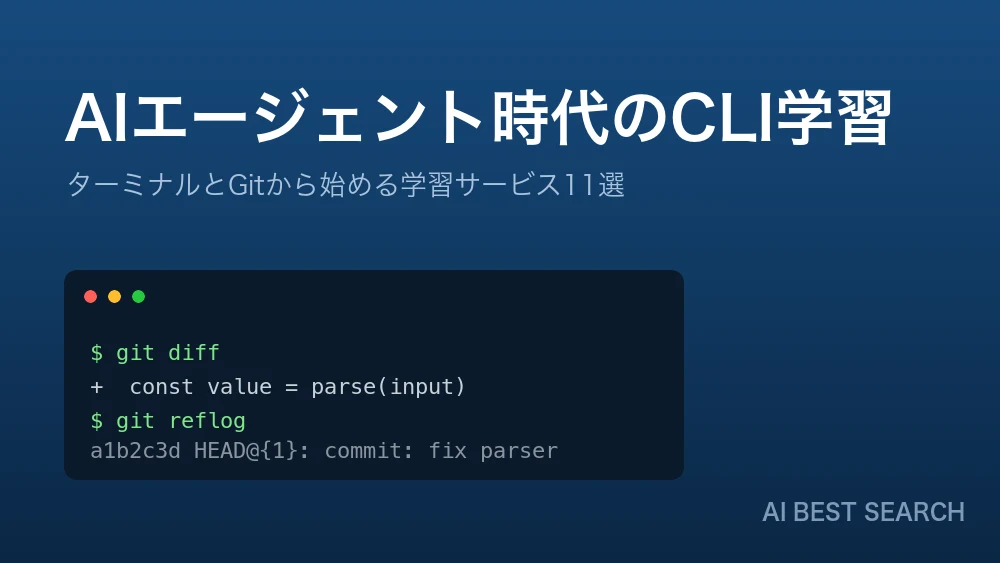
Claude Code, Codex, Cursor, GitHub Copilot — by 2026, AI agents handle a substantial share of the work of writing code. What has happened is not that "learning to program became unnecessary," but that the contents of the necessary foundation were swapped out.
Agents write code. But launching the agent, reading the diff it proposes, interpreting a failed command, and restoring a broken state are all things a human does in the terminal. Every major coding agent takes the CLI as its main ground.
This article compares 11 learning services, Japanese and international, from one angle: programming and CLI study as the prerequisite for using AI agents well. Pricing, format, language support and free tiers all reflect official figures as of August 2026.
The short version
To start from the environment (terminal and Git): WebTerm and WebTerm Learn. Both are free, and both let you type everything from `pwd`, `ls` and `grep` to `git reflog` in a browser. Spending one or two weeks here before you touch an agent changes how you get stuck afterwards.
To start from language syntax: Progate (from ¥990/month). Alongside Command Line and Git lessons, its Claude Code Introduction (beta) covers CLAUDE.md, skills and permissions in Japanese — still rare. For a video overview, dotinstall; to tie study to a job search, paiza Learning.
To become someone who can evaluate what an AI produces: Recursion (CS fundamentals, in Japanese), Boot.dev (backend + DevOps), KodeKloud (real labs plus an 8h32m Claude Code course), DeepLearning.AI (a Claude Code course co-produced with Anthropic, free).
Why the terminal matters more, not less, as you delegate
Every AI coding agent follows a similar execution model. A human states the goal, the agent reads and writes files and runs commands, and the human approves the result — and the place where that approval happens is the terminal.
Delegating without reading the terminal
- You cannot judge the proposed diff, so you approve it anyway
- Work stops the moment a command fails
- You have no way to check how much was changed
- You cannot undo the wrong commit
With the basic commands in hand
- `git diff` lets you read the change yourself
- An error message tells you what to do next
- `git status` and `ls` show you where you are
- `git reflog` lets you get back from a broken state
Three points matter most.
01Can you design the permissions?
Settings like Claude Code's permissions — deciding what an agent may and may not do — are written in terms of commands. You cannot scope that safely without knowing what rm or git push actually does.
02Can you read a diff?
Almost everything an agent produces arrives as a diff. If you cannot read it, review degrades into checking whether the thing still runs. Understanding Git is review capability.
03Can you recover?
Agents run long stretches of work at once. When an unintended change slips in, whether you can recover with git reflog or git restore decides how much you have to redo.
The 11 services at a glance
Prices include tax and reflect August 2026. Overseas services show official figures (US dollars, or the yen price displayed from Japan).
| Service | Main coverage | Format | Japanese | Free tier | Price |
|---|---|---|---|---|---|
| WebTerm | Terminal, Vim, Git | In-browser exercises | Yes | Everything | Free |
| WebTerm Learn | Terminal basics to advanced, Git | Slides + exercises | Yes | All courses | Free |
| Progate | Language basics, Command Line, generative AI | Slides + exercises | Yes | Opening of each lesson | From ¥990 / ¥2,490 per month |
| dotinstall | Languages, environment, AI | 3-minute videos | Yes | Free lessons | ¥1,480/month |
| paiza Learning | Language basics, hiring | Videos + exercises | Yes | 928 courses, 1,209 exercises | ¥980–¥1,490/month |
| ZEN Study | Web development, CS, apps | Material + live classes | Yes | None | ¥1,100/month |
| Techpit | Shipping one service | Written tutorials | Yes | Partial | Per tutorial / ¥2,980 per month |
| Recursion | CS fundamentals, backend | Projects and challenges | Yes | ~30 hours | $61/month, $588/year |
| Boot.dev | Backend + DevOps | Coding challenges | No | A few demo chapters | ¥4,200/month, ¥32,000/year |
| KodeKloud | Linux, DevOps, AI | Real hands-on labs | No | Free trial | 4 tiers (check site) |
| DeepLearning.AI | AI, LLMs, agents | Short courses | No | Short courses | Free and up |
How to choose: four axes
1. Enter through the language, or through the environment
Most services start from syntax. But when you plan to work with AI agents, running the environment (terminal, Git) first often gets you moving faster: the agent fills in syntax, while operating the environment is not delegated.
For the environment, WebTerm and WebTerm Learn; for the language, Progate, dotinstall or paiza Learning. ZEN Study sits between the two, since Linux, Git, GitHub and Docker are built into its introductory course.
2. Overview by video, or work it out by hand
Video-led
- You get the whole picture quickly
- It is easy to mistake watching for understanding
- Examples: dotinstall, paiza Learning (video portion)
Exercise-led
- You cannot advance without typing
- Where you are stuck becomes explicit
- Examples: WebTerm, WebTerm Learn, Progate, Recursion, Boot.dev, KodeKloud
3. Does it work in your language
Boot.dev, KodeKloud and DeepLearning.AI have no Japanese interface. Reading technical English is itself a professional skill, but starting your very first course in a second language raises the odds of quitting. Build the foundation in your own language, then move across.
4. How far the free tier goes
Free tiers vary widely. WebTerm and WebTerm Learn are entirely free, and DeepLearning.AI's short courses enroll for free. paiza Learning's free tier includes 928 courses and 1,209 exercises, and Recursion offers about 30 hours. ZEN Study, by contrast, is subscription-only with no free study tier.
Recommendations by situation
01You started using an agent and keep stalling in the terminal
Work through WebTerm's 15 tutorials (4 on the terminal, 2 on Vim, 3 on Git, 6 on Git troubleshooting). Free, no sign-up, and graded on the state of the filesystem so copying does not work. For a structured path, WebTerm Learn's 12 courses and 129 lessons.
02You have never programmed
Progate: touch HTML/CSS and JavaScript, then continue into Command Line, Git, Generative AI Basics and Claude Code Introduction (beta) inside the same service. Covering agent configuration (CLAUDE.md, permissions) in Japanese is close to unique right now.
03You can write code but do not trust your evaluation of what AI produces
Recursion builds CS fundamentals — data structures and algorithms, databases, networking, system design — in Japanese, at 20% input / 80% output across 800+ hours. If English is fine, Boot.dev covers backend and DevOps as one continuous path.
04You want to run agents in production
KodeKloud's AI learning path (19 courses, ~106 hours): Claude Code For Beginners at 8h32m, Cursor AI at 3h48m, MCP For Beginners at 2h31m — all handled in the same environment as the Linux, Docker and Kubernetes labs. To learn the implementation side, DeepLearning.AI's Anthropic co-produced course is free.
The order to learn in
Get comfortable in the environment (1–2 weeks)
- Basic terminal operation
- Files and search (grep / find)
- Git basics and recovery
Take one language all the way through (1–2 months)
- JavaScript or Python — just one
- Far enough to read it and know what it means
Delegate to an agent
Run a small task through Claude Code or Cursor and read the diff yourself. Design the permissions on your own.
Become able to evaluate
- CS fundamentals (complexity, data structures, DB design)
- DevOps (containers, CI/CD)
Skip step 1 and step 3 tends to end in "it worked, but I have no idea what happened."
The services in detail
Here is each service through one lens: what part of the work it covers when you are using AI agents. The order follows the learning sequence — environment (terminal, Git), then language basics, then implementation and evaluation.
 WebTerm | A free learning terminal that runs in the browser
An in-browser Linux terminal implementing over 100 commands: pwd, ls, cd through grep, find, chmod, pipes and redirection, Vim and Git, on an environment with real filesystem state. Nothing to install, no account to create — you can type your first command the moment the page loads.
The core is 15 tutorials (4 on the terminal, 2 on Vim, 3 on Git, 6 on Git troubleshooting), with mode 16 as a free-play sandbox. Because grading looks at the state of the filesystem after your command runs, copying an answer will not move you forward.
What matters most for agent work is the six Git troubleshooting tutorials: undoing commits, resolving merge conflicts, recovering lost commits, switching branches under pressure. These are exactly the operations you need after handing an agent a long stretch of work.
 WebTerm Learn | The terminal and Git across 12 courses and 129 lessons
Illustrated slides alternate with exercises across the terminal (introduction 20 / fundamentals 13 / advanced 25) and Git (introduction 23 / fundamentals 18), each stage followed by training courses (3 lessons × 5). The advanced terminal course reaches shell customization, process management and SSH, so you can carry on to the point of working on a server.
Structurally, the notable choice is 41 lessons on Git. As agents take over implementation, what remains on the human side is reading diffs, isolating branches and undoing the wrong commit — all Git operations.
There are also 9 lessons on Vim and, unusually, 6 on the terminal multiplexer Herdr, a multiplexer built for coding agents. Understanding panes, tabs and workspaces first means you will not trip when you start running several agents in parallel.
 Progate | Claude Code Introduction (beta), in Japanese
Illustration-led slides paired with in-browser exercises. 3.7 million users across more than 100 countries. Alongside 15+ languages, it carries environment lessons: Command Line (1 lesson + 9 articles) and Git (1 lesson + 9 articles).
What is close to unique in this category is that AI agent courses sit on the same shelf as the language primers. Generative AI Basics has you converse with an AI in the browser to internalize prompt patterns; Claude Code Introduction (beta) covers agent basics, project configuration via CLAUDE.md, automation through skills and safety management via permissions.
Covering permissions in an introductory course is a practical choice. What an agent may and may not do is written in terms of commands, so you cannot scope it without knowing what rm or git push does. Environment knowledge and agent configuration are continuous — the argument of this article, turned into a curriculum.
 ドットインストール | dotinstall: 576 lessons in 8,618 three-minute videos
A video-first service running since 2011. Three-minute units keep the cost of starting low — one video per commute — and the lessons play on a phone.
For agent work, the value is that the environment side — local setup, Linux commands, Git — is covered in Japanese. Agents run in your own environment, so getting stuck on Node.js versions or PATH means never reaching the point of launching one. As of August 2026, the site announced that AI-related lessons were being added.
 paizaラーニング | paiza Learning: where the exit leads to job listings
Code runs in the browser, so no setup is required, and the free tier alone includes 928 courses and 1,209 exercises — enough to reach working knowledge of a language at zero cost.
What separates it: skill-check ranks (S through E) function directly as job application credentials. The curriculum itself is designed against more than 20 million skill-check attempts and job data from 3,000+ companies, so "learn → measure → apply" completes inside one service.
 ZEN Study | Linux, Git and Docker inside the introductory course
Material written from scratch by working Dowango engineers, with unusual breadth for ¥1,100 per month: the same subscription also covers university-entrance preparation, web design and video creation.
The detail worth noting is the learning elements of "Introduction to Programming: Web Application Development" — Linux, Git, GitHub, Docker, web security and Hono beside JavaScript. Environment topics fall inside a course meant for complete beginners, reflecting a stated policy of teaching from basic PC operation without skipping steps.
Beyond it lie large-scale web development in Scala and computer science courses — data structures and algorithms, automata, networking. Environment through CS theory on one subscription has no equivalent at this price.
 Techpit | After syntax, ship one whole service
A marketplace of tutorials by working engineers. From 100+ titles you can select backwards from the finished product — "build a matching app in Rails" — which fills the gap after syntax, when the question becomes what to build.
There is no in-browser runtime; you write the code in your own environment, so terminal skills and environment setup are prerequisites. If that is where you stall, running WebTerm Learn or Progate's Command Line lessons first changes how it goes. INTLOOP Inc. acquired the business in November 2025 and it now runs at techpit.intloop.com.
 Recursion | CS fundamentals in Japanese, designed by ex-Meta engineers
800+ hours selected from US university CS curricula and built at a ratio of 20% input, 80% output. It covers data structures and algorithms, OOP, databases, networking, operating systems and system design in Japanese, with 100+ backend assignments that avoid frameworks.
The more implementation agents take on, the more the human job becomes evaluating what comes out. Estimating complexity, choosing a data structure, spotting a table design that will not hold — these belong to the person reading generated code, and that is exactly the layer Recursion covers. Its stated goal, "escaping copy-paste engineering," means more in an AI-first environment, not less.
 Boot.dev | Backend and DevOps in one path, with an AI tutor
A challenge-based service from Ogdolo LLC. Python, Go, TypeScript and SQL sit beside Linux, Git, Docker, Kubernetes, CI/CD and AWS, so the familiar gap between "I can write it" and "I cannot deploy it" rarely opens. More than 1.2 million learners.
Its AI tutor, Boots, answers questions with Socratic questions rather than solutions, steering you to locate the hole in your own understanding. Combined with a format that requires working code, it is designed to produce people who can evaluate AI output rather than depend on it.
 KodeKloud | Real labs and an AI path with 8h32m on Claude Code
A hands-on platform for DevOps, cloud and AI from Zaurac Technologies (Singapore). 80+ courses and 880+ labs, with environments for Kubernetes, Docker, Terraform and more that start instantly. The motto — "Build. Break Fix. Learn." — describes the design.
It is the only service here carrying an AI learning path (19 courses, ~106 hours) as a formal curriculum, running from Prompt Engineering 101 (5h) and MCP For Beginners (2h31m) through Claude Code For Beginners (8h32m) and Cursor AI (3h48m) to MLOps and AIOps.
An eight-and-a-half-hour Claude Code course sitting on the same shelf as Linux, Docker and Kubernetes says it plainly: a coding agent is one development tool among others, taught with the environment knowledge it depends on.
 DeepLearning.AI | The Anthropic co-produced Claude Code course, free
The AI learning platform founded by Andrew Ng, publishing 104 short courses that finish in one to three hours — most of them co-produced with the companies that build the tools. Courses on features that shipped weeks earlier keep arriving, so the material tracks current behavior.
For coding agents there are Claude Code: A Highly Agentic Coding Assistant (2 hours, intermediate, with Anthropic) and AI Coding Workflows: From Cloud to Local (1h32m, intermediate, with JetBrains), both listed as "Enroll for Free." Forty-three agent-related courses reach as far as designing multi-agent systems with crewAI.
The prerequisite is being able to read code. Put the other way: if you can, the closest thing to official material is available at zero cost.
FAQ
If AI writes the code, why learn to program at all?
The share of work spent writing has certainly fallen. But reading, evaluating and recovering remain human work. A person approves the diff an agent produces, and as long as responsibility comes with that approval, being able to read is a requirement. It is closer to the truth to say the target moved from "writing from scratch" to "reading and judging."
Terminal first, or programming first?
If working with AI agents is the premise, do the terminal and Git first. One or two weeks is enough for the basics, and afterwards no language you pick will strand you at environment setup. WebTerm and WebTerm Learn are both free.
How far can I get for free?
Terminal and Git fundamentals are fully covered for free (WebTerm, WebTerm Learn). Language syntax goes a long way on paiza Learning's free tier (928 courses, 1,209 exercises). Even agent usage is free through DeepLearning.AI's short courses. Paying starts to matter at systematic CS fundamentals (Recursion) and real infrastructure practice (KodeKloud).
Should I avoid English-only services?
Make your first course one in your own language. That said, Boot.dev, KodeKloud and DeepLearning.AI hold ground that Japanese services do not — real-environment DevOps practice and vendor-official agent courses. Build the base first, then cross over when you need to.
Conclusion
AI coding agents did not remove the need to learn; they changed the order. Rather than perfecting syntax before implementing anything, it is now faster to secure the environment (terminal, Git) first, delegate to an agent while reading the diffs yourself, and fill in the knowledge required for evaluation afterwards.
The first step costs nothing. Type commands in WebTerm, structure it with WebTerm Learn, and move on to Progate or Recursion — a detour that turns out to be the shortest route.
For choosing the agent itself, see "Comparing AI coding tools"; for using Claude Code, "The complete Claude Code guide". For learning services compared by purpose, see "11 programming learning services compared".
This article reflects information published on each company's official site as of August 2026. Pricing and course structure change; check the official sites for the latest details.
AI tools featured in this article

Related articles
11 Programming Learning Services Compared [August 2026]: Choosing by Purpose, Price, End State and Language Support
Lists of thirty "best programming learning sites" mix free services with schools costing thousands of dollars, which makes them useless for deciding. This article narrows the field to 11 services you can study on independently for a few thousand yen a month — Progate, dotinstall, paiza Learning, ZEN Study, Techpit, Recursion, WebTerm, WebTerm Learn, Boot.dev, KodeKloud and DeepLearning.AI — organized by purpose: getting hired, finishing a first course, having something to build, breaking a plateau, and moving into infrastructure. It compares end state, format, language support, free tier and yearly cost, then sets out a study order that working people can sustain and what the foundation needs to contain in the age of AI coding agents.
![11 Programming Learning Services Compared [August 2026]: Choosing by Purpose, Price, End State and Language Support](/_next/image?url=%2Fimages%2Farticles%2Fprogramming-learning-services-comparison.png&w=3840&q=75 "11 Programming Learning Services Compared [August 2026]: Choosing by Purpose, Price, End State and Language Support")
Claude MaxのAPIクレジットとは【2026年10月最新】毎月$100〜の受け取り方・使える範囲・Claude Codeは対象か・Haiku 5.5で何回動くか
2026年10月7日(米国時間)、AnthropicはClaudeのMax・Teamプランに毎月のAPIクレジットを付けると発表しました。Max 5xは月$100、Max 20xは月$200、Teamは1席あたりStandard $20・Premium $100をチームで1つの残高にまとめ、上限は$500です。この記事では、Xで食い違って広まったTeamの付き方(オーナー1人が受け取るプール方式)を公式ヘルプにもとづいて正し、使える範囲(Claude API・Managed Agents・Agent SDK・APIキーで動かすclaude -p)と使えない範囲(対話で使うClaude Code・Bedrock等の経由)、claude.aiの請求設定から組織を連携する受け取り方、7日の待機期間と繰り越し不可の条件を整理します。あわせて、同時公開のClaude Haiku 5.5の料金(入力$0.10・出力$0.50/100万トークン)で$100がどれだけの処理になるかを試算し、Pro・Max・Teamの選び方の目安を示します。
What Jev Is [September 2026]: The AI That Generates No Text — How System One Models Work, Pricing and Use Cases
On 15 September 2026, TypeSafe AI came out of two years of stealth with $40M in funding and shipped Jev — and it spread past social media into developer communities, with Qiita running an official campaign from 16 September to 2 October. What caught on was not the benchmarks but the positioning: an AI that does not generate text. Jev does not chat; it picks from options you defined and returns the answer with a probability attached. This article covers what the three question types (Choice, Score, Noul) actually return, the speculative fan-out that makes stacking questions free in latency, the pricing model of $0.042 per million input tokens with output free, the path from waitlist to Python SDK, HTTP API and the Claude Code skill, how to gate on confidence and route the uncertain cases to a person, and where it pays off — support triage, LLM guardrails, RAG re-ranking. It also covers what TypeSafe publishes about its own weak spots: lower accuracy on CJK scripts, unreliable counting, and weak date comparison.
![What Jev Is [September 2026]: The AI That Generates No Text — How System One Models Work, Pricing and Use Cases](/_next/image?url=%2Fimages%2Farticles%2Fjev-typesafe-ai-guide.png&w=3840&q=75 "What Jev Is [September 2026]: The AI That Generates No Text — How System One Models Work, Pricing and Use Cases")
Claude Fable 5 vs. GPT-5.5 vs. Gemini 3.1 Pro: Which Should You Choose? A Deep Dive into Performance, Pricing, and Use Cases [July 2026]
A thorough comparison of the latest flagship models from the industry's three leading AI labs, all released in the first half of 2026: Claude Fable 5, GPT-5.5, and Gemini 3.1 Pro. Covers benchmark performance, API pricing, context windows, multimodal support, and how to use them on consumer plans like ChatGPT Plus, Claude Pro, and Google AI Pro — with recommendations by use case, based primarily on official data.
![Claude Fable 5 vs. GPT-5.5 vs. Gemini 3.1 Pro: Which Should You Choose? A Deep Dive into Performance, Pricing, and Use Cases [July 2026]](/_next/image?url=%2Fimages%2Farticles%2Fai-model-compare-claude-fable-5-gpt-5-5-gemini-3-1.png&w=3840&q=75 "Claude Fable 5 vs. GPT-5.5 vs. Gemini 3.1 Pro: Which Should You Choose? A Deep Dive into Performance, Pricing, and Use Cases [July 2026]")
What Is Claude Fable 5 | A Deep Dive into Anthropic's Latest Frontier Model: Performance, Pricing, and How to Use It
A comprehensive look at Claude Fable 5, Anthropic's latest model released in June 2026. Covers benchmark performance in coding, knowledge work, and science, how it compares to Mythos 5, API pricing, and usage guidance — all backed by official data.