
AILEX
: How to use it, features, and the business problems it solves
Add bookmark
What is AILEX?
AILEX is an AI legal OS from AILEX LLC for Japanese law firms with one to five lawyers. In a single screen per case, it offers a case chat that reads the case record and answers with citations, drafting from 57 templates with quality checks, preparation of filings for mints (Japan's electronic filing system for civil court documents) including exhibit-number stamps, splitting by file size, and file naming, deadline and hearing-date management, and fee, expense, and invoice tracking. Case records are stored in the AWS Tokyo Region and AI inference runs only on Amazon Bedrock's Japan-only inference profiles (Tokyo and Osaka); inputs are not used for training. Pricing is ¥13,200 per seat per month (tax included), with a one-month free trial from sign-up.
Business problems it solves

About "AILEX"
What is AILEX?
AILEX is an AI legal OS for Japanese law firms with one to five lawyers, developed and provided by AILEX LLC. It handles intake and engagement, reading case materials, drafting court documents, preparing filings for mints (Japan's electronic filing system for civil court documents), managing hearing dates and deadlines, and tracking fees, expenses, and invoices, all in one screen per case.
The design principle the company states is that "AILEX does the work, and the judgment stays with the lawyer." The AI produces drafts and candidates awaiting confirmation; finalizing documents, sending them to clients, and filing with the court remain actions taken by the lawyer. On September 27, 2026, the service switched to the current "AILEX v2," in which case records are stored in the AWS Tokyo Region and AI inference runs entirely on Amazon Bedrock's Japan-only inference profiles (Tokyo and Osaka).
Same for lawyers and staff
No automatic switch to paid
Complaints, briefs, notices of representation, etc.
Announced Aug 2026, including staff
Open a case and see cited answers and items awaiting your decision
At the center of AILEX is the case chat on each case's screen. It reads the complaints, answers, evidence, and other documents imported into the case record, and is designed to attach the document name, exhibit number, and page to its answers. When something cannot be confirmed from the record, it says so.
When a brief arrives from the opposing party, AILEX picks out the assertions and drafts an admission/denial table (exportable to Word), then lists anything that needs the lawyer's judgment under "Awaiting your decision" below the conversation. In the screen below, it points out that materials are missing for two points disputed in the answer and offers buttons to either "Request materials from the client (recommended)" or "Rebut with current evidence." Up to two pending decisions are shown at a time, in order of urgency; the rest are collapsed.
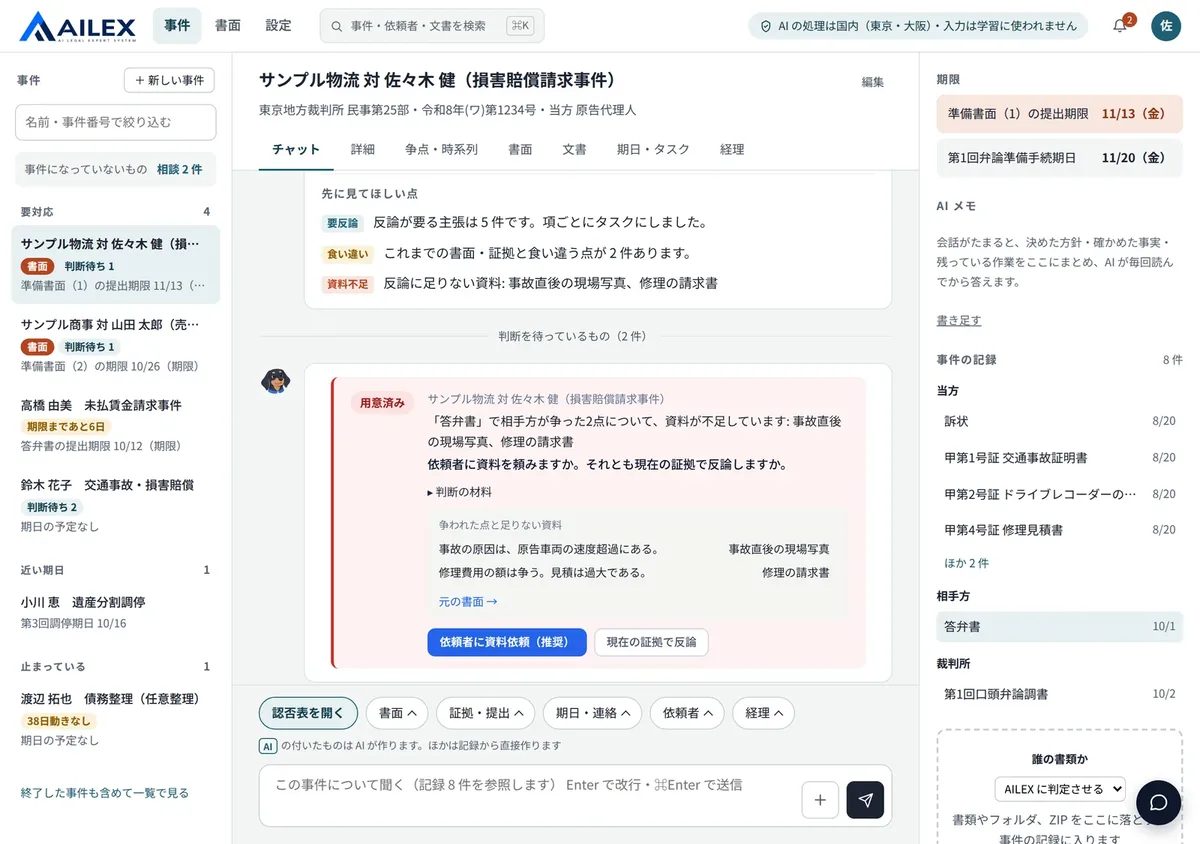
Source: AILEX official website (also applies to the screenshots below; all cases and people are fictitious demo data)
The case list is ordered "Needs action," "Upcoming dates," and "Stalled," so a case with no activity for 38 days, for example, does not get buried. Every morning at 7:30, each person receives a single notification summarizing that day's hearings and filing deadlines within the next three days.
Finish the work before uploading to mints, all at once
With the amended Code of Civil Procedure taking effect on May 21, 2026, attorneys and other litigation representatives are now required to file online via mints. AILEX released its mints filing support more than three months before the mandate, in February 2026, and v2 carries it forward.
The mints filing package feature takes the documents you select and produces a zip with exhibit numbers stamped, files split to fit the 200 MB-per-upload limit, and file names formatted. It also prepares drafts of the mints input fields, the evidence description, a cross-check of briefs against evidence, and how to number the exhibits. The list of parties can be exported as a CSV for transcription.
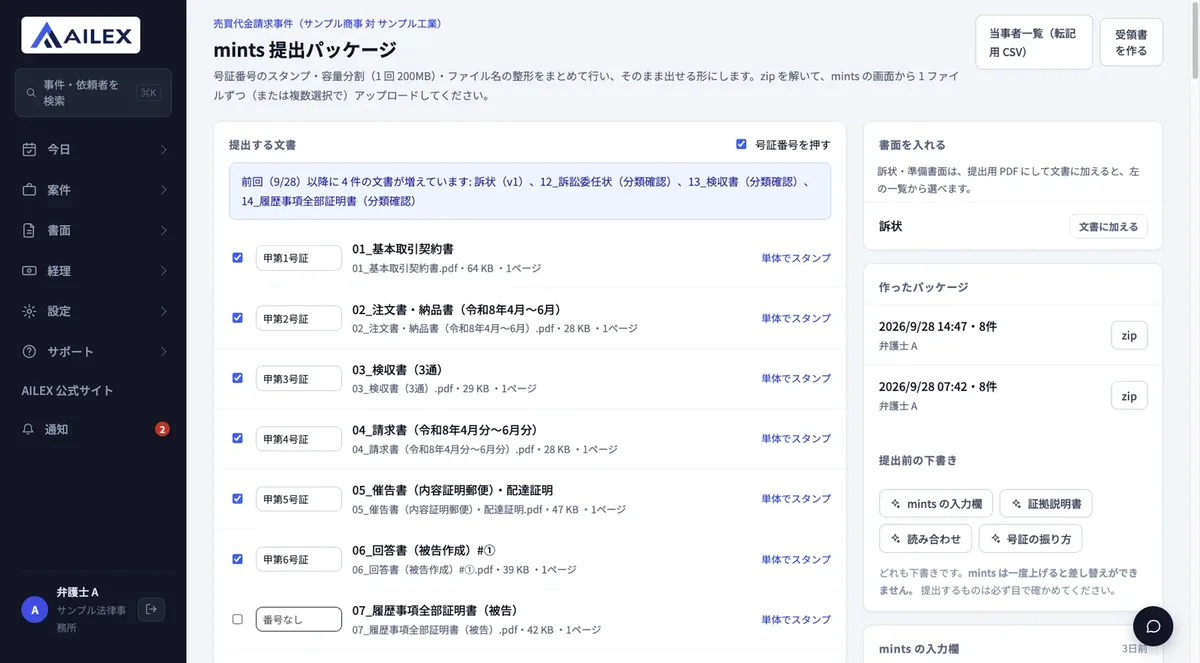
Because mints does not provide an API for external integration, AILEX never sends anything directly to mints. The lawyer unzips the package and uploads it from the mints screen. Since files cannot be replaced once uploaded to mints, the company advises users to "always check what you file with your own eyes." The company also states that mints and TreeeS are systems of the Supreme Court of Japan and that their mention does not imply any partnership or certification.
Deadlines and status can be tracked in a list for each filing and receipt, and for electronic service through mints, you can record the dates of notification, viewing, or download along with the resulting deadlines. The company also runs a public "mints Practice Guide" that is useful even for firms that do not use AILEX.
Policy for the next system, TreeeS
The Supreme Court's new system TreeeS (e-filing and e-records management) is scheduled to be introduced first in January 2027 at the Nagoya High Court main office, the Nagoya District Court (including branches), and the summary courts in its jurisdiction, with a goal of rollout to all courts during fiscal 2027 (based on information published as of September 2026).
AILEX positions TreeeS support as planned and has published its approach. It intends to update filing package generation, PDF requirement checks, exhibit-number stamping, confidential-information checks, and service and deadline management to match each filing destination, so that the period in which paper, mints, and TreeeS coexist can be handled in a single filing management view. The company states that this support is under development and may change depending on what TreeeS specifications are published, and that because TreeeS also has no public API for external integration, lawyers perform the filing in each system themselves.
It drafts, but you cannot finalize while blanks remain
Documents are drafted from 57 templates, including complaints, briefs, answers, statements of reasons for appeal, petitions for commencement of bankruptcy and discharge, and notices of representation. You choose which documents to reference for each type, and the draft is generated based on the case's framework and history.
Each version of a draft goes through a quality check: matching against registered information and source materials, checking statutes and case law against e-Gov statutes and information published by the courts, and flagging fields that still need to be filled in. In the screen below, four items such as the office address and exhibit number remain "Not filled in," and "Finalize" cannot be pressed until they are completed. Finalized documents cannot be edited, and you can switch between versions (v1, v2) to compare with earlier ones. Output is available in Word, PDF, and print.
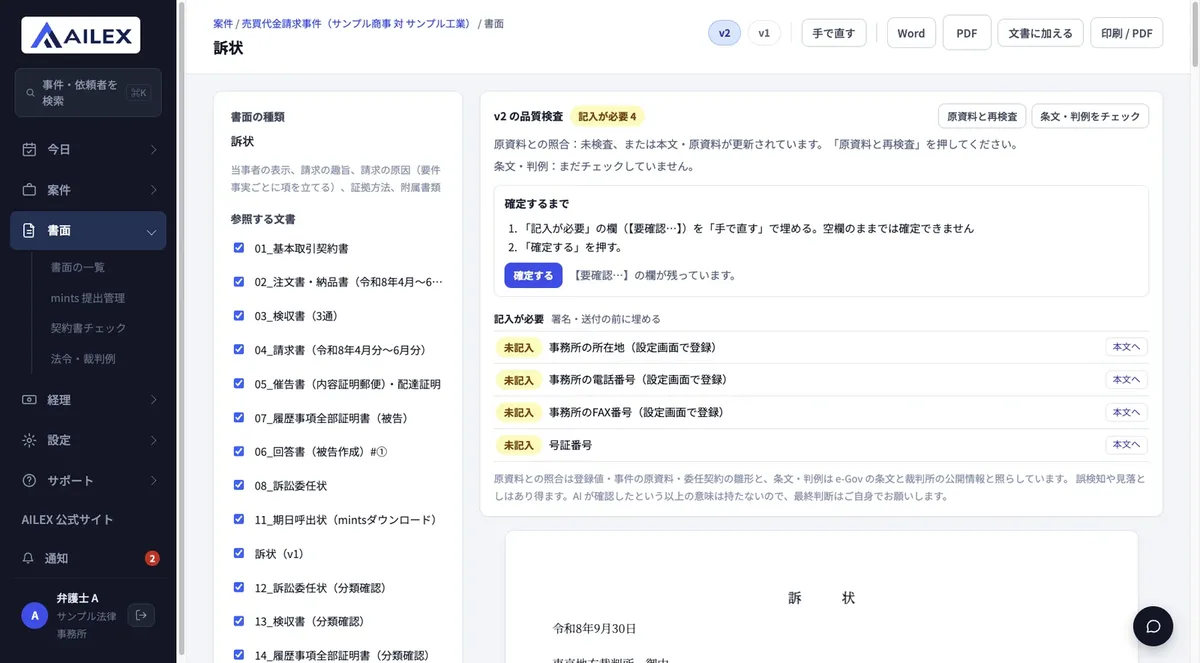
The company states on screen as well that matching may produce false positives or misses and means nothing more than that the AI has checked. For contracts, there is also a contract check that reads from a specified party's standpoint and lists unfavorable clauses with severity and suggested revisions.
Pick up dates from documents and register them after confirmation
AILEX reads hearing dates from court documents (such as summonses) and registers them marked "Needs confirmation." They are confirmed only after the lawyer checks them. Filing deadlines are shown as "23:59 on that day," deadlines calculated from the date of service are labeled "estimate," and cases where the court's designation takes precedence are shown separately. Deadline calculation accounts for excluding the first day and carrying over holidays, and it also reminds you when to send progress reports to clients at the frequency set in the engagement agreement.
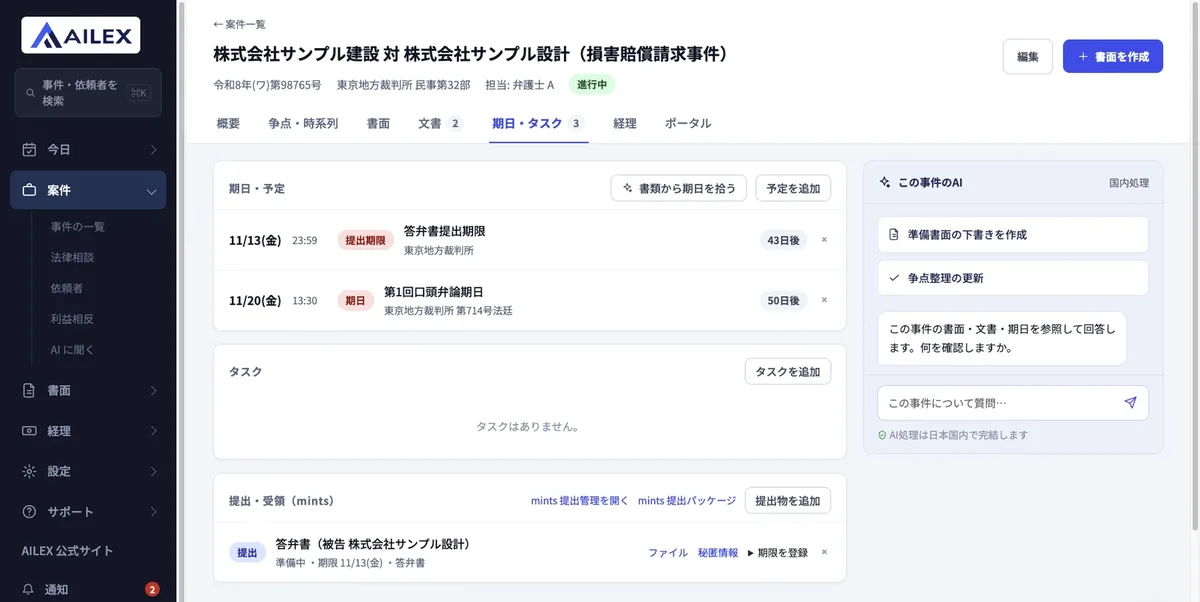
Record fees and expenses per case, all the way to invoices
Retainers, success fees, consultation fees, advisory fees, and expenses are recorded per case together with their tax category: 10%, 8% (reduced rate), tax-exempt, or out of scope. If a client is designated as subject to withholding tax, 10.21% (20.42% on the portion over ¥1 million) is automatically deducted and displayed. Refunds such as settlement receipts or reimbursements can be recorded as negative amounts and are shown with a "△."
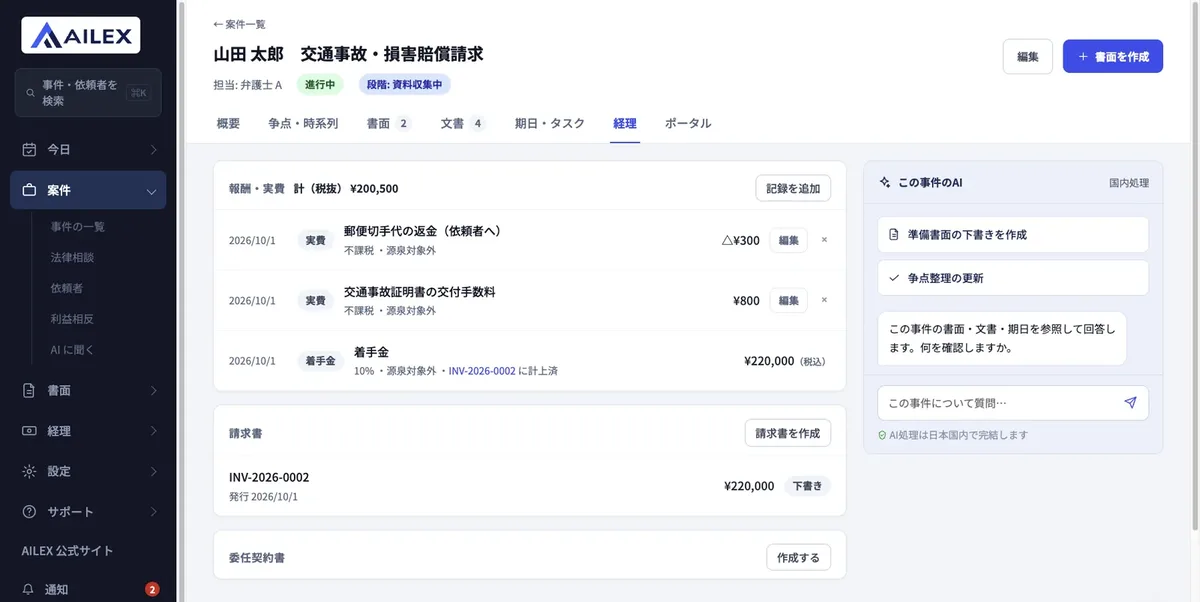
Invoices move from draft to issued, and subtotals, consumption tax, and totals are calculated automatically. Issued invoices are added to the total of unpaid amounts.
How to use
-
Register as a firm
Sign up from "Try free for 1 month" on the official website. No installation is needed; you can start using it in your browser the same day. Contracts are per firm: when the firm's administrator consents, a usage agreement combining a non-disclosure agreement and a data processing agreement takes effect, and the consent is recorded.
-
Invite lawyers and staff, and set permissions
Both lawyers and staff (paralegals) are registered as users of the same firm. Role-based permissions and per-case assignment of handlers let you separate what each person can see, and cases with information barriers cannot be viewed even by administrators unless they are assigned as handlers. You can also require two-factor authentication, restrict source IP addresses, and set up SSO with Microsoft Entra ID or Google Workspace.
-
Create cases
Either accept a consultation received through the intake form and turn it into a case, or use bulk import to create cases, parties, dates, and documents at once from a set of records such as complaints and summonses. What was read is always confirmed before registration. Eight case types—traffic accidents, divorce, inheritance, debt restructuring, labor, criminal defense, real estate (leases), and business-to-business claims—come with standard workflows covering required materials, deadlines, and more.
-
Add materials and ask in the case chat
Drop PDFs, photos, Word, Excel, ZIP files, and more into the case record, and the text is extracted and summarized into key points, important dates, timelines, and tables. The AI also determines whose document it is (your side, the opposing party, the court, or the client), which you can correct in the list.
-
Draft documents and prepare the mints filing
Create a draft from a template, resolve the quality-check findings, and the lawyer finalizes it. When the documents to file are ready, create a filing package, and the lawyer uploads it from the mints screen.
-
Run dates and billing
Confirm and register dates picked up from court documents, record fees and expenses, and issue invoices. When the free period ends, it does not switch to paid automatically; to continue, you move to a paid contract paid by invoice.
Features
01Intake and case creation
From the first inquiry to the framework of a case.
- Intake and engagement decisions — A public form for the firm whose questions change by practice area. The AI pre-reads urgency and issues, automatically checks for conflicts of interest, and lays out materials for the engagement decision
- Bulk import — Create cases, parties, dates, and documents at once from complaints, summonses, and the like. Confirmed before registration
- Case workspace — Tabs per case for chat, details, issues and timeline, documents, files, dates and tasks, and accounting. Standard workflows for eight case types
02Reading and writing
Read the record and draft with citations.
- Document and text extraction — Supports ZIP, PDF, PNG, JPEG, Word, Excel, text, and CSV. Summarizes into key points, timelines, and tables; "Ask this document" answers only from that document and quotes the supporting passage
- Case chat — Reads the case record and answers with document name, exhibit number, and page. Lists pending decisions below the conversation
- Drafting and quality checks — 57 templates. Version control, matching against source materials, statute and case-law checks, and no finalizing while blank fields remain. Word, PDF, and print
- Contract check — Lists unfavorable clauses from a specified standpoint with severity and suggested revisions. Also suggests clauses to add and compares with the other side's draft
- Petition preparation (bankruptcy and individual rehabilitation) — Builds creditors, assets, and household finances from dunning letters, bank books, and pay slips, and creates the creditor list. Compares rough outcomes of voluntary arrangement, individual rehabilitation, and bankruptcy
03Filing and meeting deadlines
Court systems and date management.
- mints filing preparation — A zip with exhibit numbers stamped, split every 200 MB, and file names formatted. Drafts of input fields, evidence description, and exhibit numbering, plus a party list CSV
- Date and deadline management — Picks up dates from court documents and registers them as "Needs confirmation." Deadline calculation, a daily summary at 7:30, and reminders for client progress reports
- TreeeS support (planned) — Published approach to updating pre- and post-filing support for the January 2027 pilot introduction
04Clients, money, and records
Features that support running the firm.
- Client portal — A dedicated page per case for the client. Share only selected documents, exchange messages, obtain electronic consent to the engagement agreement, and receive requested materials as photos. Password unlocking can be required, and access can be revoked at any time
- Fees, expenses, and invoices — Record per case including tax category and withholding, and issue invoices from drafts
- Activity logs and security settings — Records more than 80 types of operations, including viewing cases and calling the AI, which the firm can review and export. Two-factor authentication, source IP restriction, and SSO
- MCP support — AI assistants such as Microsoft Copilot Studio can reference cases, dates, tasks, documents, case law, and statutes. Read-only; cannot create, modify, or delete
Pricing
There is a single paid plan, priced monthly per seat. Lawyers, staff (paralegals), and administrators all pay the same amount, and seats are counted as the total of registered users and pending invitations.
| Seats | Monthly (tax incl.) | Documents / month | Extraction / month | Case chat / month |
|---|---|---|---|---|
| 1 seat | ¥13,200 (¥12,000 excl. tax) | 60 | 1,000 pages | 200 |
| 3 seats | ¥39,600 | 180 | 3,000 pages | 600 |
| 5 seats | ¥66,000 | 300 | 5,000 pages | 1,000 |
| 10 seats | ¥132,000 | 600 | 10,000 pages | 2,000 |
- One document is one AI document-creation operation (including fact checks, case analysis, and contract checks), and one extraction page is one page of a PDF or image without text data read by the AI
- Allowances are shared across the whole firm rather than per person, and reset on the 1st of each month (no carryover)
- At 70% usage, administrators are notified on screen and by email. At 100%, new document creation and extraction cannot be started, but non-AI features such as viewing, registering, and exporting cases remain available. Case chat does not stop when its allowance is exceeded; it switches to a lighter AI
- In months when you need more, you can add an extra allowance (¥11,000 each, tax incl.; 30 documents + 500 extraction pages + 200 case chats, valid until the end of the month of purchase)
(Based on the official pricing page as of October 8, 2026. Prices include 10% consumption tax.)
About the legacy version and the iOS app
AILEX has the current AILEX v2 (app.ailex.co.jp), switched over on September 27, 2026, and the earlier legacy version (users.ailex.co.jp). The features, pricing, and in-Japan configuration described on this page are those of v2. You can still log in to the legacy version, and because v2 is a separate system, transfer from the legacy version is handled by contacting info@ailex.co.jp.
The iOS app "AILEX" on the App Store (iOS 16.0 or later) connects to the legacy version as of October 2026. It lists an in-app purchase called "AILEX Pro" (¥9,000), which is separate from v2 pricing. v2 can be used in the browser from the day you register, with screens designed for both PC and smartphone widths.
Where case records are handled and what they are used for
When putting records entrusted by clients into an external service, where they are processed and whether they are used for training are the first things to check. AILEX v2 explains these points specifically on its official website and in its public security white paper.
The company also states what falls outside the in-Japan scope: emails sent to recipients the firm specifies, data sent to external services the firm connects on its own (such as MCP clients or Google Calendar), and technical summaries passed to its development management environment when a bug is reported (the original report text is not sent).
The company explains that because it does not hand data to overseas AI providers and instead processes it in Japan as a Japanese corporation acting as the firm's contractor, the design does not presuppose obtaining individual client consent in order to use AI. It also states, however, that this is the company's own analysis and not legal advice, and that compliance with confidentiality obligations and the Act on the Protection of Personal Information, as well as whether to explain to clients, is for each firm to decide. It also publishes a self-assessment table of 23 items showing how its features and usage agreement correspond to each provision of the Attorney Act and the rules of the Japan Federation of Bar Associations (including the rules on information security for attorneys). Third-party certifications (ISO/IEC 27001 and SOC 2) are stated to be in preparation.
Pros and cons
Pros
- Case management, drafting, mints filing preparation, dates, and billing are brought together in one case screen
- mints filing packages (exhibit numbers, splitting by size, file names) are generated automatically
- Both storage of case records and AI inference stay in Japan, and inputs are not used for training
- Lawyers and staff use it at the same price under the same system, with per-case control over what each can see
- Mechanisms keep AI drafts from going out as-is, such as not allowing documents with blank fields to be finalized
- The one-month free period does not switch to paid automatically, and data can still be viewed and exported afterward
Things to note
- Filing with mints or TreeeS is not automatic; the lawyer files in each system (because no API is published)
- TreeeS support is planned, and its scope will change depending on the published specifications
- Payment is by bank transfer (invoice) only, and mid-term cancellation is not possible (contracts are monthly)
- Because it is limited to models available in Japanese regions, the company itself says adoption of the newest AI model generations lags behind overseas offerings
- The iOS app currently connects to the legacy version
Reputation and reviews
According to the company, the number of users exceeded 1,000 in August 2026 (press release distributed on August 25, 2026; the number of accounts in actual use, including lawyers, paralegals, and office staff). It also reports 200 registered legal apprentices as of October 2026. The official website states that the service has been adopted widely, "from Hokkaido to Okinawa."
The official website explains that it reflects feedback sent to its hotline (a desk for requests and bug reports) by law firms using the service, citing examples such as "We once had trouble because a report to a client was late," "We want to read creditor investigation forms in bulk and build the creditor list," "We want to record settlement receipts and reimbursements as negative expenses," and "Please let paralegals update case information too" (summaries of the gist; firm names and personal names are not published). The company says it has organized this feedback and built it into standard features, and reminders for client progress reports, creditor list creation, and negative expense entries are among the features introduced on this page.
The iOS app on the App Store (which connects to the legacy version) is rated 4.8 out of 5 (6 ratings) as of October 8, 2026. We could not find third-party reviews of v2 at the time of writing. The surest way to judge its usability is to try it with your own firm's cases during the one-month free period.
Frequently asked questions (FAQ)
How it differs from other legal AI tools
Many of the legal AI tools listed on this site are mainly used by corporate legal departments for contract review or for researching statutes and case law. AILEX covers different ground: it handles the progress of the cases themselves at small law firms (engagement, records, drafting, filing, dates, and billing).
| Aspect | AILEX | LegalForce / LeCHECK | OLGA | Legalscape / Legal Brain | General-purpose generative AI (e.g., Claude) |
|---|---|---|---|---|---|
| Main use | Case management, drafting, mints filing preparation, dates, and billing for law firms | AI contract review | From contract review to contract and legal matter management | Research across statutes, case law, and books | Writing, summarizing, and analysis in general |
| Intended users | Law firms with 1–5 lawyers (lawyers and staff) | Corporate legal departments, etc. | Corporate legal departments | Law firms and corporate legal | Individuals and companies in general |
| mints | Filing packages, input-field drafts, filing and deadline management | Not covered | Not covered | Not covered | Not covered |
| Handling of records | Storage and inference both in Japan (Tokyo/Osaka), no training use | Per each company's terms | Per each company's terms | Per each company's terms | Depends on service and settings |
| Pricing | ¥13,200/seat/month (tax incl.), 1 month free | Per each company's pricing | Per each company's pricing | Per each company's pricing | Per each service's pricing |
AILEX also offers contract checks and statute and case-law checks, but what sets it apart is that they work tied to the case record. If corporate contract review is your focus, LegalForce and OLGA are the points of comparison; for literature research with citations, Legalscape. AILEX case data can also be referenced read-only from AI assistants such as Microsoft Copilot via MCP (in that case, processing at the connected service is governed by that AI service's terms).
About the provider
AILEX LLC is located in Dogenzaka, Shibuya-ku, Tokyo, and develops and provides "AILEX," an AI legal OS for law firms (it plans to convert into a kabushiki kaisha). Its advisory law firm is Bengoshi Hojin Esora (弁護士法人えそら). The company is also engaged in standardization work, having submitted "VAP/LAP," a technical specification for making AI-generated records verifiable, to the IETF as an Internet-Draft (the company notes that an Internet-Draft is a proposal-stage document and does not imply IETF approval or standardization).
The information on this page is based on what was published on the official website as of October 2026. Please check the official website for the latest specifications and pricing.