ScribeAssist(AmiVoice)
: How to use it, features, and the business problems it solves
Add bookmark
What is ScribeAssist(AmiVoice)?
A standalone AI meeting-minutes tool from Advanced Media, Inc. (Tokyo; TSE Growth-listed), the maker of the AmiVoice speech recognition engine, installed and run on Windows PCs. Without an internet connection, it handles recording, transcription and editing through to summarization by a generative AI running inside the PC (a local LLM), and it can be used in LGWAN environments. It supports speaker identification, word registration, live captions with furigana and Word-template export, and cloud summarization is also available. Pricing is open, a flat rate based on concurrent connections (individual quote, no initial cost), with a 14-day trial.
Business problems it solves


About "ScribeAssist(AmiVoice)"
What is ScribeAssist (AmiVoice)?
ScribeAssist is a standalone AI meeting-minutes tool that you install and run on a PC, provided by Advanced Media, Inc. (Toshima, Tokyo; listed on the Tokyo Stock Exchange Growth Market), the developer of the "AmiVoice" speech recognition engine. Recording, transcription, editing and summarization can all be done inside the PC, with no internet connection.
As cloud-based AI minutes tools multiply, ScribeAssist's position is clear: it is a tool for organizations that cannot let meeting audio or content leave their premises. It offers "Standalone Summary," which summarizes with a generative AI running inside the PC (a local LLM), and it can be used on LGWAN, the closed network used by Japanese local governments. According to the company, Advanced Media's meeting-minutes support services have been adopted by 2,100 private companies and organizations and 990 local governments.
How to Use
- Apply for a trial and install it on a PC You can apply for a 14-day trial through the inquiry form on the official website. It is installed on a Windows 10/11 PC, and no server is required.
- Connect a microphone and transcribe the meeting In-person meetings are captured with a microphone, and web meetings are transcribed directly from the audio playing on the PC (it works with any web meeting tool, including Zoom, Microsoft Teams and Google Meet). Recorded audio and video files (mp3, wma, wav, m4a, wmv, mp4) can also be transcribed.
- Edit and tag during and after the meeting Recognition results can be edited in real time, and tags such as "Important," "Decision" and "ToDo" can be added with one click. Because text and audio are linked, you can replay just the remarks you want to check.
- Summarize with AI and export to Word and other formats Choose one of three summarization methods to put the transcript into minutes format, then export to Word, Excel, CSV or text. You can also export using a registered Word template (your company's format or a local government's own form).
Features
01Transcription
Transcription powered by AmiVoice. All of these work without an internet connection.
- Real-time recognition — Turns speech into text on the spot, including audio playing on the PC
- File recognition — Transcribes the audio of recorded files
- Word registration — Register industry terms, technical terms, proper nouns and in-house terms so they are recognized (Japanese only)
- Speaker identification — Learns voice characteristics and labels remarks with speakers' names; without training data it distinguishes speakers by number
- Automatic filler removal — Removes fillers such as "etto" and "ano" (can be turned off)
- Multilingual — In addition to Japanese and English, Ver2.10.0 (October 2026) added Chinese, Korean and Thai, plus an engine that automatically identifies 99 languages
02Producing minutes
Features for turning a transcript into finished minutes.
- Three AI summary methods — Standalone Summary, Cloud Summary and the Minutes Editor (see the table below)
- Facilitation mode — Handles meeting preparation and facilitation through to creating summary minutes in real time on one screen; images, tables and links can be added to the minutes area
- Tagging, keyword search and replace — Find remarks by tag or keyword and replace terms in bulk
- Export — Word (.docx), Excel (.xlsx), CSV and text; supports extracting by tag or speaker and exporting with Word templates
- Timer — Set transcription start and end times in advance (Ver2.10.0)
03Captions and accessibility
Features for conveying meeting content to people who have difficulty hearing.
- Pop-up captions — Shows the transcript as live captions, with colors designed for color-vision diversity and optional furigana (phonetic readings for kanji)
- Zoom integration — Displays captions on every participant's Zoom screen
04Options
- Tuning plan — Advanced Media builds a speech recognition dictionary dedicated to your organization using past minutes, glossaries, meeting audio and other materials
Data stays inside the PC, all the way through summarization
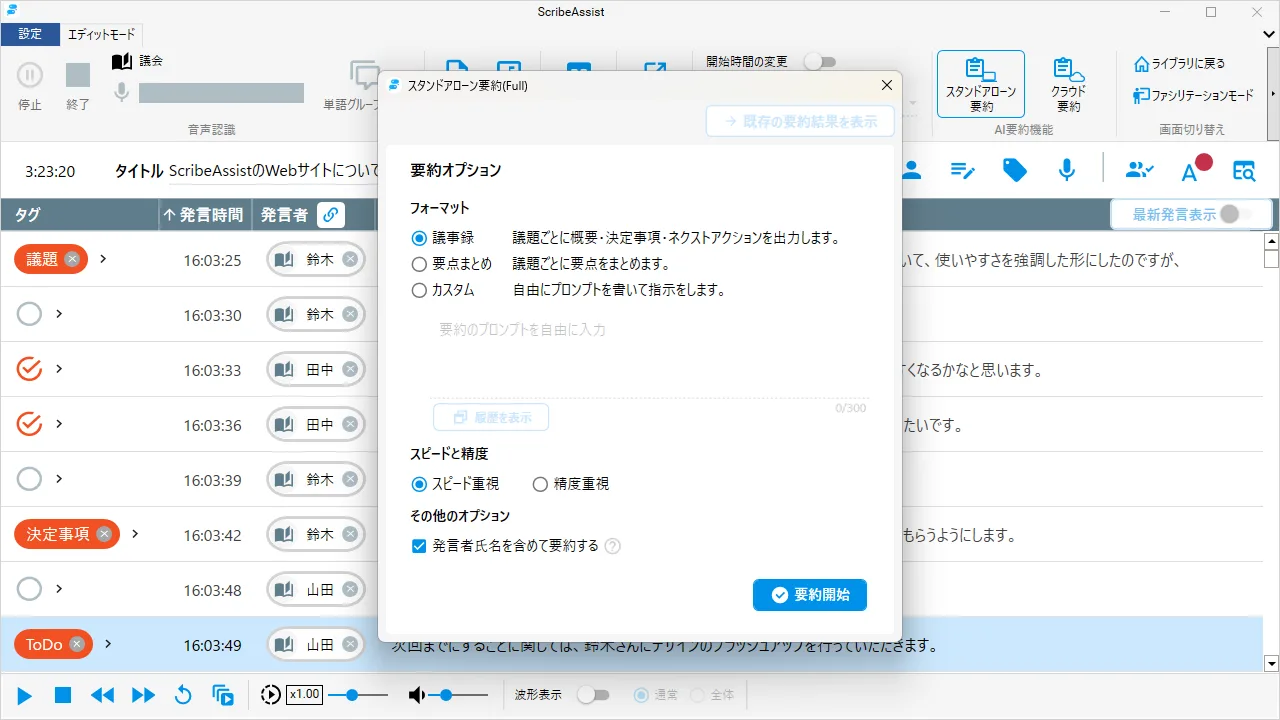
Source: ScribeAssist official website (the same applies to the screenshots below)
ScribeAssist's biggest distinguishing feature is that the whole process, summarization included, can be completed inside the PC. "Standalone Summary" runs a generative AI on the PC that Advanced Media fine-tuned from Meta Llama and Google Gemma, and turns the transcript into minutes. Because nothing is sent outside, even organizations that cannot use cloud-based generative AI can automate summarization.
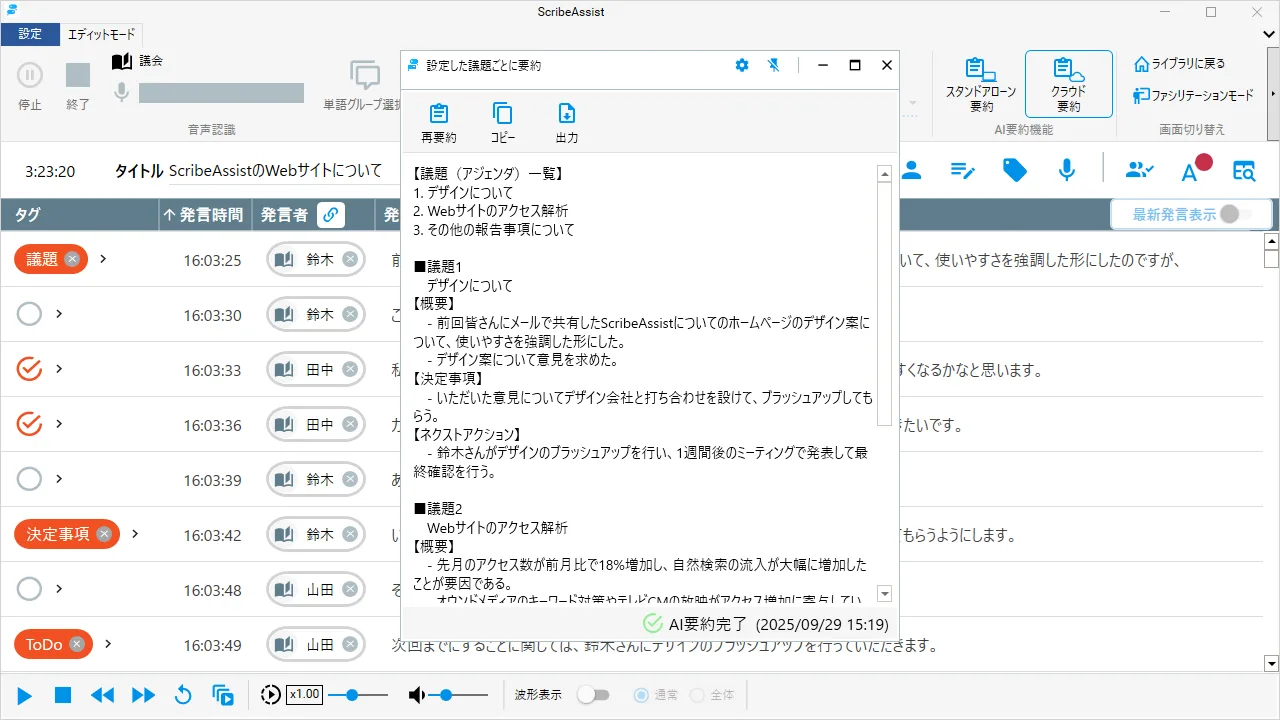
There are three summarization methods, chosen according to how much data may leave the PC and the accuracy and speed you need.
| Standalone Summary | Cloud Summary (ScribeAssist) | Cloud Summary (Minutes Editor) | |
|---|---|---|---|
| Where summarization runs | Inside the PC (local LLM) | Cloud | Cloud |
| Where data is stored | Inside the PC | Inside the PC (audio and summaries are not stored in the cloud) | Cloud |
| Generative AI | Fine-tuned from Meta Llama and Google Gemma | Azure OpenAI Service (ChatGPT API) | Azure OpenAI Service (ChatGPT API) |
| Time to summarize a 1-hour transcript (guide) | Accuracy priority approx. 30 min / speed priority approx. 15 min | Approx. 5 min | Approx. 5 min |
| Accuracy (company's description) | Practical | High | High |
| Pricing | Unlimited use | Consumes tokens granted according to the number of licenses | Same as left |
| Best for | Environments with no network connection, or when no data at all may leave the PC | When you want high accuracy but do not want audio or transcripts stored externally | When you want to finish minutes in a web editor and share them by URL |
Summary times are the company's guide figures and vary with the operating environment.
Standalone Summary offers three formats: "Minutes" (overview, decisions and next actions for each agenda item), "Key points," and "Custom," where you write your own prompt. AI automatically creates agenda items from the transcript and summarizes each one, and you can compare two of your five most recent summaries side by side. There are two generative AI models, "speed priority" and "accuracy priority": the Full version (7GB or more of free space) offers both, and the Lite version (2GB or more) offers speed priority only. An extension must be installed to use it.
Captions with furigana for assemblies and service counters
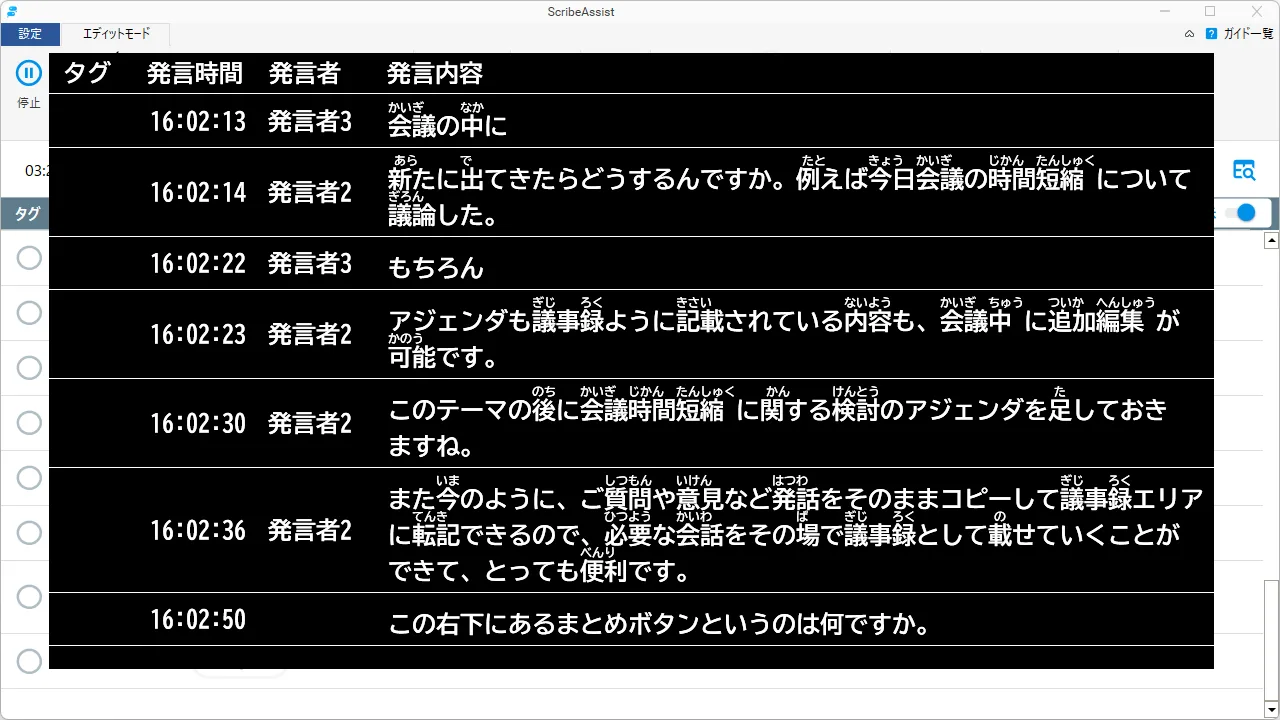
The transcript can be shown as live captions as it is produced. With large text, furigana and a color scheme designed with color-vision diversity in mind, it can be used to make meetings accessible to people who are deaf or hard of hearing and to older people. The company cites use at shareholders' meetings, local assemblies and service counters, and with Zoom integration captions can appear on every participant's screen.
Pricing
ScribeAssist has open pricing, and amounts are not published (as of October 24, 2026).
| Item | Price | Notes |
|---|---|---|
| Base fee | Individual quote | Includes unlimited Standalone Summary |
| License fee | Individual quote | Varies with the maximum number of concurrent connections |
| AI summary usage fee | Included in the license fee | A summary allowance (tokens) is granted according to the number of licenses |
| Initial cost | ¥0 | No server installation required |
- Flat-rate — Rather than pay-per-use by recognition time or caps such as "up to X hours," it is a flat rate based on the number of licenses (only some summary features incur charges beyond a certain level of use)
- Support included — The monthly fee includes support and version upgrades, so you always use the latest version. Licenses can be added later
- Plans — Plans range from small-scale plans to enterprise plans for large numbers of users and multiple sites, and there are set plans bundled with the cloud-based sister product ProVoXT
- Sales partners — Deployment through sales partners is also available
For reference, the cloud-based sister product ProVoXT, which uses the same AmiVoice engine, publishes its pricing as usage-based packs starting from ¥13,000 per month (excluding tax) for the 10-hour pack. Because ScribeAssist is priced by concurrent connections rather than usage time, the company explains that the more you use it, the better value it becomes.
System requirements
| Item | Details |
|---|---|
| OS | Windows 10 / Windows 11 (smartphones and tablets not supported) |
| CPU | Intel Core i5 processor (max. frequency 2.5GHz with Turbo Boost) or better |
| Memory | 8GB or more |
| Storage | 1GB or more of free space at installation (separate space needed for audio data). Standalone Summary requires 2GB or more for Lite and 7GB or more for Full |
| Recognizable files | Audio: mp3, wma, wav, m4a / Video: wmv, mp4 |
| Export formats | Word (.docx), Excel (.xlsx), CSV, text |
Security and data handling
- Standalone — Because it runs inside the PC, it works with or without an internet connection. Even in meetings that handle confidential information, data is not stored or sent to the cloud (except when using Cloud Summary or the Minutes Editor)
- LGWAN — As a standalone application, it can be used in local governments' LGWAN environments
- Certifications — Advanced Media holds ISO/IEC 27001 (ISMS) certification and the PrivacyMark
Track record and reputation
According to the company, Advanced Media's meeting-minutes support services have been adopted by 2,100 private companies and organizations and 990 local governments. ScribeAssist was also named a "High Performer" for the third consecutive time in both the AI automatic minutes creation tool category and the transcription software category of the "ITreview Grid Award 2026 Fall" (announced October 2026). The company describes the built-in AmiVoice as "No.1 in market share," citing ecarlate LLC's "Speech Recognition Market Trends 2026" (speech recognition software / cloud services market) as the source.
01Streamlining confidential meetings
- Mizuho Securities — Because services connecting to external networks required rigorous checks, it chose a standalone tool. Time spent on minutes fell by about 30% (an estimate based on user interviews), and use has spread to more than 25 departments
02Assembly minutes and captions
- Nagasaki City Office — For plenary-session minutes that it outsources, the city now hands ScribeAssist's transcripts to the contractor, shortening delivery from about 20 days to 3–10 days. Since February 2024 it has displayed live captions in the public gallery of plenary sessions
03Communicating with employees with hearing impairments
- LIXIL — Monitors and microphones in the office display all remarks as captions at all times, and captions are also shown on Zoom screens for customer service in its online showroom
The company decided on full-scale deployment because ScribeAssist is easy to operate, supports web meetings, and allows an unlimited number of installations, which promised flexible operation.
— 藤野様, Digital Innovation Department, Mizuho Securities Co., Ltd. (summarized from the official case study)
Introducing ScribeAssist greatly improved the efficiency of minutes-related work; the benefits are immeasurable, and they strongly recommend it to other local governments.
— 野中様, Proceedings Research Section, Secretariat of the Nagasaki City Assembly (summarized from the official case study)
How it differs from other AI meeting-minutes tools
Most AI minutes tools send audio to the cloud for transcription and summarization. ScribeAssist differs in its very approach: both transcription and summarization can be completed inside the PC. On the other hand, it is software for Windows PCs and does not support smartphones or tablets. For web meetings, it transcribes the audio playing on the PC.
| Aspect | ScribeAssist | toruno | YOMEL | LINE WORKS AiNote | Rimo Voice |
|---|---|---|---|---|---|
| Provider | Advanced Media | Ricoh | PKSHA Infinity | LINE WORKS | Rimo |
| Approach | Completed inside the PC (standalone) | Cloud (Windows recording app + iPhone app) | Cloud (no bot joins the meeting) | Cloud (app recording, bot joins) | Cloud (automatic bot recording) |
| Pricing | Individual quote (flat rate by concurrent connections) | Business from ¥9,000 per month for 30 hours (excl. tax) | From ¥28,000 per month (30 hours, excl. tax) | Free / Solo from ¥1,440 per month / Team from ¥19,800 per month (excl. tax) | From ¥1,650 per month (incl. tax); quote for businesses |
The columns for other products reflect the information on each product page as of when it was checked.
If you want easy cloud access to the same AmiVoice recognition, toruno is a candidate; if you want to keep your usual meeting tools and contract by usage time, YOMEL; and for minutes tools you can try for free, LINE WORKS AiNote and Rimo Voice are worth comparing. If your requirements are that meeting audio must not leave your premises and that it must work on LGWAN, ScribeAssist is a strong choice.
FAQ
Q. Can it be used without an internet connection? A. Yes. Transcription, editing and Standalone Summary work offline. An internet connection is needed only when using Cloud Summary or the Minutes Editor.
Q. How much does it cost? A. It has open pricing, and both the base fee and license fees are quoted individually. The license fee varies with the maximum number of concurrent connections, and the AI summary usage fee is included in the license fee. There is no initial cost.
Q. Can I try it for free? A. There is a 14-day trial. Apply through the inquiry form on the official website.
Q. Can it be used with web meetings? A. Yes. Because it transcribes the audio playing on the PC, it works with any web meeting tool, including Zoom, Microsoft Teams and Google Meet.
Q. Can it be used on a smartphone or tablet? A. ScribeAssist does not support them (it is for Windows PCs). If you want to use iPhone or iPad, the cloud-based sister product ProVoXT has an iOS app.
Q. Can it translate? A. ScribeAssist does not support translation. If you need real-time translation, ProVoXT has a translation feature.
The information on this page is based on what was published on the official website as of October 2026. Please check the official website for the latest specifications and pricing.