toruno
: How to use it, features, and the business problems it solves
Add bookmark
What is toruno?
A meeting transcription and AI summary service from Ricoh Company, Ltd. Its Windows recording app captures online and in-person meetings as "transcript + audio + screen captures," and it can also transcribe recordings from its iPhone app and uploaded audio/video files. Japanese speech recognition uses AmiVoice and summaries use Amazon Bedrock; data is stored in a Japan region and not used for AI training. The business plan "toruno ビジネス" starts at ¥9,000/month for 30 hours, and the AI summary plan with real-time translation in 18 languages starts at ¥27,000/month (excl. tax). The personal plan is free (3 hours in total) or ¥1,650/month (incl. tax).
Business problems it solves


About "toruno"
What is toruno?
toruno is a meeting transcription and AI summary service developed and provided by Ricoh Company, Ltd. A recording app on your PC transcribes online and in-person meetings in real time, and also saves the meeting audio and screen captures. You can also upload audio recorded with the iPhone app, or files from IC recorders and online-meeting recordings, for transcription.
The business edition, "toruno ビジネス" (toruno Business), includes the "toruno ビジネス AI要約" (AI Summary) plan, which uses generative AI to turn transcripts into minutes, summaries, sales-meeting notes and daily reports, and adds real-time translation in 18 languages. Pricing is monthly, based on recording hours, and there is no charge per registered user (up to 1,000 users).
According to the official news page, after a beta in 2021, Ricoh launched toruno Personal (for individuals) and toruno Business (for companies) on April 12, 2022. The AI Summary plan has been available since July 10, 2025.
How to use it
- Apply for a free trial For companies, a representative (administrator) applies for a 3-week free trial (up to 30 hours) via the application form and then invites other users. The trial covers all features including AI Summary, and it does not convert to a paid plan automatically. Individuals get 3 hours in total for free after signing up.
- Choose how to record To record online or in-person meetings in real time, use the desktop app for Windows. In meeting rooms or on the go, record with the iPhone app and upload to the cloud later. Upload existing audio/video files from the website.
- Start recording in the app Launch the app and start recording in as little as one click. There is no need to integrate with your web-conferencing software, and participants do not have to log in. Ricoh recommends placing a headset or a speakerphone with a microphone close to the speakers.
- Review, correct and share on the web Recorded meetings appear in the web meeting log, where you can correct the transcript while listening to the audio. Share it with view/edit permissions and participants can fix misrecognitions simultaneously, even during recording (co-editing is available on the two Business plans).
- Create minutes with AI Summary and export On the AI Summary plan, send a prompt from the "minutes," "summary" or "daily report / sales notes" templates and polish the result in the minutes editor. Transcripts, audio, images and summaries can be downloaded as txt, csv, docx, mp3, jpg and more, and saved to kintone, OneDrive and Google Drive.
Captures the whole meeting as "transcript + audio + screen"
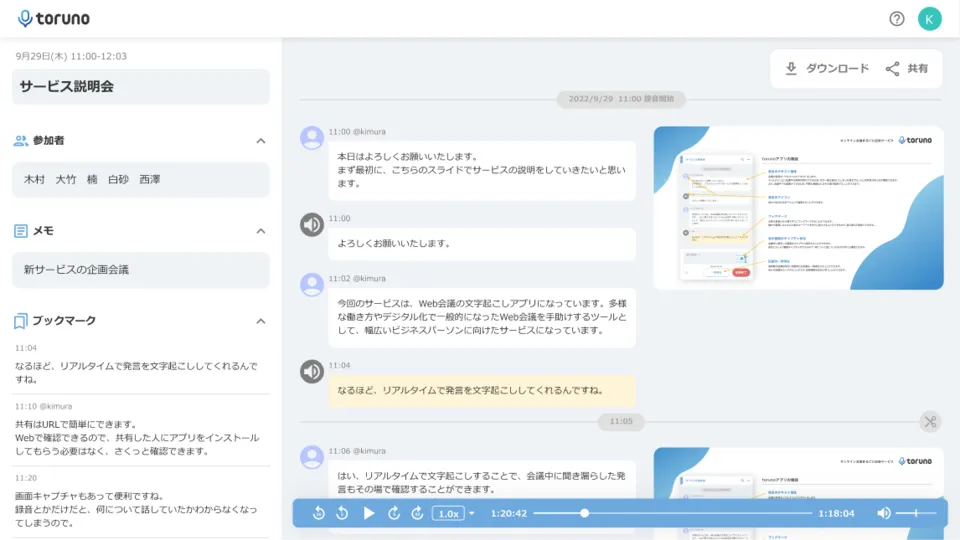
The recording app keeps each meeting as three things: the transcript, the meeting audio and screen captures. The web-meeting screen and shared materials are captured automatically and shown alongside the remarks in the meeting log.
You can tag remarks as "Important," "Decision" or "To-do," and jump back with the playback bar to re-listen. Fillers such as "um" and "uh" are removed automatically. Company-specific and technical terms can be registered in a user dictionary and in a tenant dictionary shared across the contract.
Source: toruno official website
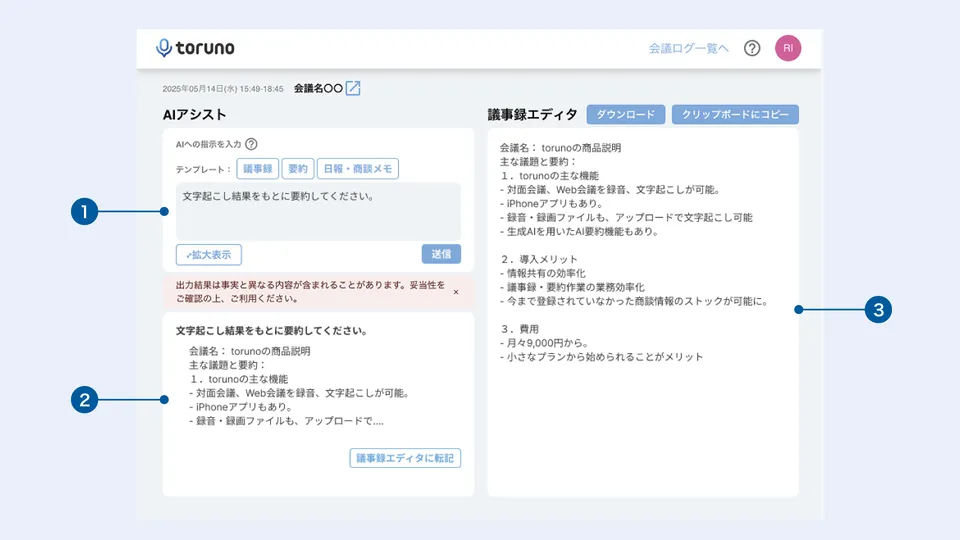
On the AI Summary plan, open "AI要約" (AI Summary) from the transcript screen, pick a ready-made template (minutes, summary, daily report, sales notes) and send the prompt. Copy the output into the minutes editor on the right, adjust it, then save it as text or paste it into another tool from the clipboard.
Frequently used prompts can be registered as tenant templates and shared within the company. Up to 20 prompts can be sent per meeting.
Source: Ricoh toruno product page (noted as an in-development screen that may differ from the actual one)
Features
01Recording and transcription
Audio comes in three ways and is transcribed in the cloud.
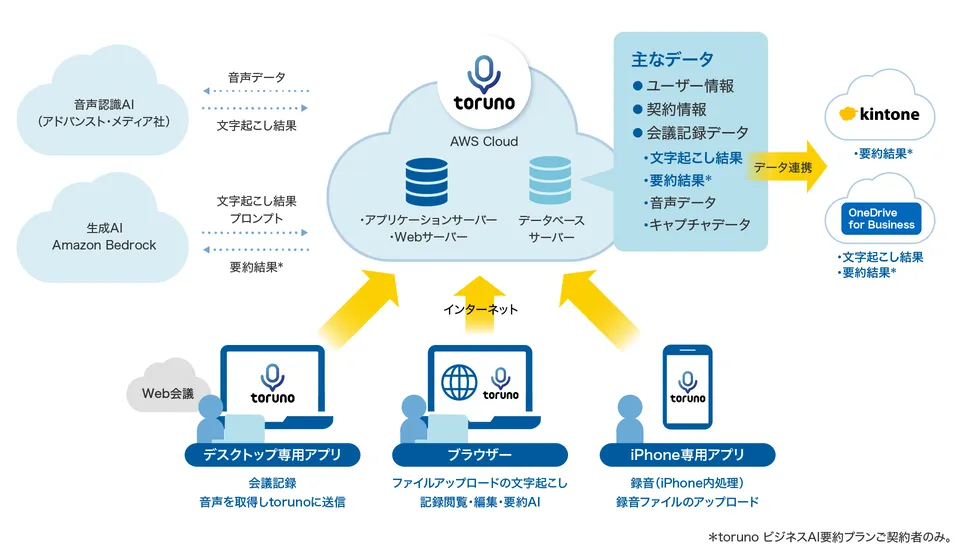
- Desktop app (Windows) — Transcribes online, in-person and hybrid meetings in real time and saves audio and screen captures. Ricoh has confirmed recording with Teams, Zoom, Google Meet and Webex
- iPhone app — Records in meeting rooms or on the go and uploads to the cloud for transcription (no real-time transcription in the app; not for online meetings)
- File upload — Transcribes audio from IC recorders or smartphones and online-meeting recordings; you can specify the number of speakers
- Speaker identification, dictionaries, tags — Separates remarks by speaker, registers specific terms in user/tenant dictionaries, and tags remarks as "Important," "Decision" or "To-do"
02AI Summary and multilingual (toruno ビジネス AI要約)
Features that use generative AI (Amazon Bedrock) and multilingual speech recognition are available only on the AI Summary plan.
- AI Summary — Generates minutes, summaries, sales notes and daily reports from templates, editable in the minutes editor; custom templates can be shared in the company
- Non-Japanese transcription — Transcribes English, Chinese and other languages, including several languages at once
- Real-time translation — Translates speech as it is transcribed and shows it on screen; 18 source and target languages; shareable with participants via URL (no spoken interpretation)
- kintone integration — Saves transcripts and summaries to kintone for sales records and more
03Sharing, management and security
Business features for inviting multiple users to one contract.
- Permissions and co-editing — Set permissions per user or group and edit meeting logs together during or after recording (two Business plans)
- Downloads and integrations — Export as txt, csv, docx, mp3, jpg and more; OneDrive and Google Drive integration on all plans
- Security — IP address restriction and two-step authentication; data is stored in a Japan-region cloud (AWS), and audio and transcripts are not used for AI training
Source: Ricoh toruno product page
Pricing
Pricing is monthly with no initial fee. The hours in each plan name are monthly recording hours; usage beyond them is charged per hour. Business plans are billed on the total hours recorded by invited users, with no per-user fee. Generative AI usage is included in the AI Summary plan price.
For companies (excl. tax)
| Plan | Monthly base fee | Overage | Storage | Main features |
|---|---|---|---|---|
| toruno ビジネス 30 hours/month | ¥9,000 | ¥300/hour | 75GB | Transcription, audio recording, screen capture, sharing, permissions, co-editing, tenant dictionary, OneDrive and Google Drive integration, up to 1,000 registered users |
| toruno ビジネス 100 hours/month | ¥28,500 | ¥285/hour | 250GB | Same as above |
| toruno ビジネス 500 hours/month | ¥135,000 | ¥270/hour | 1,500GB | Same as above |
| toruno ビジネス AI要約 30 hours/month | ¥27,000 | ¥900/hour | 75GB | All of the above plus AI Summary, non-Japanese transcription, real-time translation and kintone integration |
| toruno ビジネス AI要約 100 hours/month | ¥85,500 | ¥855/hour | 250GB | Same as above |
Business plans are paid by invoice, and the formal contract is arranged through a sales representative. In Ricoh's example, recording 40 hours on the AI Summary 30-hour plan costs ¥27,000 + 10 extra hours × ¥900 = ¥36,000 (excl. tax).
toruno パーソナル for individuals (incl. tax)
| Plan | Monthly base fee | Recording time included | Overage | Storage |
|---|---|---|---|---|
| Free | ¥0 | 3 hours in total after sign-up | — | 20GB |
| Paid | ¥1,650 | 10 hours/month | ¥2.2/minute | 20GB |
Personal is for one person and includes transcription, audio recording, screen capture, file upload, the iPhone app and the user dictionary. Multi-user use, permission-based sharing, AI Summary and non-Japanese transcription are only on the Business plans. Payment is by credit card, and the free plan never switches to a paid plan automatically. According to the legal notice under the Act on Specified Commercial Transactions, cancellations and refunds are not accepted once a purchase is confirmed.
Sources: toruno plans and pricing, toruno for individuals, price table on the Ricoh toruno product page, legal notice (as of October 24, 2026)
AI used and data handling
Sources: FAQ on the toruno official website, Ricoh toruno product page, toruno for individuals (as of October 2026)
System requirements
The desktop app for real-time recording is Windows only; the official FAQ says there is no Mac app or Android app. On Mac or Android you can still transcribe by uploading recorded files, and there is a browser-based recording web app (microphone audio only) for Android and others.
Source: Main specifications on the Ricoh toruno product page (recommended environment as of September 2026)
How toruno differs from other AI meeting-minutes tools
toruno keeps the meeting audio and screen captures in the same meeting log as the transcript, and Business pricing depends only on recording hours. It does not send a bot into the meeting; the recording app picks up the PC's audio, so you can record external online meetings you were invited to in the same way.
| Aspect | toruno | YOMEL | LINE WORKS AiNote | Notta |
|---|---|---|---|---|
| Recording online meetings | Windows recording app (no bot) + screen capture | Records without a bot joining | A bot joins the meeting | Auto-joins Zoom, Teams, Google Meet, Webex |
| How pricing is set | Recording hours (no per-user fee for Business) | Usage hours (unlimited IDs) | Individual and organization plans | Individual and business plans |
| Price | Business from ¥9,000/month, AI Summary from ¥27,000/month (excl. tax), Personal ¥1,650/month (incl. tax) | Starter from ¥28,000/month (30 hours, excl. tax) | Free ¥0, Solo from ¥1,440/month, Team from ¥19,800/month (annual, excl. tax) | Free ¥0, Premium ¥1,185, Business ¥2,508 (monthly on annual billing, incl. tax) |
The other columns reflect what each product page states as of its check date.
YOMEL is the closest domestic business tool that also prices by usage hours, while LINE WORKS AiNote is the comparison if you prefer a bot joining the meeting. To start with a per-user monthly fee for individuals or small teams, Notta and Rimo Voice are also options.
Pros and cons
Pros
- Keeps the meeting audio and screen captures along with the transcript, so you can review meetings with the materials
- Business pricing depends on recording hours, with no per-user cost for up to 1,000 registered users
- Records external meetings without a bot and without integrating with web-conferencing software
- Data is stored in a Japan region, and audio, transcripts and summaries are not used for AI training
- Companies can try all features free for 3 weeks (up to 30 hours)
Cons
- The real-time desktop recording app is Windows only; there are no Mac or Android apps
- AI Summary, non-Japanese transcription, real-time translation and kintone integration require the AI Summary plan (from ¥27,000/month, excl. tax)
- The iPhone app records and uploads; it does not transcribe in real time in the app
- Formal business contracts go through a sales representative and cannot be completed entirely online
Case studies
The official website publishes two case studies.
- 九電みらいエナジー株式会社 (Kyuden Mirai Energy) (renewable energy generation): Started using toruno in March 2025 and expanded from one department to company-wide use. Minutes now take 10–30 minutes instead of 1–2 hours, and recording and reporting after off-site meetings takes under an hour instead of nearly half a day. On a business trip to Vietnam, staff recorded with the iPhone app and uploaded the audio for transcription after returning to Japan
- Ricoh Company, Ltd., Corporate Planning Center: Has used toruno since 2024 for minutes of management and project meetings, moving from a trial on the Personal edition to a Business plan used by about 10 people. The manual transcription step, which used to take more than twice the meeting length, is gone, and the whole minutes process now takes about an hour
The official news page also reports that toruno obtained a patent for its "intuitive meeting review technology" in December 2023, and that it was featured in a Nikkei Style article testing seven speech transcription services in June 2021.
FAQ
How much does toruno cost? toruno ビジネス for companies costs ¥9,000 (30 hours/month), ¥28,500 (100 hours/month) or ¥135,000 (500 hours/month); toruno ビジネス AI要約 with AI Summary costs ¥27,000 (30 hours/month) or ¥85,500 (100 hours/month), all excluding tax. toruno パーソナル for individuals is free (3 hours in total) or ¥1,650/month (10 hours/month, incl. tax) (as of October 2026).
Can I use it for free? Individuals get 3 hours in total for free after signing up. Companies can try all features including AI Summary with a 3-week free trial (up to 30 hours), and are not charged automatically afterward.
Can it record Zoom or Teams meetings? Yes. The Windows recording app captures the PC's audio, and Ricoh has confirmed recording with Microsoft Teams, Zoom, Google Meet and Webex. No bot needs to join the meeting.
Does it work on Mac? There is no Mac recording app. On Mac you can transcribe uploaded recordings and use mobile recording (browser version) in Chrome.
Is meeting content used for AI training? No. Ricoh states that neither AmiVoice (Japanese), Azure AI Speech (other languages) nor Amazon Bedrock (summaries) uses audio or transcripts for training. Data is stored in a Japan-region cloud.
Can it handle English meetings? On the toruno ビジネス AI要約 plan you can transcribe English, Chinese and other non-Japanese speech and use real-time translation in 18 languages. Other plans transcribe Japanese only.
The information on this page is based on what was published on the official website as of October 2026. Please check the official website for the latest specifications and pricing.