YOMEL
: How to use it, features, and the business problems it solves
Add bookmark
What is YOMEL?
An AI meeting-minutes tool for businesses from PKSHA Infinity Inc. (Fukuoka). Press the start button when a meeting begins, and it transcribes, identifies speakers, and produces an AI summary automatically, without changing your meeting tool (Zoom, Teams, Google Meet, etc.) and without a bot joining. In-person meetings can be recorded with the smartphone app. Pricing is based on monthly usage hours, from 28,000 yen/month for 30 hours (Starter, excl. tax), with unlimited user IDs. A 14-day free trial is available for businesses.
Business problems it solves



About "YOMEL"
What is YOMEL?
YOMEL is an AI meeting-minutes tool for businesses developed and provided by PKSHA Infinity Inc. (Fukuoka, Japan). When a meeting starts, you press the start button in the desktop app; YOMEL then transcribes everything every participant says, separates speakers, and produces a summary as soon as the meeting ends. It works with the meeting tools you already use, such as Zoom, Google Meet, Teams, and Webex, without issuing URLs to participants or having a bot join the call. In-person meetings are recorded with the smartphone app.
YOMEL was officially released in January 2023, and its cumulative number of customer companies passed 2,000 at the end of March 2026 (counting paying corporate customers only, excluding free trials). Speech recognition runs on the company's in-house engine "Olaris", and summaries and other features use external generative AI (Claude on Amazon Bedrock and GPT on Microsoft Azure). PKSHA Infinity is a PKSHA Group company that changed its name from アーニーMLG in May 2025.
End of March 2026, paying
As shown on the official site
Default setting
Businesses only, no auto-billing
How to use
- Apply for the free trial Apply through the form on the official site. The trial is offered only to businesses, for evaluating an in-house rollout, and can start in as little as 2–3 business days. It lasts 14 days and covers almost all features (the "how to get started" section on the official top page describes it as about two weeks and up to 10 hours free). You are not billed automatically when it ends.
- Press the start button when the meeting begins With the dedicated desktop app installed, YOMEL can also pick up the other side's voice in online meetings. Press start, and it transcribes every participant automatically. For in-person meetings, launch the app on an iPhone or similar device and place it in the middle of the table.
- Click the remarks you want to keep during the meeting Besides typing items for the minutes, you can click a transcribed speech bubble to have it rewritten concisely and added as a key point.
- Press stop and share the URL You get a log with everyone's remarks plus a summary, key points, Q&A, and more. Simply sharing the log's URL with participants is enough, and for light internal meetings it can serve as the minutes as is.
- Sign a contract and switch to the full version Send the application form by email and you can start official use from the first day of the following month. Trial accounts and data carry over to the full version.
Features
01Transcription
The in-house speech recognition engine "Olaris" turns what is said in the meeting into text.
- Automatic transcription — Transcribes every remark and automatically removes filler words such as "um" and "uh"
- Automatic speaker identification — Separates speakers by voice. No need to specify the number of participants; renaming a speaker once updates all of their remarks
- Dictionary registration — Register service names and internal jargon to teach the engine hard-to-recognize words
- Audio import — Import recorded audio files and turn them into minutes
- English mode (option) — Automatically detects and transcribes meetings that mix Japanese and English, and outputs summaries translated into Japanese
02Summaries and minutes
When the meeting ends, the AI summarizes the content in several formats. The summary function costs nothing extra.
- AI summary — Outputs formats such as "topics per agenda item", "meeting overview", "bulleted key points", and "FAQ from the meeting"
- Custom summary — Choose from official templates by scene, or instruct the summary content with a prompt (officially released in March 2026)
- AI chat — Ask questions about meeting logs for analysis and suggestions. Usable during meetings, and can analyze up to three meeting logs at once (July 2026)
- Minutes editor and bookmarks — Organize important remarks with a click, then add notes and next actions alongside the summary. Automatic full-text proofreading and search/replace-all are also included
- URL sharing — Share the meeting log's URL with participants inside or outside the company
03Management and sales support
Features for managers to keep track of their team's meetings.
- Group management — Create groups per department or team and set log access and permissions per group. No limit on the number of groups or members
- Real-time meeting view and alerts — See team members' customer meetings as they happen and get notified when specific words come up
- Counter-talk — Displays preset FAQ answers in response to keywords spoken by participants (real-time FAQ display is an option; contact for pricing)
04Integrations
- Salesforce and Slack — Available on all plans
- Outlook Calendar — Shows a notification in the desktop app one minute before a scheduled meeting so you can start recording with one click; the log title is filled in from the calendar event (September 2026)
- Box — Automatically saves post-meeting transcripts and summaries to a specified Box folder. Free on any plan, set up individually for each company that requests it (October 2026)
Recording starts with one button, without changing your meeting tool
YOMEL does not work by sending a bot into the meeting or distributing a URL to participants. The dedicated desktop app picks up the meeting audio, so it works with Zoom, Meet, Teams, Webex, and any other web meeting tool without any integration setup. No unfamiliar bot shows up in meetings with external parties.
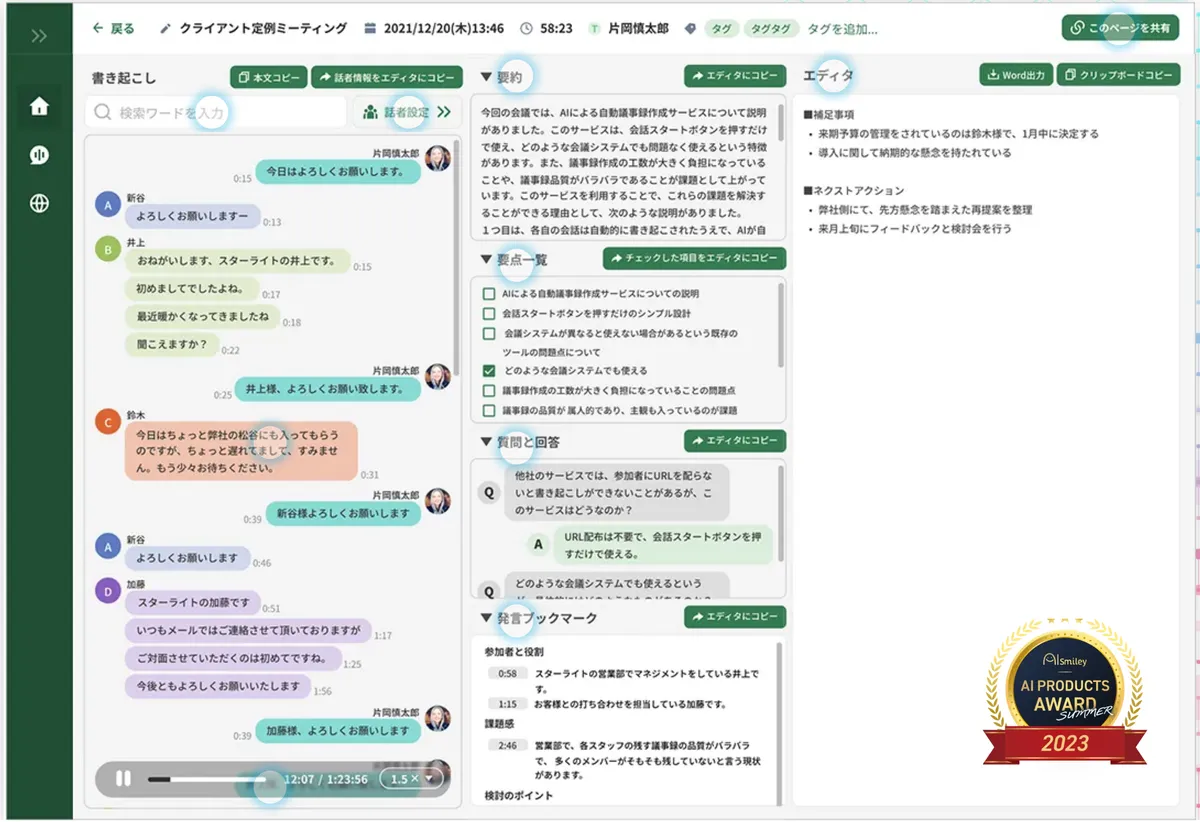
After the meeting, you get a screen with the transcript by speaker on the left, the summary, key points, questions and answers, and bookmarked remarks in the middle, and the minutes editor on the right. Clicking a remark plays back the audio for that part, so you can check only the parts you want to hear again.
Source: YOMEL official website
According to the official site, for minutes that used to take two to three hours of re-listening to a one-hour recording, re-listening became almost unnecessary and the work was cut in half. Microphones from any manufacturer can be used, but to prevent feedback and improve recognition accuracy, the company recommends an external headset or a conference speakerphone rather than a laptop's built-in microphone and speakers (no microphones or speakers are included).
In-person meetings and sites with no signal, all from one smartphone
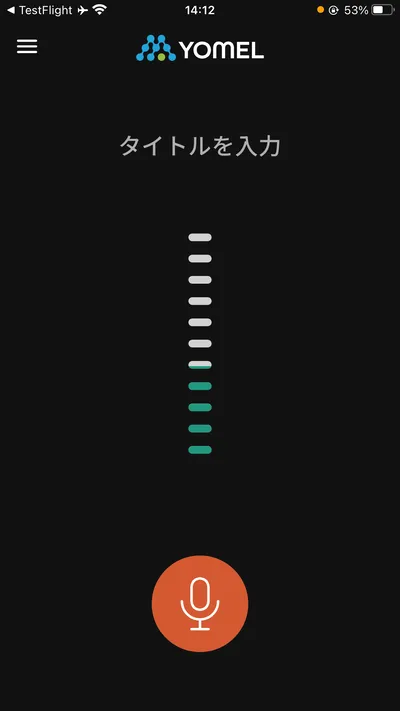
For in-person meetings, place the smartphone app (iPhone, Android) in the middle of the table to record. The app has been enhanced several times in 2026.
- Data-saving mode (August 2026) — Keeps recording on the device even if the connection drops after recording starts, and syncs to the cloud automatically once reconnected
- Full offline mode (October 2026) — Lets you launch the app and start recording even where there is no connection
- Audio file import (October 2026) — Imports audio saved on the phone and turns it into minutes
These features are aimed at meetings where you cannot open a laptop, such as construction sites, medical settings, and sales visits, and are available on every plan. Note that the App Store app is described as "for existing YOMEL users only", so you need an account from a contract (or trial) to use it.
Pricing
Pricing is based on the usage hours available per month to the whole space (contract). There is no limit on the number of users (IDs), so you can create accounts freely, even during the trial. All prices exclude tax.
| Plan | Monthly usage hours | Monthly fee (excl. tax) | English option (monthly, excl. tax) |
|---|---|---|---|
| Starter | 30 hours | 28,000 yen | +6,000 yen |
| Standard | 130 hours | 95,000 yen | +26,000 yen |
| Business | 300 hours | 180,000 yen | +60,000 yen |
| Enterprise | 500 hours+ | 250,000 yen+ | +100,000 yen+ |
| Option | Price (excl. tax) |
|---|---|
| SSO authentication | 100,000 yen/month |
| Real-time counter-talk (FAQ) | Contact for pricing |
| English mode | Contact for pricing (as listed on the pricing page; the table above shows the English option price per plan) |
Automatic transcription, speaker identification, AI summary, custom summary, AI chat, group management, IP restriction, audit logs, automatic personal-information removal, and Salesforce/Slack integration are included in all plans.
- How usage is counted — The length of each log you create counts as usage time. Deleting a log does not give the time back
- When you run out of hours — Once you exceed your hours, the start button can no longer be pressed. You will not be moved to a higher plan without consent, and you can add hours for a single month with an add-on option. If time runs out during a recording, that meeting is still recorded to the end at no extra cost (the overage is deducted the next time you add hours)
- Changing plans — Upgrades take effect within the next business day, downgrades from the first of the following month. Downgrades are not possible during the minimum contract period (ask your sales contact for its length)
- Payment — Credit card or bank transfer, closing at month-end and payable at the end of the following month
Pricing is based on the official pricing page and the support site's plan FAQ (checked October 2026).
Security and data handling
01Protective settings
- ISO 27001 — The operating company is certified for its information security management system
- IP address restriction — Blocks access from anything other than specified IP addresses
- Automatic personal-information removal — Stores data with parts that look like names, phone numbers, addresses, credit card numbers, and similar removed
- Option to keep no recordings — If text alone is enough, recording files can be kept off the server entirely
- Audit logs — Export logs of user operations, access, and IP addresses as CSV
02Where data goes and how long it is kept
- Use for training — The official FAQ says the policies of each external generative AI service explicitly state that transcript text sent to the summary AI is not used for training
- Where it is processed — Transcription is processed in Japan. AI features such as summarization and proofreading also use regions outside Japan by default. To process only in Japanese regions, apply through your sales contact (some features may be limited)
- Retention — After contract, 36 months by default; shorter or longer periods can be arranged. Trial data is deleted after the trial ends (kept if you go on to sign a contract)
A security checklist (PDF and Excel) based on materials published by Japan's Ministry of Economy, Trade and Industry is also available from the official site.
Track record and reputation
01Adoption
The company announced that YOMEL had passed 2,000 cumulative paying corporate customers at the end of March 2026, with revenue growing 300% year on year for two consecutive fiscal years. Listed customers include Ono Pharmaceutical, Kanadevia, JR九州駅ビルホールディングス, Tokyu Land, and Fukui Television. Among local governments, Fukui Prefecture has rolled it out across all departments.
02Published results
- The Gunma Bank — Cut time spent writing minutes by about 75%, and 98% of users felt more productive (case study published April 2026)
- Kanadevia — Reduced minutes-writing time to one third in an environment where English meetings are routine (March 2026)
- 杵築市立山香病院 — Freed up 39 hours a month in a medical and nursing-care setting with more than 100 meetings (case study on the official site)
03Third-party recognition
- ITreview Grid Award — In the AI meeting-minutes category: "High Performer" in 2026 Winter, then the top "Leader" rank three times in a row in Spring, Summer, and Fall
- Rankings — No. 1 in the minutes-tool category of "ITトレンド 上半期ランキング2026" and No. 1 in six categories of the BOXIL document-request ranking for the first half of 2026 (both announced by the operating company)
- App Store — The smartphone app is rated 3.0 out of 5 (8 ratings, checked October 2026). Treat this as a rough reference given the small number of ratings
Pros and cons
Pros
- Works without changing your meeting tool and without a bot joining. No bot shows up in meetings with external parties either
- Unlimited user IDs, so you can roll it out across departments or the whole company without worrying about headcount
- IP restriction, audit logs, and automatic personal-information removal are included in every plan, and a security checklist is published
- In-person meetings and meetings where there is no signal can also be recorded on a smartphone
Cons
- Even the cheapest Starter plan is 28,000 yen/month (excl. tax), not a price for individuals or small teams to try casually. The trial is also limited to businesses
- Usage hours are shared across the whole space, so organizations with many meetings will need a higher plan or add-ons
- English is the only supported foreign language, and English mode costs extra
- AI features such as summarization are also processed in regions outside Japan by default (restricting to Japan requires an application)
How it compares with other AI meeting-minutes tools
| Product | Provider | Price (at time of checking) | How meetings are recorded |
|---|---|---|---|
| YOMEL | PKSHA Infinity (Fukuoka) | From 28,000 yen/month for 30 hours, unlimited IDs (excl. tax) | Desktop app picks up the audio. No bot or URL needed |
| Rimo Voice | Rimo LLC (Tokyo) | Transcription 1,650 yen/month, Pro from 4,950 yen/month (incl. tax); quote for enterprise | A bot joins the meeting and records automatically |
| LINE WORKS AiNote | LINE WORKS Corp. | Free plan available; Team from 19,800 yen/month (annual contract, excl. tax) | A bot joins online meetings; in-person meetings are recorded in the app |
| Otolio | Epicbase | Initial fee + AI credits (contact for pricing) | AI agents also handle work before and after the meeting |
| Notta | Notta | Free plan available; Business 2,508 yen/month (annual, incl. tax) | Meeting-tool integration and file import |
Figures for other products are as listed on each product page at the time of checking.
YOMEL stands out for business pricing based on usage hours and for picking up audio through a desktop app instead of a bot. Its entry price is higher than Notta or Rimo Voice, which can be compared on a per-person monthly basis, but the price does not change as headcount grows. If features for sales teams matter most, also consider Otolio, whose AI agents handle work before and after meetings, and ACES Meet, which offers sales-oriented features such as Salesforce integration.
FAQ
Q. Can I use YOMEL for free? A. There is no free plan. Businesses can use a 14-day free trial that covers almost all features. You are not billed automatically when it ends.
Q. How much does it cost? A. Starter is 28,000 yen/month (30 hours), Standard 95,000 yen/month (130 hours), Business 180,000 yen/month (300 hours), and Enterprise from 250,000 yen/month (500 hours+). All prices exclude tax (checked October 2026).
Q. How many people can use it? A. User IDs are unlimited, with no cap on the number of accounts. Pricing depends on the usage hours of the whole space.
Q. Does it work with Zoom or Teams? A. Yes. It works with Zoom, Google Meet, Teams, Webex, and any other web meeting tool without integration setup. Installing the dedicated desktop app lets it also transcribe the other side in online meetings.
Q. Does it support English meetings? A. English is the only supported foreign language. "English mode", which can handle meetings mixing Japanese and English, is an option applied only to companies that request it, with an additional fee per plan.
Q. Is meeting content used to train AI? A. The official FAQ says the policies of each external generative AI service explicitly state that transcript text sent to the summary AI is not used for training. The summary engines are Claude on Amazon Bedrock and GPT on Microsoft Azure.
Q. Who operates it? A. PKSHA Infinity Inc., headquartered in Hakata-ku, Fukuoka (Representative Director: 森 慎吾; established October 2019).
The information on this page is based on what was published on the official website, official support site, and press releases as of October 2026. Please check the official website for the latest specifications and pricing.