

Kliv
: How to use it, features, and the business problems it solves
What is Kliv?
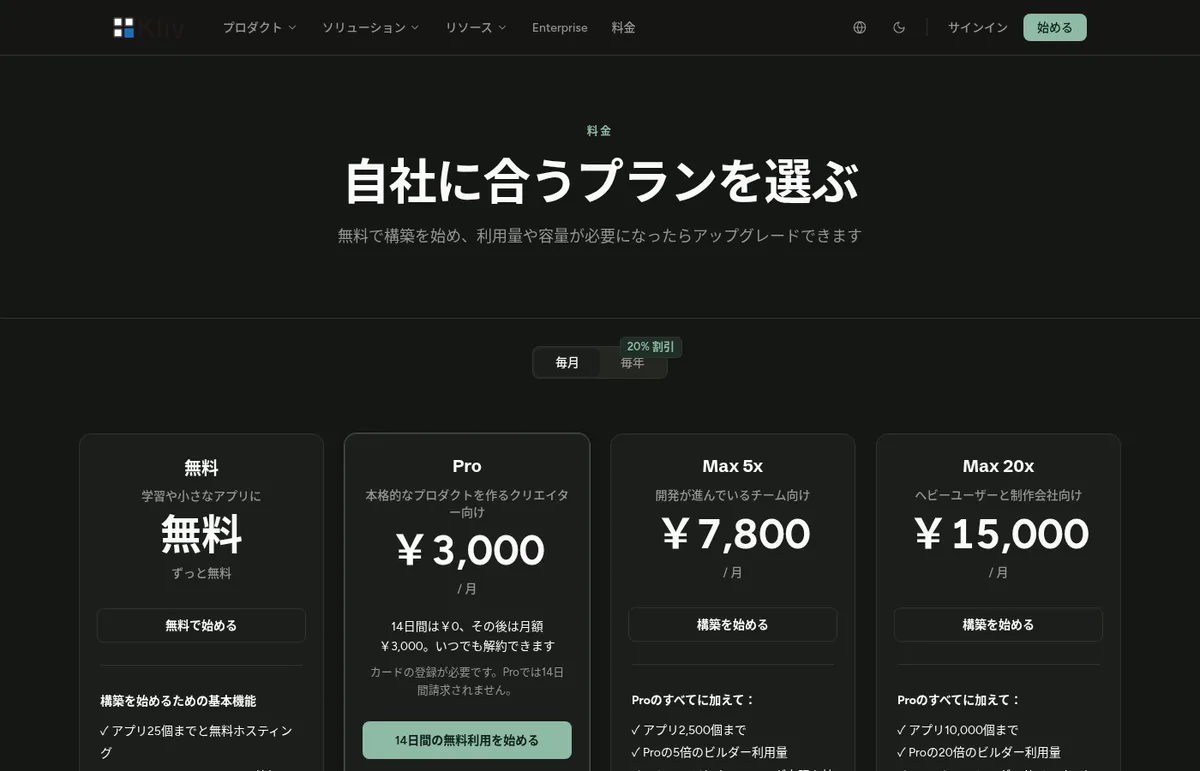
Kliv is an AI app builder run by Rational Ventures, Inc. (USA). Describe the app you want in a conversation and Kliv builds and publishes a web app with a database, sign-in, payments and subscriptions, tax calculation, email and hosting built in. Sales go to your own Stripe account, and a Sandbox lets you rehearse a year of billing before going live. The Japanese site lists yen prices: Free (up to 25 apps), Pro ¥3,000/month (14-day free trial), Max 5x ¥7,800/month, Max 20x ¥15,000/month, with annual plans from ¥30,000 for Pro; the English site lists Pro at $19/month (as of November 2026).
Business problems it solves



About "Kliv"
What is Kliv?
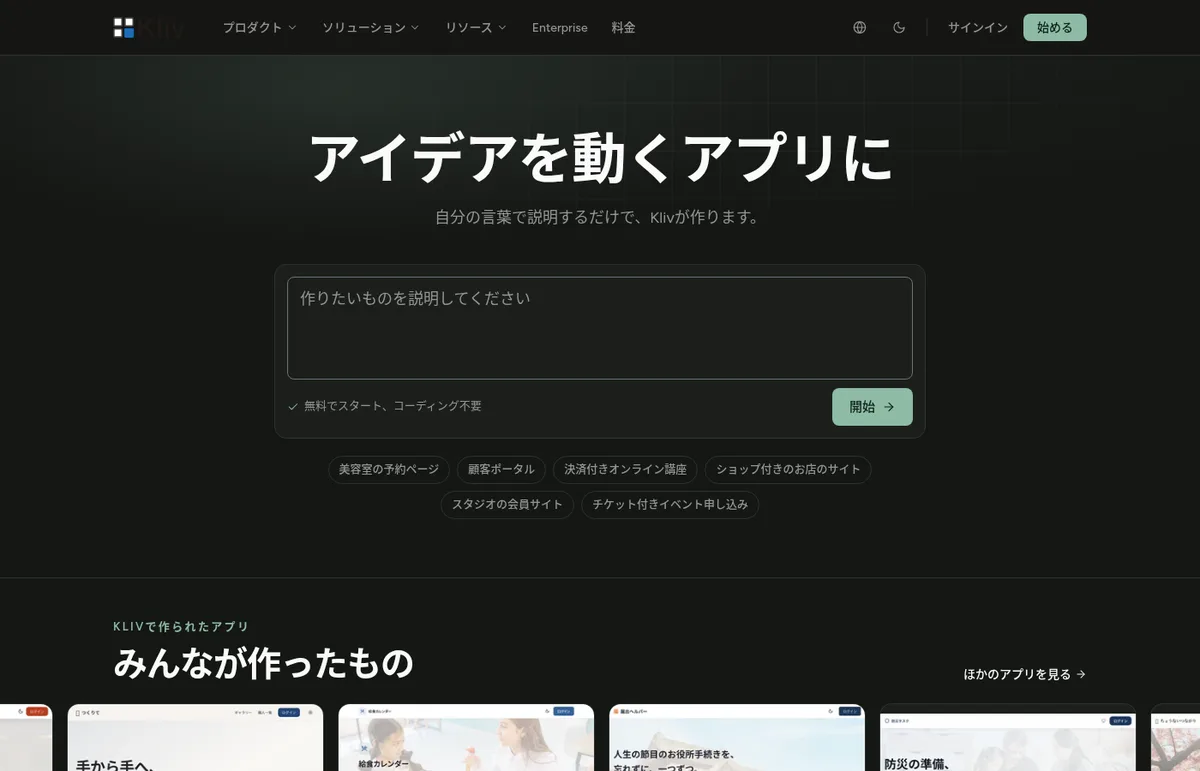
Kliv is an AI app builder that turns a conversation into a published web app with sign-in, a database, payments, email and hosting already built in. It is run by Rational Ventures, Inc. in the United States, and offers a Japanese-language interface and pricing page as well as a yen-denominated Specified Commercial Transactions Act disclosure.
The official site describes Kliv as "an agentic AI platform that turns a conversation into a complete, running product — app, database, sign-in, payments, agents, and proof that it works." It is designed from the start for apps that take money and keep running, such as booking pages, client portals, paid online courses and membership sites.
- Build by conversation — describe the app, watch it get built, and refine it in chat while looking at the preview
- The app foundation is already there — a database with row-level security, sign-in, file storage, edge functions and email delivery
- Selling is built in — products, subscriptions, usage-based billing, checkout, tax calculation and refund approvals. Revenue goes to your own Stripe account
- Verify before launch — automated tests run as the app is built, and the Sandbox lets you rehearse a year of billing with simulated money and time
You can start on the Free plan; the paid Pro plan is ¥3,000/month on the Japanese site ($19/month on the English site), with the first 14 days free.
Source: Kliv official site (applies to the images below as well)
How to use
The flow below follows the official Quick Start Guide.
- Describe what you want to build Type the app you want into the box on the official top page, the way you would explain it to a friend (for example, "a booking page for a hair salon" or "an online course with payments"). If you don't have an account, you are taken to sign-up, where you can register with email and password or with a Google account.
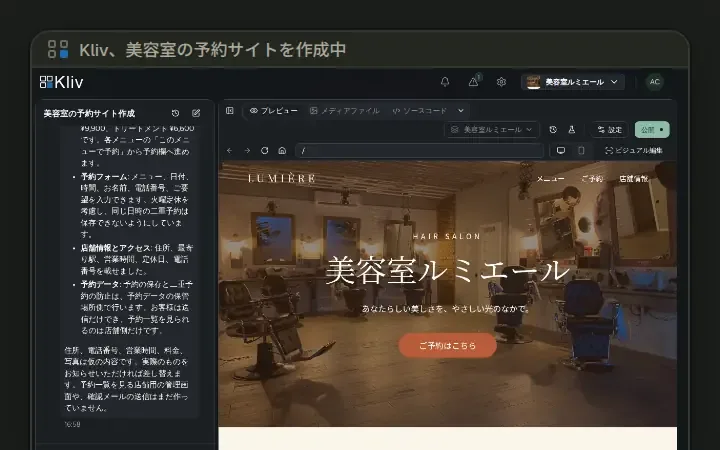
- Watch Kliv build it After signing in, the workspace opens and the AI starts building from your description. According to the official guide, the first version takes about a minute. The app is automatically given a name and published at a URL on the kliv.site domain.
- Refine it in chat Check how it works in the preview and ask for changes in chat. Small tweaks such as text and colors can also be made with Visual edits by pointing at the screen. You can start new apps from the box on your logged-in dashboard, or pick a template from the App Store via "New Site."
- Get ready to sell Tell Kliv what you want to sell, and products, prices and checkout are built into the app. Even without a Stripe account, you can test checkout, subscriptions, refunds and failed payments in the Sandbox (a test environment with simulated payments).
- Go live When you are ready to handle real money, connect your own Stripe account in a few clicks. On Pro and above you can publish on your own custom domain.
The "selling" part is built together with the app
Many AI app builders stop at screens and a database, leaving payments to be wired up later with external services. Kliv puts this at the center of the product with a built-in commerce engine.
01Ways to sell
- Six pricing models — subscriptions (monthly/annual, trials, proration, pause), one-time purchases, usage-based billing, bundles, time-limited prices and promotion codes, and free products, all in one catalog
- Sell features — tie any part of the app to a plan so customers can use exactly what they paid for
- Checkout — embedded in the app on your domain or hosted
02Running it after the sale
- Billing page — customers update cards, change plans and view invoices themselves inside the app
- Recovering failed payments — failed payments are retried on schedule and customers get an email asking them to update their card
- Refund approvals — a refund runs only after someone approves it; you can also issue a credit applied to the next invoice instead
- Tax — sales tax and VAT are calculated at checkout based on your registered jurisdictions, with reports for filing. Business customers' tax IDs can appear on invoices
According to the FAQ on the official pricing page, in-app sales are processed through your own Stripe account, and Kliv's bill does not change as your sales grow. What you pay Kliv is the plan price only.
Check it with tests and "a year of billing" before you launch
Kliv also builds ways to prove the app works into the product.
- Automated tests — unit tests and scenario tests are created and run as the app is built. There is also a database fork for testing against a copy of your data
- Sandbox and time travel — try the whole store with simulated money, then copy a scenario and fast-forward time to see a year of renewals, trials and failed payments in seconds
- Changes in preview — changes are made in a preview, and according to the official description, publishing is gated on passing tests
Features
01App foundation (Kliv Cloud)
- Database — with row-level security; each app gets its own dedicated database
- Sign-in — authentication for your app's users
- File storage — with automatic image optimization
- Edge functions, scheduled functions and secrets management — for server-side logic
- Email delivery and templates, admin interface
02AI and integrations inside your app
- AI agents — add an assistant to your app with a knowledge base, access control and usage limits
- Integrations — Slack, GitHub, Discord, Notion, Linear, Intercom, Mailchimp, Trello, Airtable, Calendly and HubSpot, plus AI tools over MCP
- Analytics — dashboards showing what each channel is worth, plus custom conversion events
03Building and taking it with you
- Visual edits — point at text or styles on the screen to change them
- Code view and version history — view the source and roll back to a previous version in one click
- GitHub integration — every AI change is committed and synced to your own repository; export to any host that runs React apps
- Remix and templates — fork an existing app and rework it
04Publishing and enterprise
- Hosting and SEO — published with HTTPS and a CDN; prerendered for crawlers and AI, with a sitemap
- Custom domains (Pro and above)
- SSO (SAML/OIDC) and SCIM (Max 20x and Custom) — with audit log export
Pricing
The pricing page shows yen on the Japanese site and dollars on the English site. The amounts on the Japanese site and the Specified Commercial Transactions Act disclosure are as follows (as of November 2026).
| Plan | Monthly | Annual | Apps | Builder usage | Main additions |
|---|---|---|---|---|---|
| Free | ¥0 | ¥0 | Up to 25 | Limited | Free hosting; commerce, agents, integrations, database, auth, edge functions, analytics and team collaboration |
| Pro | ¥3,000 (14 days free) | ¥30,000 | Up to 1,000 | Standard | Custom domain, Kliv logo removal, priority support, extended change history |
| Max 5x | ¥7,800 | ¥78,000 | Up to 2,500 | 5x Pro | Higher storage and hosting limits |
| Max 20x | ¥15,000 | ¥150,000 | Up to 10,000 | 20x Pro | SAML/OIDC single sign-on and SCIM, maximum storage and hosting limits |
| Custom | Custom | Custom | Custom | Custom | Dedicated support engineer, private environment |
On the English pricing page, monthly prices are Pro $19, Max 5x $49 and Max 20x $99, and annual prices are Pro $199, Max 5x $490 and Max 20x $990.
- Same features on every plan — according to Kliv, commerce, agents, integrations, edge functions, Visual edits, analytics, the database, email and hosting are in every plan including Free; higher plans add builder usage, storage and custom domains, and at the top single sign-on and a dedicated support engineer
- How builder usage is counted — only work you ask the AI to do counts. There is a 5-hour window and a 7-day window; when either is full, new AI requests wait until that window frees up. Published apps and their users are not affected. Requests from your app's visitors to AI you built into the app draw from the same usage (official docs)
- Free trial — Pro is free for 14 days and requires a card; the first charge happens when the trial ends
- Tax — the Japanese disclosure states that Japanese consumption tax is not charged
- Payment — credit card (processed by Stripe), renewing automatically monthly or annually
- Cancellation — cancel anytime from account settings and keep access until the end of the billing period
- Refunds — full refund if requested within 7 days of the first payment for a paid plan; later payments are not refundable
How Kliv differs from other AI app builders
Other tools also build web apps from a conversation, but Kliv puts its weight on having payments, subscriptions, tax and refund operations as built-in features, and on letting you rehearse billing in a Sandbox.
| Tool | Highlights | Price guide |
|---|---|---|
| Kliv | Built-in commerce engine (payments, subscriptions, tax, refund approvals) plus automated tests and Sandbox. Yen pricing | Free, Pro from ¥3,000/month |
| Founden | Publishes apps wired to payments, email, database and custom domain; autopilot keeps improving after launch | Pro $29/month |
| Lovable | A leading vibe-coding tool generating front end through back end; credit-based with unlimited members | Free, Pro from $25 |
| bolt.new | Generates editable code in StackBlitz's in-browser dev environment; GitHub and Figma import | Free, Pro from $25 |
| Base44 | Owned by Wix; generates apps with database and auth, with a Japanese version | Free, from $20/month |
| v0 | Vercel's full-stack app builder with Vercel deployment and Design mode | Free, Plus from $30 |
| Replit | In-browser dev environment with Replit Agent; supports 50+ languages | Starter free, Core from $20 |
Details for other products reflect the check dates on their respective pages.
Who it suits
Company
| Item | Details |
|---|---|
| Seller | Rational Ventures, Inc. |
| Responsible manager | Anders Olsson |
| Address | 848 N Rainbow Blvd #3037, Las Vegas, NV 89107-1103, USA |
| Phone | Disclosed upon request |
| Contact | hello@kliv.dev |
Sources: Specified Commercial Transactions Act disclosure, Terms of Service
FAQ
Q. Can I use Kliv for free? Yes. The Free plan lets you build up to 25 apps and includes hosting, database, auth, commerce, AI agents and more. Builder usage is limited, and custom domains and Kliv logo removal start on Pro.
Q. Is it available in Japanese? The official site, pricing page and Specified Commercial Transactions Act disclosure are available in Japanese, with prices shown in yen. The official documentation (docs.kliv.dev) also has a Japanese version.
Q. Does Kliv take a cut of my app's sales? According to the official FAQ, you only pay Kliv for your plan. In-app sales are processed through your own Stripe account, and Kliv's bill does not change as your sales grow.
Q. Can I try it without a Stripe account? Yes. In the Sandbox (a test environment with simulated payments) you can test checkout, subscriptions, refunds and even failing cards. You connect Stripe when you are ready for real money.
Q. Can I take the code with me? With the GitHub integration, every AI change is synced to your own repository. Kliv says the app can be exported to any host that supports React apps.
Q. What happens when I hit the usage limit? When either the 5-hour window or the 7-day window is full, new AI requests wait until that window frees up. Published apps keep running. Moving to a higher plan gives you more room.
Information on this page is based on what was published on the official website as of November 2026. Please check the official website for the latest specifications and pricing.