

Replit
: How to use it, features, and the business problems it solves
Add bookmark
What is Replit?
A development platform to build apps and websites with AI in the browser and deploy them, all in one place. Describe what you want and the AI agent Replit Agent (currently Agent 4) handles requirements, code generation, and publishing. Auth, DB, and hosting are built in; 50+ languages and real-time collaboration. Starter free, Core from $20/mo.
Business problems it solves



About "Replit"
What is Replit
Replit is a development platform where you build apps and websites with AI in the browser and deploy them, all in one place. Describe what you want, and the AI agent "Replit Agent" handles everything from clarifying requirements through generating and revising code to publishing. Under the banner "Turn ideas into apps in minutes," it lets even non-coders build apps. On top of its long-standing browser IDE (50+ languages, real-time collaboration), it now offers an Agent-centric "vibe coding" experience. It is used by a wide range of companies including ClickUp, Coinbase, Duolingo, Google, and Microsoft.
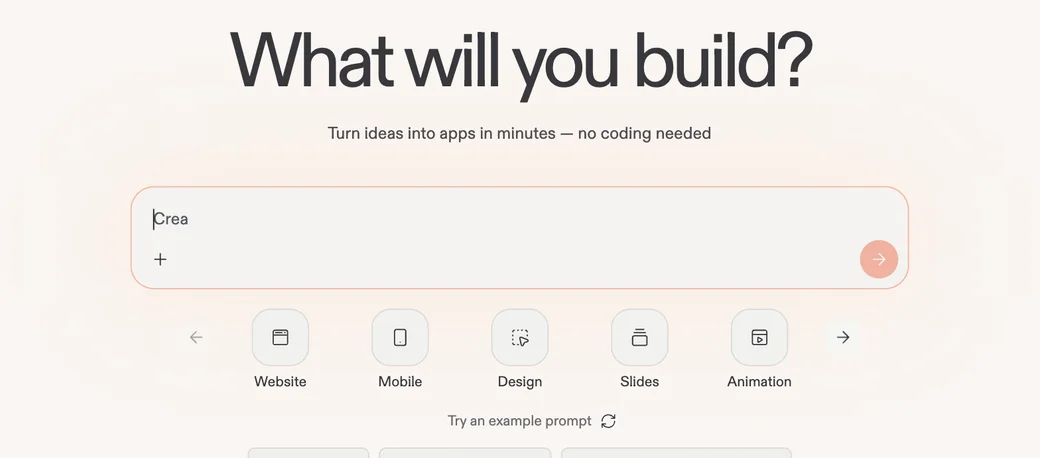
Source: Replit official site
Describe an idea, and the Agent turns it into an app
The centre of Replit is now handing app-building to Replit Agent. Just write what you want, and a working app — including authentication and a database — is generated and can be published as-is.
01The Agent builds and publishes
- Replit Agent — Write an instruction and it generates and improves production-ready code, through to publishing
- No-code capable — Even non-coders can build apps just by describing them
- Japanese support — You can instruct it with Japanese prompts
02Zero-setup built-in services
- Auth, DB, hosting, monitoring — Build scalable apps from day one without separate services
- 100+ integrations — Connect to OpenAI, Stripe, Google Workspace, and more in minutes
03Dev environment & teams
- Browser IDE — No install, 50+ languages
- Real-time collaboration — Multiple people edit the same project at once
- Security — SSO/SAML, SOC 2, admin controls
How to use
-
Create an account
Create an account and sign in on the official site (replit.com).
-
Describe what you want
In the top input, describe the app or site you want in Japanese (or pick from Website / Mobile / Design, etc.).
-
Let the Agent build it
Replit Agent plans and generates/revises code. You can give further instructions while watching progress.
-
Edit and run
Review and edit code in the browser editor as needed, and run it with "Run."
-
Publish and share
Deploy the finished app and share it by URL. Real-time team collaboration is also available.
Features
01Build
- Replit Agent — Generate, improve, and publish apps from natural language
- Browser-based dev environment — No install, 50+ languages
- Code completion & error checking — AI-assisted completion and checks
02Built-in & integrations
- Auth, DB, hosting, monitoring — Zero-setup built-in services
- 100+ external integrations — OpenAI, Stripe, Google Workspace, and more
03Collaborate & operate
- Real-time collaboration — Work together simultaneously
- Security & admin — SSO/SAML, SOC 2, role-based access control
Pricing
On top of a fixed subscription, Replit Agent adds effort-based, usage billing. Amounts are in USD.
| Plan | Monthly | Highlights |
|---|---|---|
| Starter | Free | Public projects, basic dev environment, limited Agent access |
| Core | $20 (annual) | Full Agent access, includes $20/mo usage credits, unlimited private |
| Teams | $35/user | Team features, role-based access control, private deploys |
| Enterprise | Custom | SSO, dedicated support, custom pricing |
Replit Agent is fully available on Core, and its cost scales with "the actual work the Agent performed" (effort-based billing). A simple change is usually under $0.25; complex tasks can cost more. Core includes $20/mo in usage credits. Since cost varies with how you use it, trying the free Starter plan first is safest.
Pricing is based on official information as of August 2026 (subject to change). Check the official pricing page for the latest.
How it differs from other AI app-development tools
Replit's trait is that it combines the dev environment (IDE), the AI agent, and publishing/hosting in one place. Unlike tools specialised in UI generation or code completion, you can build apps including auth and a database and take them straight to operation.
| Aspect | Replit | UI-gen / IDE-assist tools |
|---|---|---|
| Scope | Dev environment + Agent + deploy/hosting | Mainly UI generation or editor assist |
| Backend | Built-in auth, DB, hosting | May need to be arranged separately |
| Runtime | Runs entirely in the browser (no install) | May depend on your local environment |
| Best for | People who want to go from idea to launch fast | People with a narrow, specific use |
For full-stack app generation including a backend, Base44; for UI/front-end generation, v0 or Lovable; for assistance in your local editor, Cursor or Windsurf. If you want to go from idea to publishing and operations entirely in the browser, Replit is a strong choice.
FAQ
Q. Is Replit free to use?
Yes. The Starter plan is free and includes a basic dev environment and limited Agent access. Full Agent use requires Core (from $20/mo).
Q. How is Replit Agent priced?
Effort-based usage billing. A simple change is usually under $0.25; complex tasks can cost more. The Core plan includes $20/mo in usage credits.
Q. Can I use it in Japanese?
Replit Agent supports Japanese prompts. The UI is English-centric, but you can instruct it in Japanese.
Q. Do I need coding knowledge?
Not required. Describe what you want and the Agent generates the app. You can also edit code directly in the browser editor if needed.
Q. What can it do?
You can build web apps, mobile, design, slides, and more. With auth, DB, and hosting built in, you can handle publishing and operations in one place.
Information on this page is based on what was published on the official site as of August 2026. The Agent generation, features, and pricing may change, so check the official site for the latest.




![[2026 Edition] 20 AI Tools Transforming Developer Workflows | Coding Assistance, Automated Code Review, No-Code Web Development, and Workflow Automation](/_next/image?url=%2Fimages%2Farticles%2Fdeveloper-ai-programming-tools.png&w=3840&q=75 "[2026 Edition] 20 AI Tools Transforming Developer Workflows | Coding Assistance, Automated Code Review, No-Code Web Development, and Workflow Automation")