kotoba
: How to use it, features, and the business problems it solves
Add bookmark
What is kotoba?
kotoba is an AI simultaneous interpretation app from Kotoba Technologies Japan. Its in-house speech foundation model, Koto, reads up to 0.5 seconds ahead of the conversation, holding latency from speech onset to about 1 second. It covers 21 input and 13 output languages on iOS and Android. The free plan gives 5 hours a month, Unlimited is $99/month, and the business Enterprise licence is ¥15,000 per device per month. A Meeting Bot for web conferences is also available.
Business problems it solves


About "kotoba"
What is kotoba
kotoba is an AI simultaneous interpretation app built by Kotoba Technologies Japan, Inc. It runs on a single iOS or Android phone, turning what a speaker says into subtitles and audio on the spot.
What separates it from other products is that its design centres not on accuracy but on when the translation appears. The company's own speech foundation model, "Koto," predicts where the conversation is heading and puts the translation out before the speaker has finished. The published figures are up to roughly 0.5 seconds of look-ahead and at most about 1 second of latency from the start of an utterance (look-ahead applies to subtitle mode only; figures vary with environment, language, and speaking style).
A design philosophy built on removing the wait
The official site is explicit about what latency actually costs: "the more the translation lags, the more you miss the moment to respond, and the more you lose control of the conversation." The claim is that in a sales meeting, broken timing hurts you more than an imperfect word choice.
On screen, translated text keeps flowing while the speaker is still talking. A "live translation" indicator sits at the top, an audio waveform and pause button at the bottom, and the input and output language switches on either side.
Coverage centres on Japanese, English, Chinese, Korean, and Spanish, with 21 input languages and 13 output languages. The in-house Koto model handles the main translation languages, with external AI translation models combined in for some language pairs.
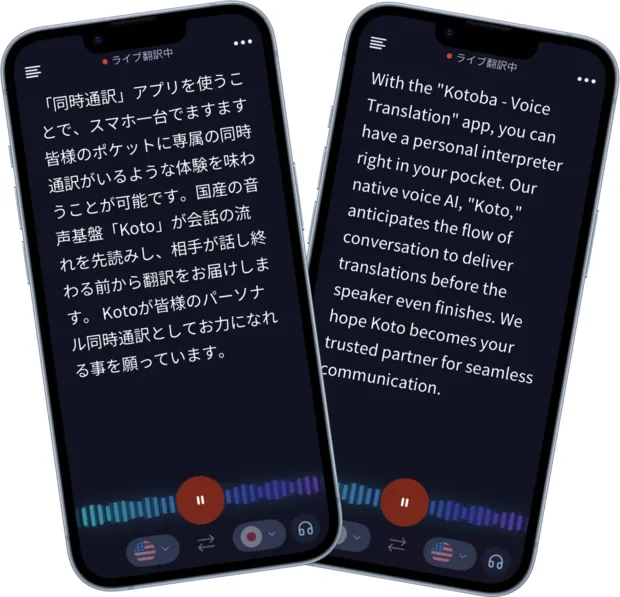
Source: kotoba simultaneous interpretation app official site (subsequent images are from the same source)
Online meetings are handled by the Meeting Bot
The app is strongest for in-person and handheld interpretation; web meetings use a separate mechanism. Register a meeting URL and two translation languages, and the Meeting Bot joins the call and posts a translation viewing URL into the chat. Participants open that URL in a browser and read the translation without installing anything.
It supports Google Meet, Zoom, and Microsoft Teams, translating bidirectionally between two languages chosen from Japanese, English, Chinese, and Korean. Access to the translation viewing page can be restricted by IP address.
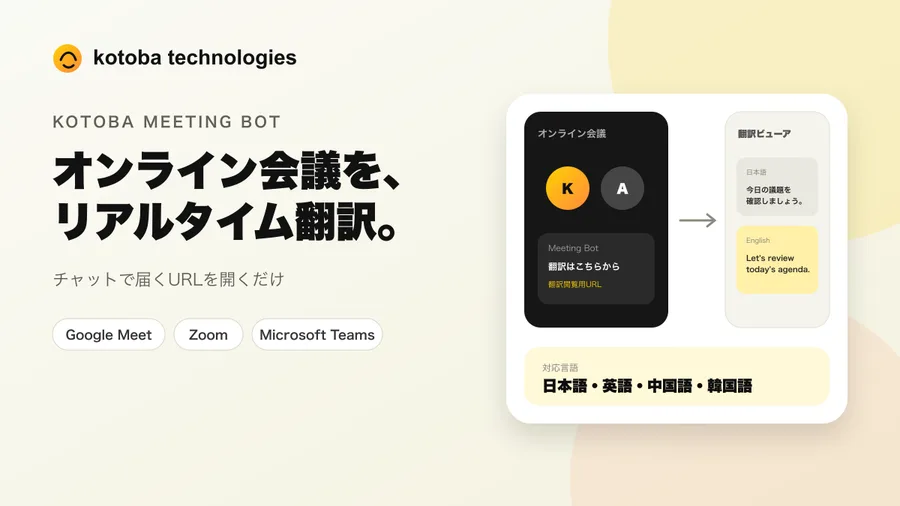
The Meeting Bot is exclusive to the Enterprise Volume licence. It is not included in Free, Unlimited, or the standard Enterprise licence. If translating web meetings is your main goal, note that an individual plan will not get you there.
How to use it
-
Install the app
Download it from the iOS or Android store and you can start immediately on the Free plan. Beyond creating an account, there is no setup.
-
Choose input and output languages
At the bottom of the screen, select the speaker's language and the language used for display and read-aloud.
-
Just speak
No special speaking style is needed. Thanks to look-ahead and low latency, the translation flows before the other person finishes.
-
Read the subtitles, review the log
Understand in the moment from subtitles, then review or share afterwards via the translation history (Unlimited plan and above).
-
Set up the Meeting Bot for web meetings
On the Enterprise Volume licence, register the meeting URL and two translation languages. The bot joins the meeting and posts a viewing URL into the chat for participants.
Pricing
Two consumer plans and two business plans (as of 22 August 2026).
| Plan | For | Price | What you get |
|---|---|---|---|
| Free | Individuals | ¥0 | Up to 5 hours a month. Real-time subtitles and live translation |
| Unlimited | Individuals | iOS: $99/month or $999.99/year; Android: $99/month | Unlimited translation time, translation history, everything in Free |
| Enterprise | Business | ¥15,000 / device / month | Business licence for the interpretation app. Bulk member management by an administrator, instant start via invitation email, priority support |
| Enterprise Volume | Business | Quoted individually | Interpretation app plus Meeting Bot. Google Meet, Zoom, and Teams; bidirectional Japanese/English/Chinese/Korean; IP restriction on the viewing page |
The official site frames the Unlimited plan against the alternative: "professional interpreters go for ¥20,000 an hour and up. $99 a month, unlimited." Conference and trade-show scale deployments can be discussed through a dedicated form.
The free tier covers 5 hours a month — generous next to competitors (Sentio offers 30 minutes a month, VoicePing 90). That is several meetings' worth of real material, enough to judge how the latency actually feels before deciding.
Information security
Kotoba Technologies Japan holds ISO/IEC 27001:2022 (ISMS) certification for its information security management system, issued by GCERTI Co., Ltd. For a tool that handles meeting content, that means it can answer the security questionnaires that come with corporate procurement. The Meeting Bot's translation viewing page also supports IP-based access restriction.
Track record and reputation
(subtitle mode, vendor-published)
(vendor-published)
(as of August 2026)
(approx. ¥1.7bn, June 2025)
kotoba has been featured on TV Tokyo, Abema Prime, and NHK, and the company reports that it was used for live transcription at AI Summit Japan 2024 as part of NVIDIA's programme. In June 2026 a strategic partnership was announced with jig.jp for its next-generation smart glasses, "SABERA."
The official site publishes user comments with the speaker's role attached.
"We introduced it for weekly meetings with overseas suppliers. Because the translation appears before the other person finishes, the rhythm of the conversation doesn't break. It genuinely feels different." (trading company employee, 30s) / "I use it as a support tool for on-site interpretation at trade shows. Even if I miss something I can follow it in text, which is reassuring." (freelance interpreter) — both are user comments published on the official site.
How it differs from other AI interpretation tools
| Product | Main form | Free tier | Web meeting support | Price |
|---|---|---|---|---|
| kotoba | Smartphone app | 5 hours/month | Meeting Bot (Enterprise Volume only) | Individual: $99/month; business: ¥15,000/device/month |
| Sentio | Browser | 30 min/month | Captures browser tab audio | From ¥3,300/month (tax included) |
| VoicePing | Desktop and mobile apps | 90 min/month | Both PC audio and a meeting bot | From ¥3,163/month (tax included) |
| DeepL Voice | Conference tool integration | Free trial available | Teams, Zoom, Google Meet | Undisclosed |
kotoba is at its best in an in-person sales meeting or at a trade show, where a phone in your hand has to carry the conversation. Short latency translates directly into keeping the initiative, so the gap widens the more the exchange goes back and forth.
Conversely, be careful if translating web meetings is the main goal. The Meeting Bot is Enterprise Volume only, so individual plans cannot cover it. For that use case, Sentio or VoicePing, which handle web meetings on their standard plans, are easier to adopt. If you also need minutes kept, consider pairing with an AI meeting-minutes tool such as Notta.
Information on this page is based on what the official site published as of August 2026. Please check the official site for current specifications and pricing.