VoicePing
: How to use it, features, and the business problems it solves
Add bookmark
What is VoicePing?
VoicePing is a multilingual communication platform from VoicePing Inc. It can translate Zoom, Teams, and Google Meet audio directly from your PC, or send a meeting bot into the call, and it also covers in-person meetings and trade-show events. Translated meetings are kept as AI minutes, summaries, and action items in a searchable meeting log. The free plan covers 90 minutes a month, paid plans start at ¥3,163/month, and event interpretation starts at ¥33,000 per day (tax included).
Business problems it solves


About "VoicePing"
What is VoicePing
VoicePing is a multilingual communication platform built by VoicePing Inc. It provides real-time transcription and translation across web meetings, in-person meetings, trade-show events, audio and video files, and a virtual office.
What sets it apart from similar tools is breadth. Beyond interpreting the meeting, it keeps what was said as AI meeting minutes, summaries, decisions, and action items in a meeting log you can search across later. Making the conversation work in the moment, and keeping it findable afterwards, are handled by the same product.
On 6 July 2026 the company shipped a major revision, VoicePing 3.0, with a reworked UI/UX, more responsive real-time translation, hardened workspace security, and two in-house models: VoicePing ASR V0.1 and VoicePing MT V0.1.
It offers both the meeting-bot approach and direct PC audio capture
Meeting translation tools split into two camps: those that admit a translation bot into the web conference to capture audio, and those that capture your own machine's audio directly. The first makes recording and minutes easy to automate but can be a problem in external meetings. The second asks nothing of the other side.
VoicePing has both. A Web Meeting Bot joins Zoom, Google Meet, and Microsoft Teams automatically to record and translate, while PC audio translation in the desktop app translates the conference tool's audio directly — so you can use the bot for internal meetings and PC audio for external sales calls. In-person meetings are also transcribed and translated.
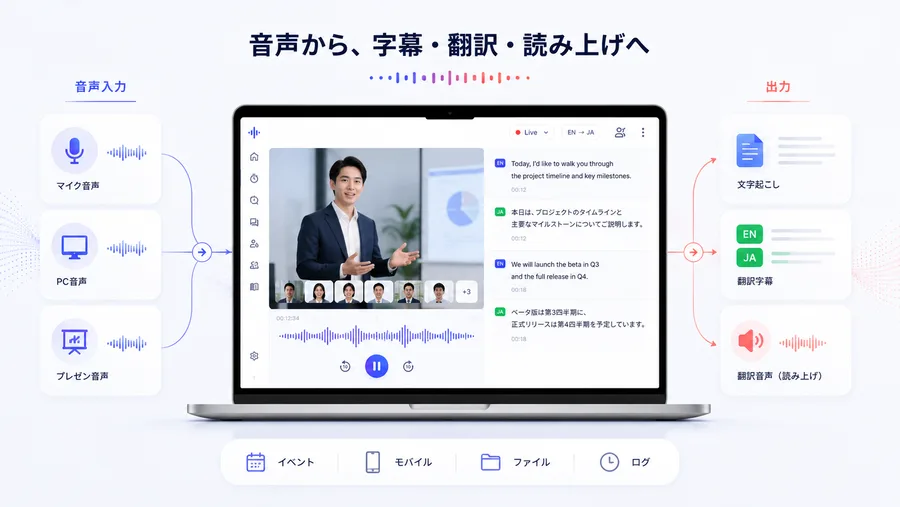
On the input side it accepts microphone audio, PC audio, or presentation audio. On the output side it branches into transcription, translated subtitles, and translated speech (read-aloud).
One meeting therefore yields live subtitles, synthesized audio to listen to, and a transcript to read later, all at once. The event, mobile, file, and log modes all sit on top of this shared pipeline.
Source: VoicePing 3.0 launch announcement (PR TIMES) (subsequent screen images are from the same source)
After the meeting, it stays in a form you can search
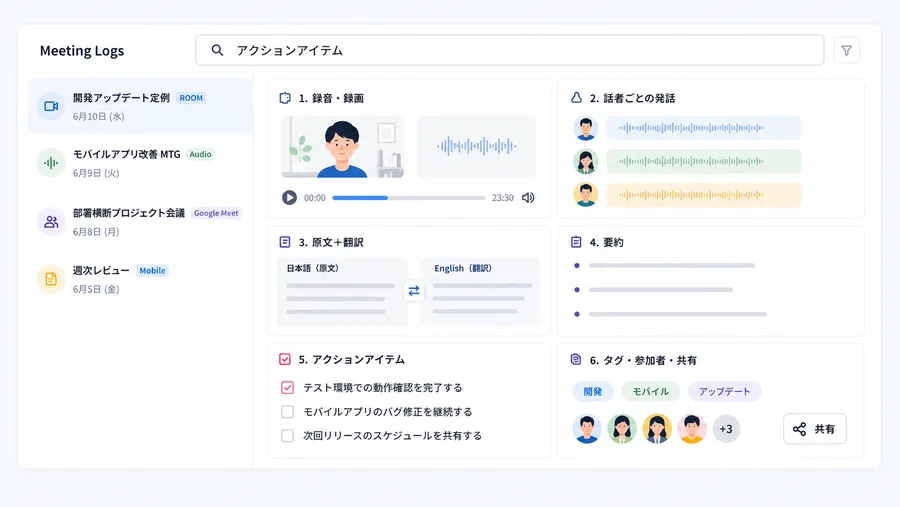
Interpretation is not the end of it. Each meeting leaves a Meeting Log holding the recording, utterances by speaker, source text alongside its translation, an AI summary, action items, and tags with participants.
Because the origin of each meeting is recorded distinctly (ROOM / Audio / Google Meet / Mobile), web meetings, in-person meetings, and mobile recordings all land in one place. You can search across past meetings on a keyword such as "action items," so reviewing works without a separate AI meeting-minutes contract.
How to use it
-
Create a workspace on the free plan
Start free from the official site. The free plan covers one account and 90 minutes a month, which is enough to check accuracy on real meetings.
-
Choose how you will use it
Either translate Zoom, Teams, or Google Meet audio directly through the desktop app, or send the Web Meeting Bot into the meeting. In-person meetings are transcribed and translated through the desktop or mobile app.
-
Register your dictionary
Add company names, product names, and industry terms to the transcription dictionary and the translation dictionary. The vocabulary builder helps maintain the list.
-
Watch and share subtitles during the meeting
Follow the live subtitles. At seminars and events you can push subtitles to attendees' devices by QR code or URL, or display them on a monitor.
-
Use the minutes and the logs
After the meeting, AI minutes, a summary, and action items are generated and accumulated as meeting logs. MCP and API access connect them to external workflows.
Key features
01Interpret the meeting
There is an entry point for online, in-person, and event formats alike.
- PC audio translation — the desktop app translates Zoom, Microsoft Teams, and Google Meet audio directly, with no bot in the meeting
- Web Meeting Bot — a bot joins Zoom, Google Meet, and Teams automatically to record and translate
- In-person transcription and translation — the conversation in front of you becomes text and translation on the spot
- Expo Mode and event translation — multilingual delivery at trade shows and seminars by QR code, URL, and monitor subtitles
- Mobile offline translation — translation without an internet connection (Japanese–English)
02Tune accuracy to your organization
Proper nouns and jargon are handled from two directions: dictionaries and in-house models.
- Dictionaries — separate transcription and translation dictionaries, maintained through the vocabulary builder
- VoicePing ASR V0.1 — in-house speech recognition model; average WER of 19.3% across English, Japanese, Korean, Chinese, and Vietnamese (vendor-published figure)
- VoicePing MT V0.1 — in-house translation model; overall English-to-Japanese score of 87.2 (vendor-published figure)
- Real-time editing — transcription and translation text can be corrected during the meeting
- Speaker identification — utterances are recorded per speaker
03Keep it, connect it, govern it
Meeting records are treated as an asset, with the controls corporate use requires.
- Minutes and AI summaries — summaries, decisions, and action items generated automatically and searchable across meeting logs
- File transcription — transcription of audio and video files, plus subtitle and dubbing generation
- MCP / API access — meeting data reachable from external workflows
- Administration — member and group management, IP restriction, Event Log, SSO (Microsoft Entra ID, HENNGE One)
- Virtual office and time tracking — bundled into every plan, including floors, meeting rooms, and invoicing
Pricing
The voice translation plans run in five tiers from free to enterprise. All figures include Japanese consumption tax; annual plan figures are per month (from the official manual, checked 22 August 2026).
| Plan | Annual plan | Monthly plan | Accounts | Transcription / translation minutes | Free trial |
|---|---|---|---|---|---|
| Free | Free | Free | 1 | 90 min/month | — |
| Personal | Monthly only | ¥3,163 / 450 min · ¥6,325 / 800 min · ¥12,650 / 2,000 min | 1 | Per plan | ❌ |
| Small | ¥4,125 / 450 min · ¥8,250 / 800 min · ¥16,500 / 2,000 min | ¥6,325 / 450 min · ¥12,650 / 800 min · ¥25,300 / 2,000 min | 15 | Per plan | ❌ |
| Premium | ¥33,000 / month | ¥47,300 / month | 50 | Unlimited | 1 week |
| Enterprise | ¥990 / user / month (50 user minimum) | ¥1,430 / user / month (50 user minimum) | Unlimited | Unlimited | 2 weeks |
The Personal plan is a monthly plan available only when the workspace has a single active member; its features match the Small plan at half the price. NDAs and security questionnaires, a dedicated support contact, and feature development requests all require an Enterprise contract of one year or more.
Event interpretation is a separate day-rate plan, priced by audience size.
| Tier | Price (tax included) |
|---|---|
| Event plan, 1–50 people | ¥33,000 / day |
| Event plan, 51–200 people | ¥110,000 / day |
| Event plan, 201–500 people | ¥220,000 / day |
| Event plan, 501–1,000 people | ¥396,000 / day |
| Event plan, 1,001+ people | Contact sales |
| Premium support (remote) | +¥77,000 / day (one staff member) |
| Premium support (on-site) | +¥110,000 / day (one staff member) |
Every event tier includes unlimited transcription and translation, along with QR codes, translation URLs, monitor subtitles, read-aloud, minutes, recording, and attendee passwords. On-site support adds monitoring during the event and even MacBook rental. Note that without premium support, equipment-related problems are explicitly excluded from refunds.
Customers willing to appear in a published case study are offered up to 10% off voice translation plans and 10–30% off event plans.
Language coverage
The pricing table states 45 translation languages (official manual). The marketing site gives a per-feature breakdown: 46 speech recognition locales, 60 subtitle translation languages, 43 translated-speech languages, and 16 languages for bilingual auto-detection (all as of 22 August 2026). VoicePing is a Japanese product, so the UI, manual, and support are complete in Japanese; the manual is also published in English, Korean, Chinese (Simplified and Traditional), Vietnamese, and Thai.
Data retention and security
Note that the free plan retains no data at all. If the point is to keep meeting records as an asset, a paid plan is the starting line.
Deployments and reputation
(at the VoicePing 3.0 announcement)
(same source)
VoicePing ASR V0.1, 5-language average
VoicePing MT V0.1
The official site names customers including Denka, NEC, SCSK, Tekken Corporation, Asahi Group, Tokyo Gas, Honda, Kobayashi Pharmaceutical, Menicon, and Teijin. The list skews toward manufacturing, construction, infrastructure, and materials — industries where dealing with overseas sites and non-Japanese-speaking technicians is a daily occurrence.
For events, VoicePing has published its work at Japan Summit 2024, a 2,000-person event, providing real-time AI translation across languages including Japanese, English, Chinese, Korean, and Mongolian.
How it differs from other AI interpretation tools
| Product | Audio capture | Minutes and summary | Pricing model |
|---|---|---|---|
| VoicePing | PC audio / meeting bot / in-person / mobile | Yes, searchable across meeting logs | Metered plus flat rate; events by the day |
| Sentio | Browser tab audio / microphone | No (history can be reviewed) | Flat rate (from ¥3,300/month) |
| kotoba | Smartphone app | Saved as voice memos | Flat rate (5 free hours/month) |
| DeepL Voice | Teams / Zoom / Google Meet integration | Subtitle text saved | Custom quote |
| Wordly | Meeting and event platform integration | Yes, with summaries | Metered by time |
If interpretation is all you need, a flat-rate tool like Sentio is a simpler setup. If you want interpretation and minutes in one place, VoicePing is the strong option, and it removes the need for a separate contract with an AI meeting-minutes tool such as Notta or Rimo Voice. It is also one of the few options that publishes day rates when you need to budget multilingual delivery for an event.
Information on this page is based on what the official site published as of August 2026. Please check the official site for current specifications and pricing.