
7 AI Simultaneous Interpretation Tools Compared (August 2026): Is the Built-in Feature in Teams and Zoom Enough?
Search for AI interpretation tools and you get lists of 25 apps mixing consumer travel tools with enterprise meeting software. The real question is whether the built-in feature in the Teams or Zoom plan you already pay for is enough — and if not, what is missing. With Microsoft Teams shipping its Interpreter agent in January 2026 and Google Meet making speech translation generally available in February, that question now has an answer. This article pins down what all three platforms can and cannot do, then compares seven dedicated tools — Sentio, VoicePing, kotoba, DeepL Voice, Wordly, Interprefy, and KUDO — by how they capture audio, what they output, and how they charge.
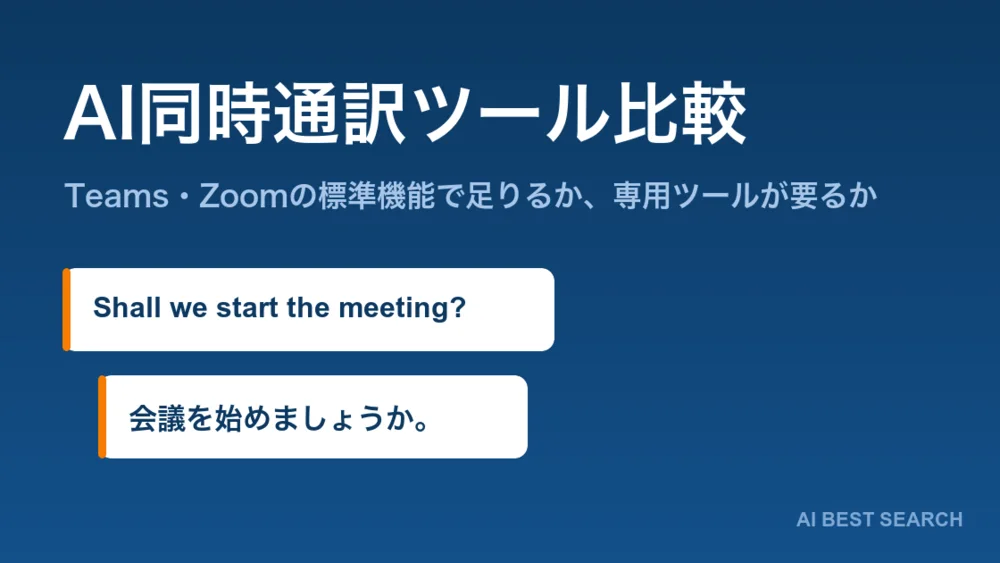
Search for "AI simultaneous interpretation tools" and you get lists of "25 best apps" that mix consumer travel apps with enterprise meeting tools. That is not what someone facing a recurring meeting with an overseas office actually needs to know.
Is the built-in feature in the Teams or Zoom subscription you already pay for enough? And if not, what exactly is missing? Since Microsoft Teams shipped its Interpreter agent in January 2026 and Google Meet made speech translation generally available in February, that question finally has a researchable answer.
This article first pins down what Teams, Zoom, and Google Meet can and cannot do on their own, then compares seven dedicated tools — four from Japan, three from overseas for the cases where the built-in feature falls short. Pricing, language coverage, and availability follow what each official site published as of 22 August 2026.
The short version
If you already have Teams with M365 Copilot, or a higher-tier Zoom plan, try the built-in feature first. Teams' Interpreter agent does speech-to-speech interpretation in 9 languages and Zoom's Translated Captions covers 35 languages, so you can start at no extra cost or around $5 a month.
If you cannot put a bot in the meeting, or you also need in-person conversations covered, look at Sentio (from ¥3,300/month) or kotoba (5 free hours a month). Both capture browser tab audio or microphone input directly, so nothing appears in the participant list and nothing is asked of the other side.
If you run multilingual events for hundreds of people, or have sessions where a mistranslation is expensive, consider Wordly (hour packages with every language included), Interprefy, or KUDO (human interpreters and AI on one contract). They also handle venue-monitor captions and per-session assignment of human versus AI.
If you are unsure, the least wasteful order is: try the built-in feature on one real meeting, write down what was missing, then choose a dedicated tool against that list.
First, decide whether the built-in feature is enough
All three major platforms shipped real-time translation in 2026. But availability and approach differ substantially between them.
| Microsoft Teams | Zoom | Google Meet | |
|---|---|---|---|
| Feature name | Interpreter agent | Translated Captions | Speech translation |
| Output | Speech to speech | Captions | Speech to speech |
| Languages | 9 (Chinese, English, French, German, Italian, Japanese, Korean, Portuguese, Spanish) | 35 | English ⇄ Spanish, French, German, Portuguese (Brazil), Italian — 5 languages |
| Availability | January 2026 (Teams calls) | Available now | Generally available for business in February 2026 |
| What you need | Microsoft 365 Copilot licence | Included in Business Plus, Premier, Enterprise Essentials, and Enterprise Plus; $5 per user per month as an add-on on other paid plans | An eligible Google Workspace plan |
| Notes | Voice simulation can generate interpreted audio in the speaker's own voice. Teams Rooms on Windows gets 20 hours per room per month with a Teams Rooms Pro licence | Attendees can choose their own speaking language inside the meeting | Gemini 3.5 Live Translate (70+ languages, 2,000+ pairs) entered private preview in June 2026; general availability and pricing are not yet confirmed |
Zoom AI Companion does not translate. It transcribes and summarizes meetings, but translated captions are a separate feature called Translated Captions. This is an easy place to assume "we pay for AI Companion, so translation must be included."
Four conditions where the built-in feature runs out
If any of these apply, the built-in feature will not meet your requirements. This is the fork where a dedicated tool starts to make sense.
01Your language is not on the list
Teams covers 9 languages and Google Meet 5, all routed through English. Vietnamese, Thai, and Indonesian — the languages manufacturing and construction firms actually need — are outside that range. Zoom's 35 languages are broader, but the output is captions only, never audio.
02You need in-person meetings covered too
All the built-in features only work inside a web meeting. A trade show booth, a visitor at reception, a discussion on site — none of these are in scope. That is the territory of dedicated tools that can capture microphone input directly.
03You need to distribute captions to attendees
Delivering captions in each attendee's own language to their own device at an event of tens or thousands of people — or putting captions on a venue monitor — is simply not what a web conferencing tool's built-in feature was designed for.
04The meeting tool varies by counterparty
When internal meetings run on Teams and clients use Zoom, the built-in feature works on some meetings and not others. If you want one consistent way of working across platforms, a dedicated tool is more even.
Seven AI interpretation tools compared
These are the options when the built-in feature is not enough — four Japanese, three international — lined up by how they capture audio, what they output, language coverage, and pricing. All figures follow the official sites as of 22 August 2026; Japanese prices include consumption tax.
| Tool | Vendor (country) | Audio capture | Output | Languages | Free tier | Pricing |
|---|---|---|---|---|---|---|
| Sentio | Pocketalk (Japan) | Browser tab audio / microphone (no bot joins) | Captions + read-aloud | 44 into 77 | 30 min/month | ¥3,300/month or ¥33,000/year |
| VoicePing | VoicePing (Japan) | PC audio / meeting bot / in-person / mobile | Captions + read-aloud + minutes | 45 (per the price list) | 90 min/month | From ¥3,163/month; events from ¥33,000/day |
| kotoba | Kotoba Technologies Japan (Japan) | Smartphone app | Captions + read-aloud | 21 input / 13 output | 5 hours/month | $99/month personal; ¥15,000/device/month business |
| DeepL Voice | DeepL SE (Germany) | A DeepL bot joins the meeting | Captions (speech-to-speech coming soon) | 40+ | Free trial | Undisclosed (quoted individually) |
| Wordly | Wordly (USA) | Platform integrations / direct AV feed | Captions + read-aloud + transcripts + summaries | Dozens of languages, 3,000+ pairs | — | Annual hour packages (from 10 hours) |
| Interprefy | Interprefy AG (Switzerland) | 80+ platforms / AV and broadcast | Captions + read-aloud + human interpreters | 6,000+ caption language combinations | — | Undisclosed (quoted individually) |
| KUDO | KUDO (USA) | Native Teams integration / widget / AV | Captions + read-aloud + human interpreters | 70+ AI; 200+ including human | — | Undisclosed (plans with no annual subscription) |
How to choose: four decision axes
Of everything in that table, these four decide whether a tool is viable at all, in order. Price can come last.
1. Can a bot join your meetings?
This is the first gate. Meeting translation tools split into two camps by how they capture audio.
Meeting bot approach
- The tool joins as a participant
- External sales calls require explaining it to the other side
- Your organization must permit external participants to join
- Recording and minutes are easier to automate
- Applies to: DeepL Voice, VoicePing (Meeting Bot), kotoba (Meeting Bot)
Device-side capture
- Nothing appears in the participant list
- Asks nothing of the other party
- Often needs no setting changes or IT approval
- Works for in-person meetings as-is
- Applies to: Sentio, VoicePing (PC audio), kotoba (app)
For organizations that block external guests, the bot approach makes a settings change a precondition for adoption. DeepL Voice's own help centre states that the organization must permit external participants for the bot to join. Settle this before comparing price or accuracy.
Note that VoicePing offers both, so you can use the bot internally and PC audio for external calls.
2. Captions only, or spoken output too?
Whether reading captions is workable depends on the meeting. In meetings driven by a deck, there is often no attention to spare for text on screen. Those need synthesized speech.
As of August 2026, watch out for DeepL Voice here. Speech-to-speech translation in for Online Meetings is still listed as "coming soon" on the official site; what ships today is captions only. If you need spoken output now, look elsewhere.
3. Do you need minutes kept?
Interpretation and minutes are separate problems, but solving both in one product has a direct cost impact.
- Kept: VoicePing (searchable across meeting logs), Wordly (transcripts and summaries), Interprefy (Media Hub)
- Deliberately not kept: DeepL Voice never stores transcripts or translations permanently and deletes them after the call. A security strength, but a constraint if you want an archive
If minutes are the real goal, pairing with an AI meeting-minutes tool such as Notta or Rimo Voice is also an option.
4. Match the pricing model to how you will use it
Choosing on pricing model rather than headline price is the more reliable approach.
| Model | Fits | Tools |
|---|---|---|
| Flat monthly | Predictable recurring use, such as a weekly meeting | Sentio, kotoba (business), VoicePing (Premium) |
| Metered by minutes | Meeting volume varies month to month | VoicePing (450 to 2,000 minutes) |
| Annual hour package | You can estimate total annual meeting hours | Wordly (10 to 500+ hours) |
| Day rate | One-off events | VoicePing event plan (from ¥33,000/day) |
| No annual commitment | Frequency unclear, or you want one trial run | KUDO (Marketplace, Pay As You Go), Sentio (¥3,300 one-off) |
| Quoted individually | Company-wide rollout, complex requirements | DeepL Voice, Interprefy, KUDO (Annual) |
The seven tools in detail
Here is each tool in turn. The order runs from the easiest to evaluate — that is, the ones that publish prices and can start small — to the rest.
 Sentio | Interprets your screen's audio and your own voice, without a bot in the meeting
Pocketalk Corporation, known for its handheld translator, offers this as its software-only AI simultaneous interpretation service. It runs entirely in the browser, with no app to install.
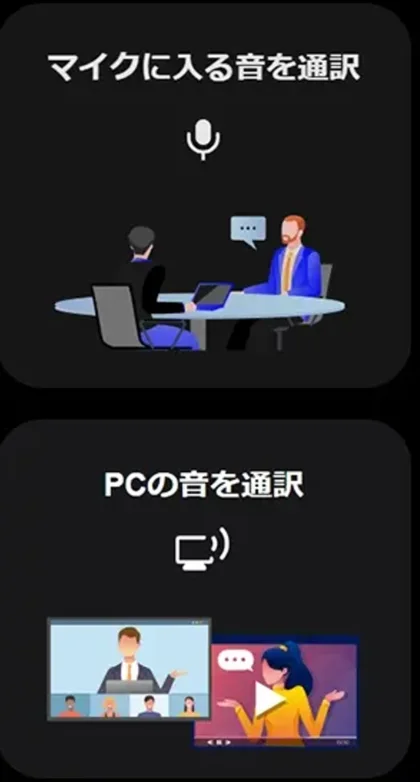
Its defining trait is how it captures audio. Two modes — "interpret microphone input" and "interpret PC audio" — mean no translation bot joins the meeting. Nothing appears in the participant list, so external sales calls need no explanation and organizations that block third-party tools from joining can still use it. In-person meetings are covered by the same tool.
It interprets speech in 44 languages into 77, and the output can be pushed to 50+ attendees by QR code or URL. Interpretation typically appears within 5 to 10 seconds.
 VoicePing | A Japanese platform that consolidates interpretation and minutes
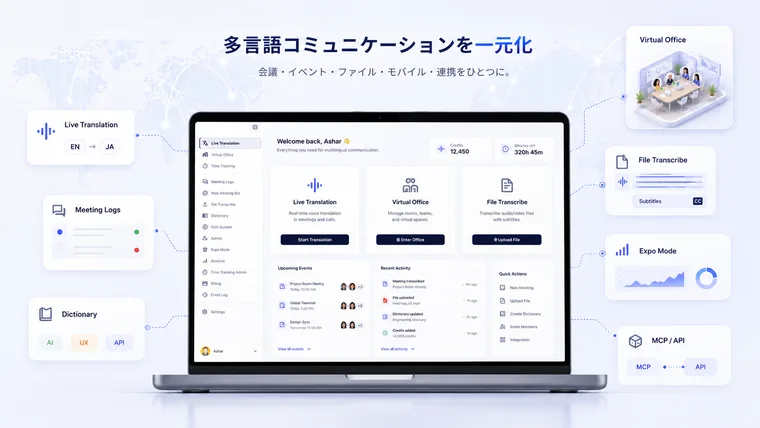
VoicePing Inc.'s multilingual communication platform provides real-time transcription and translation across web meetings, in-person meetings, trade shows, audio and video files, and a virtual office.
Of the seven tools here it is the only one with both the meeting-bot approach and PC audio capture — bot for internal meetings, PC audio for external calls.
Its other strength is Meeting Logs: each meeting leaves a recording, utterances by speaker, source alongside translation, an AI summary, and action items, all searchable across meetings. Reviewing works without a separate AI meeting-minutes contract. With "VoicePing 3.0" in July 2026 the company shipped in-house models, publishing an English-to-Japanese translation score of 87.2 and an average WER of 19.3% across five languages.
See the full VoicePing profile
 kotoba | Look-ahead interpretation that arrives before the speaker finishes
A Japanese AI simultaneous interpretation app from Kotoba Technologies Japan, Inc., running on a single iOS or Android phone.
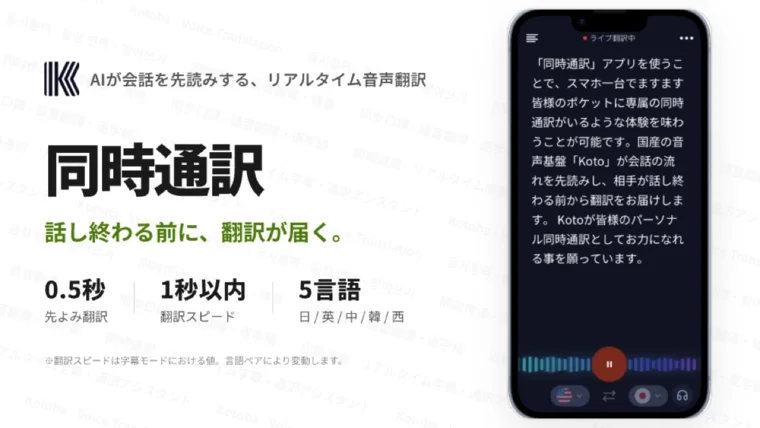
Its design centres not on accuracy but on when the translation appears. The in-house speech foundation model "Koto" predicts where the conversation is heading and puts the translation out before the speaker finishes. Look-ahead runs up to roughly 0.5 seconds, with at most about 1 second of latency from the start of an utterance.
The official site puts it plainly: the more the translation lags, the more you miss the moment to respond, and the more you lose control of the conversation. The claim is that broken timing hurts a sales meeting more than an imperfect word choice. Its free tier of 5 hours a month is the most generous of the seven, so you can judge how the latency feels on real material.
 DeepL Voice | Extends the DeepL you already run company-wide into meetings
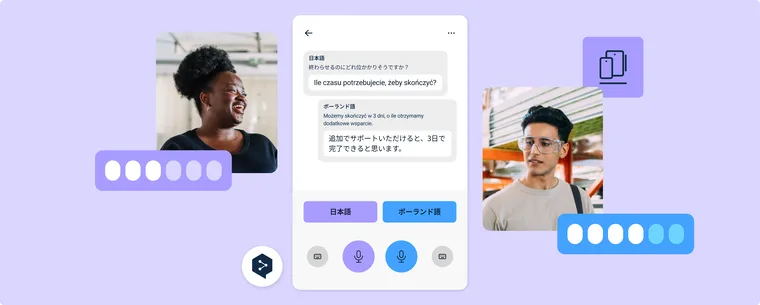
The real-time voice translation solution from DeepL SE, maker of the DeepL translator. It works with Microsoft Teams, Zoom Meetings, and Google Meet, and can show a different caption language per participant within one meeting. Caption targets are not limited to the languages supported for voice input — any language available in DeepL translation can be chosen.
The reason to pick it is clear: an organization already standardized on DeepL can extend the same translation quality and security baseline into its meetings. Transcripts and translations are never stored permanently and are deleted once the call ends.
Two things to confirm before adopting, though. A DeepL bot joins the meeting, so the organization must permit external participants. And speech-to-speech translation in for Online Meetings is still listed as "coming soon" as of August 2026 — what ships today is captions only.
See the full DeepL Voice profile
 Wordly | The event standard where adding languages does not change the price
An AI translation and captioning platform for meetings and events from Wordly, Inc. in the United States. It pioneered this market in 2019 and has been used by over 6 million people across 120 countries.
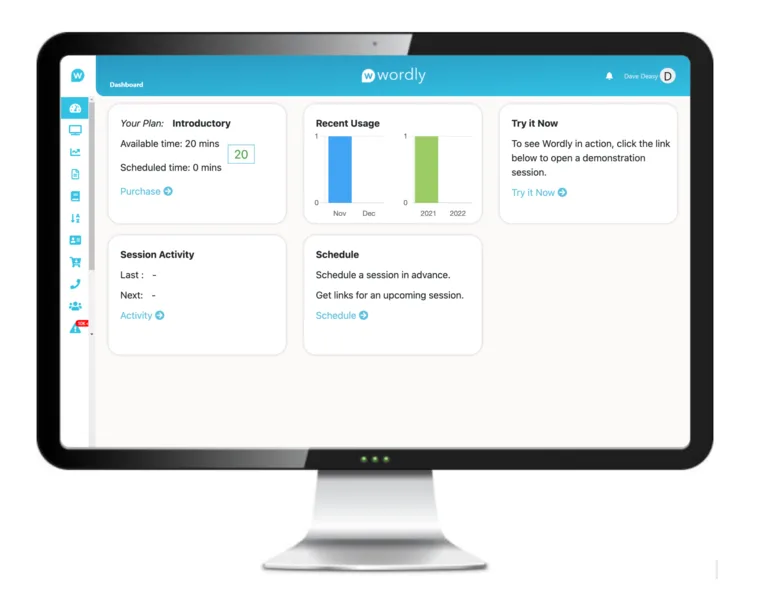
Because it starts from conferences of hundreds to thousands of people, its focus is the machinery of running an event: attendees reading captions on their own device, captions on venue monitors, audio fed straight from the sound mixer. Only the host needs an account; attendees download nothing, create no account, and share no personal information.
Its charging model is equally distinctive: translation, captions, transcripts, and summaries, plus every supported language, all in one price. Costs do not stack as languages multiply, so budgeting gets easier precisely when an event is most multilingual. Compliance with accessibility mandates such as VPAT, WCAG, and the EAA also matters for government and education buyers.
 Interprefy | Assigns human interpreters and AI session by session
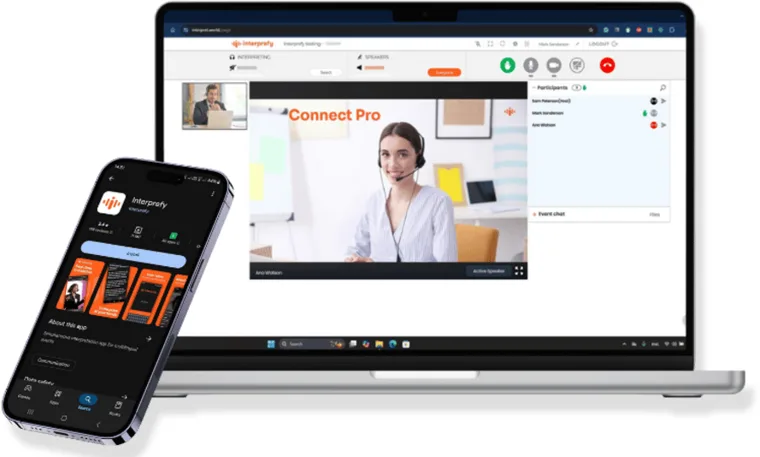
An enterprise multilingual communication platform from Interprefy AG of Switzerland. Where many AI interpretation tools promise to replace humans with AI, Interprefy holds professional interpreters and AI translation side by side, on one contract and one platform.
What makes that practical is that each session is assigned to human, AI, or hybrid before the event. Sessions with a regulator present go to human interpreters; parallel tracks and rare languages go to AI. During the event AI holds continuity if a feed drops, and humans backstop the AI on the riskiest sessions.
It brings over 6,000 professional interpreters (sign language included), captions across more than 6,000 language combinations, and integrations with over 80 meeting and event platforms. Built in Switzerland and hosted in Europe, with an explicit commitment never to train on customer data.
See the full Interprefy profile
 KUDO | Book interpreters on screen, with plans that need no annual contract
A live speech translation and captioning platform from KUDO, Inc. in the United States. It is structured in two tiers: AI speech translation covering over 70 languages around the clock, with a marketplace of more than 12,000 professional interpreters bookable on demand on top. Counting human interpreters, coverage reaches over 200 languages including sign languages.
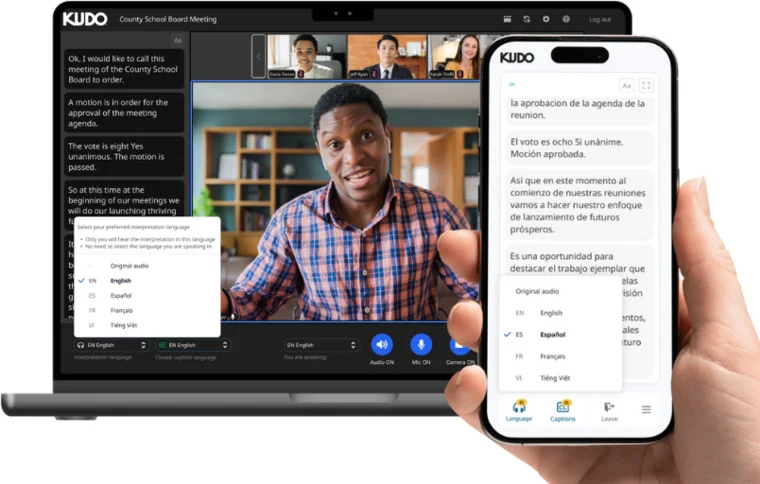
Its distinguishing trait is that arranging interpreters has been turned into a purchase experience. Choose a platform, the languages, and the interpreters, and the confirmation screen shows the language pairs and duration. What takes days through an agency is done on the spot.
For attendees, it is just picking a language in the browser. Each language in the list carries an icon marking AI translation or human interpretation, so mixing the two within one event confuses nobody.
By use case
01Recurring meetings with overseas offices (internal, web)
Try the built-in feature first. If the languages fall short, Sentio or VoicePing. If you also want minutes, VoicePing consolidates both.
02Sales calls with overseas customers (external, online or in person)
No-bot capture is the premise. Sentio (browser only) or kotoba (a single phone). If keeping the rhythm of a reply matters, kotoba's look-ahead keeps latency down.
03Trade shows and on-site conversations
The kotoba app, or VoicePing's Expo Mode. Decide on whether you need to hand attendees captions by QR code.
04Multilingual conferences for hundreds of people
Wordly (price does not move as languages multiply) or the VoicePing event plan (day rates are published). If venue-monitor captions or accessibility compliance are requirements, Wordly.
05Sessions where a mistranslation is expensive (IR, regulators, medical)
Interprefy or KUDO. Human interpreters and AI can be assigned per session and consolidated into one contract. If European data residency is a requirement, Interprefy.
06You have already rolled out DeepL company-wide
DeepL Voice. It extends the same translation quality and security baseline into meetings. Just confirm that a bot can join your meetings, and that spoken output is still forthcoming.
In closing
In 2026 AI simultaneous interpretation shifted from "is this worth trying" to "how much do we cover with the built-in feature, and where do we add a dedicated tool." Work the decision in this order.
- Try the built-in feature on one real meeting. Most organizations already have Teams, Zoom, or Google Meet available
- Write down what was missing — languages, in-person, caption distribution, or cross-platform consistency
- Settle the bot question first. It halves the candidate list
- Decide whether you need spoken output, and whether you need minutes
- Match the pricing model to how you will actually use it, last
The free tiers are 30 minutes a month for Sentio, 90 minutes for VoicePing, and 5 hours for kotoba. Each is enough to check accuracy and latency on real meetings, so one trial run will settle the question faster than reading another comparison article.
Information in this article is based on what each official site published as of 22 August 2026. Please check the official sites for current specifications and pricing.
AI tools featured in this article
Related articles
What Grok Bot Is [September 2026]: The AI Teammate That Came Down to $20 a Month — Pricing, What It Does, How to Start
Grok Bot launched on 11 August 2026, and the reason it suddenly got loud in September is not that the product changed — it is that the door came down from $200–300 upper tiers to Cursor Pro at $20 a month. This article walks through what Grok Bot actually does, following the official screens: it signs in to Salesforce, pulls 52 accounts, queues 36 drafts and holds them at "0 sent" waiting for approval, then saves the approved exchange as a routine. It covers the three routes in and eight plans, how Grok Bot differs from Manus, Devin and Genspark AI at the same $20 mark (what each one operates, and whether you hand over your accounts), and the three things to settle before handing anything over — which account it signs in with, how far it may act unattended, and the one shared cloud computer per user — all as published in September 2026.
![What Grok Bot Is [September 2026]: The AI Teammate That Came Down to $20 a Month — Pricing, What It Does, How to Start](/_next/image?url=%2Fimages%2Farticles%2Fgrok-bot-guide.png&w=3840&q=75 "What Grok Bot Is [September 2026]: The AI Teammate That Came Down to $20 a Month — Pricing, What It Does, How to Start")
Autonomous AI Agents Compared: 7 Picks for August 2026 — Grok Bot, Manus, Devin and How to Choose
You tried an AI agent and it ended at "wow, impressive" — because what it returned was an answer, not finished work. That changed in August 2026, when products that leave the work inside your actual tools arrived all at once. This article compares seven of them — Grok Bot, Hey Noah, Manus, Genspark AI, Devin, Kilo Code, and Cloudflare OS — along a single axis: where the output lands. It covers the unit of isolation, how much access you hand over, the three layers of cost, and where to start, all from primary sources.
[2026 Edition] 10 AI Tools to Accelerate Executive Decision-Making | Mid-Term Plans, Investment Analysis, Learning, and Presentation Decks
[Latest 2026] Speed up mid-term business plan drafting, investment decision reports, executive learning, and presentation creation. A deep dive into 9 AI tools that support leadership decision-making — covering features, benefits, selection criteria, and real-world adoption examples.
![[2026 Edition] 10 AI Tools to Accelerate Executive Decision-Making | Mid-Term Plans, Investment Analysis, Learning, and Presentation Decks](/_next/image?url=%2Fimages%2Farticles%2Fai-tools-for-executive-decision-making.png&w=3840&q=75 "[2026 Edition] 10 AI Tools to Accelerate Executive Decision-Making | Mid-Term Plans, Investment Analysis, Learning, and Presentation Decks")