Sentio
: How to use it, features, and the business problems it solves
Add bookmark
What is Sentio?
Sentio is an AI simultaneous interpretation service from Pocketalk Corporation. It runs in the browser alone and interprets both microphone input and browser tab audio without admitting a translation bot to the meeting. Speech in 44 languages becomes real-time subtitles and audio in 77, shareable with 50+ attendees by QR code or URL. The free trial covers 30 minutes a month; Premium is ¥3,300/month or ¥33,000/year (tax included).
Business problems it solves


About "Sentio"
What is Sentio
Sentio is an AI simultaneous interpretation service from Pocketalk Corporation. It runs entirely in the browser on a PC, tablet, or smartphone — no app installation required. It converts speech into subtitles and audio in another language on the spot, and the interpreted output can be distributed to attendees through a QR code or URL.
Pocketalk is best known for its handheld translator device; Sentio is the same company's software-only product, previously named "Pocketalk for Tour" and "Pocketalk Live Translation." It covers online meetings, but also in-person meetings, morning briefings, lectures, classes, and guided tours — any situation where the speaker and the listener do not share a language.
Where AI meeting-minutes tools summarize a meeting that has ended, Sentio exists to make the conversation itself work while it is happening. Both are used in meetings, but they solve different problems.
No bot in the meeting — it captures the screen's audio and your own voice
Most meeting translation tools admit a "translation bot" into the web conference as a participant in order to capture audio. In external sales calls that requires explaining the bot to the other side, and some companies prohibit third-party tools from joining at all.
Sentio instead picks up the audio of a browser tab or of the whole machine, so the tool never appears in the participant list. Nothing is asked of the other party. You choose "Entire screen" in the sharing dialog, turn on "Also share system audio," and start sharing — from then on, the audio coming out of that screen is what gets interpreted.
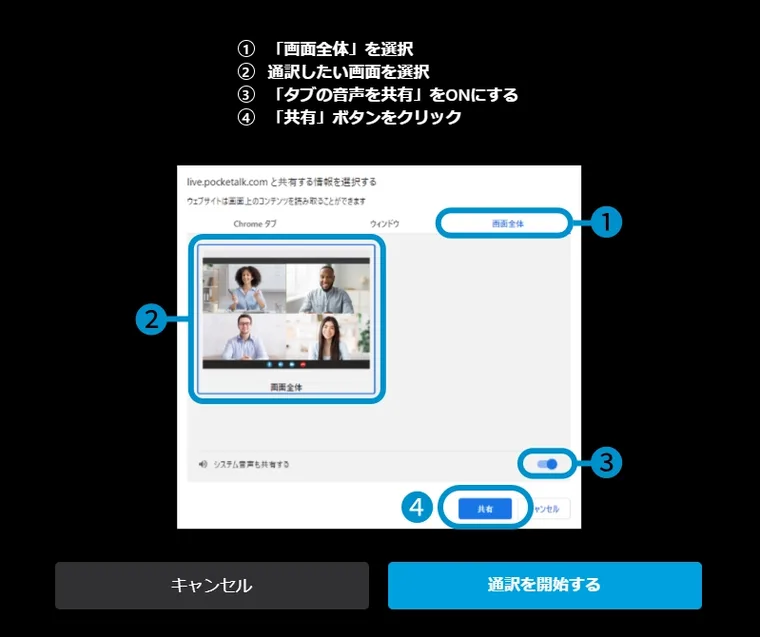
Source: Sentio user manual (subsequent screen images are from the same source)
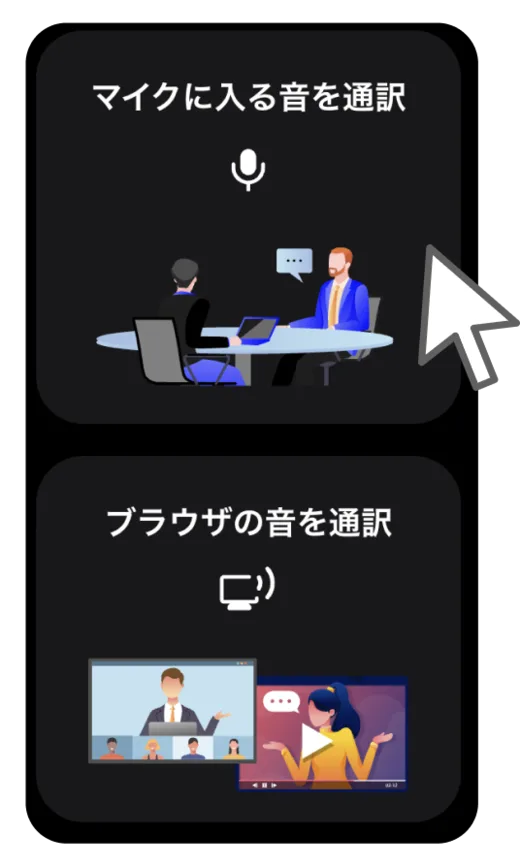
There are two audio sources to choose from. "Interpret microphone input" targets in-person meetings and your own speech, interpreting the conversation happening in front of you. "Interpret browser audio" targets sound arriving from the other side of the screen — web meetings, videos, online lectures.
Having both modes means a single tool also covers the in-person sales call and the on-site lecture, which web-conference-only tools cannot reach.
How to use it
-
Open Sentio in a browser
No installation. It works from browsers on Windows, macOS, Android, iOS/iPadOS, and ChromeOS (see the environment table below).
-
Choose where the audio comes from
Either "Interpret microphone input" (in-person, your own speech) or "Interpret browser audio" (web meetings, video). For the latter, switch on "Also share system audio" in the screen-sharing dialog.
-
Set the languages
Pick the speaker's language and the language used for display and read-aloud. Speech in 44 languages can be interpreted into 77.
-
Start interpreting
Audio is recognized and translated automatically and shown as subtitles, with read-aloud available. Interpretation typically appears within 5 to 10 seconds.
-
Share with attendees
Hand out the sharing QR code or URL and attendees read subtitles in their own language on their own devices — again in the browser, with no app to install.
Key features
01Interpret on the spot
Speech becomes subtitles and audio, whatever the meeting format.
- 44 languages into 77 — speech in 44 languages converted in real time into audio and text in 77
- Two capture modes — switch between microphone input (in-person, your own speech) and browser audio (web meetings, video)
- Read-aloud — translations can be heard as synthesized speech, not just read as subtitles
- Adjustable text size — from a projected venue screen down to a phone in the hand
02Distribute to attendees
The interpreted output reaches each listener in their own language.
- QR code and URL sharing — attendees just scan the code; no app installation
- Per-attendee language choice — in the same meeting, each attendee selects the language they read
- Sharing beyond 50 people — paid plans support audiences larger than 50 (customized under the Conference plan)
03Fit real operations
Details aimed at event operations and information handling.
- Auto-expiring share links — sharing QR codes and URLs are discarded automatically after at most 6 hours (the Conference plan can fix the URL instead)
- History — interpreted content can be reviewed afterwards
- Free rehearsal — the Conference plan includes rehearsals at no charge
Pricing
Plans are split four ways by use case and scale. All prices include Japanese consumption tax (as published on the official lineup page, checked 22 August 2026).
| Plan | Price | Monthly total usage | Continuous usage per session | Sharing audience |
|---|---|---|---|---|
| Free trial | ¥0 | 30 min | 30 min | 50 (internal use only) |
| Paid trial | ¥3,300 (one-off) | Unlimited for one month | 90 min | 50+ supported |
| Premium | ¥3,300/month or ¥33,000/year | Unlimited | Unlimited | 50+ supported |
| For School | ¥55,000/year | Unlimited | Unlimited | 50+ supported |
| Conference | Quoted by audience and duration | Customized | Customized | 50+ supported |
The official site states that the Premium plan is comfortable for most cases. For School can only be purchased by school staff. Events with more than 50 people, or those needing even longer continuous interpretation, fall under the Conference plan — and that plan alone allows the sharing URL to be fixed. Pocketalk also directs third-party event production companies to the Conference plan.
Depending on the plan, payment is accepted by card, convenience store, PayPay, or invoice.
What you can try for free
The free trial allows 30 minutes per month and 30 minutes of continuous use, sharing with up to 50 people for internal use only. Thirty minutes is roughly one short recurring meeting, which is enough to judge accuracy on real material. To try it for longer, the one-off ¥3,300 paid trial gives unlimited use for a single month.
Languages and system requirements
Speakers can be interpreted from 44 languages into 77. Alongside Japanese, English, Chinese, Korean, Spanish, German, French, Italian, Portuguese, and Russian, coverage extends widely across Asian languages including Vietnamese, Thai, Indonesian, Malay, Filipino (Tagalog), Tamil, Hindi, Bengali, and Mongolian.
Sentio is browser-based (as of 22 August 2026).
Deployments and reputation
The official site publishes case studies spanning companies, public bodies, educational institutions, and international conferences.
01Large-scale conferences
Events of several thousand people, with subtitles delivered to each attendee's own device.
- TCEA Convention & Exposition — held in San Antonio, Texas in February 2026, drawing over 5,500 attendees from around the world across more than 130 sessions. Pocketalk reports that attendees including non-native English speakers and people who are hard of hearing could access the same information simultaneously in the same space
- VimConf — the international conference for the Vim text editor, run on the Conference plan
02Companies and schools
Everyday business and classroom use for cross-language communication.
- Mizuho Securities Co., Ltd. — adopted as a global communication tool
- Osaka Science and Technology Center — used for international exchange
- Japan Computer System Distributors Association — used on a US study tour
On accuracy, the official VimConf case study notes the following.
"It cleanly recognized the different kinds of English spoken in Germany, the United States, India and Japan" — from the VimConf case study. The write-up highlights handling a wide range of accents from an international speaker lineup in an IT field dense with jargon, and coping appropriately with hesitations mid-speech.
How it differs from other AI interpretation tools
Even within "real-time meeting interpretation," products differ in how they capture audio and how they charge.
| Product | Audio capture | Pricing model | Strength |
|---|---|---|---|
| Sentio | Browser tab audio / microphone (no bot joins) | Flat rate (from ¥3,300/month) | Covers both in-person and online; subtitle delivery by QR code |
| VoicePing | Web conference integration / in-person | Metered plus flat rate | Leaves a meeting log with transcript and summary |
| kotoba | Smartphone app | Flat rate (5 free hours/month) | Low latency through up to 0.5-second look-ahead |
| DeepL Voice | Teams / Zoom / Google Meet integration | Custom quote | DeepL translation quality; consolidates with an existing DeepL contract |
If the goal is mainly to keep a record of the meeting, an AI meeting-minutes tool such as Notta or Rimo Voice fits better. If the goal is document translation, look at Mirai Translator or DeepL. Sentio is for the case where the meeting cannot proceed at all unless the conversation works.
Information on this page is based on what the official site published as of August 2026. Please check the official site for current specifications and pricing.