DeepL Voice
: How to use it, features, and the business problems it solves
Add bookmark
What is DeepL Voice?
DeepL Voice is the real-time voice translation solution from DeepL SE, the company behind the DeepL translator. It works with Microsoft Teams, Zoom Meetings, and Google Meet, showing captions in over 40 languages — a different language per participant within the same meeting. Speech-to-speech translation is coming soon. Transcripts and translations are never stored permanently and are deleted once the call ends. Pricing is undisclosed and quoted individually.
Business problems it solves


About "DeepL Voice"
What is DeepL Voice
DeepL Voice is the real-time voice translation solution from DeepL SE, the company behind the DeepL translator. Separate from the classic DeepL that translates documents and text, its purpose is to turn spoken words into captions as they are said.
It launched on 13 November 2024 in 13 languages including Japanese, expanded in July 2025 to 16 speech input languages and 35 caption languages, and reached over 40 languages in April 2026. Its distinct position among meeting translation tools is that an organization already standardized on DeepL can extend the same translation quality and the same security baseline to its meetings.
DeepL Voice is not one product
Three solutions ship under the DeepL Voice name. The first is the one used in meetings.
01DeepL Voice for Online Meetings
Real-time voice translation for web conferences — the focus of this page.
- Platforms — Microsoft Teams, Zoom Meetings, Google Meet
- Available now — real-time captions in over 40 languages
- Coming soon — speech-to-speech translation (as of August 2026 the official site still lists it as "coming soon")
02DeepL Voice for In-Person Conversations
For conversations with someone in the same room — a meeting room, a shop floor.
- Environments — iOS, Android, web
- Scope — one-to-one and group conversations
- Processing — supports on-device voice translation
03DeepL Voice API
For embedding voice translation into your own product or contact centre.
- Typical uses — multilingual customer service and sales handling
- Capability — voice translation and real-time interpretation delivered as an API
One meeting, a different caption language for each participant
DeepL Voice for Online Meetings translates multiple languages of audio within a single meeting. An utterance spoken in English appears simultaneously in German on the screen of a participant who chose German, and in Japanese for one who chose Japanese.
Captions carry the speaker's name, so in a meeting with several speakers you can still follow who said what. Each participant speaks and reads in their own language; nobody has to converge on English as a shared tongue.
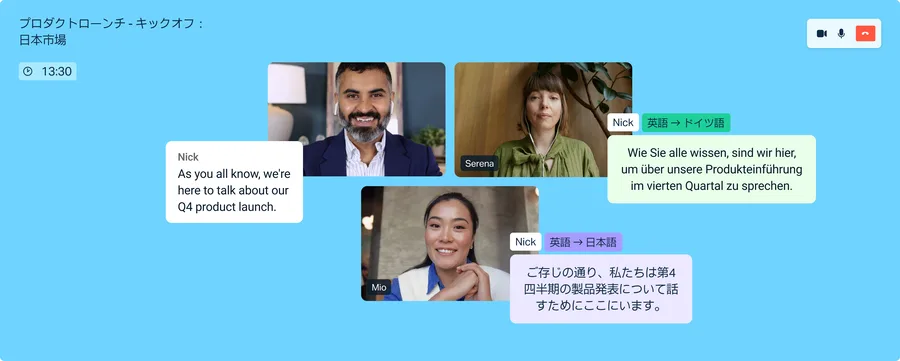
Source: DeepL blog, "Introducing DeepL Voice: real-time voice translation" (subsequent images are from the same source)
The caption target language is also not limited to the languages supported for speech input. The official FAQ explains that while only certain languages are supported for voice input, captions can be translated into any language available in DeepL translation. The listener's side of the matrix is wider than the speaker's.
A DeepL bot joins the meeting
The thing to check before you commit is how audio is captured. DeepL Voice for Online Meetings uses a DeepL bot that joins the meeting and receives the audio there.
The official help centre states that for the bot to join, the organization must permit external participants in meetings; on Microsoft Teams, chat with external and anonymous users also has to be enabled. For organizations that block external guests from joining, changing that setting is a precondition for adoption.
If you cannot put a bot in the meeting, look at tools that capture browser tab audio or microphone input directly — [Sentio](https://ai-best-search.com/products/sentio), or the PC audio translation mode in [VoicePing](https://ai-best-search.com/products/voiceping). When external sales calls are the main use case, this difference matters before either price or accuracy does.
How to use it
-
Ask about plans and scope
This is an enterprise solution and pricing is quoted individually. Start from the sales enquiry form or the free trial on the official site.
-
An administrator installs the app
An administrator adds the DeepL Voice app to Microsoft Teams, Zoom Meetings, or Google Meet, and confirms that external participants are permitted to join meetings.
-
Assign licences
Assign DeepL Voice for Meetings licences to the people who will use it.
-
Turn on captions in the meeting
Launching DeepL Voice during a meeting brings the DeepL bot in and starts real-time captions. Each participant picks their own display language.
-
Keep the transcript if you need it
Since the July 2025 update, the full meeting transcript and its translation can be downloaded.
Pricing
Pricing is not published. The official FAQ states that "our pricing takes into account translation volume, product type, and usage, and is adjusted to each customer's needs" — that is, quoted individually (as of 22 August 2026).
| Item | Detail (official wording as of 22 August 2026) |
|---|---|
| Pricing model | Undisclosed; quoted per customer by volume, product, and usage |
| Contract unit | Enterprise |
| Free trial | The official site offers a "Start free trial" path |
| Enquiries | Request a quote from the sales team |
Compared with Sentio, which starts at a flat rate, or VoicePing, which publishes a full price list, it is harder to get a sense of cost early in evaluation. On the other hand, an organization that has already rolled DeepL out company-wide will be quoted alongside its existing contract.
Language coverage
Real-time captions support over 40 languages, including Japanese, all 24 official EU languages, Vietnamese, Thai, Arabic, Norwegian, Hebrew, Bengali, and Tagalog. As noted above, the set of languages supported for voice input differs from the set available as caption targets.
Security and data handling
The official FAQ answers the question that matters most for enterprise use directly.
If you want to accumulate meeting logs and search them later, this "keep nothing" design becomes a constraint instead. When building an archive of minutes is the goal, consider a tool that retains meeting logs such as VoicePing, or pair DeepL Voice with an AI meeting-minutes tool.
Deployments and reputation
More than 200,000 companies use DeepL overall, and two customers are published as DeepL Voice case studies.
01Inetum
A leading European IT consultancy with 28,000 employees.
- How they use it — DeepL Voice combined with the API
- Outcome — faster knowledge sharing, and the ability to staff people by skill rather than by language ability, as published
02Aramark / Avendra International
A major food service and facilities management group and its procurement arm.
- Outcome — adopting DeepL Voice cut global meeting time by 50%, as published
For third-party assessment, DeepL publishes a comparison by the translation industry publication Slator, pitting DeepL Voice against Microsoft Teams, Google Meet, and Zoom: a translation quality score of 96.4 out of 100 (competing platforms scored 87–89), an error rate of 4% against a 17% average, and 96% of language experts placing DeepL Voice first in a blind test.
These figures come from a report DeepL publishes on its own site. The assessment was carried out by Slator, a third party, but DeepL is the one publishing it — read it with that in mind. Real-world accuracy will vary with the jargon used in your meetings and the accents of your speakers. Test it on your own material during the free trial.
How it differs from other AI interpretation tools
| Product | Audio capture | Spoken output | Pricing |
|---|---|---|---|
| DeepL Voice | A DeepL bot joins the meeting | Coming soon (captions available now) | Undisclosed, quoted individually |
| Sentio | Browser tab audio / microphone | Available | Flat rate (from ¥3,300/month) |
| VoicePing | Both PC audio and a meeting bot | Available | Metered plus flat rate |
| kotoba | Smartphone app | Available | Flat rate (5 free hours/month) |
| Wordly | Meeting and event platform integration | Available | Metered by time |
DeepL Voice suits organizations already standardized on DeepL that want one consistent translation quality and security baseline extended into meetings. It does not suit environments where a bot cannot join, evaluations that need a cost figure up front, or situations that need spoken output today. If document and web page translation is the real goal, see the page for DeepL itself.
Information on this page is based on what the official site published as of August 2026. Please check the official site for current specifications and pricing.