
Page Atlas
: How to use it, features, and the business problems it solves
Add bookmark
What is Page Atlas?
Page Atlas is a tool that brings together reviews, revision requests, and agreement-building for website production. Enter a site's top-page URL, and it automatically crawls multiple pages and captures each one in full; you can then write revision instructions directly on the images and exchange them with clients via share links. AI compares the client's instructions with the registered concept and meeting notes, and alerts you before saving if they may contradict earlier decisions. Supports Basic-auth and logged-in pages. Pricing is ¥2,200/month per company (tax incl.), or ¥19,800 for a set with a 273-page practical note and one year of use. A free demo with no registration is available. As of October 2026, applications are not open yet. Operated by Open Field Inc. (Japanese interface).
Business problems it solves

About "Page Atlas"
What is Page Atlas?
Availability: As of October 9, 2026, the sign-up buttons on the official site show "Applications are not open yet", so the paid plans cannot be purchased yet. However, a free demo that requires no registration is already available, and you can actually try capturing, writing revision instructions, sharing, and the AI check. Pricing has been published on the official site. Please check the official site for the latest status.
Page Atlas is a tool that brings together reviews, revision requests, and agreement-building for website production. Under the slogan "Review, revision, and consensus — all in one place," it is provided by Open Field Inc., a web production company based in Suginami, Tokyo. The service is in Japanese.
Just enter the URL of a site's top page, and it automatically crawls multiple pages of the site and captures each page in full, from top to bottom. You can then write revision instructions directly on the captured screens. Its distinguishing feature is that AI compares the client's revision instructions against the concept and meeting notes you registered in advance, and flags revisions that contradict earlier decisions before they are saved.
and captures them in full
Tool-only plan
1 year of use
No email or card required
Source: Page Atlas official site
Problems it solves
The official site starts from a familiar situation in web production: spending the whole day just on reviews.
- Opening, scrolling, capturing, and saving each page one by one, for every page of the site
- Descriptions like "around the middle of the top page" fail to convey the location, so you start over by confirming where the change is
- A design that seemed settled gets revised in a direction that contradicts what was agreed earlier
- What was meant as a small request turns into a discussion about cost and schedule over whether it is a fix or an addition
- Decisions are scattered across email, chat, and meeting notes, so just finding them takes effort
How to use
-
Create a project and capture the site from its top-page URL
Enter a URL, and it automatically crawls multiple pages of the site and captures each page in full. For pre-launch staging sites, set the Basic authentication credentials; for admin screens, configure the login. Image uploads are also supported.
-
Register the concept and meeting notes
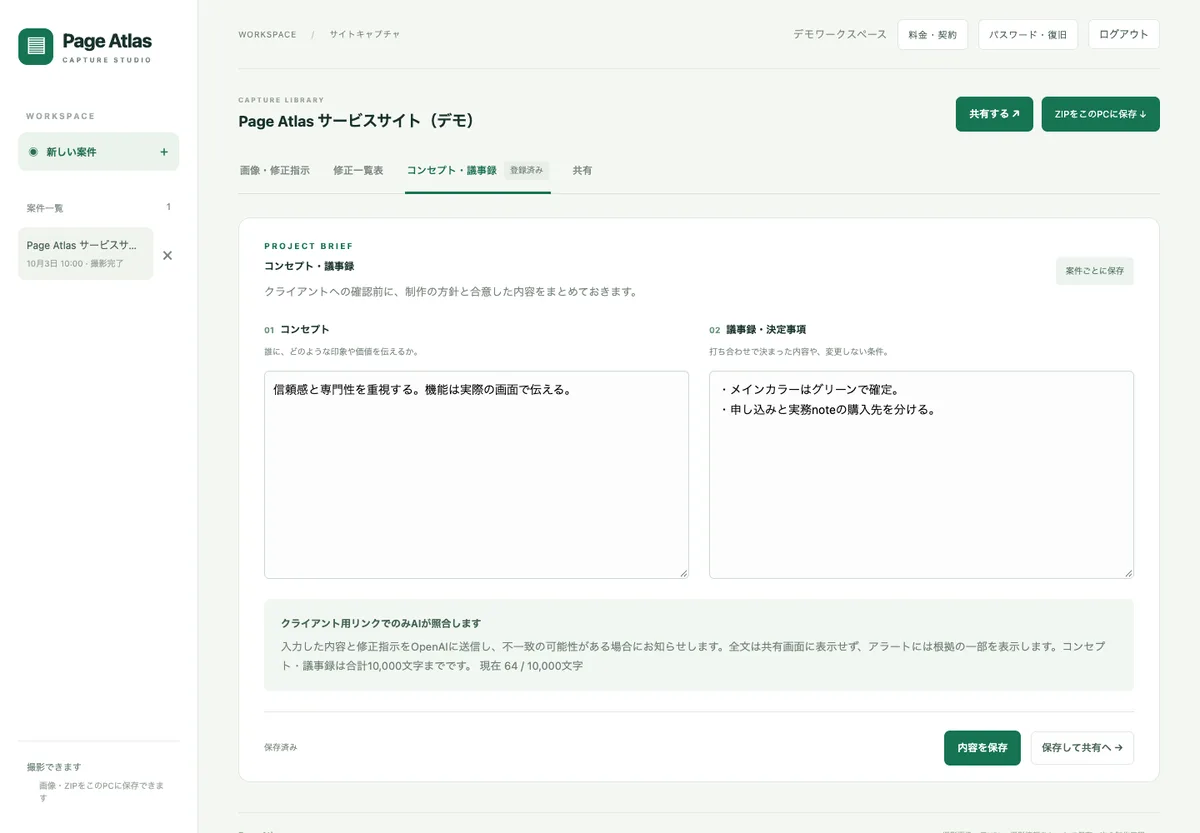
For each project, write down the concept ("what impression and value to convey, and to whom") and the meeting notes and decisions ("what was decided in meetings and conditions that will not change").
-
Write revision instructions on the screen
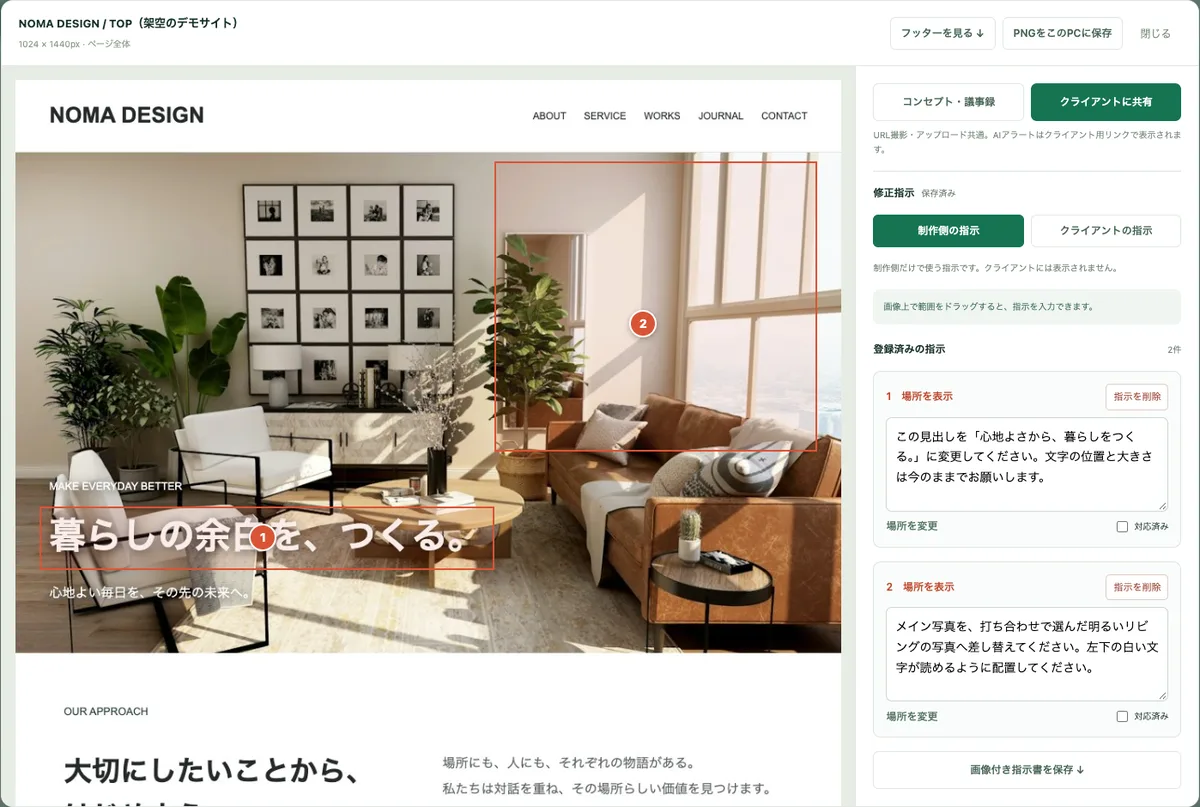
Drag to select an area on the capture and enter what you want changed. You can keep instructions for the production team separate from instructions shared with the client.
-
Send the share link to the client
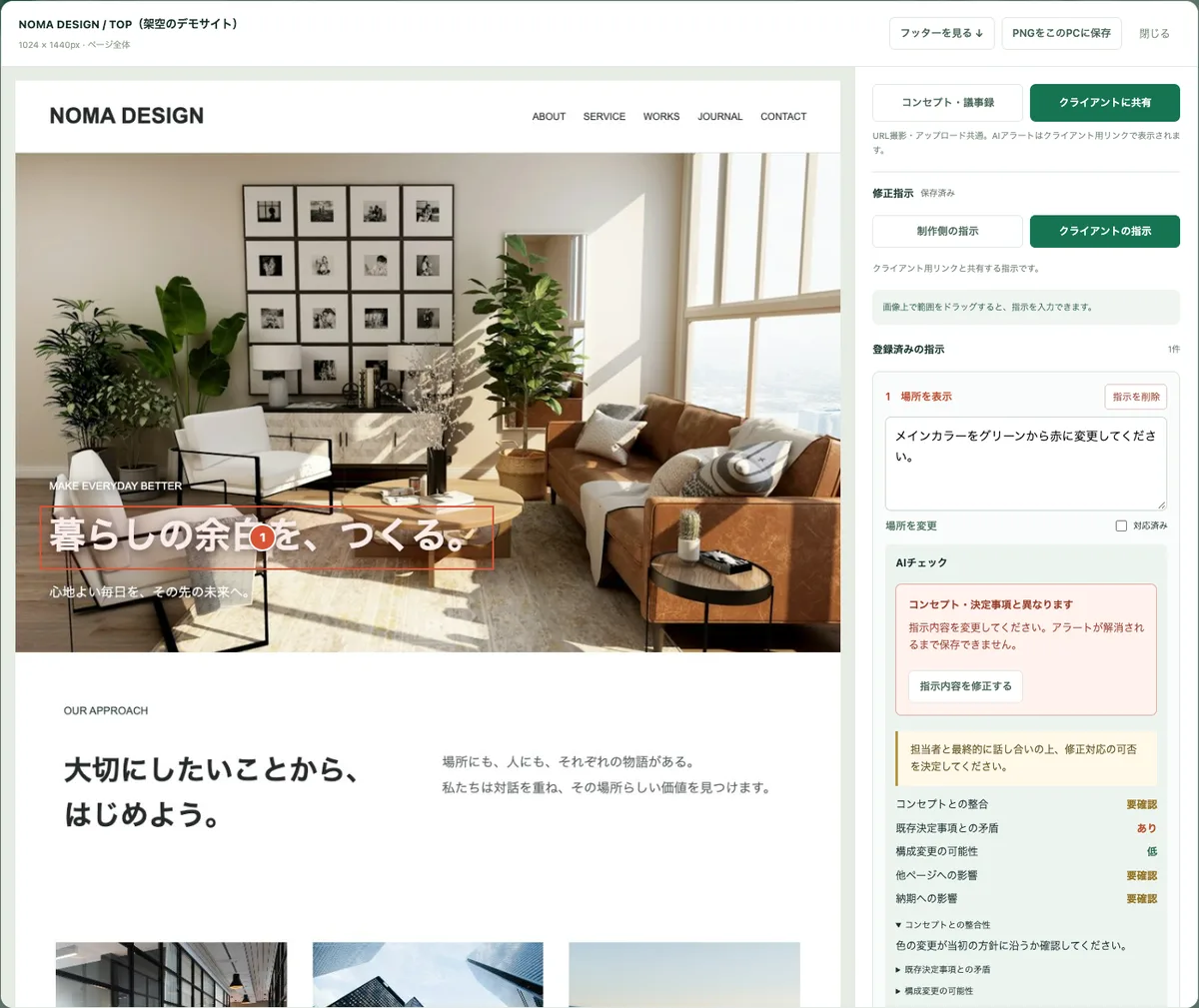
The client opens the same screen from the share link and can write revision instructions. If a client's instruction may contradict the registered decisions, the AI shows an alert.
-
Work through the revision list and export
Check off each instruction as "done" as you work. You can save a revision list, an instruction sheet with images, PNG images, or everything as a ZIP.
Features
01Capture the whole site at once
Capture multiple pages at once from an entry URL.
- Auto-crawl and batch capture — Crawls multiple pages of the site from the top-page URL and captures them. The official site gives sites of 10, 30, 50, 100, and 200 pages as examples
- Full-page capture — Captures not just the visible area but long pages all the way to the bottom
- Pre-launch and logged-in pages — Staging sites behind Basic authentication and logged-in pages such as admin screens can also be captured
- Overview at a glance — Captured pages are shown as a thumbnail list
02On-screen revision instructions and sharing
Convey "which page, where, and what to change" together with the screen.
- Area-based instructions — Select an area on the capture and write numbered instructions
- Separate production-side and client instructions — Instructions for the production team only are not shown to the client
- Share links — Only people who know the link can open the shared screen
- Export — Revision list, instruction sheet with images, PNG images, and batch download as a ZIP
03AI assist (checking against decisions)
Compares revision instructions with the registered concept and meeting notes.
- Contradiction detection and alerts — For example, if the meeting notes say "main color confirmed as green" and an instruction says "change it to red," the AI flags the possible contradiction, and the instruction cannot be saved until the alert is resolved
- Points to check — Shows results for "consistency with the concept," "conflict with existing decisions," "possibility of structural changes," "impact on other pages," and "impact on the schedule"
- Humans make the call — According to the official FAQ, the AI does not decide revisions automatically; it only points out discrepancies and possible additional work, and people make the final decision
- Checks run on the client link — AI checks and alerts appear on the client-facing shared screen. The concept and meeting notes can total up to 10,000 characters
Source: Page Atlas official site
Pricing
There are two options: a tool-only monthly plan, and a set with a 273-page practical note written by the company's representative (as shown on the official site in October 2026).
| Plan | Price (tax incl.) | Main contents |
|---|---|---|
| Free demo | ¥0 | No registration. 24 hours from start, up to 3 captures/image uploads in total (up to 30 pages per capture), and up to 10 AI checks |
| Page Atlas (tool only) | ¥2,200/month per company (¥26,400 for 12 months) | Auto-crawl and full-page capture of multiple pages, Basic auth and admin-screen support, on-screen revision instructions, meeting-note reference and AI assist |
| 273-page practical note set | ¥19,800 | 1 year of free Page Atlas use (from first login) + a 30-chapter, 273-page practical note (with PDF). Continuing from the second year is optional at ¥2,200/month, with no automatic billing |
- The monthly plan starts on the first payment date and renews automatically every month. You can cancel from "Pricing & Contract" after logging in, and keep using it until the end of the paid period (Terms of Service)
- The official site says the note set is ¥6,600 cheaper than using the tool alone for a year (¥26,400)
- As of October 9, 2026, applications are not open yet. Check the sign-up and payment screens for procedures and conditions once applications open
What you can do in the free demo
You can create your own trial space and use it without registering an email address or card. Sample projects are provided, and you can also try it with your own images or URLs.
How the tool and the practical note fit together
Page Atlas was built by Teppei Noguchi, the representative of Open Field, who has over 20 years of experience in web production and wrote the Japanese book "Ureru WEB Design Marketing no Hosoku" (The Marketing Rules of Web Design That Sells). The official site explains that both a tool and shared criteria are needed: "Even with records and reviews, accidents happen — unless everyone agrees on what counts as OK."
The practical note in the set is a 30-chapter, 273-page resource that organizes decision criteria based on production experience, such as "the difference between reviewing and approving" and "where to draw the line between a fix and an addition or change." It includes "7 questions to ask before production," "12 real cases," and an "accident prevention checklist." The intended use is to align decision criteria with the note and then use Page Atlas to connect actual screens, instructions, and past decisions in day-to-day work.
Reviews and reputation
As of October 2026, applications had not opened yet, so we could not find reviews from actual users. The official free demo requires no registration and lets you try the whole flow from capturing to the AI check for 24 hours, so if you are considering it, the surest approach is to first try it on a site similar to your own projects.
Pros and cons
Pros
- Captures multiple pages of a site in full from a single URL
- Works with staging sites behind Basic authentication and logged-in pages
- Revision instructions are tied to locations on the screen, reducing explanation effort and miscommunication
- AI flags instructions that contradict meeting notes and decisions before they are saved
- ¥2,200/month (tax incl.), priced per company
- The free demo requires no registration and includes the AI check
Cons
- As of October 2026, applications are not open yet, so you cannot start full use
- The AI check requires registering the concept and meeting notes in advance
- AI checks send instructions and meeting notes to OpenAI, so care is needed with confidential information
- As it has not launched yet, there are no user reviews or track record
- The interface is in Japanese
How it differs from other tools
Page Atlas is not a tool for "building" websites; it handles the review and revision exchanges for sites you have built. To build the site itself, candidates include the Japanese no-code platform Studio, Readdy, which generates sites from text, and Stitch, which generates UI designs. For meeting notes, you can use AI note-taking tools such as Notta or tl;dv, then register the decisions in Page Atlas's concept and meeting notes fields to use them for checking revision instructions.
| Aspect | Page Atlas | Typical screenshots + chat/email exchanges |
|---|---|---|
| Capturing | Auto-crawls multiple pages from a URL and captures them in full | Open and capture each page one by one |
| Pointing out changes | Numbered instructions on areas of the capture | Describe locations in text or annotate images by hand |
| Checking past decisions | AI compares with registered meeting notes and alerts before saving | People search the meeting notes and check |
| Organizing instructions | Export as a revision list, instruction sheet with images, or ZIP | Scattered across email and chat |
FAQ
The information on this page is based on what was published on the official site, the free demo, and the Terms of Service as of October 2026. Please check the official site for the latest specifications, pricing, and availability.