Notion
: How to use it, features, and the business problems it solves
Add bookmark
What is Notion?
An all-in-one AI workspace that combines docs, wikis, projects, and databases with deeply integrated AI — including Q&A across your workspace and connected apps, AI meeting notes, autonomous agents, and autofill. Its AI uses models from Anthropic, OpenAI, and others.
Business problems it solves






About "Notion"
What is Notion
Notion is an "all-in-one AI workspace" that combines docs, wikis, projects, and databases with deeply integrated AI. Under the banner "Where teams and agents think together," it offers everything from writing and AI chat across your workspace to meeting transcription and autonomous agents. It is operated by Notion Labs, Inc. (USA).
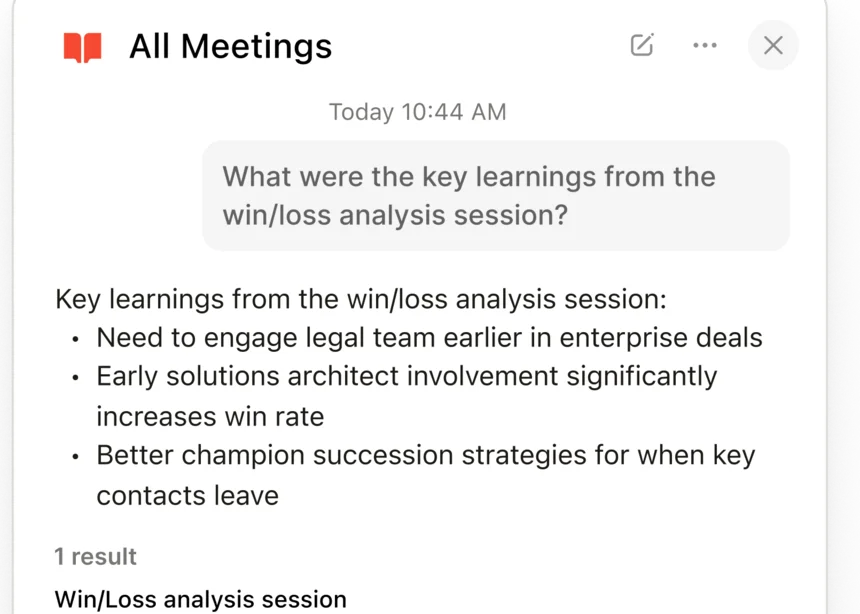
At its core, Notion has AI answer and work across your documents, databases, and even connected external apps. Beyond generating, summarizing, and translating text, autofilling databases, and creating meeting notes, you can also use "agents" that run autonomously on schedules and triggers.
"Notion AI," once a separate add-on, is now bundled into the paid plans. Free and Plus offer trial-level AI, Business lets you use Notion AI fully, and Enterprise adds zero data retention. Autonomous Custom Agents consume "Notion credits" on top of your plan. The AI uses models from Anthropic, OpenAI, and others (specific version names are not disclosed).
How to use
Build a workspace, and use AI in your documents and databases.
Build a workspace
Organize information with docs, wikis, projects, and DBs.
Let AI help
Generate, summarize, translate, autofill DBs, and Q&A with AI.
Search across
AI answers across connected apps like Slack and Google Drive.
Automate with agents
Have agents run tasks autonomously on schedules/triggers.
Even the free plan includes core features and trial-level AI. To use AI fully, you need Business or higher (Free and Plus are trial-level).
Key features
01Notion AI (creation & Q&A)
Supports text generation, summarizing, and translation, AI Blocks, and Q&A (chat) across your workspace. It also includes Autofill, which auto-populates database properties with AI, Research Mode for detailed reports, and a model picker to switch models.
02AI meeting notes & enterprise search
AI Meeting Notes transcribes meetings in real time and auto-generates summaries and action items (19 languages including Japanese; SOC 2 Type 2). Enterprise Search (Beta) answers across your workspace plus connected apps like Slack, Google Drive, and GitHub.
03Agents + the foundation
Notion Agent automates multi-step tasks using workspace context, and Custom Agents run autonomously on schedules/triggers. The foundation remains the classic docs, wikis, projects, databases, and calendar.
Pricing
You can start for free; the figures below are per member, per month. The scope of AI differs by plan.
| Plan | Monthly (per person) | AI scope | Main content |
|---|---|---|---|
| Free | ¥0 | Trial-level | Personal use, core features |
| Plus | ¥1,650 | Trial-level | Small teams, unlimited blocks |
| Business | ¥3,150 | Full Notion AI | AI meeting notes, enterprise search, SAML SSO |
| Enterprise | By inquiry | Full + zero data retention | Audit logs, advanced admin |
The separate "Notion AI" add-on was discontinued, and AI is now built into each plan. AI on Free and Plus is trial-level (Free has a lifetime credit cap), and it can be used fully on Business and up. Autonomous Custom Agents consume "Notion credits" on top of your plan ($10 per 1,000 credits). Prices are subject to change; check the official site for the latest (as of August 2026).
How it differs from other workspaces
Notion stands out as an AI workspace that unifies Q&A, meeting notes, autonomous agents, and cross-app search on top of a foundation of docs and databases. Its scope differs from tools centered on app generation or single-purpose document tools.
| Aspect | Notion | Taskade | Traditional docs/wiki |
|---|---|---|---|
| Focus | Docs/DB + AI | App generation + agents | Documents, wiki |
| AI | Q&A, meeting notes, search, agents | 15+ models, agents | Limited |
| Use | Organizing info, knowledge, collaboration | In-house apps & automation | Writing/sharing docs |
Taskade, which also leads with AI, and traditional doc/wiki tools make good points of comparison. If you want to cover everything from Q&A to meeting notes and automation with AI, on top of organizing and sharing information, Notion is a strong option.
The information on this page is based on the official site as of August 2026. Please check the official site for the latest specifications and pricing.