Readdy
: How to use it, features, and the business problems it solves
Add bookmark
What is Readdy?
Readdy is an AI website builder: describe the site you want and it generates the design and the code together. You can also start from a template, a screenshot, or a reference URL, then edit it in a no-code editor and publish on your own domain. The official site is available in Japanese. The free plan covers 250 credits a month and 2 projects; paid starts at $25/month for Starter ($15/month equivalent on an annual plan). It also includes GEO optimization to help you get cited in AI search, Credit Care that refunds spent credits when a generation misses, form-based lead capture, and an AI receptionist. More than 120,000 people use it worldwide (as of August 2026).
Business problems it solves



About "Readdy"
What is Readdy
Readdy is an AI website builder that generates, edits, and publishes websites from text instructions. The name plays on "ready," and it is read as "Reddy."
You can start a site from four different entry points: write a description, pick a template, hand it a screenshot, or hand it the URL of a site you want to reference. After generation, you edit in a no-code visual editor and can connect a custom domain to publish directly.
The marketing site, feature pages, and pricing are all available in Japanese (readdy.ai/ja/), with a language switcher in the header. You can use any language in the content of the sites you build.
Four entry points
- Write a description
- Pick a template
- Hand over a screenshot
- Hand over a reference URL
AI generates
Page structure, design, and body copy are produced together
Fix it in prose
Target elements with Selector Mode and instruct in writing; roll back with Version History
Publish and attract
Custom domain and SEO, plus GEO Optimization for AI search
Writing code never appears anywhere in this flow. Code export is available only on Agency Pro and above.
You can also build from a screenshot or a reference URL
Most AI website builders assume you will "describe what you want to make" in prose, but in practice putting it into words is often the hard part. More often you have a rough image on hand, or a site you want to model.
Alongside descriptions and templates, Readdy accepts screenshots and reference URLs as input. When the image comes first, you can start by handing that over directly.
In the example on the right, a single sentence — "Design a website for my restaurant" — produces a complete landing page for a food delivery service.
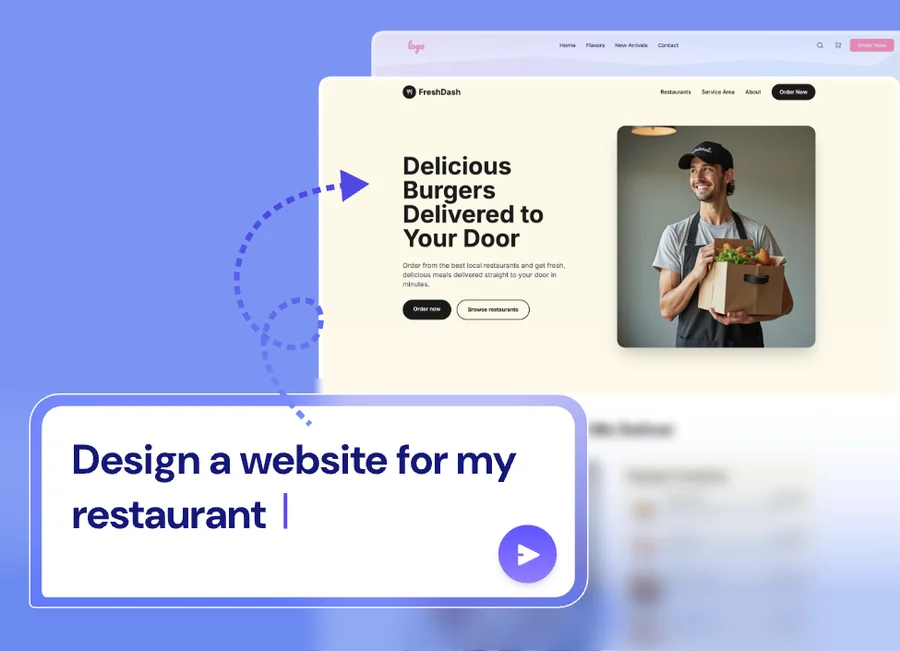
Source: Readdy official site (the screen below is from the same source)
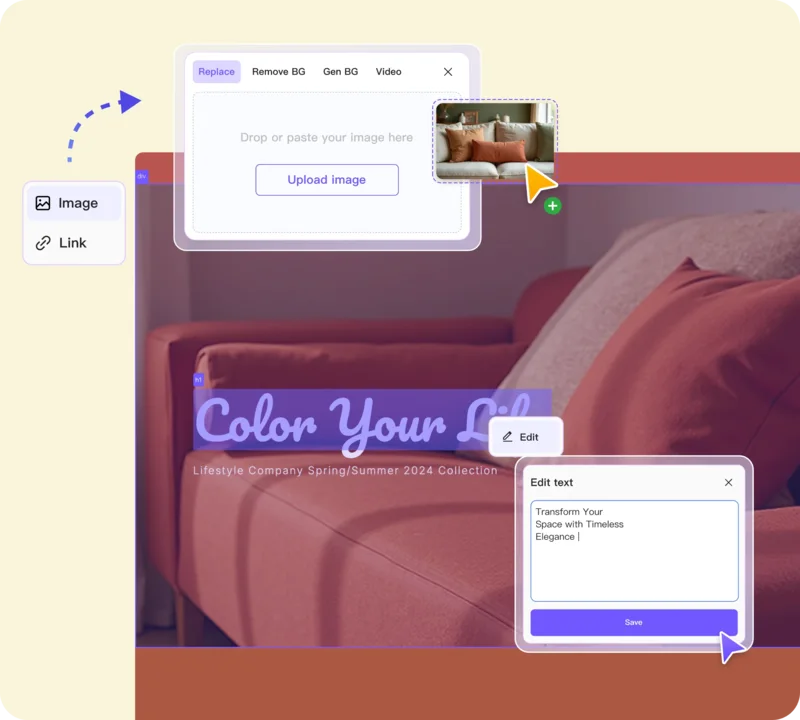
Editing is also done in natural language. Selector Mode lets you point at the element you want to change and describe the change in prose. Version History lets you roll back, so you can recover if stacked instructions break the layout.
The screen on the right shows an image element selected, opening a panel with Replace / Remove BG / Gen BG / Video, alongside a panel for rewriting the headline directly. Image processing is completed inside the editor — that is the design of this tool.
It has features aimed at being found through AI search
This is where Readdy clearly differs from other no-code tools. On top of conventional SEO features (metadata editing, site structure adjustments), it offers GEO Optimization and AI Readable Sites.
GEO (Generative Engine Optimization) is the idea of building a site in a structure that is likely to be cited by generative AI and AI search such as ChatGPT and Perplexity. Because it is evaluated differently from conventional search engine optimization, it requires dedicated handling.
Conventional SEO only
- Assumes appearing in search results
- Citation in AI search is not accounted for
- Unstructured descriptions tend to remain
Readdy (GEO Optimization / AI Readable Sites)
- Accounts for both search engines and AI search
- Generates sites in structures AI can read
- Metadata and site structure remain editable
That said, what Readdy covers ends at building the site in a citable form — it has no feature for measuring which AI actually cited you after launch. To check whether your brand comes up in ChatGPT or Gemini answers, and how you compare with competitors, you need a separate measurement tool. In Japan there is Mieruca GEO (LLM monitoring, from 49,800 yen/month) and, if you run it alongside SEO article production, BringRitera; a full list including non-Japanese products is in our comparison of LLMO and GEO tools.
For inbound inquiries, AI Receptionist (formerly Readdy Agent) handles visitors via chat or voice and captures leads. It is not available on the free plan and is included from Starter upward.
How to use
-
Create an account
Create a free account on the official site. You can try up to two projects while staying on the free plan.
-
Choose your starting point
Begin by writing a description, choosing a template, handing over a screenshot, or handing over a reference URL. There are more than 500 templates.
-
Edit in natural language
Adjust the generated site with written instructions. Using Selector Mode to target an element first keeps changes confined to the part you intended.
-
Structure pages and content
Build out your page and section structure, then generate and refine the body content.
-
Configure SEO and GEO
Edit meta title, description, and site structure, and apply GEO Optimization for AI search.
-
Connect a custom domain and publish
Paid plans include one custom domain free for a year. The free plan publishes on a subdomain.
-
Run it with forms, analytics, and integrations
Add forms, analytics, and third-party integrations to put the site into operation.
Features
01Build
Features that handle getting a site off the ground.
- AI Website Builder — Generates a site from a description, template, screenshot, or reference URL
- Template library — 500+ templates by industry and use case
02Refine
Features for adjusting after generation without writing code.
- Selector Mode — Target an element, then instruct in natural language
- Version History — Roll back to an earlier state
- No-code editor — Visual editing interface
03Get found
Features for attracting traffic after publishing. This is Readdy's differentiator.
- GEO Optimization — Optimization aimed at being cited by generative AI and AI search
- AI Readable Sites — Structures sites so AI can read them (1 site on the free plan)
- SEO tools — Metadata editing and site structure adjustment
04Operate
Features for connecting a published site to the business.
- AI Receptionist — Handles visitors by chat or voice and captures leads (Starter and above)
- Custom domain — One free for a year on paid plans
- Forms, analytics, and integrations
- Code export — Available on Agency Pro and above
Pricing
Pricing is credit-based. Choosing an annual plan discounts the monthly equivalent by roughly 40%. The "annual" column below shows the monthly equivalent on a one-year plan.
| Plan | Monthly | Annual (per month) | Credits | Projects | Code export |
|---|---|---|---|---|---|
| Free | $0 | — | 250 / month | 2 | No |
| Starter | $25 | $15 | 30,000 / year | 10 | No |
| Pro | $40 | $24 | 72,000 / year | 50 | No |
| Agency | $120 | $72 | 216,000 / year | 150 | No |
| Agency Pro | $199 | $119 | Unlimited | 250 | Yes |
| Ultimate | $1,299 | $779 | Unlimited | Unlimited | Yes |
A custom domain is free for one year on all paid plans, and AI Receptionist is included from Starter upward.
Code export requires Agency Pro or above. If you want to take the generated site's HTML off the platform, Starter and Pro do not support it. When export is a requirement, this single point drives the plan choice.
Amounts are based on the official pricing page (USD) as of August 2026. Pricing is subject to change, so please confirm on the official site before purchasing.
Reception and traction
The figures the company publishes, plus the named user reviews on its own site (all as of August 2026).
worldwide
regions
engineering team
(service launch)
What the reviews have in common is the same claim: a non-engineer gets something usable on the first try.
01Speed, and how complete the first output is
- Taishi (former Silicon Valley CTO, indie developer) — "Best one-shot quality for website building I've used. It generates a landing page complete with images in a single pass."
- Shana (creator, investing) — "A professional-grade site in minutes. Typing out 'I want a site like this' and getting layout, design, and code back was genuinely startling."
02Used alongside other AI tools
- Suguru (AI advisor) — "bolt and v0 are good too, but for a non-engineer doing web design with AI, Readdy is the one I'd recommend. It hands you the code as well, so Readdy for the design mock then Windsurf or Cursor for development works."
What is not published. Named paying customers, retention, and support arrangements are not disclosed. The reviews above are published by the vendor on its own site, not independent evaluations, and should be read with that in mind. Before committing, the surest check is the free plan (250 credits a month, 2 projects).
FAQ
Q. How is Readdy pronounced?
"Reddy." The name plays on the English word "ready."
Q. Does it support Japanese?
Yes. The official site has a Japanese edition (readdy.ai/ja/) covering the home page, feature pages, and pricing, selectable from the language switcher in the header. You can also use Japanese in the content of the sites you build.
Whether the post-login editor itself is localized cannot be confirmed from public sources. A localized marketing site and a localized editing interface are two different things. If the language of the editor is a requirement for you, check it on the free plan before committing.
Q. Can I cancel or get a refund?
Cancellation steps and refund terms are not stated on the official pricing page (as of August 2026). There is, however, a mechanism called Credit Care that refunds the credits you spent when you are not satisfied with an AI generation — 50 times a month on Pro, 150 on Agency, and 300 on Agency Pro. Note that it returns credits, not money.
Q. How far can I go on the free plan?
250 credits per month and up to 2 projects. However, you cannot connect a custom domain — publishing is on a subdomain.
Q. Can I take the code out?
Code export is available on Agency Pro ($199/month, or $119/month on an annual plan) and above. Starter and Pro do not support it.
Q. What are credits?
A unit measuring how much AI generation and editing you run. The free plan grants 250 monthly; paid plans grant an annual total (30,000/year on Starter, for example).
How it differs from other AI website builders
This category divides by how much is automated and where you can intervene. Readdy leans toward completing generation, hosting, publishing, and acquisition in one place, and does not assume you will touch code.
| Aspect | Readdy | AI UI generators | Conventional no-code CMS |
|---|---|---|---|
| Input | Description / template / screenshot / reference URL | Mostly prompts | Template selection plus manual work |
| Main output | A complete publishable site | Components and code | A site |
| Editing | Natural language plus visual editing | Editing code directly | Visual editing |
| Hosting | Included | Needed separately | Included |
| AI search support | GEO Optimization / AI Readable Sites | None | None |
| Code export | Agency Pro and above | Assumed available | Varies by product |
| Japanese site | Yes (official site, incl. pricing) | Varies by product | Varies by product |
If you want to start from code, v0 is closer. If you want a product built in Japan with Japanese support end to end, STUDIO AI is a candidate. If you are building on WordPress, 10Web is the comparison point.
Information on this page is based on what was published on the official site as of August 2026. Please check the official site for the latest specifications and pricing.