Papago
: How to use it, features, and the business problems it solves
Add bookmark
What is Papago?
An AI translation service from NAVER Corp. of South Korea. It translates text, images (camera), voice, conversations, handwriting, documents (PDF and Office) and websites, works offline, and the app handles 14 languages including Japanese, Korean, English and Chinese. The web version (papago.naver.com) and the apps are free. The paid Papago Plus does not store translation data and starts at $9.99/month (Basic).
Business problems it solves

About "Papago"
What is Papago?
Papago is an AI translation service from NAVER Corp. of South Korea. Beyond typing in text, it translates signs and menus you photograph with the camera (image translation), spoken words (voice translation), back-and-forth talk with another person (conversation translation), characters you draw with a finger (handwriting translation) and PDF or Office files (document translation), all in one app. There is a web version (papago.naver.com) and apps for iPhone and Android, and both are free.
The App Store description explains that "Papago" means "parrot" in Esperanto. The app supports 14 languages: Korean, English, Japanese, Chinese (Simplified/Traditional), Spanish, French, Vietnamese, Thai, Indonesian, Russian, German, Italian and Arabic (according to the App Store description). In Japan it is widely used as a Korean translation app.
Separate from the free Papago, there is a paid version for work called "Papago Plus" (papago-plus.com). Text translation becomes unlimited, the number of file and image translations goes up, translation content is not stored on the server, and teams can share glossaries. For developers, a translation API is offered through NAVER Cloud Platform.
Papago is also on the mobile list of the 6th edition of "Top 100 Gen AI Consumer Apps," published in March 2026 by the US investment firm a16z.
15K ratings
Reference
(App Store description)
(no in-app purchases)
Store figures are from the App Store (Japan) listing (checked October 21, 2026). Rankings change daily.
How to use
- Open the web version or install the app On a computer, open papago.naver.com in a browser and you can start translating text without signing up. On a smartphone, install "Papago" from the App Store (iOS 17.0 or later) or Google Play. The interface is available in Japanese.
- Choose how to translate In the web version, pick a tab at the top: Text, Image, File, Voice or Website. In the app, start from buttons such as Voice, Conversation, Image and Document.
- Choose the languages and translate Select the source and target languages, then type text, take a photo, speak, or load a file. The web version accepts up to 3,000 characters per text translation (as shown in the input box).
- Register frequent terms in a glossary Proper nouns or in-house expressions that should always be translated the same way can be registered in a glossary and applied to translations. The free version allows 1 glossary with up to 10 terms; Papago Plus allows up to 10,000 terms.
- Switch to Papago Plus for larger volumes If you run out of image or file translations, consider a paid Papago Plus plan. Basic and Standard start with a one-month free trial for first-time users.
Features
01Translation for every kind of input
These are listed as the "main features" in the App Store description.
- Text translation — translates the text you enter in real time
- Image translation — take a photo and press a button; it recognizes the text in the image and translates it
- Voice translation — translates what you say in real time
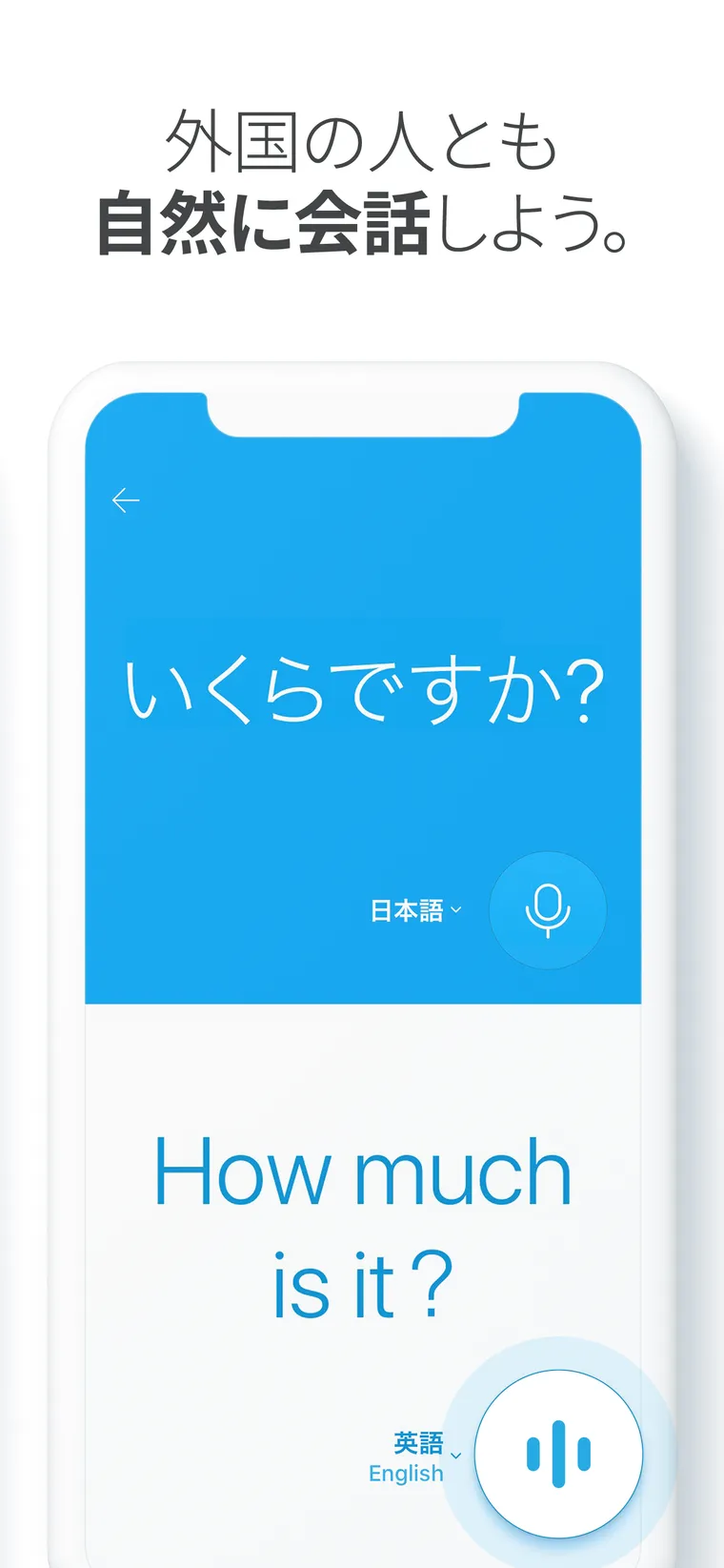
- Conversation translation — talk one-on-one with someone from another country, each speaking your own language
- Handwriting translation — looks up and translates characters you write with a finger
- Website translation — enter the URL of an overseas site to translate the whole page
Image translation is designed for photographing restaurant menus or street signs in Korea and checking what they mean on the spot. According to the App Store update history, the daily limit on image translations rose from 50 to 100 in May 2026, and in July the app began showing an AI Briefing (an AI explanation) when it recognizes a product. Note that the pricing page lists image translation in the app and Chrome for the free version as 300 per month; the official site does not explain how these two limits relate.
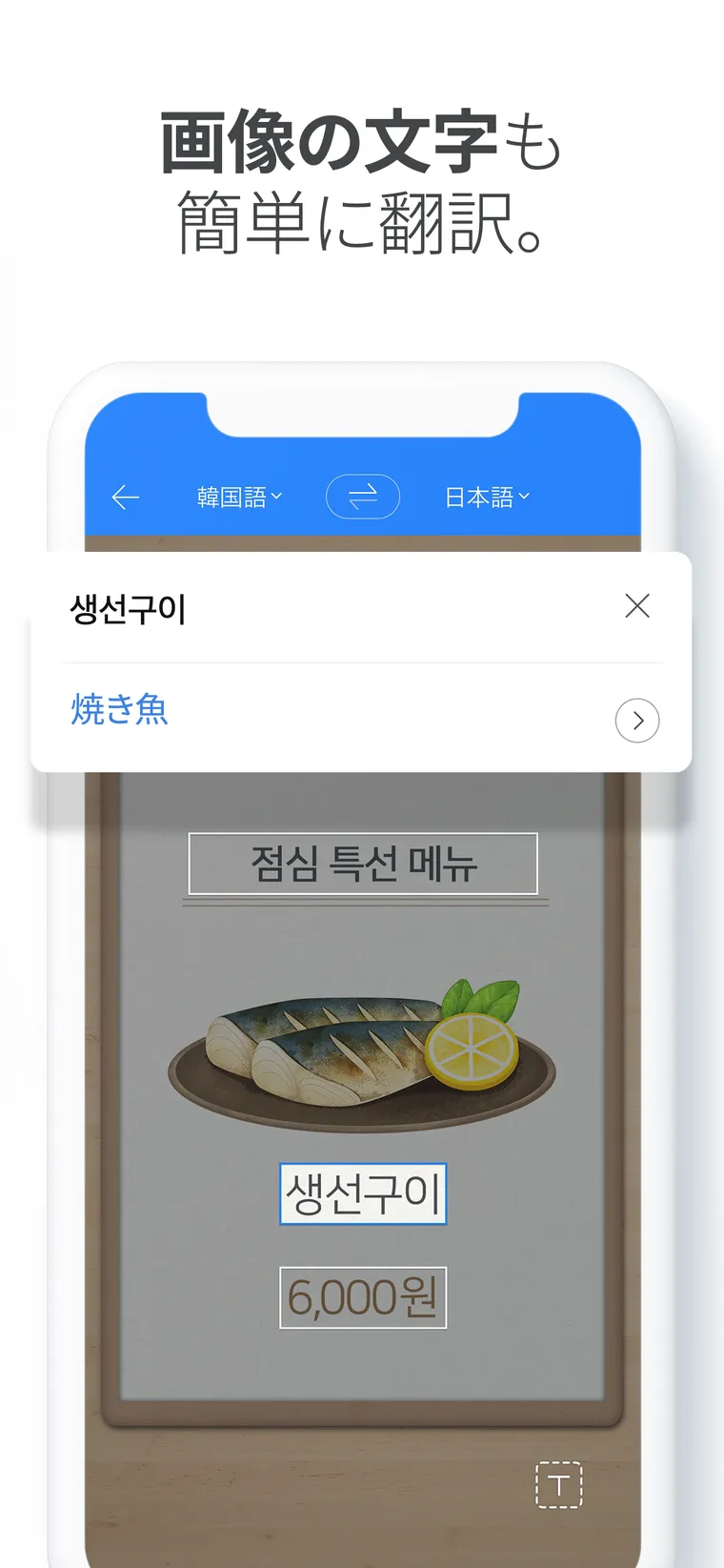
Source: App Store (Japan) Papago - AI通訳・翻訳 (the app screen images below are from the same source)
02For travel and places without internet
Features designed for use while traveling.
- Offline translation — text translation works without an internet connection. A September 2026 update added offline voice translation as well
- Global conversation — a phrasebook of basic everyday expressions that works without a network connection
- Dictionary — lets you look up other meanings of a word, not just the translation
03Translating work documents
File translation in the web version, plus what Papago Plus adds.
- File translation — loads PDF, DOCX, XLSX, PPTX and HWPX files and translates them while keeping the original formatting. Up to 20MB in the free version (as shown in the web version)
- Glossary — register fixed translations and apply them to text, image and file translation
- Document and image editing (Plus) — edit translated documents and images on the spot
- Team management (Plus Standard and above) — teams of 2 to 100 people share glossaries and pool document and image translation quotas
- PC app and Chrome extension — distributed on the Papago Plus site. The PC app (Windows 10 or later, macOS 12 or later) supports shortcut translation, capture translation of a selected area, and real-time subtitles for audio playing on the PC. The Chrome extension translates text, images and videos in the browser
Conversation translation lets you talk without speaking Korean
Conversation translation works by placing one smartphone between you and the other person. Each of you speaks in your own language, and the app shows the translation in the other language. The App Store description says it lets you "converse simultaneously in each other's languages when you need a one-on-one conversation with someone from another country."
According to the required-permissions note for the iPhone version, voice and conversation translation in Vietnamese, Thai, Indonesian, Russian and Italian use the OS speech recognition, and that audio data is sent to Apple. This is worth knowing if you use it for work conversations.
Pricing
The Papago web version and apps are free. The App Store (Japan) lists the app as "Free," with no in-app purchases. For people who need higher limits or use it for work, there is the paid Papago Plus.
The Papago Plus pricing page shows the free Papago alongside three Plus plans. Even on the Japanese page, prices are shown in US dollars, and it does not say whether tax is included.
Basic and Standard come with a one-month free trial for first-time users only (the $0 shown on the pricing page is this trial).
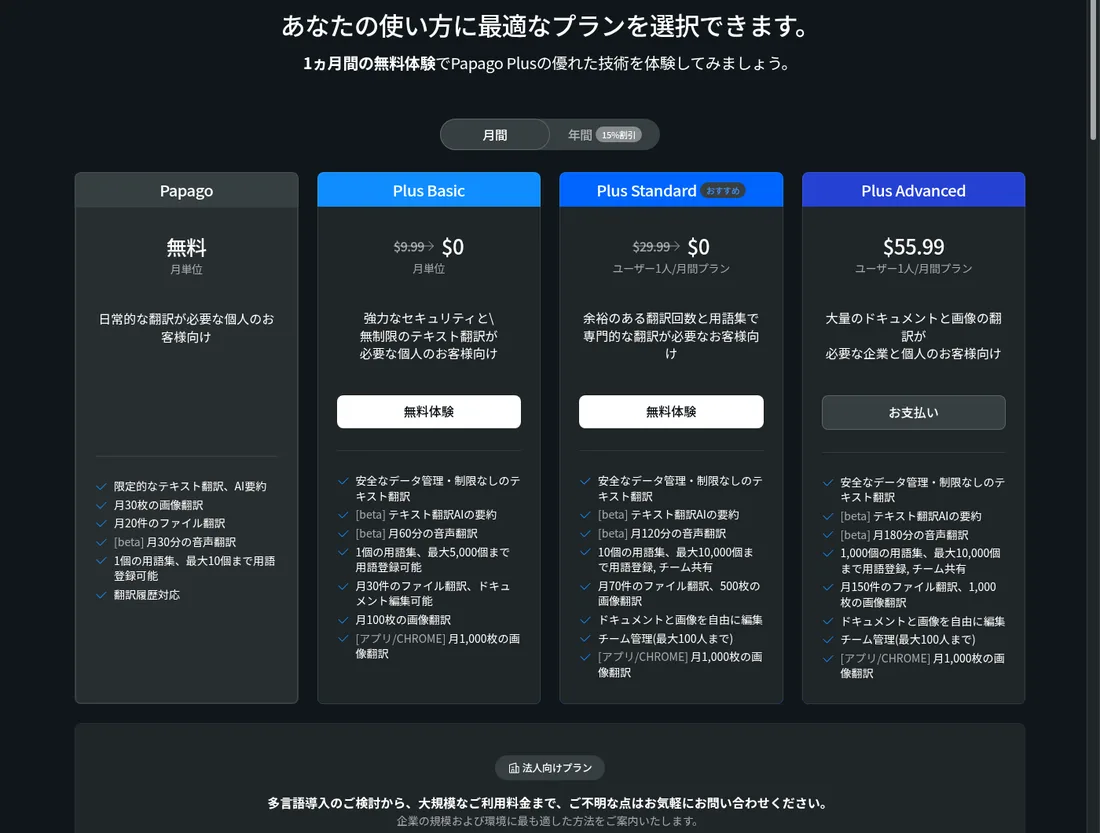
Source: Papago Plus pricing
| Plan | Monthly | Annual (per month) | Image translation (web) | File translation | Voice translation (beta) | Glossary |
|---|---|---|---|---|---|---|
| Papago (free) | $0 | — | 30/month | 20/month (up to 20MB) | 30 min/month | 1 glossary, up to 10 terms |
| Plus Basic | $9.99 | $8.49 | 100/month | 30/month (up to 50MB) | 60 min/month | 1 glossary, up to 5,000 terms |
| Plus Standard | $29.99/user | $25.49/user | 500/month | 70/month (up to 100MB) | 120 min/month | 10 glossaries, up to 10,000 terms each, team sharing |
| Plus Advanced | $55.99/user | $47.59/user | 1,000/month | 150/month (up to 100MB) | 180 min/month | 1,000 glossaries, up to 10,000 terms each, team sharing |
| Business plan | Contact sales | Contact sales | — | — | — | — |
- Text translation is "limited" in the free version and unlimited in all three Plus plans
- Image translation in the app and Chrome extension is 300 per month in the free version and 1,000 per month in all three Plus plans
- Batch image translation handles up to 50 images at once in Basic and Standard, and 100 in Advanced
- Team management (2 to 100 people) is available in Standard and Advanced
- Annual billing is 15% cheaper than monthly billing
- If you have no usage within 7 days of the monthly billing date, you can withdraw the subscription for a full refund. Otherwise, a deduction is made based on days used and other usage
- Plans bought in the app (App Store or Google Play) cannot be changed or canceled on the web; use the store where you bought them
(Based on the official pricing page as of October 21, 2026)
The Papago Translation API for developers (text and image translation) is offered on NAVER Cloud Platform, and its pricing is listed there.
How translation content is handled
The free Papago and Papago Plus describe the handling of translation content differently. The Papago Plus introduction page explains the following.
The free Papago web version has a "consent to quality improvement" setting in the footer and a link to NAVER's privacy policy. For confidential documents, it is safer to use Papago Plus, which states that it does not store data, or to check the terms of use and privacy policy before using the free version.
Pros and cons
Pros
- Both the web version and the apps are free, and the web version works right away without signing up
- Translates text, images, voice, conversations, handwriting and documents, whatever the form of input
- Text translation works offline (and voice translation too since September 2026), so it is usable while traveling without a connection
- The paid Papago Plus states that it does not store translation data on its servers, and teams can share glossaries
Cons
- The app supports 14 languages, fewer than translation services that cover 100 or more
- The free version has limits on image translation (30 per month on the web) and file translation (20 per month)
- Papago Plus prices are shown in US dollars even on the Japanese page, so you need to check the yen amount at checkout
- Only the paid Papago Plus explicitly states that translation data is not stored on the server; the free version has no equivalent statement
Reviews and reputation
On the App Store (Japan), Papago is rated 4.5 out of 5 from 15,000 ratings (checked October 21, 2026). Reviews include a user who installed it to read Korean novels and praised it for producing sentences that make sense rather than word-by-word literal translations, and another who found it helpful for studying because the free translations are understandable. On the other hand, one user found a German recipe translation hard to follow, so opinions vary depending on the language pair.
How Papago differs from other translation services
Papago stands out for offering image, voice and conversation translation on a smartphone for free, and for being built by Korea's NAVER. Here is how it compares with other translation services.
| Product | Strengths | Platforms | Pricing (as listed on each product page) |
|---|---|---|---|
| Papago | Text, image, voice, conversation, handwriting and document translation. Offline translation | Web, iPhone, Android, PC app, Chrome extension | Free. Papago Plus from $9.99/month |
| DeepL | Natural translations that reflect context. Text and document translation, DeepL Write, API | Web, desktop, mobile | Free version up to 50,000 characters/month. Individual is ¥1,380/month (tax included) |
| みらい翻訳 | High-security translation of Japanese business documents | Web (FLaT for organizations, Plus for individuals) | Plus has a free plan and paid plans from ¥550/month (tax included). FLaT from ¥250,000/month (tax excluded) |
| Reglyph | Rebuilds scanned PDFs with the translation while keeping the layout | Web | 5 pages free every day. Lite is $9/month (tax included) |
| Sentio | Real-time interpretation of meetings as subtitles and voice | Browser | Free trial up to 30 minutes/month. Premium is ¥3,300/month (tax included) |
Other products' prices are as listed on each product page at the time it was checked. See each product page and official site for the latest pricing.
Papago suits translating Korean menus, signs and conversations on a smartphone, especially while traveling. If you want polished, natural translations of work documents, compare DeepL; for translating internal documents with a Japanese provider, みらい翻訳; for scanned PDFs of paper documents, Reglyph; and for meeting interpretation, Sentio.
FAQ
Q. Is Papago free? A. Yes. The web version (papago.naver.com) and the apps are free, with no in-app purchases. The free version does have limits, such as 30 image translations per month on the web and 20 file translations per month. If you need more, there is the paid Papago Plus (from $9.99/month).
Q. Does it support Japanese? A. Yes. It translates between Japanese and Korean, English, Chinese and other languages, and both the web version and the apps can be used with a Japanese interface.
Q. What is the difference between Papago and Papago Plus? A. Papago Plus is the paid version. Text translation becomes unlimited, and image, file and voice translation limits go up. Not storing translation data on the server, team glossary sharing (Standard and above) and editing translated documents and images are also features of Plus.
Q. Can I use it offline? A. The app supports offline text translation. A September 2026 update also added offline voice translation.
Q. Who runs Papago? A. NAVER Corp. of South Korea (Seongnam, Gyeonggi Province). The company details and address are shown in the web version's footer and on the App Store.
The information on this page is based on what was published on the official sites (papago.naver.com and papago-plus.com) and the App Store as of October 2026. Check the official site for the latest specifications and pricing.