PLaMo翻訳
: How to use it, features, and the business problems it solves
Add bookmark
What is PLaMo翻訳?
An AI translation service from Preferred Networks, Inc. (PFN), powered by a translation-specialized model built on PLaMo, the Japanese LLM that PFN develops in-house. It covers text, file (PDF/Office) and web page translation, live audio translation, meeting translation for Zoom, Google Meet and Teams, and English proofreading across 53 languages (15 for meeting translation), with all data processing completed inside Japan. Adopted for Japan's Digital Agency "Gennai" government AI environment. There is a free plan; paid plans are Lite at ¥1,078/month and Pro at ¥2,838/month (tax included, campaign prices until November 30, 2026), plus per-user team plans.
Business problems it solves



About "PLaMo翻訳"
What is PLaMo翻訳?
PLaMo翻訳 (PLaMo Translate) is an AI translation service powered by a translation-specialized model built on PLaMo, the Japanese LLM developed in-house by Preferred Networks, Inc. (PFN, Chiyoda-ku, Tokyo). It offers text translation, file translation (PDF, Word, PowerPoint, Excel), browser translation, live audio translation, online meeting translation and English proofreading through a web app, desktop apps (Mac and Windows) and browser extensions (Chrome, Edge, Firefox).
With a major update on October 7, 2026, PFN switched the translation model to a new one based on the third-generation PLaMo, expanded supported languages from two (Japanese and English) to 53, and officially launched meeting translation. It translates in both directions between Japanese or English and each language (English proofreading supports English only, and meeting translation supports 15 languages).
Plans consist of a free Free plan, Lite and Pro for individuals, Lite Team and Pro Team contracted per user, and Enterprise with invoice payment. Until November 30, 2026, launch campaign prices are shown, which are lower than the regular prices (see "Pricing" below).
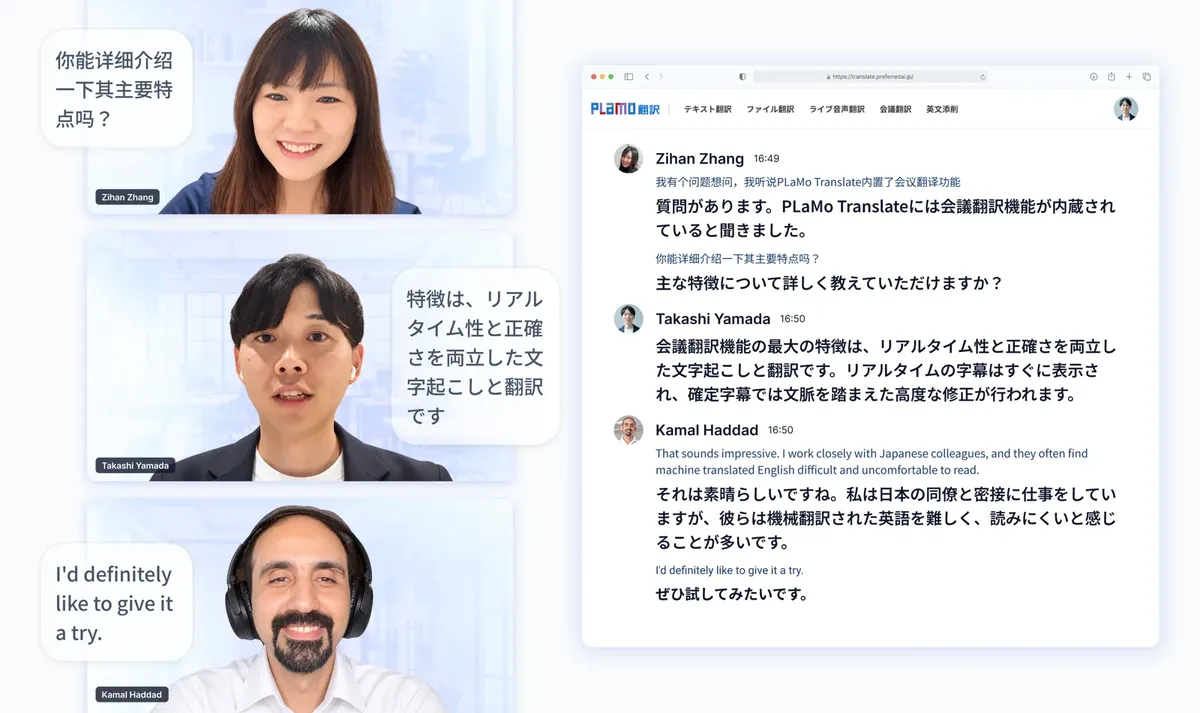
Source: PLaMo翻訳 official website (all images on this page are from the same site)
No reliance on overseas AI, and data processing stays in Japan
The defining feature of PLaMo翻訳 is that its translation model is not a tuned version of an overseas model; PFN developed it from scratch, from collecting training data to designing and training the model. According to the official site, Japanese makes up about 30% of the training data. Translation is processed on servers in Japan, and no data is sent to servers overseas.
On December 2, 2025, Japan's Digital Agency announced that it would make PLaMo翻訳 available in its generative AI environment for government employees (the government AI project "Gennai"). Use began inside the Digital Agency in December, with a rollout to other ministries and agencies planned from 2026 onward.
On translation accuracy, the official site says it is "on par with overseas frontier models such as Claude Fable 5.1 and GPT-6 Astra, and above DeepL and Google Translate." This is PFN's own evaluation based on four benchmarks (including a Japanese-English benchmark PFN developed) and LLM-judged comparisons of translations (as of October 2026).
Note that English proofreading also uses AI models other than the PLaMo translation model (official feature list). If you want processing by the domestic model only, use features other than English proofreading.
How to use it
- Try text translation without logging in Paste text on the text translation page of the official site and click "翻訳する" (Translate). Without logging in, each request is limited to 500 characters. English proofreading can also be tried without logging in.
- Sign up as a free member Signing up gives you the Free plan: 50,000 characters of text translation per month (up to 2,000 per request), 200,000 characters of browser translation per month, and file translation up to 1 point per month. No credit card is needed.
- Install the browser extension or desktop app The Chrome, Edge and Firefox extensions translate entire web pages. The desktop apps (Mac and Windows; the Windows version is also on the Microsoft Store) are available on all plans and translate or proofread text selected in other apps with a shortcut key.
- Translate files and meetings Upload a PDF or Office file to file translation and you get a translated file that keeps the layout. For meeting translation, paste a Zoom, Google Meet or Microsoft Teams meeting URL; a translation bot joins and shows the original and translated text on a dedicated viewing screen (for paid plans; a free trial is available).
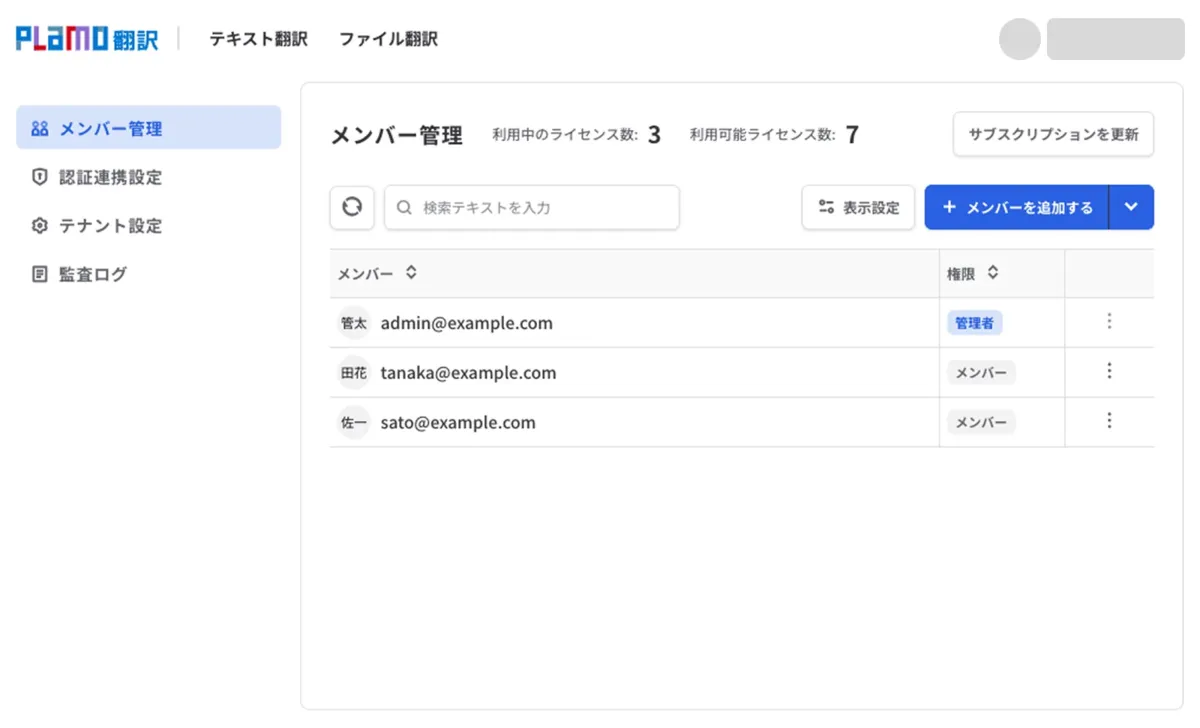
- Use it as a team Team plans can be contracted from 5 licenses and include member management, audit logs and single sign-on (SSO). Points for file translation and meeting translation are shared across the whole team.
Features
01Read and translate
- Text translation — Translates pasted text. Structured text such as Markdown, JSON and YAML is translated while keeping its format. Paid plans allow up to 50,000 characters per request
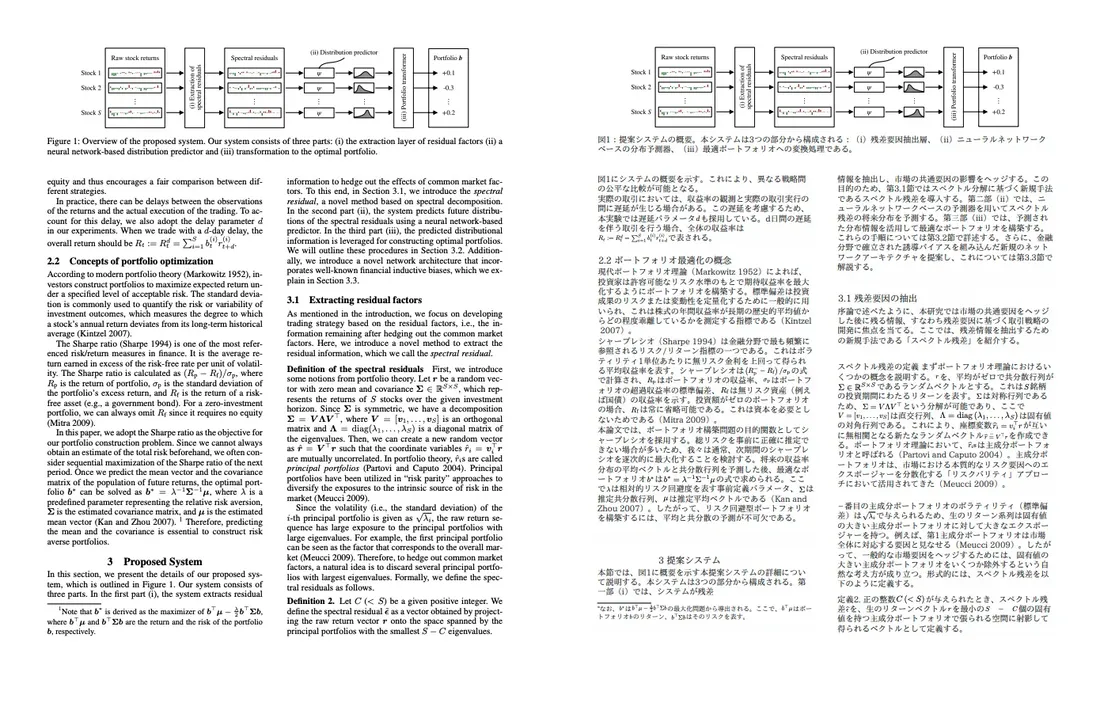
- File translation — Translates PDF, TXT, Word, PowerPoint and Markdown (plus Excel on Pro and team plans) while keeping formatting and layout. Handles papers with equations and two-column layouts
- Browser translation — Translates entire web pages with the Chrome, Edge and Firefox extensions, keeping layout and text styling
02Listen and speak
- Meeting translation — A translation bot joins Zoom, Google Meet or Microsoft Teams and transcribes and translates remarks by speaker in real time. Supports 15 languages and automatically detects the spoken language in meetings with 2–3 languages that include Japanese or English. Viewers use a shared link, so participants do not need accounts
- Live audio translation — Transcribes and translates audio from the tab, window or screen you are watching, and shows the original and translation as subtitles. Available in the web app and browser extension
03Write and keep terms consistent
- English proofreading — Corrects unnatural grammar, vocabulary and expressions in English you wrote, with reasons for each correction in Japanese (also uses AI models other than PLaMo)
- Glossary — Register translations for proper nouns and technical terms, reflected in translation and meeting transcription. Pro and Pro Team allow an unlimited number of glossaries (up to 10,000 entries each)
File translation replaces a PDF paper with Japanese without breaking its figures, equations or two-column layout. You can read while comparing the original and translated files, which suits reading overseas papers and technical documents.
It consumes 1 point per about 200,000 characters (1 point per 20 pages for PDFs). The file size limit is 5 MB on Free, 50 MB on Lite and 100 MB on Pro.
Pricing
These are the prices shown on the official pricing page as of October 24, 2026. During the campaign until November 30, 2026, campaign prices discounted from the regular prices are shown. The pricing page shows campaign prices both including and excluding tax, and regular prices excluding tax.
| Plan | Campaign price (tax included) | Regular price (excluding tax) | Main monthly limits |
|---|---|---|---|
| Free | ¥0 | ¥0 | Text translation 50,000 characters (2,000 per request), browser translation 200,000 characters, English proofreading 5,000 characters, live audio translation 50,000 characters, 1 point |
| Lite | ¥1,078/month or ¥10,780/year | ¥1,180/month or ¥11,800/year | Text translation 1 million characters, unlimited browser translation, English proofreading 50,000 characters, live audio translation 1 million characters, 20 points |
| Pro | ¥2,838/month or ¥28,380/year | ¥2,980/month or ¥29,800/year | Text translation 5 million characters, English proofreading 200,000 characters, live audio translation 5 million characters, 80 points, 5 hours of cloud speech recognition |
| Lite Team (per user) | ¥2,178/month or ¥21,780/year | ¥2,380/month or ¥23,800/year | Text translation 2 million characters, English proofreading 100,000 characters, 25 points (shared by the team), member management, audit logs, SSO |
| Pro Team (per user) | ¥3,938/month or ¥39,380/year | ¥3,980/month or ¥39,800/year | Text translation 10 million characters, English proofreading 300,000 characters, 100 points (shared by the team), priority support |
| Enterprise | Contact sales | Contact sales | Invoice payment, 100+ seats, priority support |
Points are shared between file translation and meeting translation. File translation uses 1 point per about 200,000 characters (per 20 pages for PDFs), and meeting translation uses 1 point for every 3 minutes the translation bot is in the meeting. For example, using all 20 Lite points on meeting translation gives 60 minutes, and 10 Pro Team licenses give the whole team 1,000 points per month.
During the campaign, points for file translation and meeting translation are doubled (figures on the plan cards such as "up to 40 file translations per month" are doubled values; the points in the table above are the regular values listed in the comparison table). Lite is free for the first two months if you sign up during the campaign, and billing for the Lite plan (¥1,298/month, tax included) starts automatically from the third month. A registered credit card is required for the campaign.
- Annual billing — Annual billing costs 10 months of monthly billing, and the pricing page says it is "16.7% cheaper"
- Meeting translation — For paid plans (Lite, Pro, Lite Team, Pro Team). There is a 30-day free trial you can apply for on the meeting translation page, and meetings created during the trial do not consume points
- Team plans — Can be contracted from 5 licenses. Up to 100 licenses can be contracted on the site; for more, or for invoice payment, contact the business inquiry desk
- Payment and cancellation — Payment is by credit card (Stripe) in advance, and plans renew automatically until cancelled. Cancelling mid-term does not refund the remaining period, and you can use the service until the end date
Security and data handling
Input data is handled differently on free and paid plans. According to the official FAQ, on paid plans input and output data are never used for training AI models or improving the service. On the free plan, input and output data may be used for developing new services or training and improving AI models. However, live audio translation and meeting translation data (audio, transcripts and translation results) are not used for training on any plan, including the free plan.
On paid plans, input to text translation, English proofreading, browser translation and live audio translation is not stored and is discarded immediately after the result is returned. File translation data is completely deleted when you delete it or after 7 days, and meeting translation transcripts and results when the meeting creator deletes them or 7 days after the meeting ends.
On team plans, administrators manage member additions, roles and authentication integration in the admin screen. Audit logs record logins, setting changes and the start and end of meeting translation, but not translation input or output.
PFN holds ISO/IEC 27001 (ISMS) certification covering the operations of its AI Products & Solutions Division, which provides PLaMo翻訳. Requests to fill in security check sheets are handled by the business inquiry desk.
Adoption and reputation
01Adoption in government
- Digital Agency — Announced on December 2, 2025 that it would provide PLaMo翻訳 in its generative AI environment for government employees (the government AI project "Gennai"), citing that it is a domestic LLM optimized for Japanese expressions and writing styles specific to government documents
02Awards
- AAMT Nagao Award — The PLaMo翻訳 team received the 21st AAMT Nagao Award (2026) from the Asia-Pacific Association for Machine Translation (AAMT), recognized for building everything from a translation-specialized foundation model to a production service with in-house technology
- Nikkei Superior Products and Services Award — Received the top prize of the 2025 Nikkei Superior Products and Services Awards (according to the official site)
The official site does not list the number of corporate customers or individual case studies.
How it differs from other AI translation services
Compared with major AI translation services available in Japanese:
| Service | Provider | Free usage | Lowest paid plan (published) | Data handling |
|---|---|---|---|---|
| PLaMo翻訳 | Preferred Networks, Inc. (Japan) | Text translation 50,000 characters/month, browser translation 200,000 characters/month, and more | Lite ¥1,078/month (tax included, campaign price; regular ¥1,180 excluding tax) | Not used for training on paid plans; processing completed in Japan |
| DeepL | DeepL SE (Germany) | Text translation 50,000 characters/month | Individual ¥1,380/month (tax included) | Paid plans are not used for training |
| みらい翻訳 | Mirai Translate, Inc. (NTT DOCOMO Group) | Text translation 5,000 characters/day | Plus Starter ¥550/month (tax included) | No secondary use, including on the free plan |
| Papago | NAVER Corp. (South Korea) | Web version and app are free | Plus Basic $9.99/month | Paid version does not store translation data |
The other services' columns reflect the information on each product page as of when it was checked.
What sets PLaMo翻訳 apart is that it processes everything with a domestic model on servers in Japan only, and that text, file and web page translation plus meeting translation and live audio translation are bundled in one subscription. If you want a long-established service with an API and related products such as DeepL Write, compare DeepL; for corporate contracts with unlimited translation volume and IDs, compare みらい翻訳. If you are choosing mainly for simultaneous interpretation in meetings, DeepL Voice and kotoba are also options.
Who it suits and who it does not
It suits people who often read overseas papers, documents and web pages in Japanese, and companies that want to translate confidential documents without sending them to overseas services. Data processing is completed in Japan, and paid plans do not use input for training. Teams that have many online meetings with overseas offices or partners can use translation and meeting translation from the same pool of points.
It does not suit people who want to call translation from their own systems via API. According to the official FAQ, the PLaMo translation model is currently not available via API (sales of the model itself for deployment in your own environment can be discussed through a separate desk). Also, because input may be used for training on the free plan, confidential documents need to be translated on a paid plan. The official site does not mention a smartphone app.
FAQ
Can I use PLaMo翻訳 for free? Yes. With the Free plan for free members, you get 50,000 characters of text translation per month (up to 2,000 per request), 200,000 characters of browser translation per month, and file translation up to 1 point per month. Without logging in, you can try text translation (up to 500 characters per request) and English proofreading. Meeting translation is for paid plans, with a free trial.
How much does PLaMo翻訳 cost? As of October 24, 2026, Lite is ¥1,078/month, Pro ¥2,838/month, Lite Team ¥2,178 per user per month and Pro Team ¥3,938 per user per month (all tax-included campaign prices). The campaign runs until November 30, and regular prices excluding tax are ¥1,180/month for Lite, ¥2,980 for Pro, ¥2,380 for Lite Team and ¥3,980 for Pro Team.
Which languages does it support? 53 languages. It translates in both directions between Japanese or English and languages such as Chinese, Korean, Spanish, German, French and Vietnamese. Meeting translation supports 15 languages, and English proofreading supports English only.
Is translated content used for training? Not on paid plans. On the free plan, input and output data may be used for developing new services or training and improving AI models. Live audio translation and meeting translation data are not used for training on any plan.
Can I use it via API? No. The official FAQ says the PLaMo translation model is currently not available via API. If you want to use it in your own on-premises or cloud environment, you can inquire about purchasing the PLaMo translation model itself.
The information on this page is based on what was published on the official website as of October 2026. Please check the official website for the latest prices and details.