ToText
: How to use it, features, and the business problems it solves
Add bookmark
What is ToText?
ToText is a recording and transcription app for iPhone and iPad, provided by Eyal Ronen of Israel under the LovelaceLoom brand. Record meetings, lectures, interviews or voice memos—or import audio files—and it transcribes them by speaker in 60 languages, creates AI summaries, to-dos and tags, and answers questions about a recording based on its transcript. No account is required, and data is stored on your device (optionally in iCloud). Pricing in Japan: Free (60 min/month) / Basic ¥700/month (1,000 min) / Pro ¥1,400/month (2,000 min).
Business problems it solves
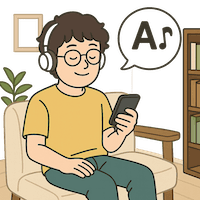

About "ToText"
What is ToText?
ToText (listed on the App Store as "ToText: AI文字起こし" in Japan) is a recording app for iPhone and iPad that transcribes your audio and adds AI summaries, to-do lists, and answers to questions about the recording. It is developed and provided by Eyal Ronen of Israel under the brand of the AI product studio "LovelaceLoom (Lovelace Loom)."
It is not a meeting-only tool: it targets every kind of recording, including university lectures, research and press interviews, voice memos, and ideas you think of on the go. The official tagline (Japanese site) translates to "Find what you need without listening to the whole thing again"—the focus is not only on turning recordings into text but on making it easy to find "what exactly was said" later.
Features
- Record or import audio Record with the device microphone or import an audio file you already have. You can also share audio or video from other apps to ToText for transcription; for video, it extracts the audio on the device when possible before uploading. Each recording can be up to 4 hours long.
- Transcription in 60 languages with speaker separation Transcribes audio in 60 languages, organized by speaker. Let it auto-detect the language, or choose a primary language and add a secondary one for recordings that mix two languages. Transcripts are not translated; they stay in the language spoken in the recording.
- AI summaries, to-dos, titles and tags Create summaries with your choice of length and style, and automatically generate action items (tasks), titles and tags from the recording. Generated text such as summaries and answers is written in the app's display language.
- Ask your recording (Q&A) Ask in plain language—e.g., "What exactly did Maya promise to submit, and by when?"—and ToText answers based only on that recording's transcript. When timing data is available, tap the timestamp cited in the answer to replay that part.
- Playback synced with audio The transcript is synced with the audio, so you can check the playback position while viewing speaker labels and word highlighting.
- Search and organize Search saved transcripts by keyword, filter by tag, mark important recordings, and sort by date or length. On iOS 26 you also get a "Home" screen with insights and charts, a weekly calendar, and tasks you selected from recordings.
- Export and share Export the summary and transcript together as a PDF, save the summary as plain text, or copy and share either.
- Dictation keyboard With the ToText keyboard you can dictate by voice into text fields in other apps. When you finish, the text is typed right where you are, and you can also keep the recording in ToText if you like. The dictation language follows your transcription language setting (added in version 2.1.8 in July 2026, per the App Store release notes).
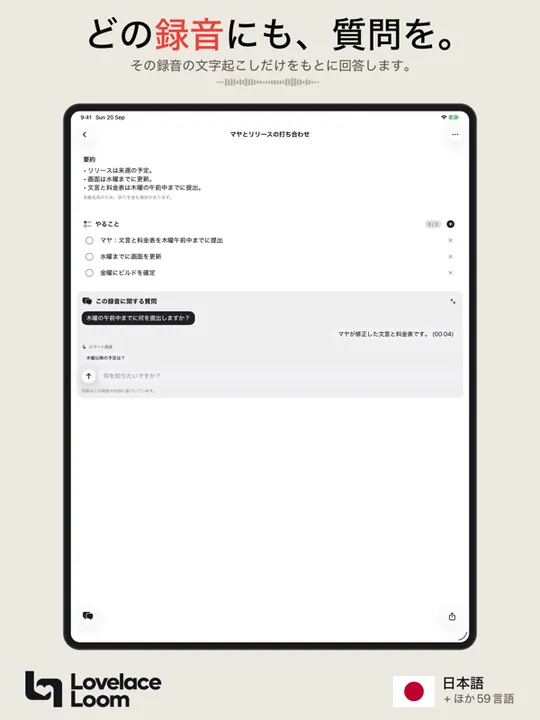
Source: screenshot from the ToText App Store listing (Japanese version)
How to use
- Install from the App Store Install "ToText" from the App Store. No account, email address or sign-in is needed; you can start on the Free plan right away.
- Record or import audio Record a meeting, lecture or interview on the spot, or import an audio file. Choose the recording language (primary and secondary) if needed.
- Review the summary and to-dos When transcription finishes, the summary and the to-dos extracted from the recording appear. Start here to grasp the key points.
- Ask questions and verify against the original audio Ask about what you want to confirm, and replay the original audio from the timestamps in the answer. Export to PDF and share if needed.
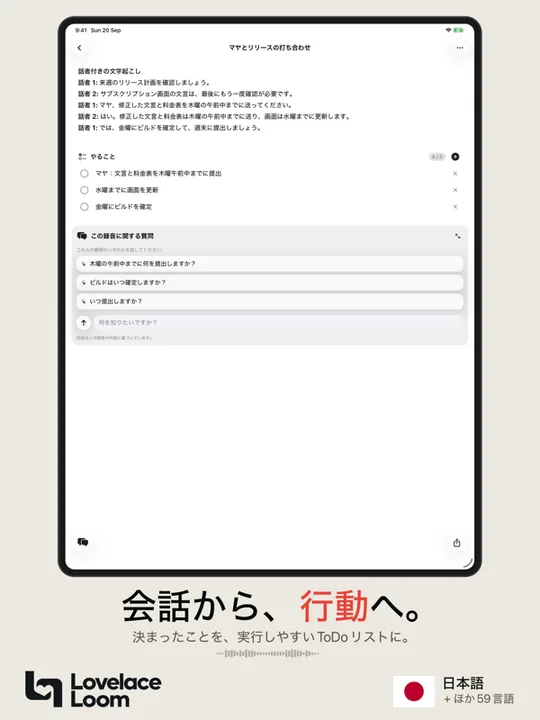
Source: screenshot from ToText's App Store listing (Japanese)
Note: ToText is not a bot that joins online meetings. It cannot directly record calls, Zoom or Google Meet audio, or other system audio. To capture online meetings, use the meeting tool's own recording/transcription feature or a dedicated meeting tool.
Pricing
Prices on the Japanese App Store as of October 11, 2026 (tax included). Paid plans are App Store subscriptions, managed and canceled in your Apple Account settings. Prices are shown in local currency in other regions.
| Plan | Monthly | Yearly | Transcription per month | Questions per recording |
|---|---|---|---|---|
| Free | ¥0 | — | 60 min | Up to 2 |
| Basic | ¥700 | ¥6,000 | 1,000 min | Up to 30 |
| Pro | ¥1,400 | ¥13,000 | 2,000 min | Unlimited (fair-use controls apply) |
- Transcription, summaries, to-dos, tags, search, playback and export are all available on the Free plan. Plans differ in monthly transcription minutes and number of questions.
- Included minutes are granted again at the start of each calendar month in UTC, and unused minutes do not roll over.
- Specifying more speakers does not consume extra minutes (usage is counted by recording length).
Pros and cons
Pros
- Start without creating an account; recordings and transcripts are stored on your device (and optionally your own iCloud Drive)
- Designed for recordings beyond meetings, such as lectures, interviews and voice memos
- Ask questions about a recording and verify answers against the original audio via timestamps
- Supports 60 languages, including mixed-language recordings via a secondary language
- Interface, summaries and answers are available in Japanese, with prices clearly listed in yen
- The Free plan covers 60 minutes a month with core features, including summaries and export
- No ads
Cons
- An iPhone/iPad app; no Android or Windows support
- Cannot directly record online meeting audio (Zoom, Google Meet, etc.) or system audio
- Uses external service providers for transcription and summaries, so audio and text are temporarily sent outside the device for processing (deleted shortly after)
- No transcript translation
- A new app run by an individual, with few user reviews so far
- The "Home" screen with insights and calendar requires iOS 26
Reviews and reputation
As of October 2026, the Japanese App Store does not show a rating summary because there are too few ratings. The app launched in May 2026.
Updates are frequent, though: more than a dozen releases shipped between late August and October. Release notes include "support for long recordings," "recovery of recordings whose upload stalled," "VoiceOver labels in every supported language," and "'Delete all my data' now also erases server-side data," suggesting the developer keeps improving the app based on user feedback.
The official site cautions that automatic transcription and generated text can contain errors, and recommends checking names, numbers and commitments against the recording.
ToText vs. other transcription tools
| Product | Key features | Best for |
|---|---|---|
| ToText | iPhone/iPad recording app; no account needed; ask questions per recording | Easily capturing lectures, interviews and voice memos and finding content later |
| Notta | Transcription and meeting-notes service that can auto-join web meetings | Recording online meetings on Zoom, Teams, etc. |
| PLAUD | Transcription and summaries with a dedicated recording device and app | Recording calls and in-person conversations on a device separate from your phone |
| Rimo Voice | Japanese transcription and meeting-notes service strong in Japanese | Editing and sharing Japanese meetings and interviews as a team |
| Otter AI | AI assistant that joins meetings and transcribes in real time | Searching and analyzing across mainly English meetings |
To automate online meeting notes, consider Notta or Otter AI; to record lectures or interviews on your iPhone and search them later, ToText is a good fit.
FAQ
Q. Is ToText free? Yes. The Free plan includes 60 minutes of transcription per month, plus summaries, to-dos, search and export. You can ask up to 2 questions per recording. No account or purchase is required.
Q. Does it support Japanese? Yes. It transcribes Japanese recordings, and the interface, titles, tags, summaries, to-dos and answers can all be shown in Japanese.
Q. Can it record Zoom or Google Meet meetings? No. ToText does not join meetings and cannot directly record calls or system audio. Record in-person meetings with the device microphone, or import a recording saved by your meeting tool.
Q. Where is my data stored? Recordings, transcripts, summaries, questions and answers are stored on your device and can optionally sync via iCloud Drive. Audio uploaded for processing is usually deleted about one minute after processing finishes.
Q. Can I use it on Android or Mac? There is no Android version. For Mac, the official FAQ says the iPhone/iPad app also runs on Apple silicon Macs (the App Store lists macOS 15 or later and an M1 chip or later). The App Store also shows "not verified for macOS," however (as of October 2026).
Provider
ToText is operated by Eyal Ronen under the "LovelaceLoom" brand (per the Terms of Service; based in Israel and governed by Israeli law). According to its official site, LovelaceLoom is an independent AI product studio owned by two engineers, Tai Baran and Eyal Ronen, which builds its own products and also offers AI engineering and working sessions for companies. The App Store seller is also Eyal Ronen. Support is available from the app's settings and the contact link on the official site.
The information on this page is based on what was published on the official site and the App Store as of October 2026. Features and pricing may change; please check the official site and the App Store listing for the latest information.