SonaFact
: How to use it, features, and the business problems it solves
Add bookmark
What is SonaFact?
SonaFact is a browser-based AI transcription, meeting-minutes and subtitle service operated by AKINT in Poland. It transcribes recordings and audio/video files in 100 languages, separates speakers automatically and underlines words it is unsure about. Every item in its AI-generated minutes, task lists, summaries and sales-call scorecards links to the matching moment in the recording, and items not tied to the recording are removed automatically. It also exports SRT/WebVTT subtitles with translation into up to 4 languages and files for NVivo, MAXQDA and ATLAS.ti. Processing takes place in the EU and recordings are not used to train AI. There is a free plan (3 files a day, up to 30 minutes each); paid plans start at ¥990 a month billed yearly (tax included).
Business problems it solves




About "SonaFact"
What is SonaFact?
SonaFact is an AI transcription service that takes a recording all the way to a transcript, AI meeting minutes and subtitles in the browser. It is developed and operated by AKINT, based in Warsaw, Poland, and offers a Japanese-language site with yen pricing and a disclosure under Japan's Act on Specified Commercial Transactions.
Upload audio or video of meetings, interviews, sales or support calls and podcasts, or record directly in the browser, and SonaFact detects the language from 100 options, transcribes it and separates speakers automatically. From there, AI produces minutes, task lists, summaries, chapters and scored call reviews, and you can export SRT/WebVTT subtitles or translated subtitles.
As its tagline "Evidence from audio" suggests, the defining design choice is that everything the AI writes is tied back to where it was said in the recording. Words the engine was unsure about are underlined, every item in an AI document carries the timestamp it came from, and items that cannot be linked to any moment in the recording are removed before you see them.
(auto-detected)
(incl. Japanese)
(up to 30 min each)
(billed yearly, tax incl.)
The tool tells you where it might be wrong
Automatic transcription always has weak spots — a name said too fast, a word lost under a cough. SonaFact does not hide them: it underlines words the engine was not confident about and shows, for each transcript, the share of flagged words as a number. Instead of re-reading an hour from the top, you only re-listen to the flagged parts.
In the editor, clicking a line plays from that point and clicking the text lets you edit it in place. Rename a speaker once and it changes across the whole transcript; you can merge two speakers the engine split by mistake, or move an utterance to the right speaker.
You can also switch to a clean verbatim view that hides fillers such as "um" and "uh" (the transcript itself stays word-for-word). According to SonaFact, the most frequently corrected items are short backchannels such as "yeah" or "I see".
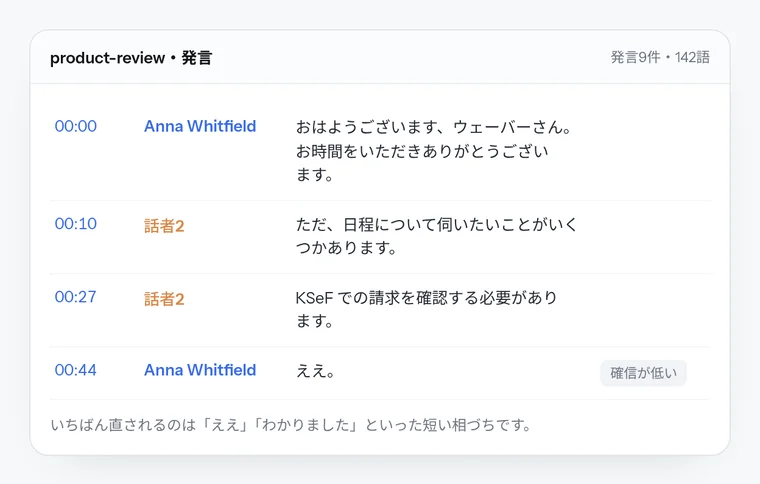
Source: screen mock-ups published on the SonaFact "Features" page (the same applies to the images below)
Check AI minutes against the recording before you share them
AI documents are created from six ready-made types, including meeting minutes, task lists, summaries, chapters and sales/support call reviews. Every item carries a clickable timestamp, so you can verify its source by ear. Items not tied to any moment in the recording — names nobody said, dates nobody mentioned — are removed automatically, and the document tells you how many it removed, e.g. "Removed 2 items not tied to any moment in the recording."
The pre-share check goes further: it compares each item in an AI document with the part of the recording it points to, and flags as "needs review" a dropped "maybe" or "not", a different number or weekday, or an uncertain name. Who reviewed each item and when is recorded.
Because this check runs on rules rather than AI, it does not use your daily AI allowance. SonaFact itself notes that an unflagged item "simply wasn't detected — it does not mean it has been verified."
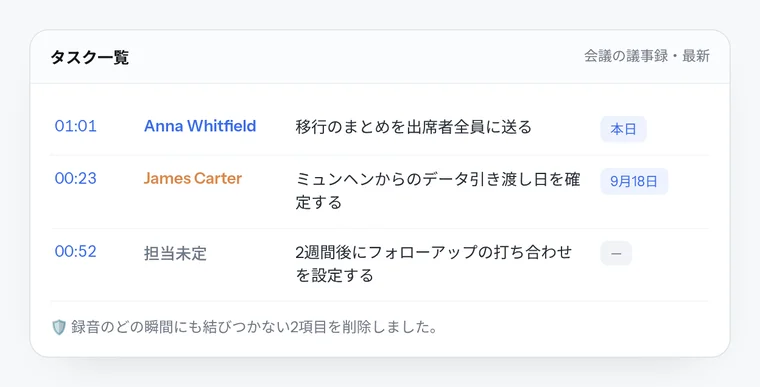
If you correct the transcript and regenerate a document, the corrections are reflected. The document language is independent of the recording language, so you can produce English minutes from a Japanese meeting.
How to use
- Create an account (or try it without signing up) From the home page and other pages you can try one recording of up to 5 minutes without registering (once per day per internet connection; deleted after 24 hours). To keep using it, create a free account with an email address or a Google account.
- Upload recordings or record in the browser Upload up to 20 files at once in 16+ formats including MP3, WAV, M4A, MP4 and MOV. Language is auto-detected but can be set manually, as can the number of speakers. Names and technical terms added to your glossary are passed to the recognition engine as hints.
- Review and correct in the editor Re-listen mainly to underlined words and name the speakers. Search and replace across the whole transcript is available.
- Create AI documents or subtitles Pick a type such as minutes or a task list, then go through the "needs review" items in the pre-share check. Export subtitles as SRT/WebVTT and translate them into other languages if needed.
- Export and share Export to DOCX, PDF, Markdown, TXT and CSV, or to formats for the qualitative research tools NVivo, MAXQDA and ATLAS.ti. Recordings can be shared by link (7 days, 30 days or no expiry), and anyone with a free account can comment on individual utterances.
On smartphones, you install SonaFact from the website to your home screen (it is not distributed through app stores). On Android, SonaFact appears in the "Share" menu, so you can send WhatsApp or Telegram voice messages to it directly.
Features
01Transcription and editing
Every plan uses the same engine and the same speaker separation.
- Auto-detection of 100 languages — 32 of them, including Japanese, English, Chinese and Korean, get word-level timestamps
- Automatic speaker separation — merge speakers, move utterances, see talk time and share per speaker
- Underlined uncertain words — plus the share of flagged words for each transcript
- Glossary — register names and terms per language or for all languages (20 on Free up to 200 on Studio)
- Clean verbatim — recognizes filler sounds in 28 languages and can drop them in both view and export
- Quote check — paste a sentence to find where it was said and see changed, added and missing words (no AI; all plans)
02AI documents and call analysis
AI processing has a daily cap (3 on Free up to 40 on Studio).
- Minutes, task lists, summaries, chapters — every item links to a timestamp. Summaries from Free, minutes and task lists from Starter, chapters from Pro
- Pre-share check — flags items that may differ from what the recording says
- Sales and support call reviews — talk ratio, speaking pace, interruptions, questions, and BANT or support scorecards (from Pro)
- Custom templates and scorecards — register your own criteria and document formats
- Ask your recordings — ask about one, several or all recordings; answers are built only from transcripts and link to timestamps
03Subtitles, export and sharing
Subtitles are checked against readability rules before export.
- SRT/WebVTT subtitles — up to 42 characters per line and 2 lines (shorter for Japanese and Chinese); lines faster than about 17 characters per second are counted and listed
- Translated subtitles — per recording, 1 language on Starter and up to 4 on Pro and above; low-confidence translations are flagged
- Wide range of exports — DOCX, PDF, Markdown, TXT, CSV and files for NVivo, MAXQDA and ATLAS.ti
- Link sharing, comments, highlights, clips — share clips of up to 10 minutes by link
- Auto-delete — delete audio only, or everything, 1–365 days after upload (email notice 3 days before)
Score sales and support calls, with evidence
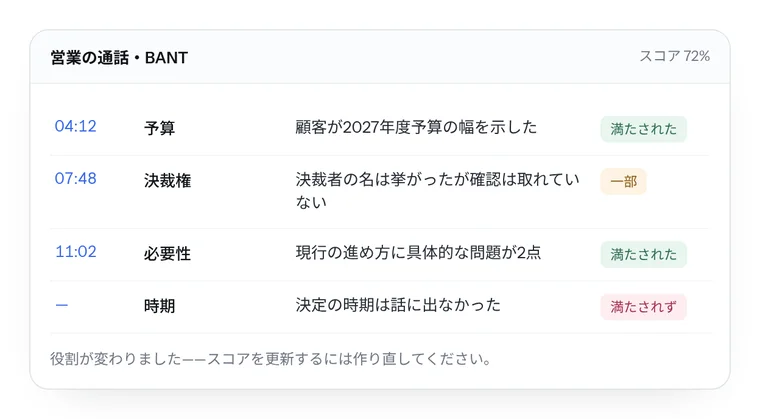
On Pro and above you can score sales and support calls criterion by criterion. Besides the built-in BANT (budget, authority, need, timing) and support scorecards, you can write your own criteria (up to 10 on Pro and 30 on Studio).
Each criterion comes back with a verdict — met, partly met or not met — the reasoning, and the moment in the call that supports it. You also get talk ratio, speaking pace, the longest monologue, interruptions and number of questions, along with objections and responses and next steps with owners.
The AI suggests each speaker's role (sales rep, customer and so on), and you can change it. After changing roles, regenerate the review to update the score.
Pricing
There is a free plan and three paid plans. They differ mainly in monthly recording hours, maximum file length and daily AI processing; the transcription engine, speaker separation and export formats are the same on every plan. Prices shown when accessing from Japan are below (checked October 2026, tax included).
| Plan | Monthly | Yearly (per month) | Recording time | Max file length | AI processing/day | Main differences |
|---|---|---|---|---|---|---|
| Free | ¥0 | — | 3 files/day | 30 min | 3 | Transcription, speaker separation, summaries, search, sharing, all export formats |
| Starter | ¥1,480 | ¥11,880/yr (¥990) | 20 h/month | 3 h | 10 | Minutes and task lists, subtitles translated into 1 language, 3 templates, clip audio download, email support |
| Pro | ¥2,480 | ¥19,800/yr (¥1,650) | 60 h/month | 6 h | 20 | Call reviews and 10 scorecards, chapters, subtitles in 4 languages, 10 templates |
| Studio | ¥5,980 | ¥52,800/yr (¥4,400) | 300 h/month | 10 h | 40 | 30 scorecards and 30 templates, 200 glossary entries |
Security and data handling
Here is what companies handling meeting and call recordings will want to check, drawn from the official "Security" and "Transparency" pages and the privacy policy.
- Processing inside the EU: recordings, transcripts, AI documents and translations are stored and processed in the EU. Subprocessors are listed publicly — OVH in Poland for application servers and databases, RunPod (EU) for GPU compute, Cloudflare (EU) for storing recordings
- Not sent to outside AI providers: SonaFact runs its own AI models on hardware in the EU and states that recordings and transcripts are not sent to OpenAI, Anthropic, Google or any other AI provider
- No training, no voiceprints: recordings, transcripts and documents are not used to train AI models; speakers are separated only within a single recording and no voice profile is stored
- Encryption: recordings are encrypted with AES-256-GCM using a per-file key, and transcripts and AI documents are encrypted in the database
- Government data requests: 0 as of October 1, 2026, with the report updated every six months
On the other hand, no third-party certifications such as ISO/IEC 27001 or SOC 2 had been published as of October 2026. The service is for users aged 18 and over.
Japanese support
The official site, pricing page, Act on Specified Commercial Transactions disclosure and privacy policy are available in Japanese, and prices are shown in yen when accessed from Japan. Japanese is one of the 32 languages with word-level timestamps, and subtitles are built with shorter lines for Japanese. Support is by email (support@sonafact.com).
Reputation and reviews
SonaFact is a recent service, and as of October 2026 we could not find customer company names, named user testimonials or third-party reviews, either on the official site or elsewhere. Accuracy varies widely with recording quality and the number of speakers, so the surest approach is to test your own recordings on the free plan (3 files a day, up to 30 minutes each) or the no-signup trial. Because each transcript shows its share of flagged words as a number, that figure also works as a yardstick when comparing tools.
How SonaFact differs from other AI transcription and meeting-notes tools
Many AI transcription tools record automatically by sending a bot into web meetings. SonaFact has no meeting bot and no integration that records Zoom, Teams or Meet automatically. You bring a recording file, or record what your microphone picks up in the browser. In exchange, its focus is on being able to trace transcripts and AI documents back to their evidence, and on covering subtitles and exports for qualitative research tools in one place.
| Product | Form | Best for |
|---|---|---|
| SonaFact | Browser (add to home screen on phones) | Transcribing recording files, evidence-linked minutes, scoring calls, subtitles and research exports |
| Notta | Web / app | Joining web meetings automatically, sharing minutes across a team |
| Rimo Voice | Web | Running Japanese meeting minutes across an organization |
| LiteScribe | Desktop app / browser extension | Recording system audio on a PC without a bot, offline processing |
| Vrew | Desktop app | Subtitling and cutting video in one editor |
If you want to automate web-meeting minutes for a team, meeting-integrated tools such as Notta or Rimo Voice fit better. To keep online-meeting audio locally without a bot, look at LiteScribe; to add subtitles as part of video editing, Vrew. SonaFact suits people who want to turn interviews, reporting or call recordings into documents while checking which part of the recording each statement comes from.
FAQ
Q. Can I use SonaFact for free? Yes. The free plan covers 3 transcripts a day of up to 30 minutes each and 3 AI actions a day (summaries or questions about recordings). Speaker separation, search, sharing and exports such as subtitles and DOCX are included in the free plan. You can also try one recording of up to 5 minutes without creating an account.
Q. Can it record Zoom or Teams meetings automatically? No. There is no meeting bot, and browser recording captures only what the microphone picks up, not audio from other tabs or apps. Record the meeting in your meeting tool and upload the file.
Q. Does it support Japanese transcription? Yes. Japanese is one of the 32 languages with word-level timestamps, and subtitle breaks are aligned to words. AI documents can be written in any of the 100 languages regardless of the recording language.
Q. Is my recording data used to train AI? No. The privacy policy states that recordings, transcripts and documents are not used to train AI models and are not sold or shared for advertising. Processing takes place in the EU, and data is not sent to outside AI providers.
Q. How do cancellation and refunds work? You can cancel anytime from the "Plan" page in your account; when the paid period ends you move to the free plan, and your existing transcripts and recordings remain. Fees paid are generally not refunded, including unused time (except where required by law or where the service did not work as described).
Q. Can a team use it? There is no team plan; each account is meant for one person. You can share recordings by link and collect comments from people with free accounts.
Provider
SonaFact is developed and operated by AKINT, a company registered in Poland (address: ul. Puławska 465, 02-844 Warszawa, Poland; tax ID PL9512000083). The company says it builds "AI tools that have to prove they are useful in real work," and positions SonaFact as one of them. Under the Act on Specified Commercial Transactions disclosure, the responsible manager and phone number are "disclosed without delay upon request." Inquiries are accepted by email (support@sonafact.com; privacy@sonafact.com for personal data).
The information on this page is based on what was published on the official website as of October 2026. Features, pricing and usage limits may change, so please check the official website for the latest information.