

Windsurf(現Devin Desktop)
: How to use it, features, and the business problems it solves
Add bookmark
What is Windsurf(現Devin Desktop)?
Windsurf (formerly Codeium) was an AI coding tool known as an AI-native code editor, but in 2025 it was integrated into Cognition, the company behind Devin, and is now offered as "Devin Desktop" (windsurf.com redirects to devin.ai/desktop). Devin Desktop is a desktop app that lets you plan, delegate, and review a group of local and cloud AI agents in a single screen (a Running/Waiting for review/Done session board) without leaving the editor. It is distributed for macOS and other platforms.
Business problems it solves

About "Windsurf(現Devin Desktop)"
What is Windsurf
Windsurf is an AI coding tool that was originally known as an AI-native code editor (formerly Codeium). In 2025 it was integrated into Cognition, the company behind Devin, and is now offered as "Devin Desktop". The official site (windsurf.com) redirects to the Devin Desktop page, and its positioning has shifted from a standalone Windsurf brand to part of the Devin ecosystem.
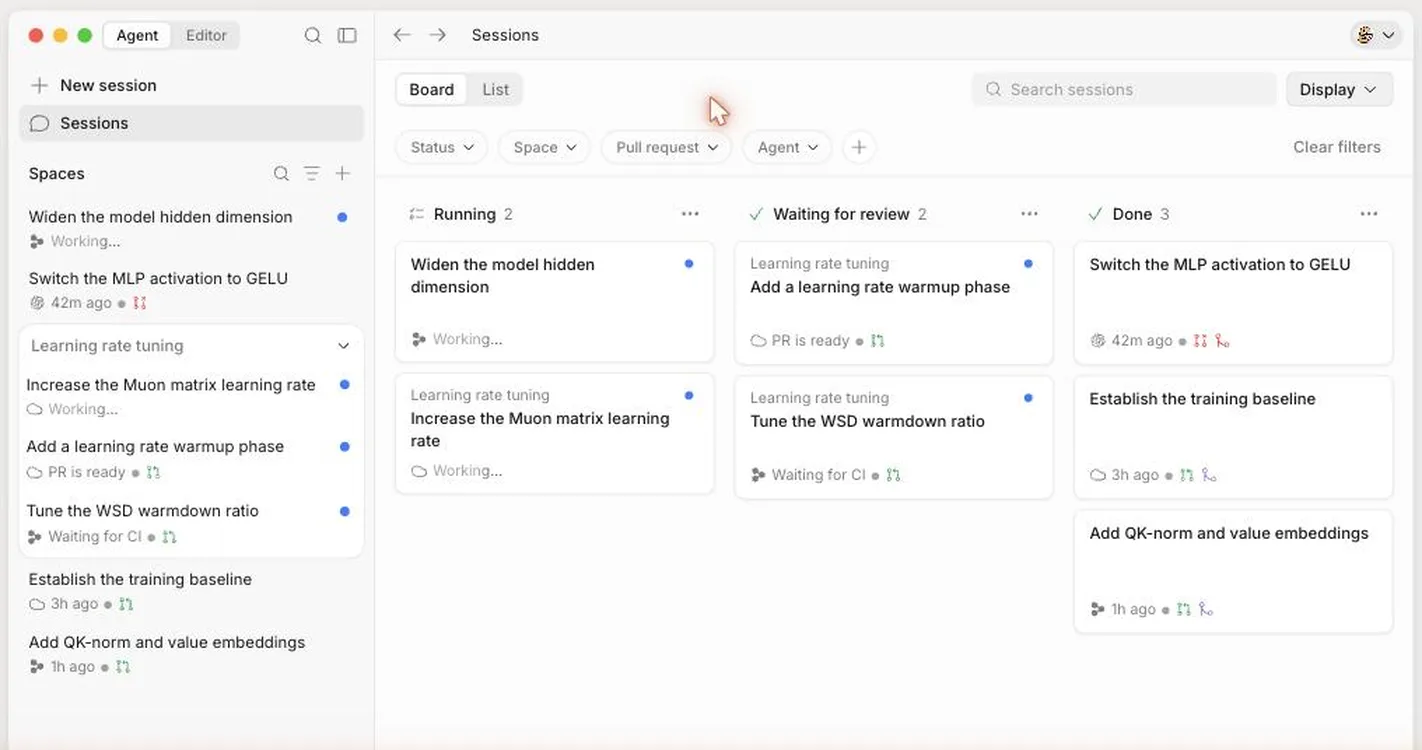
Source: Devin Desktop official site
Toward Devin Desktop — managing local and cloud agents in one place
Today's Devin Desktop is a desktop app for managing a group of local and cloud AI agents in a single screen without leaving the editor. You can survey everything from planning and delegating tasks to reviewing and merging on a session board (Running / Waiting for review / Done). It extends the "collaborate with AI inside the editor" experience that Windsurf had, in the direction of bundling it with Devin's autonomous agents.
What Windsurf was (previously)
Windsurf was an AI-native code editor based on VS Code, known for code completion and an agent feature (Cascade) that performs multi-file editing with an understanding of context. In 2025 its management structure changed significantly, and it was ultimately integrated into Devin Desktop under Cognition.
How to use
-
Get Devin Desktop
Download the desktop app (for macOS and others) from devin.ai/desktop.
-
Connect repositories and agents
Register the repositories you want to work on and your local/cloud agents.
-
Plan and delegate tasks
Create a session and assign tasks to agents.
-
Review and ship
Manage progress on the Running / Waiting for review / Done board, then review and merge.
Features
01Centralized agent management
All your agents in one screen.
- Session board — track progress with Running / Waiting for review / Done
- Local + cloud — span agents on your machine and in the cloud
02Complete it within the editor
From planning to shipping.
- Plan, delegate, review — execute without leaving the editor
- Devin integration — operate it bundled with Devin's autonomous agents
How it differs from other AI coding tools
Today's Windsurf (Devin Desktop) stands out for its positioning as "a command center that bundles and manages multiple coding agents". It takes a different direction from tools that emphasize completion and editing within a single editor.
| Windsurf (now Devin Desktop) | Cursor | Cline | |
|---|---|---|---|
| Positioning | Centralized management of local/cloud agent groups | A dedicated editor built for AI | An OSS agent extending your existing editor |
| Strengths | Planning, delegating, and reviewing many agents | A carefully crafted editor experience | Model freedom, open source |
For the autonomous agent itself that runs in the cloud, Devin is a comparison option; if you emphasize the experience of a dedicated editor, Cursor; and for an OSS agent used in your existing editor, Cline.
The information on this page is based on content published on the official site as of August 2026. Please check the official site for the latest specifications and delivery format.





![[2026 Edition] 20 AI Tools Transforming Developer Workflows | Coding Assistance, Automated Code Review, No-Code Web Development, and Workflow Automation](/_next/image?url=%2Fimages%2Farticles%2Fdeveloper-ai-programming-tools.png&w=3840&q=75 "[2026 Edition] 20 AI Tools Transforming Developer Workflows | Coding Assistance, Automated Code Review, No-Code Web Development, and Workflow Automation")