Cloudflare OS
: How to use it, features, and the business problems it solves
Add bookmark
What is Cloudflare OS?
An open-source AI agent workspace from Cloudflare where everyone in your company can build apps, automate work, and safely access internal systems. It runs inside your own Cloudflare account (self-hosted / Apache 2.0). Every agent and app starts from zero permissions, and per-service Gatekeepers expose only a limited API. Via AI Gateway you can freely choose models and visualize and cap costs per person, team, or app. Outputs can be promoted into small personal apps (Gadgets) and shared.
Business problems it solves


About "Cloudflare OS"
What is Cloudflare OS
Cloudflare OS is an open-source AI agent workspace where everyone in your company can build apps, automate work, and safely access internal systems. Cloudflare released it under the Apache License 2.0 on August 5, 2026, alongside its annual "Agents Week" event. Unlike a general-purpose chatbot such as ChatGPT, it runs on the assumption of your company's own workflows, terminology, and internal systems — and, crucially, it can run entirely inside your own Cloudflare account (self-hostable).
It began as an internal tool Cloudflare built for its own employees. Since the internal rollout in May 2026, thousands of employees — not just engineers — have used it every day to write documents, build slide decks, automate busywork, and put together small internal apps.
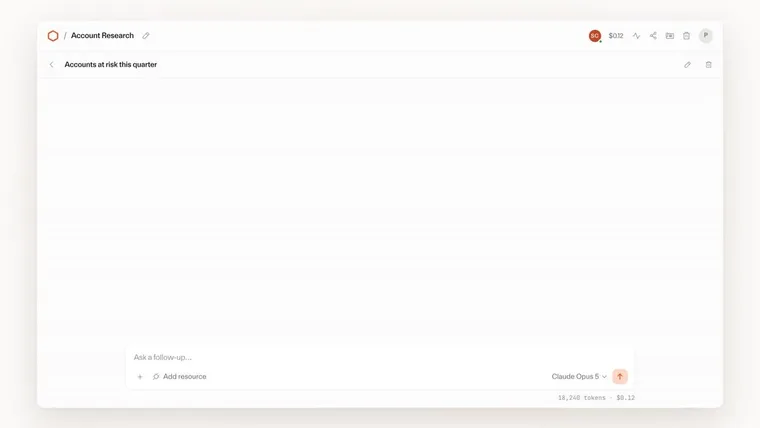
Source: Cloudflare Blog, "Cloudflare OS" (the images below are from the same source)
How to use it
Getting from setup to daily use roughly follows these steps. The only prerequisite is having pnpm installed, so you can try it locally first.
- Run it locally — Clone the repository and run
pnpm run-local; it starts athttp://localhost:8787. To develop the frontend and backend separately, usepnpm dev-serverandpnpm dev-client. - Deploy into your own Cloudflare account — Deploy in a few minutes via the guide at
https://os.cloudflare.app/deploy. If you want to customize things, Gatekeepers included, use thecloudflare-os-startersample that reflects Cloudflare's internal configuration. - Configure Access and AI Gateway — Set who can enter the workspace (Cloudflare Access) and which AI models are available, plus budgets and rate limits (AI Gateway).
- Connect internal systems with Gatekeepers — Connect GitHub, Google, Slack, Notion, and more, per service. Agents see only a limited API, never the raw credentials.
- Direct work in the workspace, then turn it into a Gadget and share — From the browser chat UI, direct research, document creation, and automation, then promote the results into a small app (a Gadget) and share it with colleagues.
Features
Cloudflare OS is made up of four parts: the workspace, Gadgets, Gatekeepers, and AI Gateway.
01Agent workspace
A chat UI that runs on your company's context. No terminal or developer knowledge required.
- Research and analysis — Agents write code to search and aggregate, so you don't have to load huge datasets into the context window
- Document creation — Generate documents, slides, and spreadsheets while keeping them connected to live data, and export to Google Drive and elsewhere
- Deterministic workflows — Run known steps deterministically in code, and let AI handle only the parts that need judgment
02Gadgets (small, personal apps)
Promote an agent's output into a full-stack app with UI, logic, and state.
- Share as an app — Collaborate in real time with shared state (multiplayer)
- Share as a blueprint — The recipient creates an independent copy with their own state and credentials
- Modify on the spot — Instead of filing a feature request and waiting, just ask the AI to change it
03Gatekeepers (zero-permission security)
A per-service Worker that sits between Cloudflare OS and an external service, holding credentials on its behalf and exposing only a limited API.
- Fine-grained control — "just one repository," "can read issues but not code," "mask specific fields," "require human approval to create a PR"
- Observation log — An agent that has read sensitive data is restricted from sending, sharing, or handing it off
- MCP support — Bring in existing MCP servers via an MCP Server Portal
04AI Gateway (model selection and cost control)
All AI inference goes through AI Gateway, so the organization controls model choice and cost.
- Bring Your Own Model — The organization chooses the models. No lock-in to a single vendor
- Task-based routing — Light work to lightweight models, hard analysis to frontier models
- Cost visibility — Attribute requests per person, team, or app, and set budgets and rate limits
How it works — starting from "zero permissions"
The security philosophy of Cloudflare OS is that "every agent and app starts with access to nothing." Only the access that is needed is granted afterward — explicitly, and at a fine grain.
Zero permissions
- Agents/apps begin with access to nothing
A Gatekeeper grants a capability
- A per-service Worker exposes only a limited API
- Credentials stay on the Gatekeeper's side
Execute only via capabilities
- Server code has outbound networking off
- External reach is only through granted capabilities
Constrained by the observation log
Later operations are limited by "what was seen." Reading sensitive data blocks external sending and sharing
The decision is made not by whether the final output "contains" secrets, but by "what the agent saw."
The "OS" is not a metaphor. Its core logic (workshop-backend) is the kernel, the UI (workshop-frontend) is the shell, and the external-service connectors (gatekeeper-*) are the device drivers — built on top of Workers, Durable Objects, Facets, and Cap'n Web. For a deeper look at how it works, see our Cloudflare OS explainer.
Pricing
The Cloudflare OS software itself is open source (Apache 2.0), with no license fee. In real operation, however, the infrastructure and AI you run are on you.
| Item | Price | Notes |
|---|---|---|
| Cloudflare OS itself (software) | Free | Open source (Apache 2.0). Deploy to your own account and use freely |
| Cloudflare usage | Usage-based | Workers, Durable Objects, AI Gateway, etc., for what you run |
| Model usage | Usage-based | Token charges for each model called via AI Gateway (your org chooses the models) |
| Fully managed version | Coming soon, price TBA | A form usable from the Cloudflare dashboard with no ops (not published as of this update) |
In other words, "the base software is free; the infrastructure and AI are on you." That AI cost can be visualized and capped per person, team, or app.
How it differs from other AI workspaces
The biggest difference from general-purpose AI assistants like ChatGPT Enterprise is that it is an architecture built on a starting point of "distrust."
Typical AI assistant
- Tends to grant broad permissions all at once for convenience
- Workflows and integrations get locked inside a vendor's SaaS
- Available models depend on the provider
Cloudflare OS
- Starts from zero permissions, granting capabilities one at a time via Gatekeepers
- Open source and self-hosted; your processes and integrations stay with you
- Freely choose your models (Bring Your Own Model)
This "not tied to a single vendor" idea matches the recent trend toward "AI sovereignty." Related products for comparison:
| Product | Positioning | Angle of comparison |
|---|---|---|
| Sakana Fugu | Multi-agent platform (API) | Secures sovereignty by bundling the "supply of models"; Cloudflare OS takes back the "execution environment" |
| Claude | General-purpose AI assistant | Can be one of the models called via Cloudflare OS's AI Gateway |
| ChatGPT | General-purpose AI assistant | Close in role to the Enterprise edition, but contrasts with self-hosting and zero-permission design |
| Gemini | General-purpose AI assistant | Likewise; can be used as one of the model choices |
Frequently asked questions (FAQ)
Is Cloudflare OS free? The software itself is open source (Apache 2.0) and free. In real operation you separately pay Cloudflare usage and the token charges of the models you call via AI Gateway.
Can non-engineers use it? Yes. It centers on a browser-based chat UI, with no terminal or developer knowledge required.
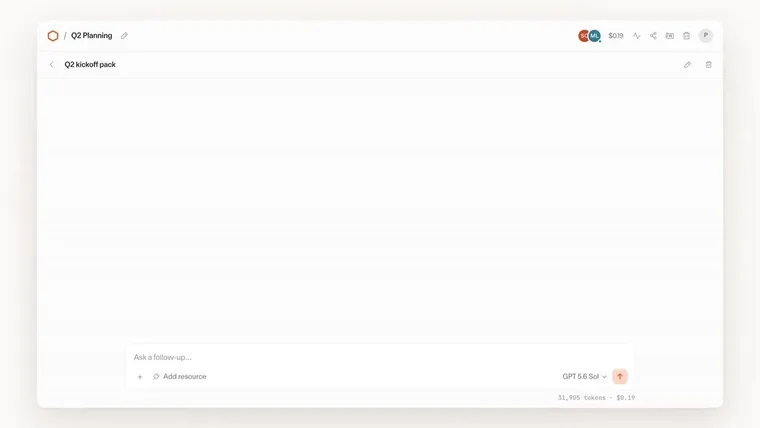
Which AI models can I use? The models your organization chooses, via AI Gateway (Bring Your Own Model). In official demos, Claude Opus 5, GPT 5.6 Sol, GLM 5.2, and Kimi K2.7 are selected.
Can I self-host (on premises)? Deploying to your own Cloudflare account is the primary form. Full self-hosting with workerd is on the roadmap but currently experimental. A fully managed version that needs no ops is coming soon.
Could our internal data leak externally? Zero permissions is the premise: server code has outbound networking off, and external reach is limited to explicitly granted capabilities. The observation log further restricts an agent that has read sensitive data from sending or sharing it.
The information on this page is based on what was published on the official site as of August 2026. Please check the official site for the latest specifications and pricing.
Frequently compared services




Articles featuring Cloudflare OS
What Grok Bot Is [September 2026]: The AI Teammate That Came Down to $20 a Month — Pricing, What It Does, How to Start
Grok Bot launched on 11 August 2026, and the reason it suddenly got loud in September is not that the product changed — it is that the door came down from $200–300 upper tiers to Cursor Pro at $20 a month. This article walks through what Grok Bot actually does, following the official screens: it signs in to Salesforce, pulls 52 accounts, queues 36 drafts and holds them at "0 sent" waiting for approval, then saves the approved exchange as a routine. It covers the three routes in and eight plans, how Grok Bot differs from Manus, Devin and Genspark AI at the same $20 mark (what each one operates, and whether you hand over your accounts), and the three things to settle before handing anything over — which account it signs in with, how far it may act unattended, and the one shared cloud computer per user — all as published in September 2026.
![What Grok Bot Is [September 2026]: The AI Teammate That Came Down to $20 a Month — Pricing, What It Does, How to Start](/_next/image?url=%2Fimages%2Farticles%2Fgrok-bot-guide.png&w=3840&q=75 "What Grok Bot Is [September 2026]: The AI Teammate That Came Down to $20 a Month — Pricing, What It Does, How to Start")
Autonomous AI Agents Compared: 7 Picks for August 2026 — Grok Bot, Manus, Devin and How to Choose
You tried an AI agent and it ended at "wow, impressive" — because what it returned was an answer, not finished work. That changed in August 2026, when products that leave the work inside your actual tools arrived all at once. This article compares seven of them — Grok Bot, Hey Noah, Manus, Genspark AI, Devin, Kilo Code, and Cloudflare OS — along a single axis: where the output lands. It covers the unit of isolation, how much access you hand over, the three layers of cost, and where to start, all from primary sources.
What Is Cloudflare OS? A Deep Dive into the Open-Source AI Agent Workspace (Architecture, Gatekeepers, Self-Hosting, Pricing)
Cloudflare open-sourced Cloudflare OS, an AI agent workspace, on August 5, 2026. This article covers its zero-permission Gatekeeper security, model selection and cost control via AI Gateway, Gadgets (small personal apps), how to deploy it into your own Cloudflare account, and pricing — based on the official blog and GitHub.