Grok Bot
: How to use it, features, and the business problems it solves
Add bookmark
What is Grok Bot?
Grok Bot is an always-on AI teammate released in early beta by SpaceXAI (formerly xAI) on August 11, 2026. Each Bot gets a computer of its own in the cloud, signs in to the tools you already use — Gmail, Salesforce, Zendesk and more — and works inside them just like a person would until the job is finished. You message a Bot the way you would message a colleague, and if you let it watch you do a workflow once, it saves the steps as a routine and runs them on its own from then on. You can run several Bots in parallel and let them hand work between themselves. Available on macOS, Windows, and iOS. There is no standalone plan: it comes bundled with the Cursor, SuperGrok, and Cursor Teams subscriptions, starting at Cursor Pro ($20/month) and SuperGrok ($30/month), with weekly usage included and overage billed on token cost.
Business problems it solves


About "Grok Bot"
What is Grok Bot
Grok Bot is an AI teammate that gets a computer of its own in the cloud, signs in to your apps, and carries work through to the end. SpaceXAI (formerly xAI / X.AI LLC) released it as an early beta on August 11, 2026.
What separates it from an AI assistant that answers in chat is where the work lands. Grok Bot does not hand back a summary — it updates the CRM record, leaves the draft in your inbox, files the ticket. It comes back to you only when something needs your approval.
It began as an internal prototype at SpaceXAI, where teams built Bots to run sales outbound, marketing campaigns, office operations, and bug fixes. That internal tool is what has now been opened up.
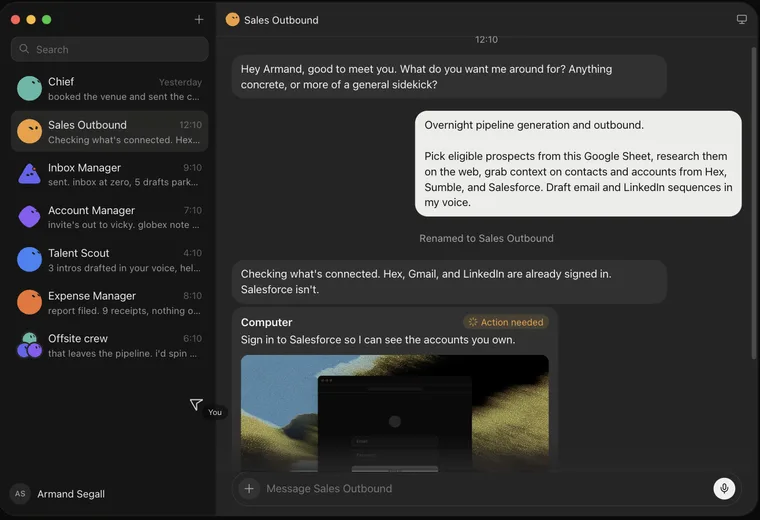
Source: Grok Bot official site (the screenshots below are from the same source)
Who finishes the last 10%
The design philosophy shows up plainly in the comment SpaceXAI published from its own team.
"There is a huge difference between 90% done and 100% done. Most AI gets you almost there. Grok Bot can finish the swing, because the work lands where a human would put it, in the actual tool."
— Roman, Product at SpaceXAI
What makes that possible is the computer each Bot has in the cloud. It comes with a browser, a terminal, and a filesystem, and it keeps running even when your laptop is closed. It also means the Bot can reach services that offer no clean API and no MCP server, because it operates the screen the way a person does.
A typical AI assistant
- Stops at the answer — a person still has to apply it
- Can only connect to services with an API or MCP server
- Stops when your machine or session does
Grok Bot
- Leaves the work inside the real tool — CRM updated, draft written, ticket filed
- Operates the screen, so it reaches services with no API at all
- Runs 24/7, laptop closed or not
How to use it
There is no workflow to design first. You start by talking to a Bot and handing it work.
- Install the app — Download the desktop build (macOS or Windows) from the official site. There is also an iOS app, and you can pick up the same thread on either surface.
- Create your first Bot — Use "New agent" and describe what you want in plain language. It names itself based on the role (for example, Sales Outbound).
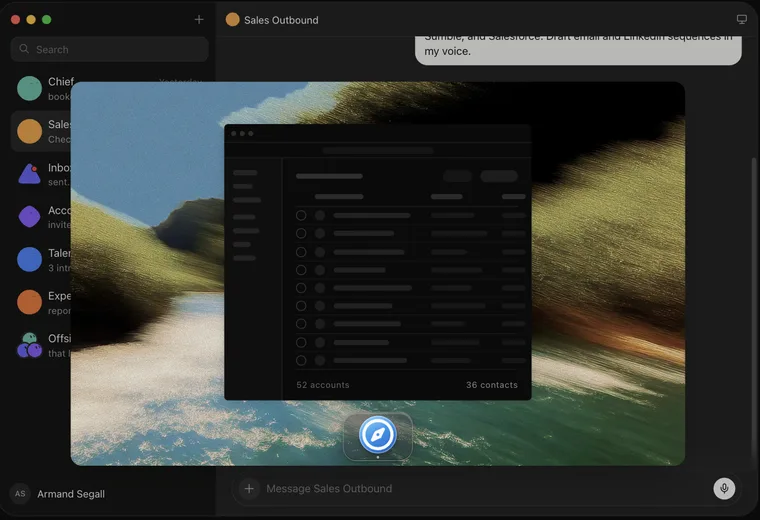
- Sign it in to your tools — When the Bot asks to be signed in to, say, Salesforce, open the Computer view and take over. It shows "You're in control" while you handle the credentials yourself.
- Ask like you would ask a colleague — "Generate pipeline overnight" is enough. The Bot researches, decides, and reports back when it is done.
- Show it once, then let it run — Ask a Bot to follow along the next time you do a job. It saves the steps as a routine, takes your corrections, and runs it on its own afterwards.
- Add Bots and connect them — Split the work across inbox, expenses, recruiting, and bug fixes, then put Bots in the same thread or a group chat so they can pass work between themselves.
Features
01A computer of its own
Bots work with a browser, a terminal, and files directly, on a machine in the cloud.
- Signs in to your apps — Uses the tools you already have, the way you use them
- No API required — Reaches services with no clean API and no MCP server
- Always on — Work does not stall when you close your laptop or step away
02Works as a team
Closer to having a small team than to managing agents one at a time.
- Runs in parallel — Inbox, expenses, recruiting, and bug fixes at the same time
- Bot-to-bot messaging — Bots share context in threads and hand ownership over
- A chief of staff — Put one Bot on top to coordinate the specialists below it
03Routines you teach by showing
Instead of writing prompts, you do the job once with the Bot watching.
- Learns by following — Observes your steps and saves them as a routine
- Absorbs corrections — Edit the output and it learns the edit too
- Scheduled runs — Saved routines can run on a schedule
04Memory and initiative
The longer you work together, the less often it stops to ask.
- Keeps context — Remembers conversations, preferences, and edge cases
- Matches your voice — Drafts in the sender's own tone
- Gets ahead of you — Picks work back up and pings you only for judgment calls
Every Bot shares one computer
This is the point most write-ups get wrong, so here is the official FAQ answer as written.
Official FAQ, "Do Bots share one computer?": Yes. Every Grok Bot shares one persistent cloud computer. Your Bots share that machine (files, browser, logins), so they can hand work off and keep context. Isolation is per user, not per Grok Bot.
In other words, each Bot does not get its own sandbox. That shared design is exactly why Bots can hand work between themselves so smoothly — but it also means credentials you sign one Bot into are reachable by your other Bots. Choose which accounts you connect with that in mind.
Pricing
Grok Bot has no standalone plan; it is bundled into existing subscriptions. As of September 2026 it starts at Cursor Pro, $20 a month.
| Plan | Price (monthly) | What Grok Bot gets you |
|---|---|---|
| Cursor Pro | $20 | Its own computer, signs into your tools, routines on a schedule, desktop and mobile, weekly usage included |
| Cursor Pro+ | $60 | Same as above |
| Cursor Ultra | $200 | The above plus extended limits on AI tokens |
| SuperGrok | $30 | Grok Bot access, Grok 4.6, higher rate limits across features, image and video generation, connectors |
| SuperGrok Plus | $100 | Everything in SuperGrok plus 1080p video, significantly higher usage across Chat, Imagine, Voice and Build, priority access |
| SuperGrok Heavy | $300 | Everything in SuperGrok plus the highest usage at the fastest speed, the most powerful intelligence, dedicated support and early access |
| Cursor Teams Standard | $40 / seat | Everything in Cursor Pro+ plus centralized team billing and settings, a team marketplace for skills and plugins, shared usage analytics |
| Cursor Teams Premium | $120 / seat | Everything in Cursor Ultra plus those team features and SAML/OIDC SSO |
The official FAQ lists eligibility as Cursor Pro, Pro+ and Ultra, SuperGrok, SuperGrok Plus and Heavy, and Cursor Standard and Premium Teams subscribers. Every plan includes weekly usage, with anything beyond that billed on token cost. Enterprise access is expected in the coming weeks; for now there is only a waitlist.
At launch in August 2026 access centred on the upper tiers. The September pricing page shows it included from the entry plan. This is still an early beta, so the terms may move again.
Security and data handling
- Authentication runs on Cursor SSO, and your existing privacy mode settings carry over
- The Bot's cloud computer is encrypted in transit and at rest, with training opt-out available
- Sensitive actions can be routed through Auto Review before they run
- Enterprise admins will be able to set DLP and data controls once enterprise access opens
As noted above, isolation is per user. Avoid connecting shared or high-privilege admin accounts, and create a scoped account for the Bot instead.
Adoption and reception
The early users are SpaceXAI's own teams. The launch post includes named comments by department.
01Nothing to learn
- Fiona, Community — "There wasn't anything to learn. It was just like bringing on a coworker. No automations to set up, no product quirks, no intricate naming. You're just chatting with a friend."
02Working in parallel
- Vincent, Growth — "Working with Grok Bot feels like I have eight arms like an octopus, with every arm in concert with the others, each performing the task the way I would."
03Letting go
- Bennett, Sales — "I showed Grok Bot a workflow once and now I just fully trust it to run forever. I feel like I'm 2-3x more efficient because it does it without me verifying and reviewing."
- Emma, Operations — "When I first started, I was checking in on them every 15 minutes and micromanaging the Bots to the point where they asked me why I kept asking so many questions. Now I let it do its thing and it's just gotten better with time."
Internally, the examples given include a sales Bot that updates the CRM from call transcripts and drafts follow-ups, an ops Bot that seats new hires and processes invoices received in Gmail, and an engineering Bot that reproduces a bug in the product UI, files the ticket, and hands the fix off to a debugging Bot.
How it differs from other AI agents
Grok Bot is positioned neither as a model nor as a chat product, but at the digital labor layer: it takes on the work itself. Setting it beside adjacent products makes the distinction clear.
| Product | Execution environment | Strength | Delivery |
|---|---|---|---|
| Grok Bot | Its own cloud PC (browser, terminal) | Operating existing SaaS the way a person does, to completion | Bundled with existing subscriptions (from $20/month) |
| Manus | Cloud virtual environment | Finishing research, documents, and website builds | Standalone subscription |
| Devin | Cloud development environment | Software development (implementation, tests, PRs) | Standalone subscription |
| Cloudflare OS | Your own Cloudflare account | Connecting to internal systems with tightly scoped permissions | Open source (self-hosted) |
A rough guide: choose Grok Bot when you want manual work inside your existing SaaS taken over as-is; Manus or Genspark when you want research and deliverables done in one pass; Devin when you want development tasks handed off wholesale; and Cloudflare OS when permissions and data residency have to stay in your hands.
If your need is narrower — scheduling and follow-ups for one person — an AI executive assistant that lives in SMS and email, such as Hey Noah, is a far lower barrier to entry.
FAQ
Q. Can I give instructions in Japanese? Grok as a model handles Japanese, but the app UI is English and no Japanese support has been announced (as of September 2026).
Q. Which devices can I use? Desktop (macOS or Windows) and the iOS app. The same thread continues across both.
Q. Is there an enterprise plan? The official FAQ says Grok Bot is expected to open to teams and enterprises in the coming weeks. For now there is a waitlist.
Q. How is this different from Grok the chat product? Grok centers on conversation and text generation. Grok Bot has a computer of its own and operates real applications to finish the work.
The information on this page is based on what was published on the official site as of August 2026. As an early beta, specifications and availability may change. Please check the official site for the latest details.
Frequently compared services



Articles featuring Grok Bot
What GPT-6 Astra Is [September 2026]: Which ChatGPT Plans Include It, API Pricing, and How to Split Work with GPT-5.6
GPT-6 Astra, announced by OpenAI on 3 September 2026 (US time), is a flagship tuned for computer use and long, multi-step work, true to the pitch that it "can do anything a person can do on a computer." It scores 72.6% on OSWorld 2.0, and time per task drops 47% from GPT-5.6 Sol's roughly 75 minutes to roughly 40. This article checks what changed against the benchmarks, then lays out where each ChatGPT plan can use it (Pro at ¥16,800 / ¥30,000, Business and Enterprise get "GPT-6 Pro" in Chat; Plus at ¥3,000 gets it through ChatGPT Work and Codex; Free and Go do not), the caps such as 50 or 200 messages a week, API pricing ($10 input / $50 output, 2.5x Sol) and how to split work with Sol, Terra and Luna, and the behaviour changes on switching (more clarifying questions, more sensitivity to skill files), based on OpenAI's announcement, Help Center and model page.
![What GPT-6 Astra Is [September 2026]: Which ChatGPT Plans Include It, API Pricing, and How to Split Work with GPT-5.6](/_next/image?url=%2Fimages%2Farticles%2Fgpt-6-astra-guide.png&w=3840&q=75 "What GPT-6 Astra Is [September 2026]: Which ChatGPT Plans Include It, API Pricing, and How to Split Work with GPT-5.6")
What Grok Bot Is [September 2026]: The AI Teammate That Came Down to $20 a Month — Pricing, What It Does, How to Start
Grok Bot launched on 11 August 2026, and the reason it suddenly got loud in September is not that the product changed — it is that the door came down from $200–300 upper tiers to Cursor Pro at $20 a month. This article walks through what Grok Bot actually does, following the official screens: it signs in to Salesforce, pulls 52 accounts, queues 36 drafts and holds them at "0 sent" waiting for approval, then saves the approved exchange as a routine. It covers the three routes in and eight plans, how Grok Bot differs from Manus, Devin and Genspark AI at the same $20 mark (what each one operates, and whether you hand over your accounts), and the three things to settle before handing anything over — which account it signs in with, how far it may act unattended, and the one shared cloud computer per user — all as published in September 2026.
![What Grok Bot Is [September 2026]: The AI Teammate That Came Down to $20 a Month — Pricing, What It Does, How to Start](/_next/image?url=%2Fimages%2Farticles%2Fgrok-bot-guide.png&w=3840&q=75 "What Grok Bot Is [September 2026]: The AI Teammate That Came Down to $20 a Month — Pricing, What It Does, How to Start")
Autonomous AI Agents Compared: 7 Picks for August 2026 — Grok Bot, Manus, Devin and How to Choose
You tried an AI agent and it ended at "wow, impressive" — because what it returned was an answer, not finished work. That changed in August 2026, when products that leave the work inside your actual tools arrived all at once. This article compares seven of them — Grok Bot, Hey Noah, Manus, Genspark AI, Devin, Kilo Code, and Cloudflare OS — along a single axis: where the output lands. It covers the unit of isolation, how much access you hand over, the three layers of cost, and where to start, all from primary sources.