
What Grok Bot Is [September 2026]: The AI Teammate That Came Down to $20 a Month — Pricing, What It Does, How to Start
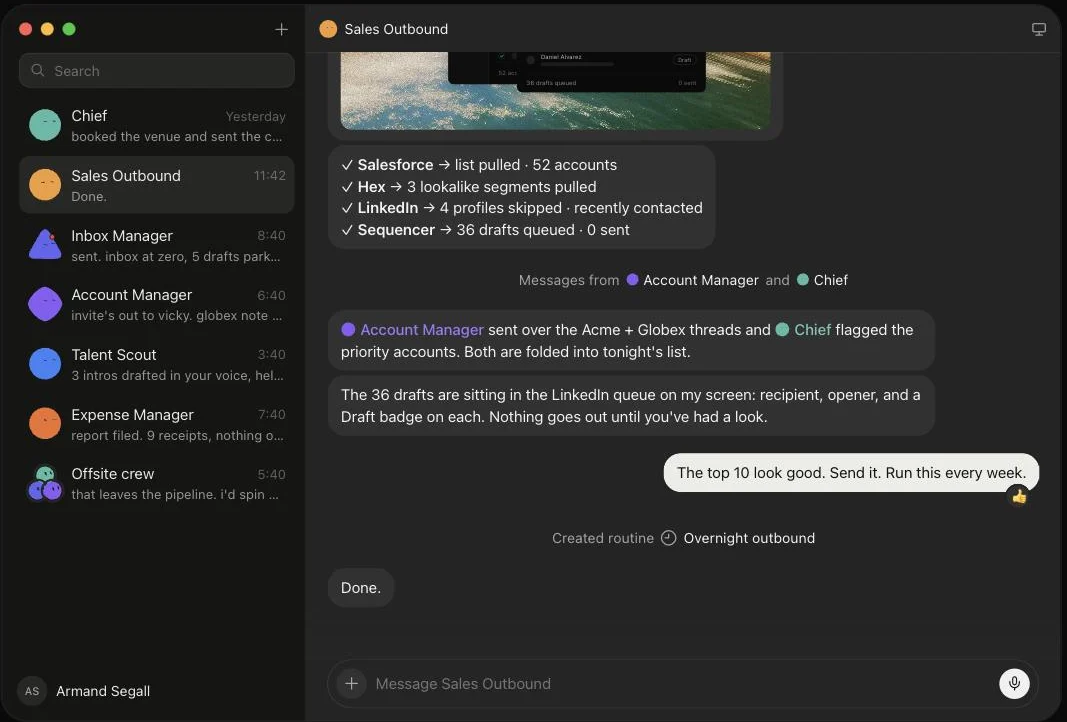
Grok Bot launched on 11 August 2026, and the reason it suddenly got loud in September is not that the product changed — it is that the door came down from $200–300 upper tiers to Cursor Pro at $20 a month. This article walks through what Grok Bot actually does, following the official screens: it signs in to Salesforce, pulls 52 accounts, queues 36 drafts and holds them at "0 sent" waiting for approval, then saves the approved exchange as a routine. It covers the three routes in and eight plans, how Grok Bot differs from Manus, Devin and Genspark AI at the same $20 mark (what each one operates, and whether you hand over your accounts), and the three things to settle before handing anything over — which account it signs in with, how far it may act unattended, and the one shared cloud computer per user — all as published in September 2026.
Source: Grok Bot official site (all screenshots in this article come from the same source)
Grok Bot launched on 11 August 2026, and suddenly, in September, everyone started saying its name. The product has not changed since August. What changed is the price of the door.
At launch, eligibility was limited to Cursor Ultra ($200/mo), SuperGrok Heavy ($300/mo) and Cursor Premium Teams ($120/seat/mo). As of September 2026 the official pricing page includes it in Cursor Pro, at $20 a month. For an individual, the door is a tenth of the price.
This article covers what Grok Bot actually does, how it differs from the other agents now sitting at the same $20 mark, and what a team should settle before trying it — all from primary sources.
The short version
Grok Bot is not an AI that returns answers; it is an AI that operates applications and finishes the job. From its own cloud computer it signs in to Gmail or Salesforce for real, updates the CRM, writes the drafts, and stops to ask when approval is needed.
It is now included from Cursor Pro at $20 a month. You cannot buy it on its own: it comes bundled with Cursor (Pro, Pro+, Ultra), SuperGrok (standard, Plus, Heavy) or Cursor Teams.
Right now it suits an individual or a small team. The UI is English only, enterprise access is still a waitlist, and every Bot shares one computer. Rolling it out across an organisation can wait until those three are resolved.
What changed: from $200 a month to $20
The official pricing page lists three routes in. The cheapest plan on each already carries the core of Grok Bot.
| Route | Cheapest plan | Monthly | Upper tiers |
|---|---|---|---|
| Cursor | Pro | $20 | Pro+ $60 / Ultra $200 |
| Grok | SuperGrok | $30 | Plus $100 / Heavy $300 |
| Cursor Teams | Standard | $40 per seat | Premium $120 per seat |
What matters is what the $20 Cursor Pro tier lists. In the official wording: "Grok Bot's own computer", "Signs into your tools", "Routines on a schedule", "Work anywhere: desktop, mobile, and more" and "Weekly Grok Bot usage included" — five items. This is not a stripped-down edition; it is the same substance as the upper tiers.
The official FAQ likewise puts eligibility at "Cursor Pro, Pro+, and Ultra, SuperGrok, SuperGrok Plus, and Heavy, and Cursor Standard and Premium Teams subscribers".
What the upper tiers add is not Grok Bot features but usage allowance, and the other things included in the same subscription. Each subscription carries a weekly Grok Bot allowance, and usage beyond it is billed on token cost. Run heavy work daily and an upper tier can end up cheaper.
What Grok Bot does: it drafts, then stops
The image at the top of this article is the behaviour itself. Read in order:
Sign in and gather the material
- 52 accounts pulled from Salesforce
- Context gathered from Hex and LinkedIn too
Produce the work
- 36 drafts queued
- 4 skipped on its own as recently contacted
Stop without sending, and wait
It reports at "0 sent". Only when a person says "the top 10 look good, send it" does anything go out — and that exchange is saved as a routine
Step 3 is the point. Grok Bot does not say "all done"; it says "this far — shall I send?" The first worry anyone has about handing work to an agent — that it will send something on its own — is answered in the product's default behaviour.
And the moment a person approves, the whole sequence is saved as a routine. That is the "Created routine / Overnight outbound" line in the image. From the following week it runs without being asked.
You show it the steps rather than writing them down
There are two ways to make a routine. One is the above: ask, let it finish, then put it on a schedule. The other is to let it watch you work.
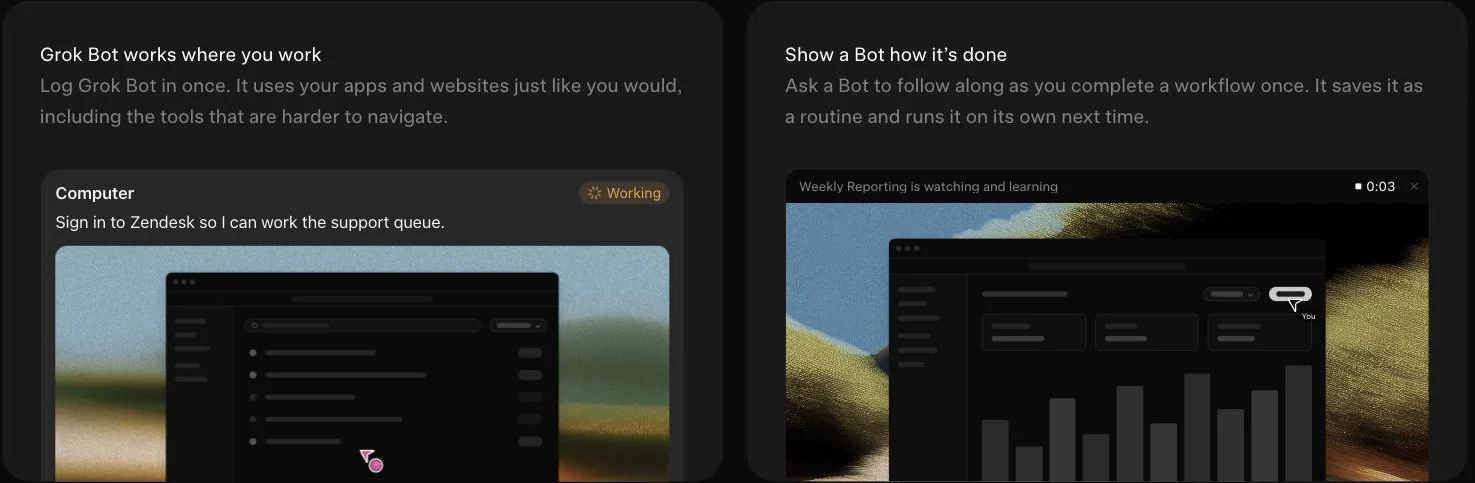
The official description: "Ask a Bot to follow along as you complete a workflow once. It saves it as a routine and runs it on its own next time." No procedure document, no workflow to build.
This is what makes it useful for work that is hard to put into words — open that admin screen, filter on this, export the CSV, keep only these columns. Faster to show than to explain.
Eight role templates
The official site lists ready-made roles: Sales Outbound, Talent Scout, Paid Media, Expense Manager, Product Performance, Bug Reproduction, Account Health and Chief of Staff.
The line-up says a lot. This is not aimed at development itself, but at the routine work that comes round every week beside it.
Comparing at $20: the other agents at this price
Now that Grok Bot has come down to $20, it has company. Here they are, sorted by what they operate.
| Tool | What $20-ish buys | What it operates | Do you hand over accounts? |
|---|---|---|---|
| Grok Bot | Bundled with Cursor Pro, $20 | Your apps and websites | Yes — it signs in for real |
| Manus | $20 (4,000 credits) | Browser and code inside a sandbox | No |
| Devin | Core from $20 (ACU-based) | Codebases and GitHub | Repository access only |
| Genspark AI | See the official site | Decks, sheets, AI phone calls | No |
Same label, entirely different things handed over. Miss this distinction and the permission conversation stalls the rollout after you have already bought.
 Grok Bot | Its own computer, signing in to your apps
Each user gets one persistent cloud computer, and the Bots work inside it with a browser and files. Because they sign in to Gmail or Zendesk exactly as a person would, they reach internal tools and dated admin screens that were never given an API. They keep working with your laptop closed.
It fits when the time is going not into the research but into the data entry and follow-ups after it.
 Manus | Keep your accounts, take the output
Give it a goal and it plans, executes and verifies inside a cloud sandbox, returning research, documents, websites and apps as artefacts. Browser control and code execution stay inside that sandbox, so you never hand over your accounts — the key difference from Grok Bot.
Pricing is $20 / $40 / $200 a month for 4,000 / 8,000 / 40,000 monthly credits, 17% off annually. Its strength is that you can start today, without waiting on a permission design.
 Devin | When the target is a codebase
Cognition's coding agent. From a natural-language instruction it plans, implements, tests and opens the pull request inside its own environment. Pricing is Core (from $20 a month, ACU-based), Team ($500 a month) and Enterprise.
Because the scope stops at code, review works as the safety valve you already have. It does not compete with Grok Bot; it covers a different area.
 Genspark AI | Research through to finished documents, in one place
A workspace that switches between several AI models and builds the work into finished form — slides, sheets, documents. Note that the pricing page requires a sign-in, so the figures are not publicly visible.
Three things to settle before you hand anything over
Grok Bot asks for more than the others do. Decide these three before you start and you will not have to walk anything back.
01Which account it signs in with
Handing over your own admin account is the most dangerous way to begin.
- Create a dedicated account — a work account with narrowed permissions, and connect only that
- Avoid shared accounts — you lose the ability to tell who did what, and it falls out of the audit trail
02How far it may act unattended
Sending, paying and deleting are the three to settle in advance.
- Use Auto Review — the official FAQ states that "Sensitive actions can go through Auto Review before they run"
- Start at the draft — leaving the send button to a person keeps early mistakes cheap
03Whether one shared computer is acceptable
This constraint is specific to Grok Bot.
- Isolation is per user — the official FAQ says "Every Grok Bot shares one persistent cloud computer" and "Isolation is per user, not per Grok Bot"
- It is also the point — sharing files, browser and logins is exactly what lets Bots hand work between themselves. The flip side: access granted to one Bot reaches the others
On data, the official FAQ states training opt-out and encryption in transit and at rest. DLP, certificates, proxies and network controls are described as configurable at boot for enterprise admins — but enterprise access itself is currently a waitlist.
Try it now, or wait?
Fine to try now
- You already pay for Cursor or SuperGrok — no extra cost to try
- An individual or small team, deciding its own permissions
- An English UI is not a blocker
Better to wait
- You want an org-wide rollout — enterprise is still a waitlist
- You need a Japanese UI — nothing has been announced
- Per-Bot isolation is a requirement — one computer per user is the design
Even if you land in the right-hand column, there is no need to stop. Try Manus or Genspark AI, which never ask for your accounts, or look at Cloudflare OS, where the permissions and logs stay yours.
 Cloudflare OS | Self-hosted, handing out permissions from zero
Cloudflare's open-source (Apache 2.0) agent workspace. You run it in your own Cloudflare account, and every agent starts from zero permissions. A per-service Gatekeeper hands over only a limited API, and cost is visible and cappable per person, per team and per app.
For an IT function that wants to hold the permissions and the logs, it is the practical option while Grok Bot's enterprise edition is still coming.
See the full Cloudflare OS page
FAQ
In summary
- Grok Bot is the kind of agent that signs in to your apps and finishes the work. What comes back is the work, not an answer
- As of September 2026 it is included from Cursor Pro at $20 a month. There is no standalone plan; it is bundled into existing ones
- By default it stops short of sending. An approved exchange is saved as a routine and runs itself next time
- Three constraints: English UI, enterprise on a waitlist, and one shared computer per user
- Worth trying for an individual or small team. For an organisation, keep Manus and Cloudflare OS in view alongside it
Related reading
- Seven autonomous AI agents compared — Grok Bot among seven tools, sorted by where the work lands
- Grok — SpaceXAI's conversational AI, and how its role differs from Grok Bot
- AI agent category — the current listing
The information here reflects what was published on the official site as of 4 September 2026. Specifications and pricing change; check the official site for the current terms.
AI tools featured in this article

Related articles
Autonomous AI Agents Compared: 7 Picks for August 2026 — Grok Bot, Manus, Devin and How to Choose
You tried an AI agent and it ended at "wow, impressive" — because what it returned was an answer, not finished work. That changed in August 2026, when products that leave the work inside your actual tools arrived all at once. This article compares seven of them — Grok Bot, Hey Noah, Manus, Genspark AI, Devin, Kilo Code, and Cloudflare OS — along a single axis: where the output lands. It covers the unit of isolation, how much access you hand over, the three layers of cost, and where to start, all from primary sources.
Best AI Consulting and Implementation Support Companies in Japan 2026: 18 Compared by Scope, Price Range and SME Fit
We compare 18 AI implementation support and consulting companies in Japan (ExaWizards, BrainPad, ABEJA, PKSHA, Laboro.AI, ELYZA, JAPAN AI, Givery, AVILEN, Algomatic, LIG, NOVEL, GENAI, AX Inc., Sun Asterisk's AI担当くん, Digital Gorilla, AX総研 (AX Research Institute) and ブーストマーケティング (BoostMarketing)) using only their official information: scope (strategy, PoC, development, adoption), strengths, price, target company size and track record. From the seven companies that publish prices plus Givery's AI advisory plan, we summarize price ranges for assessments, advisory and hands-on support, and cover five criteria for choosing, whether SMEs can engage them, and whether the Digitalization and AI Adoption Subsidy can be used for consulting fees.
How to Edit NotebookLM Slides [September 2026]: Why You Can't Fix the Text Even in PPTX, and Five Methods by What You Need to Change
NotebookLM (renamed Gemini Notebook in July 2026) produces slide decks that are "a single picture with text in it", drawn by the image generation model Nano Banana Pro. Whether you export to PDF or PowerPoint (PPTX), each slide goes in as an image, and export to Google Slides is still not available as of September. This article confirms from Google's official help that the official Revise feature rebuilds the entire slide deck every time and does not consult your sources during revisions, then sets out five methods you can choose by what you want to fix: giving instructions with Revise; laying corrections over the top in PowerPoint; conversion tools that use OCR to turn slides back into a PPTX with editable text (comparing pricing and data handling for NoteSlide, Kirigami, DeckEdit, CopySlides and Swift-Slide); redrawing the slide as an image with Nano Banana; and rebuilding it as an editable deck with tools such as GAMMA or Irusiru. It also covers caveats such as Canva's Grab Text not working on Japanese slides, the compute-based limits in place since 2 September, and how watermarks are handled.
![How to Edit NotebookLM Slides [September 2026]: Why You Can't Fix the Text Even in PPTX, and Five Methods by What You Need to Change](/_next/image?url=%2Fimages%2Farticles%2Fnotebooklm-slide-edit.png&w=3840&q=75 "How to Edit NotebookLM Slides [September 2026]: Why You Can't Fix the Text Even in PPTX, and Five Methods by What You Need to Change")
7 AI Simultaneous Interpretation Tools Compared (August 2026): Is the Built-in Feature in Teams and Zoom Enough?
Search for AI interpretation tools and you get lists of 25 apps mixing consumer travel tools with enterprise meeting software. The real question is whether the built-in feature in the Teams or Zoom plan you already pay for is enough — and if not, what is missing. With Microsoft Teams shipping its Interpreter agent in January 2026 and Google Meet making speech translation generally available in February, that question now has an answer. This article pins down what all three platforms can and cannot do, then compares seven dedicated tools — Sentio, VoicePing, kotoba, DeepL Voice, Wordly, Interprefy, and KUDO — by how they capture audio, what they output, and how they charge.
[2026 Edition] 10 AI Tools to Accelerate Executive Decision-Making | Mid-Term Plans, Investment Analysis, Learning, and Presentation Decks
[Latest 2026] Speed up mid-term business plan drafting, investment decision reports, executive learning, and presentation creation. A deep dive into 9 AI tools that support leadership decision-making — covering features, benefits, selection criteria, and real-world adoption examples.
![[2026 Edition] 10 AI Tools to Accelerate Executive Decision-Making | Mid-Term Plans, Investment Analysis, Learning, and Presentation Decks](/_next/image?url=%2Fimages%2Farticles%2Fai-tools-for-executive-decision-making.png&w=3840&q=75 "[2026 Edition] 10 AI Tools to Accelerate Executive Decision-Making | Mid-Term Plans, Investment Analysis, Learning, and Presentation Decks")
What GPT-6 Astra Is [September 2026]: Which ChatGPT Plans Include It, API Pricing, and How to Split Work with GPT-5.6
GPT-6 Astra, announced by OpenAI on 3 September 2026 (US time), is a flagship tuned for computer use and long, multi-step work, true to the pitch that it "can do anything a person can do on a computer." It scores 72.6% on OSWorld 2.0, and time per task drops 47% from GPT-5.6 Sol's roughly 75 minutes to roughly 40. This article checks what changed against the benchmarks, then lays out where each ChatGPT plan can use it (Pro at ¥16,800 / ¥30,000, Business and Enterprise get "GPT-6 Pro" in Chat; Plus at ¥3,000 gets it through ChatGPT Work and Codex; Free and Go do not), the caps such as 50 or 200 messages a week, API pricing ($10 input / $50 output, 2.5x Sol) and how to split work with Sol, Terra and Luna, and the behaviour changes on switching (more clarifying questions, more sensitivity to skill files), based on OpenAI's announcement, Help Center and model page.
![What GPT-6 Astra Is [September 2026]: Which ChatGPT Plans Include It, API Pricing, and How to Split Work with GPT-5.6](/_next/image?url=%2Fimages%2Farticles%2Fgpt-6-astra-guide.png&w=3840&q=75 "What GPT-6 Astra Is [September 2026]: Which ChatGPT Plans Include It, API Pricing, and How to Split Work with GPT-5.6")