Autonomous AI Agents Compared: 7 Picks for August 2026 — Grok Bot, Manus, Devin and How to Choose
You tried an AI agent and it ended at "wow, impressive" — because what it returned was an answer, not finished work. That changed in August 2026, when products that leave the work inside your actual tools arrived all at once. This article compares seven of them — Grok Bot, Hey Noah, Manus, Genspark AI, Devin, Kilo Code, and Cloudflare OS — along a single axis: where the output lands. It covers the unit of isolation, how much access you hand over, the three layers of cost, and where to start, all from primary sources.
You tried an AI agent and it ended at "wow, impressive" — a lot of people have had exactly that experience. It researches. It suggests. But in the end, you were still the one entering it into the CRM, sending the email, filing the ticket. So the hours barely moved.
That is what changed in August 2026. AI stopped returning answers and started leaving the finished work inside the actual tool. What people are sharing is not a new benchmark score — it is "the work actually got done."
Which makes choosing harder, not easier. The more you hand over, the more access you hand over with it. This article compares seven autonomous AI agents you can actually use as of September 2026, using nothing but primary sources, and lays out what to look at when you choose.
The short answer: it comes down to where the output lands
Here is the conclusion first. Scanning feature tables will not decide it for you. There is one thing to look at: where this agent's work ends up. The deeper that landing point, the more hours actually disappear — and the more access you have to grant.
Landing pointShallow ↑ smaller effect, safer / Deep ↓ bigger effect, needs access
In the conversation
A conventional AI chat
A summary or a suggestion comes back. A person still applies it, so the hours barely change
No access needed
A file in your hands
Manus / Genspark AI
Research and documents come back as something you can use. You check them before you use them
Mostly read access
A pull request
Devin / Kilo Code
The work arrives as a diff. Your existing pre-merge review is already the safety valve
Repository access
Inside the real business system
Grok Bot / Hey Noah
The CRM record is updated, the draft is in the inbox, and the reservation call has been made
Sign-in to your SaaS
The same words — "AI agent" — but the top row and the bottom row raise completely different questions at adoption time.
Those four rows are also the product categories. From the top: task-completion (returns a file), development (returns a pull request), doing-the-work (finishes inside the business system). And one more: platform, where you assemble agents yourself on top of your own permissions and data.
The reason every "best AI agents" list contains a different set of products is that these four get mixed together.
Comparison: seven tools
Seven products by landing point, execution environment, price, and Japanese support. Prices are as published, as of September 2026.
| Tool | Type | Where the output lands | Execution environment | Price | Japanese |
|---|---|---|---|---|---|
| Grok Bot | Doing the work | Inside your existing SaaS | Its own cloud PC | Bundled from the $20/month plan | English UI |
| Hey Noah | Doing the work | Calendar, inbox, phone calls | Inside SMS, email, Slack | $49/month | English |
| Manus | Task completion | Files, web pages | Cloud virtual environment | Free tier plus subscription | Supported |
| Genspark AI | Task completion | Slides, sheets | Cloud | Free tier plus subscription | Supported |
| Devin | Development | Pull requests | Cloud development environment | Usage-based plus subscription | English UI |
| Kilo Code | Development | Your code, PRs | Your IDE, CLI, or the cloud | Free for individuals (inference at cost) | Supported |
| Cloudflare OS | Platform | Wherever you decide | Your own Cloudflare account | Software is free | Supported |
Four axes for choosing well
Axis 1|How deep do you actually need it to land?
Decide this first. You almost never need to start by letting it write into a business system.
If your problem is "research and document prep eat my week," a task-completion agent already solves it, with essentially no permission design. If your problem is "I can do the research myself — it's the data entry and follow-ups that never end," only a doing-the-work agent will help. Naming which one applies to you narrows the field to two or three.
Axis 2|What is the unit of isolation?
This one gets missed. Assume "each agent is sandboxed separately" and you will hand over far more reach than you intended. In practice, what shares a box differs by product.
Per user
Files, browser, and logins are shared across every Bot, which is why handoffs are fast. The flip side: credentials you give one Bot are within reach of the others
e.g. Grok Bot
Per task
A disposable environment per request. An incident stays inside one task, but so does the context from the last one
e.g. Manus, Devin
Per worktree
Only the working directory is split inside one repository, so parallel agents never clobber each other's files
e.g. Kilo Code
In particular, Grok Bot's official FAQ states that "every Grok Bot shares one persistent cloud computer" and that "isolation is per user, not per Grok Bot." You will find write-ups claiming each Bot gets its own sandbox; the official documentation says the opposite. That structure is exactly why the accounts you connect should be tightly scoped.
Axis 3|How much access and data do you hand over?
If you go with a doing-the-work agent, creating a dedicated, tightly scoped account for it is the baseline. Do not connect your everyday admin account.
Whether the readable scope is stated explicitly matters too. Hey Noah, for instance, writes in its FAQ that it accesses only your calendar, the emails you CC it on, and your contacts — never the inbox itself. Products that stay vague here are the ones that stall in internal review.
Whether the training opt-out is a personal setting or something you can enforce org-wide also starts to matter at company scale.
Axis 4|Cost comes in three layers
Comparing monthly fees alone will mislead you, because a 2026 agent's cost splits three ways.
Kilo Code, for example, is free at the platform level for individuals and passes AI inference through at the provider's rate with no markup. Grok Bot includes weekly usage in the subscription and bills the overage at token cost. The more always-on the agent, the heavier that third layer gets — so factor in whether you actually intend to leave it running.
The seven tools in detail
 Grok Bot | A computer of its own, signing in to your SaaS for real
Released as an early beta by SpaceXAI (formerly xAI) on August 11, 2026. Each Bot gets a computer of its own in the cloud, with a browser, a terminal, and a filesystem it uses directly. It keeps running with your laptop closed.
Where that pays off is with services that offer no clean API and no MCP server. Because the Bot operates the screen the way a person does, it reaches the old internal tool nobody ever built an integration for. Getting started is not special either: you message it like a colleague. Let it watch you do a job once and it saves the steps as a routine, then runs them on its own.
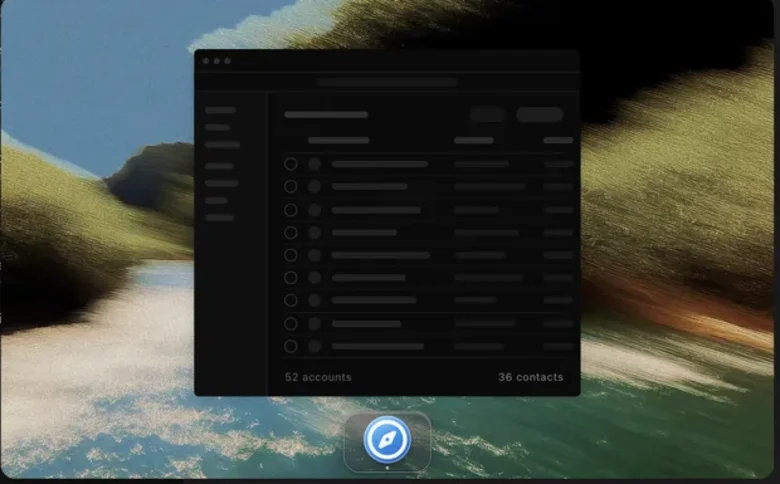
At launch it was limited to the $200–300 upper tiers; as of September 2026 the official pricing page includes Grok Bot from Cursor Pro at $20 a month. Its own computer, signing in to your tools, scheduled routines and a weekly usage allowance all appear on the lowest tier. There is more in our Grok Bot guide.
 Hey Noah | No app at all — an AI assistant that lives in SMS and email
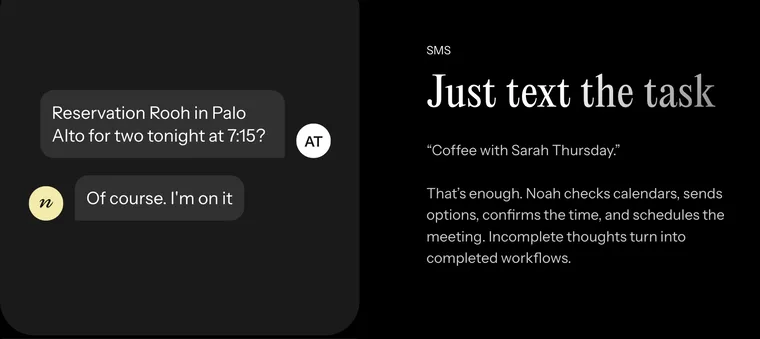
An AI executive assistant for founders and senior leaders. What defines it is that there is no app to install and no dashboard to log into. It works inside SMS, email, WhatsApp, and Slack — the channels you already use.
Text "Coffee with Sarah Thursday" and it checks your calendar, offers the other party times, takes over the back-and-forth, and books it. CC it on an email and it takes the scheduling from there. After meetings it captures notes and action items, and for restaurant or clinic bookings it places a real call, waits on hold, and speaks with the host. It launched on Product Hunt on August 4, 2026 with 604 upvotes and the #1 spot of the day.
 Manus | It researches, builds, and hands it back as a file
Runs research, analysis, document production, and website builds through to the end in a cloud virtual environment. Because the output comes back as a file, there is none of the fear that comes with letting an agent write into a live system — which makes it the lowest-friction way into agents. It takes Japanese instructions too.
 Genspark AI | Research through to the finished deck, in one pass
An agent that grew out of AI search, covering research through slide and sheet generation end to end. It sits close to Manus, but leans harder on the accuracy and speed of the research half. Usable in Japanese.
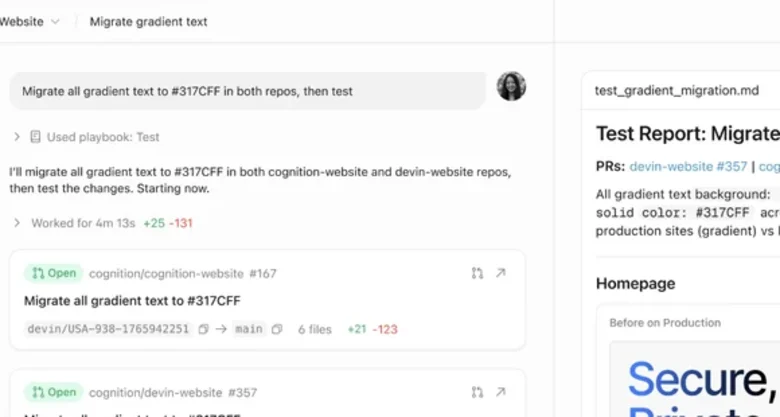
 Devin | Hand over the whole task, get back a pull request
A software-engineer-shaped agent with its own cloud development environment, handling implementation, tests, and pull request creation. It assumes you hand over a whole task and review the result, rather than decomposing it first.
Returning work as a pull request matters for safety as well: the pre-merge review you already run doubles as the agent's safety valve.
 Kilo Code | The same agent in every editor, running at model cost
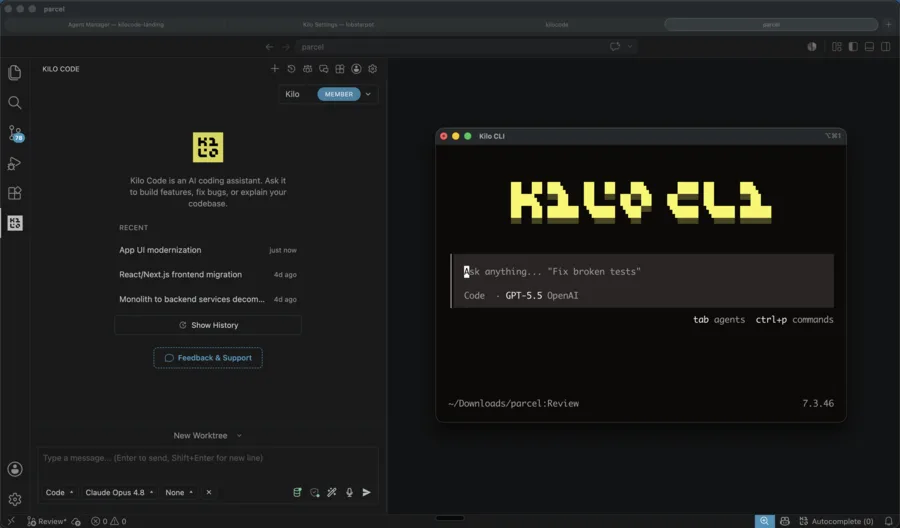
An MIT-licensed open-source agent that behaves the same in VS Code, JetBrains, the CLI, and the cloud. You switch between purpose-built Code, Plan, Ask, Debug, and Review agents.
The notable part is the cost structure: it adds no markup to AI inference. Pick from 500+ models, switch mid-task, and pay the provider's rate. Your own API keys and local models via Ollama both work. Because you can read the prompt and context in the source, you can also trace why it made a given decision — which is a real gap against the closed alternatives. More than 3 million people use it, and Anaconda acquired the company in July 2026.
 Cloudflare OS | Build it inside your own account instead of handing the process out
Cloudflare open-sourced this AI agent workspace under Apache License 2.0 on August 5, 2026. Unlike the six products above, you can run the whole thing inside your own Cloudflare account.
Security starts from zero permissions — every agent and app begins able to reach nothing — and capability is handed out explicitly through Gatekeepers, per-service intermediaries. Which AI models get used is the organization's call. And a quieter but real benefit: the workspace composer shows the model in use along with tokens consumed and the estimated cost. You learn who is spending what as it happens, not from an invoice afterwards.

Source: Cloudflare Blog, "Cloudflare OS"
See the full Cloudflare OS page
Where to start
Planning a company-wide rollout is how this stalls. Start where the landing point is shallow and go down one step at a time.
Start with the type that returns a file
- No permission design, so you can start today
- Judge output quality and feel here
Move exactly one workflow into the business system
- Create a dedicated, tightly scoped account
- Let it go as far as the draft; a person presses send
Decide what you will not review
Draw the line between actions that need approval and actions that run automatically, decide how logs are kept, and only then widen the scope
Step 3 is the crux. It was telling that on August 14, 2026, Claude Code moved its default permission mode to auto mode, stopping only on what a classifier flags as dangerous. Approving everything every time is no longer realistic — and the design work has shifted to deciding what you will not approve.
One development worth knowing about: Agent Plugins 1.0.0
This bears directly on the risk of picking a tool, so it is worth one section.
On August 6, 2026, an open, vendor-neutral specification for packaging Agent Skills and MCP servers into a single plugin — Agent Plugins 1.0.0 — was published. Amazon, Cursor, Microsoft, OpenAI, and Vercel are core maintainers, and Google has joined them.
The spec itself is strikingly small: a plugin is a directory with a plugin.json manifest, plus an optional skills/ folder for Agent Skills and an optional mcp.json for MCP servers. That is it.
Before
- Every client had its own layout and config format
- The same skill had to be rebuilt once per client
After Agent Plugins 1.0.0
- One structure distributes to multiple clients
- Client-specific behavior moves into the extensions field
Do not over-read it, though. The spec is deliberately limited to an interoperability floor: installation, registries, permissions, provenance, secrets, and OAuth are all out of scope and left to each client.
Even so, with packaging standardized on top of MCP and Agent Skills, the risk of in-house work built for one product becoming worthless has measurably dropped. One reason to keep waiting just went away.
FAQ
Q. Is there anything an individual can use? Yes. Manus and Genspark AI both have free tiers. For development, Kilo Code is free for individuals at the platform level, and choosing free or local models brings inference cost to zero too.
Q. What is the cheapest way to start? Kilo Code. It is MIT-licensed open source, adds no markup to inference, and works with your own API keys or local models. Cloudflare OS is also free as software, though you carry the infrastructure and model costs.
Q. What is the difference between Grok Bot and Manus? Where the output lands. Grok Bot signs into your existing SaaS and finishes the work inside it. Manus completes tasks in a virtual environment and returns files or web pages. Choose Grok Bot if you want changes reflected in business systems, Manus if you want research and production done.
Q. What is the biggest security consideration? The scope of the credentials you hand the agent. For doing-the-work agents especially, a dedicated, minimally scoped account is the baseline. Also confirm the unit of isolation, which varies by product — Grok Bot isolates per user.
Q. If two agents both support Agent Plugins, will a plugin behave identically in both? No. The spec covers the package structure and where skills and MCP servers live. Installation, permissions, provenance, and secrets are left to each client.
The information in this article reflects what was published on each company's official site, blog, or specification as of September 4, 2026. Pricing and availability may change — please check the official sources before adopting anything.
AI tools featured in this article
Related articles
What Grok Bot Is [September 2026]: The AI Teammate That Came Down to $20 a Month — Pricing, What It Does, How to Start
Grok Bot launched on 11 August 2026, and the reason it suddenly got loud in September is not that the product changed — it is that the door came down from $200–300 upper tiers to Cursor Pro at $20 a month. This article walks through what Grok Bot actually does, following the official screens: it signs in to Salesforce, pulls 52 accounts, queues 36 drafts and holds them at "0 sent" waiting for approval, then saves the approved exchange as a routine. It covers the three routes in and eight plans, how Grok Bot differs from Manus, Devin and Genspark AI at the same $20 mark (what each one operates, and whether you hand over your accounts), and the three things to settle before handing anything over — which account it signs in with, how far it may act unattended, and the one shared cloud computer per user — all as published in September 2026.
![What Grok Bot Is [September 2026]: The AI Teammate That Came Down to $20 a Month — Pricing, What It Does, How to Start](/_next/image?url=%2Fimages%2Farticles%2Fgrok-bot-guide.png&w=3840&q=75 "What Grok Bot Is [September 2026]: The AI Teammate That Came Down to $20 a Month — Pricing, What It Does, How to Start")
How to Edit NotebookLM Slides [September 2026]: Why You Can't Fix the Text Even in PPTX, and Five Methods by What You Need to Change
NotebookLM (renamed Gemini Notebook in July 2026) produces slide decks that are "a single picture with text in it", drawn by the image generation model Nano Banana Pro. Whether you export to PDF or PowerPoint (PPTX), each slide goes in as an image, and export to Google Slides is still not available as of September. This article confirms from Google's official help that the official Revise feature rebuilds the entire slide deck every time and does not consult your sources during revisions, then sets out five methods you can choose by what you want to fix: giving instructions with Revise; laying corrections over the top in PowerPoint; conversion tools that use OCR to turn slides back into a PPTX with editable text (comparing pricing and data handling for NoteSlide, Kirigami, DeckEdit, CopySlides and Swift-Slide); redrawing the slide as an image with Nano Banana; and rebuilding it as an editable deck with tools such as GAMMA or Irusiru. It also covers caveats such as Canva's Grab Text not working on Japanese slides, the compute-based limits in place since 2 September, and how watermarks are handled.
![How to Edit NotebookLM Slides [September 2026]: Why You Can't Fix the Text Even in PPTX, and Five Methods by What You Need to Change](/_next/image?url=%2Fimages%2Farticles%2Fnotebooklm-slide-edit.png&w=3840&q=75 "How to Edit NotebookLM Slides [September 2026]: Why You Can't Fix the Text Even in PPTX, and Five Methods by What You Need to Change")
7 AI Simultaneous Interpretation Tools Compared (August 2026): Is the Built-in Feature in Teams and Zoom Enough?
Search for AI interpretation tools and you get lists of 25 apps mixing consumer travel tools with enterprise meeting software. The real question is whether the built-in feature in the Teams or Zoom plan you already pay for is enough — and if not, what is missing. With Microsoft Teams shipping its Interpreter agent in January 2026 and Google Meet making speech translation generally available in February, that question now has an answer. This article pins down what all three platforms can and cannot do, then compares seven dedicated tools — Sentio, VoicePing, kotoba, DeepL Voice, Wordly, Interprefy, and KUDO — by how they capture audio, what they output, and how they charge.
[2026 Edition] 10 AI Tools to Accelerate Executive Decision-Making | Mid-Term Plans, Investment Analysis, Learning, and Presentation Decks
[Latest 2026] Speed up mid-term business plan drafting, investment decision reports, executive learning, and presentation creation. A deep dive into 9 AI tools that support leadership decision-making — covering features, benefits, selection criteria, and real-world adoption examples.
![[2026 Edition] 10 AI Tools to Accelerate Executive Decision-Making | Mid-Term Plans, Investment Analysis, Learning, and Presentation Decks](/_next/image?url=%2Fimages%2Farticles%2Fai-tools-for-executive-decision-making.png&w=3840&q=75 "[2026 Edition] 10 AI Tools to Accelerate Executive Decision-Making | Mid-Term Plans, Investment Analysis, Learning, and Presentation Decks")
What GPT-6 Astra Is [September 2026]: Which ChatGPT Plans Include It, API Pricing, and How to Split Work with GPT-5.6
GPT-6 Astra, announced by OpenAI on 3 September 2026 (US time), is a flagship tuned for computer use and long, multi-step work, true to the pitch that it "can do anything a person can do on a computer." It scores 72.6% on OSWorld 2.0, and time per task drops 47% from GPT-5.6 Sol's roughly 75 minutes to roughly 40. This article checks what changed against the benchmarks, then lays out where each ChatGPT plan can use it (Pro at ¥16,800 / ¥30,000, Business and Enterprise get "GPT-6 Pro" in Chat; Plus at ¥3,000 gets it through ChatGPT Work and Codex; Free and Go do not), the caps such as 50 or 200 messages a week, API pricing ($10 input / $50 output, 2.5x Sol) and how to split work with Sol, Terra and Luna, and the behaviour changes on switching (more clarifying questions, more sensitivity to skill files), based on OpenAI's announcement, Help Center and model page.
![What GPT-6 Astra Is [September 2026]: Which ChatGPT Plans Include It, API Pricing, and How to Split Work with GPT-5.6](/_next/image?url=%2Fimages%2Farticles%2Fgpt-6-astra-guide.png&w=3840&q=75 "What GPT-6 Astra Is [September 2026]: Which ChatGPT Plans Include It, API Pricing, and How to Split Work with GPT-5.6")
What Is Cloudflare OS? A Deep Dive into the Open-Source AI Agent Workspace (Architecture, Gatekeepers, Self-Hosting, Pricing)
Cloudflare open-sourced Cloudflare OS, an AI agent workspace, on August 5, 2026. This article covers its zero-permission Gatekeeper security, model selection and cost control via AI Gateway, Gadgets (small personal apps), how to deploy it into your own Cloudflare account, and pricing — based on the official blog and GitHub.