Otolio
: How to use it, features, and the business problems it solves
Add bookmark
What is Otolio?
An AI agent that proactively automates all meeting-related work — before, during, and after meetings. Rebranded from the AI minutes service "Smart Shoki," it goes beyond recording, transcription, and minutes to take over pre-meeting company research and post-meeting CRM updates and follow-up emails. Offered by Epicbase, with a "minutes agent" and a "sales agent." ISO/IEC 27001 certified; data is stored domestically and not used for machine learning without permission.
Business problems it solves



About "Otolio"
What is Otolio
Otolio is an AI agent that proactively automates all meeting-related work — before, during, and after meetings. Rebranded from the AI minutes service "Smart Shoki," it goes beyond recording, transcription, and minutes to take over pre-meeting company research and post-meeting CRM updates and follow-up emails end to end. Its proprietary, patented technology is claimed to cut meeting work by up to 90%.
Otolio's core is "automating every task around a meeting, including before and after it." Beyond creating minutes, it handles pre-meeting company research and scenario suggestions, and post-meeting tasks like auto-generating email drafts and updating/registering deals in CRMs such as Salesforce. It offers two agents — a "minutes agent" and a "sales agent" — to use depending on your goal.
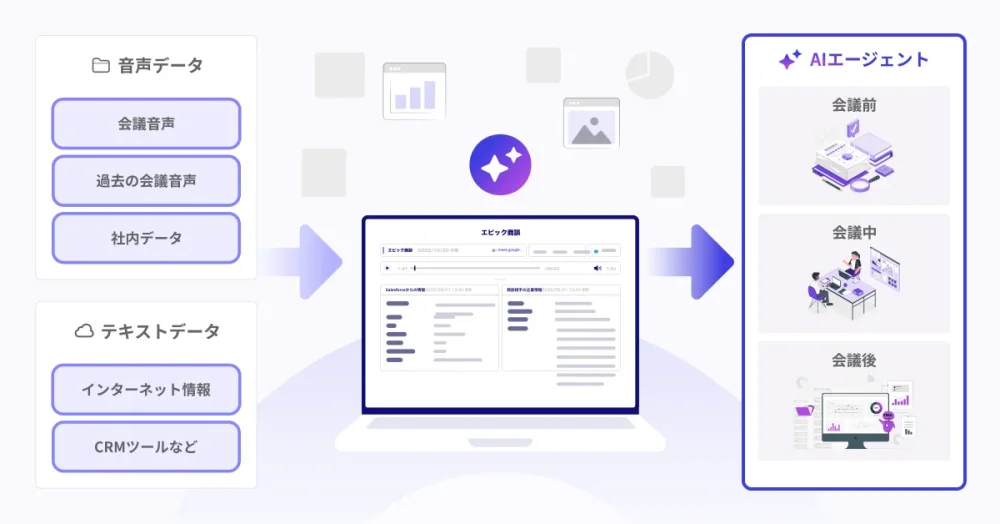
Starting from meeting audio, the AI processes it together with internal data and CRM information. Rather than just transcribing, it also handles the preparation, data entry, and follow-up before and after.
How to use
Connect your meetings and hand off the work before and after them.
Prepare before
The AI prepares pre-meeting company research and scenario suggestions.
Record the meeting
Record web or in-person audio and transcribe with speaker separation.
Generate minutes
Extract key points and to-dos and auto-create minutes from templates.
Automate after
Take over CRM field updates and follow-up email drafting.
Calendar integration enables automatic recording, and minutes can be downloaded as Word or PDF. No training is required to start, and the output aligns more closely with your internal context the more you use it. A free trial is available.
Key features
01Recording, transcription, minutes generation
Automates everything from setup to minutes. Supports speaker separation, patented timestamps, search, and playback-speed control, and extracts key points and to-dos with custom templates. Filler removal and more improve accuracy.
02Automating pre- and post-meeting work
Before meetings, it automates research on the counterpart company and scenario suggestions. After meetings, it handles auto-generating follow-up email text, auto-updating CRM deal fields, and auto-registering minutes, usable as a "minutes agent" and a "sales agent."
03Integrations and security
Works with web meetings like Zoom, Microsoft Teams, and Google Meet, plus in-person meetings and mobile. It offers Salesforce integration, IP restrictions, multi-factor auth, SSO/SAML, and ISO/IEC 27001 (ISMS) certification; data is stored in a domestic region and is not used for machine learning without permission.
Pricing
Pricing is an initial fee plus AI credits, not per-seat.
Because exact amounts are proposed individually based on meeting volume and usage, pricing is contact-sales (no public price list). You can start with a free trial. It is used by 8,000+ companies and 59,000+ users. Check the official site for the latest (as of August 2026).
How it differs from other minutes/meeting tools
Otolio's strength is that it doesn't stop at making minutes — a single agent covers everything from pre-meeting prep to post-meeting CRM updates and follow-up. Compared with transcription-focused tools or manual work, it reaches into the "before and after" of sales and meeting work.
| Aspect | Otolio | General transcription | Traditional manual work |
|---|---|---|---|
| Scope | All work before/during/after meetings | Transcription/minutes-centric | Manual, by hand |
| Strength | Research, CRM updates, follow-up automation | Efficient recording | Flexible but time-consuming |
| Billing | Initial fee + credits (not per-seat) | Varies by tool | — |
General transcription tools and traditional manual minutes/CRM entry are the comparison points. For sales and corporate teams looking to reduce all the prep, recording, entry, and follow-up around meetings at once, Otolio is a strong choice.
The information on this page is based on the official website as of August 2026. Please check the official site for the latest specs and pricing.