AccuNote
: How to use it, features, and the business problems it solves
Add bookmark
What is AccuNote?
AccuNote is a voice note app for iOS and Android from SEIWA Co., Ltd. (Osaka, Japan). It transcribes in real time while you record, and handles speaker separation, AI summaries, translation in 60 languages, and bilingual recognition that translates between two languages, all in one app. You can also import existing audio and video files. Try it as a guest with no registration or with a free account; the paid Pro plan starts at ¥1,780/month (tax included).
Business problems it solves




About "AccuNote"
What is AccuNote?
AccuNote is a voice note app that turns conversations recorded on your smartphone into notes with transcripts, summaries, and translations. It is developed and operated by SEIWA Co., Ltd. (株式会社世和) in Osaka, Japan, and is available on iOS/iPadOS and Android (the App Store also lets you install it on Macs with Apple M1 or later, but notes that it has not been verified for macOS).
When you record a meeting, lecture, interview, or briefing session, the transcript scrolls across the screen as people speak. After recording, the cloud re-recognizes the whole audio and finishes it with speaker labels, an AI summary, and translations. You can also import audio and video files you already have and transcribe them. Recognition and translation cover 60 languages, and the app stands out for its "bilingual recognition" and "two-way interpretation," which handle two languages in a single recording.
(App Store description)
recording or imported file
on a free account
(tax incl., in-app purchase)
Text appears as you listen, then gets refined afterward
AccuNote processes audio in two stages. During recording, streaming recognition shows the transcript in real time. When recording ends, the cloud recognizes the entire audio again and produces a more accurate transcript together with speaker separation, a summary, and translations.
Record or import
- Record in the app
- Import MP3 / M4A / WAV / FLAC / MP4 / MOV and more
Transcribe on the spot
- Real-time transcription
- Translation and two-language recognition at the same time if needed
Finish in the cloud
- Re-recognize the whole recording
- Speaker labels, AI summary, translation
Review and take it out
- Search, marks, folders
- Export subtitles/audio, send by email
Recording keeps going even without a signal, and upload and recognition resume automatically once you are back online (App Store description).
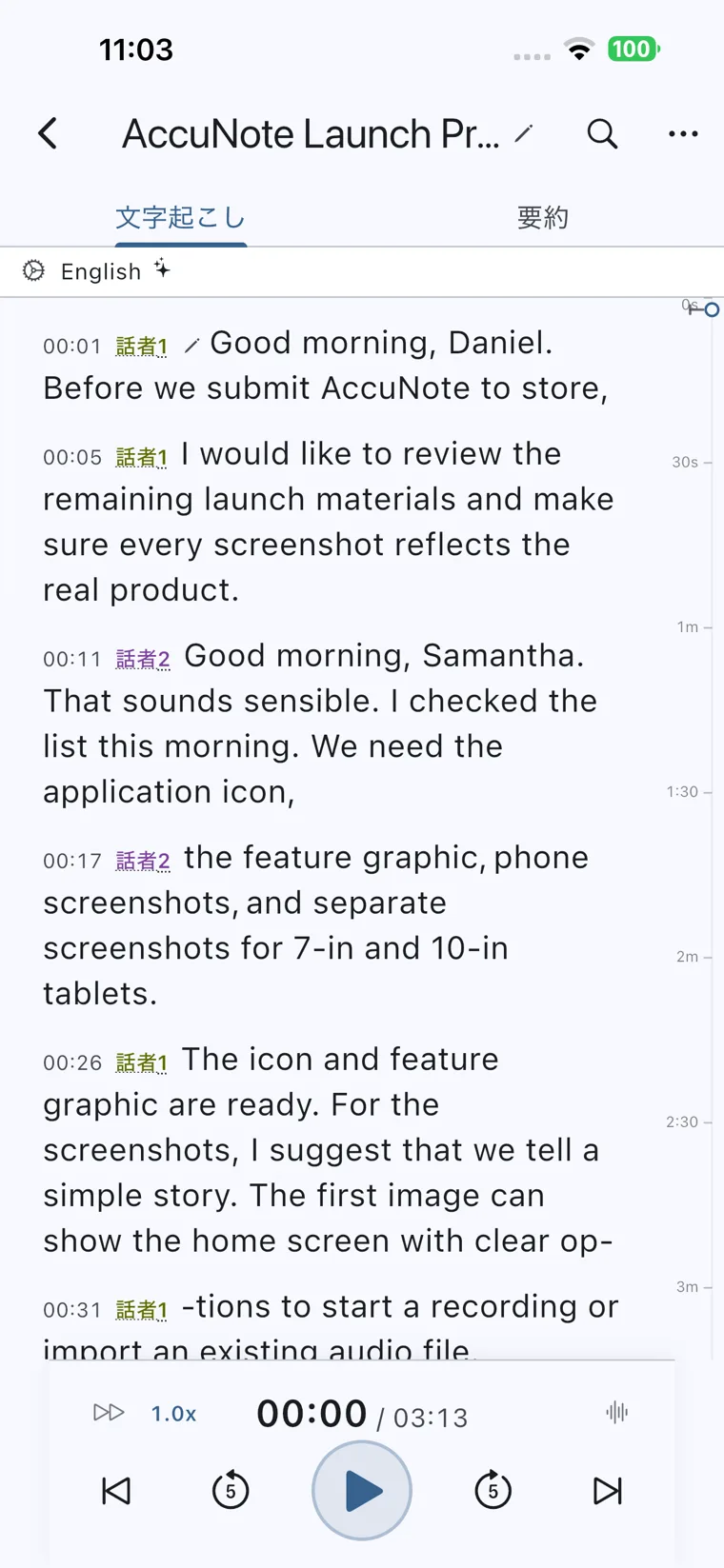
On the transcript screen, each utterance gets a timestamp and a label such as "Speaker 1" or "Speaker 2." Speaker names can be renamed later, and every sentence is editable. Edits are saved to the cloud and synced to your other devices.
A timeline of elapsed recording time runs along the right edge, and the player at the bottom lets you change playback speed and play back with noise reduction. You can recheck hard-to-hear parts in both text and audio.
Source: AccuNote (App Store) (same for the screen images below)
How to use
- Install the app Install AccuNote from the App Store or Google Play. It runs on iOS/iPadOS 16.2 or later and Android 7.0 or later. Speech recognition is processed in the cloud, so an internet connection is required.
- Try it as a guest, or register a free account You can try the core speech recognition as a "guest" without registering an email address. Registering an email address (or an Apple, Google, or Microsoft account) increases your monthly allowance and lets you log in from other devices and recover your account. After your first login, a screen explains which cloud AI provider your audio is sent to; review it and give consent.
- Start recording (or import a file) Tap "+" on the home screen to start recording. Specify the recognition language, the target language if you want a translation, and a second language for two-language conversations. Existing audio and video files can be imported from "File import," where you can trim the range to process.
- Check the transcript and summary When recording ends, cloud re-recognition, speaker separation, and summarization run automatically. Switch between the "Transcript" and "Summary" tabs to check the results, and correct misrecognitions and speaker names. Registering names and technical terms as custom vocabulary makes them easier to recognize correctly next time.
- Export and share Transcripts and summaries can be shared as text and exported as subtitles (SRT/WebVTT) or audio (MP3/M4A/OGG) (export requires Pro or higher). You can also have finished results sent automatically to your account's email address.
When recording, tell the other people that you are recording and obtain any necessary consent (the official privacy policy also asks for this).
Features
01Recording and transcription
- Real-time transcription — Turns speech into text on the spot while recording
- File import — Transcribes audio and video files such as MP3, M4A, WAV, FLAC, MP4, and MOV, with range trimming
- Speaker separation — Splits multi-person conversations by speaker; labels can be renamed later
- Keeps going offline — Continues recording out of coverage and resumes processing from where it stopped when the connection returns
- Custom vocabulary — Register names, product names, and technical terms to improve accuracy (10 on Free, 200 on Pro and above)
02AI summaries
- Automatic summary — After recognition, summarizes key points, decisions, and action items according to the recording's settings
- Summary templates — Besides built-in templates, you can create custom templates with your own prompts (1 on Free, unlimited on Pro and above)
03Translation and two-language conversations
- Real-time translation — Translates recognition results into one chosen language and shows them alongside the original
- Bilingual recognition — Specify two languages in one session; the app detects which language each sentence was spoken in
- Two-way interpretation — Automatically translates each utterance into the other of the two specified languages
- Translations follow edits — When you edit an original sentence, its translation is updated too
04Review, organize, take it out
- Marks — Attach notes or photos to a specific second, during recording or playback
- Playback — Adjustable playback speed and noise-reduced playback
- Organization — Folders, search, and a trash that keeps deleted items for about 30 days
- Export and email — Export subtitles (SRT/WebVTT) and audio (MP3/M4A/OGG); send results by email (manually or automatically)
Keep a conversation that mixes two languages in a single note
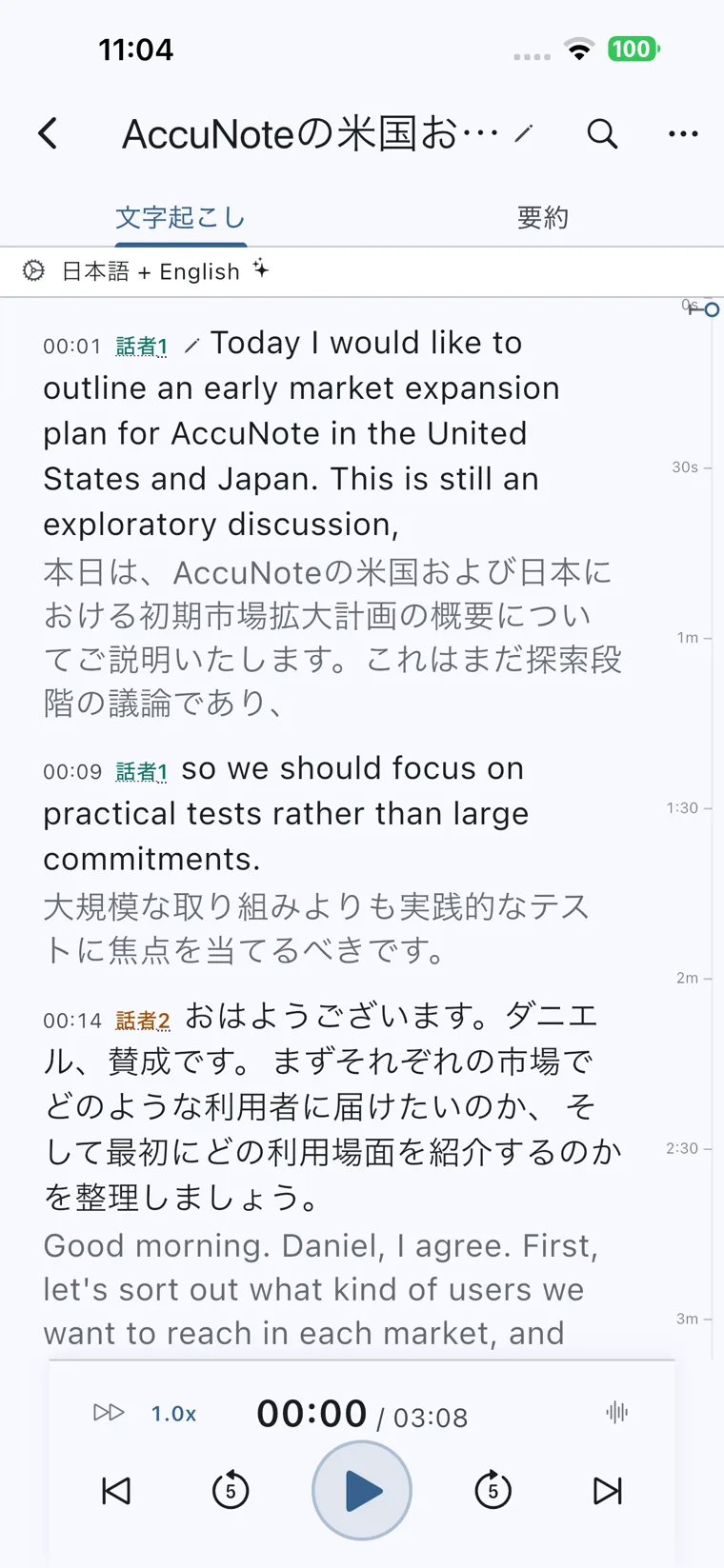
What sets AccuNote apart from other transcription apps is that it can handle conversations that move back and forth between two languages, such as Japanese and English, in one recording. Bilingual recognition detects the spoken language sentence by sentence and places a translation into the other language under each utterance.
The screen shown here is a recording set to "Japanese + English." Each English utterance has a Japanese translation underneath, and each Japanese utterance has an English one. The feature is designed for situations a single language can't fully capture: meetings with overseas partners, foreign-language talks and briefings, or classes while studying abroad.
Translation counts are limited within your "new recognition tasks per month." On Pro, both single-language translation and bilingual recognition are limited to 4 times a month. The higher "Pro + Live Translation" plan raises translation to 100 times a month, and "Pro + Bilingual Recognition & Translation" also raises bilingual recognition and two-way interpretation to 100 times a month.
Read the key points of a long recording first
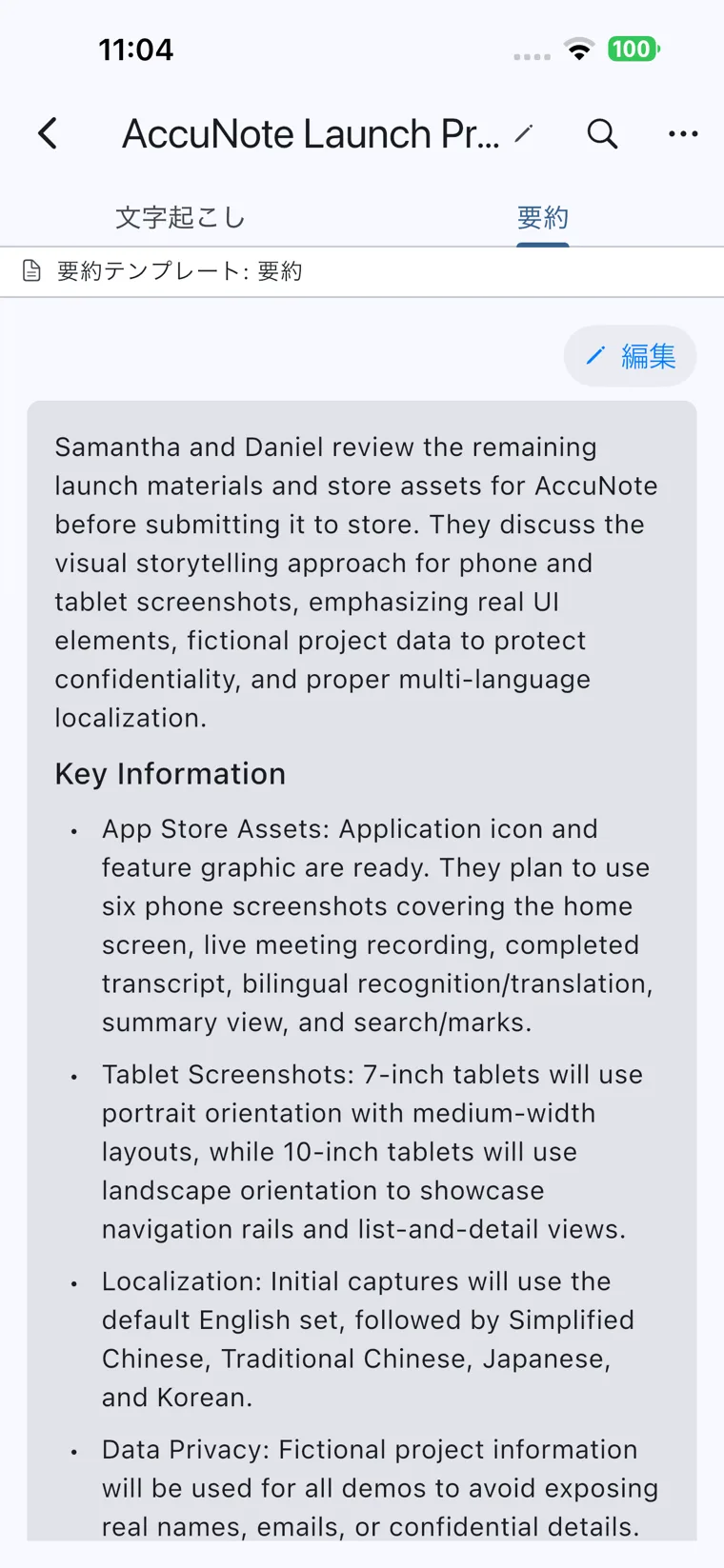
The "Summary" tab gathers an overview of the conversation and its key points as bullet points. The template used for the summary is shown at the top of the screen, and you can revise the content with "Edit."
In addition to built-in summary templates, you can create templates with your own prompts. For a lecture you might ask for "main arguments and assignments," and for a briefing session "conditions and schedule," so the summary takes the shape you need.
Pricing
Paid plans are purchased as in-app purchases (auto-renewing subscriptions) through the App Store or Google Play. Prices are from the Legal Notice under the Act on Specified Commercial Transactions and the App Store as of October 11, 2026, for the Japanese stores, all tax included. Higher plans include everything in lower plans. Stores outside Japan use local currency and taxes.
| Plan | Monthly (tax incl.) | Yearly (tax incl.) | Main contents |
|---|---|---|---|
| Guest | ¥0 | — | Trial with no registration. 20 min of audio processing and 10 new tasks per month |
| Free | ¥0 | — | Free account. 90 min of audio processing and 50 new tasks per month |
| Pro | ¥1,780 | ¥13,980 | 1,500 min of audio processing and 100 new tasks per month, export, 200 custom terms |
| Pro + Live Translation | ¥2,880 | ¥22,980 | Everything in Pro + 100 single-language translations per month |
| Pro + Bilingual Recognition & Translation | ¥3,780 | ¥29,980 | Everything above + 100 bilingual recognition / two-way interpretation sessions per month |
The allowances by plan are as follows (from the official plan comparison page).
| Item | Guest | Free | Pro | Pro + Translation | Pro + Bilingual |
|---|---|---|---|---|---|
| Monthly audio processing time | 20 min | 90 min | 1,500 min | 1,500 min | 1,500 min |
| Monthly new recognition tasks | 10 | 50 | 100 | 100 | 100 |
| Continuous cloud processing per file | 5 min | 10 min | 5 hours | 5 hours | 5 hours |
| Real-time translation into one language | 2/month | 4/month | 4/month | 100/month | 100/month |
| Bilingual recognition / two-way interpretation | 2/month | 4/month | 4/month | 4/month | 100/month |
| Custom summary templates | Not available | 1 | Unlimited | Unlimited | Unlimited |
| Custom vocabulary | 0 | 10 | 200 | 200 | 200 |
| Export | Not supported | Not supported | Supported | Supported | Supported |
Translation counts sit inside the new-task allowance. The translation plans raise the count to 100 per month, but that is not "100 on top of 100 new tasks": each translated session also consumes one new task. On Guest and Free, if you hit the continuous processing limit per file (5 or 10 minutes), upgrading lets you keep processing the rest.
- Free trial — Not offered as of October 2026 (per the Legal Notice). You try the app within the free Guest and Free allowances
- Cancellation — Done from the subscription management screen of the App Store or Google Play. Deleting the app or your account does not stop the subscription
- Refunds — The company states that it does not accept returns or refunds for personal reasons. App Store refunds follow Apple's rules and Google Play refunds follow Google's; the company says it will handle cases individually where a paid plan was not granted due to its own bug, or where double charges occur
Japanese language support
- App — The interface is available in Japanese, English, Simplified Chinese, Traditional Chinese, and Korean
- Recognition and translation — Japanese recordings can be transcribed, and 60-language translation and bilingual recognition cover combinations of Japanese and other languages
- Support — The provider is a Japanese company, and inquiries can be made in Japanese (email info@accunote.ai, weekdays 10:00–18:00 JST). The Japanese versions of the Terms of Service and Privacy Policy are authoritative
Security and data handling
The privacy policy discloses data handling in concrete terms.
- Separate consent for cloud AI — Audio and text are sent to Google's cloud AI for transcription, translation, and summarization. A consent screen separate from the Terms of Service is provided; if you don't consent, no cloud processing occurs and only recording, playback, and on-device editing are available. Consent can be withdrawn at any time from Settings
- Not used for training — The company states that it does not use user content to train its own AI models and does not enroll it in providers' programs that use submissions to improve general-purpose models
- No voiceprints — Speaker separation happens only within a single recording; no voiceprints that identify individuals across recordings are created or stored
- Retention — Recordings and transcripts are stored in the cloud until the user deletes them. Items in the trash are permanently deleted after about 30 days. Free and guest accounts may be deactivated and deleted after 12 months or more of inactivity
- A caution for guests — Guest credentials exist only on the device, so if you delete the app or lose the device, your recordings cannot be recovered. If you want to keep your records, registering an email address is the safer choice
Reputation and reviews
AccuNote is a new app that has only recently been released on the stores. As of October 11, 2026, its App Store rating is 5.0 (1 rating), which is not yet enough reviews to judge its reputation. No case studies or user numbers have been published.
On the other hand, its public documents — the plan comparison, the Legal Notice, and the privacy policy — go into detail on how allowances are counted, where to cancel and request refunds, and how data is sent to cloud AI and how consent is obtained. Being able to check "how much I can do for free" and "where my data goes" before you start is a useful basis for choosing a new app.
How AccuNote differs from other AI transcription and meeting-notes tools
Many AI transcription tools either have a bot join web meetings or run on a PC or browser. AccuNote is a personal app centered on recording and reviewing in-person conversations with a single smartphone, and it stands out for recording conversations that mix two languages as they are.
| Product | Form | Best for |
|---|---|---|
| AccuNote | Smartphone app (iOS/Android) | Lectures, briefings, in-person meetings, conversations mixing two languages |
| Plaud | Dedicated recording device + app | In-person sales meetings where taking out a phone is awkward, call recording |
| Notta | Web / app (SaaS) | Auto-joining web meetings, sharing minutes across a team |
| Rimo Voice | Web (SaaS) | Running Japanese meeting minutes across an organization |
| Sentio | Browser | Simultaneous interpretation of meetings and talks into multilingual subtitles and audio |
If your team runs minutes for web meetings, meeting-integrated tools like Notta and Rimo Voice fit better. Where you hesitate to take out a phone to record, Plaud, with its dedicated device, is an alternative. If you want to deliver interpretation to many people in the room, Sentio, which can share subtitles, and VoicePing are candidates. For individuals who want to keep what they heard in a form they can verify later, AccuNote's design is a good fit.
FAQ
Q. Can I use AccuNote for free? Yes. As a guest with no registration you get 20 minutes of audio processing a month, and with a free account (Free) 90 minutes, including AI summaries and speaker separation. However, Free limits continuous processing to 10 minutes per file and does not include export. If you record long lectures or meetings regularly, Pro (¥1,780/month), which processes 1,500 minutes a month and up to 5 hours per file, is effectively required.
Q. Does it work on Android? Can I use it on a PC? It supports Android 7.0 or later. Besides iOS/iPadOS 16.2 or later, the App Store lets you install it on Macs with Apple M1 or later chips, but notes that it has not been verified for macOS (as of October 2026). As of October 2026, no Windows app or browser version is officially offered.
Q. Can I record a Japanese conversation while translating it into English? Yes. If you specify a target language when recording, the original and the translation are shown side by side. For conversations that mix Japanese and English, bilingual recognition detects the language of each utterance and translates both ways. Up to Pro it is limited to 4 times a month, so choose a higher plan with translation if you use it often.
Q. Is my recording data used for AI training? The privacy policy states that it is not used to train the company's own AI models and is not enrolled in providers' programs for improving general-purpose models. Processing uses Google's cloud AI, and separate consent is required for that transmission.
Q. How do I cancel or get a refund? Cancel from the subscription management screen of the App Store or Google Play. Deleting the app does not stop billing. Refunds for personal reasons are not accepted, and whether a refund is granted is decided under Apple's or Google's rules.
Provider
AccuNote is developed and operated by SEIWA Co., Ltd. (株式会社世和) (head office: Yodogawa-ku, Osaka; responsible manager: GAO PENG). According to the National Tax Agency's Corporate Number Publication Site, the company was established in Kyoto in January 2024 (corporate number 8130001076119), changed to its current name in January 2025, and moved its head office to Osaka in July 2025.
The company describes itself as specializing in speech recognition and AI, with AccuNote as its flagship product. Its website also introduces "AccuNote Platform," a speech recognition API for building into applications, but as of October 2026 no pricing or sign-up process has been published.
The information on this page is based on what was published on the official website, the App Store, and Google Play as of October 2026. Features, prices, and allowances may change, so please check the official website and the in-app display for the latest information.